• Some users have recently had their accounts hijacked. It seems that the now defunct EVGA forums might have compromised your password there and seems many are using the same PW here. We would suggest you UPDATE YOUR PASSWORD and TURN ON 2FA for your account here to further secure it. None of the compromised accounts had 2FA turned on.
    Once you have enabled 2FA, your account will be updated soon to show a badge, letting other members know that you use 2FA to protect your account. This should be beneficial for everyone that uses FSFT.

High temps with q6600 GO...

husker4life

Limp Gawd
Joined
Aug 28, 2004
Messages
337
Idle temps
core 0 - 47c
core 1 - 44c
core 2 - 47c
core 3 - 43c

Im using a zalman 9700 cooler, my cpu is overclocked to 3.0 ghz and my voltage is set at 1.35 bios and 1.312 in cpu-z. Shouldn't i be idling about 10c lower than this? Seems a bit high too me, should i redo it? I put a thin line of AC5 in the middle of the cpu like your supposed to, so i don't know what i did wrong. Load temps are in the low 60s btw.
 
Don't put a line across the cores. That never works. Just put a small amount in the center and use a credit card or the like to spread it evenly across the entire processor. That works much better.
 
just reapply and put 2 spots on each side of the line for good measure. try lowering your voltage if you can.
 
Idle temps
core 0 - 47c
core 1 - 44c
core 2 - 47c
core 3 - 43c

Im using a zalman 9700 cooler, my cpu is overclocked to 3.0 ghz and my voltage is set at 1.35 bios and 1.312 in cpu-z. Shouldn't i be idling about 10c lower than this? Seems a bit high too me, should i redo it? I put a thin line of AC5 in the middle of the cpu like your supposed to, so i don't know what i did wrong. Load temps are in the low 60s btw.

I have the 9700's little brother, the 9500.. My temps at idle are:

TEMPS3ghz.jpg


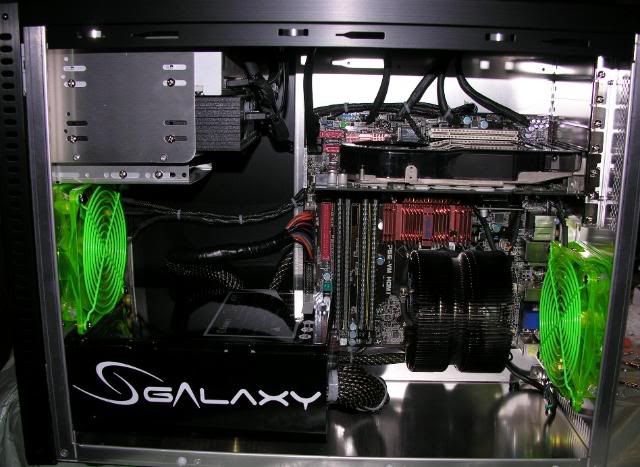
That was taken about an hour ago, inside my Lian Li PC-A05 (which is notorious for warmer than normal temps).. I too have my Q6600 at 3ghz. I use MX-2 paste.. Here is my setup (just built it a couple of days ago):

DSCN0969.jpg


So, you should be able to get better temps.. What kind of case do you have? What kind of intake and exhaust fans are you using? For me, all I have is (1) AC Ryan 120mm intake fan and (1) AC Ryan 120mm exhaust fan. That's it.
 
wow i never knew they recommend putting just a line now, i was about to spread a thin layer with a credit card.. why did they change this?
 
yeah i'm looking at that now and it makes sense as spreading it can introduce bubbles, but how thin/thick should i make the line? it doesn't specify

i'm using a xigmatek s1283 so i'm worried about little crevices and almost want to put more without spreading, like a thicker line or dots above and below where the cores are according to the picture. would overestimating the length of the line be better than underestimating?

i can't wait to overclock..
 
I just read a comparison and from what I gather the thin layer method worked best - however this article was pretty confusing for me. Apparently adding a thicker 2nd layer helped out.

http://www.techsupportforum.com/content/Hardware/Articles/168.html

i suppose it just looks like he applied way too much both times.

however, this guy did a mod to apply even less compound and said it improved:
http://www.overclock.net/air-cooling/205525-audi-s-arctic-silver-5-mod.html

I almost want to try a zig zag to make sure i get the length and width of the cores.

edit:
now i'm reading theres special things to do with HDT coolers like xigmatek s1823 that i have:

http://benchmarkreviews.com/index.p...ask=view&id=170&Itemid=1&limit=1&limitstart=5

Is this necessary at all?

Now I am contemplating lapping my heatsink a little bit with 600 Girt SandPaper from home depot, although not the the q6600 for warranty purposes, but have heard sometimes its better to lap none if you're not lapping both.

Comments?
 
Idle temps
core 0 - 47c
core 1 - 44c
core 2 - 47c
core 3 - 43c

Im using a zalman 9700 cooler, my cpu is overclocked to 3.0 ghz and my voltage is set at 1.35 bios and 1.312 in cpu-z. Shouldn't i be idling about 10c lower than this? Seems a bit high too me, should i redo it? I put a thin line of AC5 in the middle of the cpu like your supposed to, so i don't know what i did wrong. Load temps are in the low 60s btw.

Temps below 50C aren't accurately reported by the DTSes anyway, so just ignore the idle temps. I wouldn't be concerned unless you end up with abnormal load temps, but even then, as long as you stay below 70C you've really got nothing to worry about.
 
Have to take into consideration how hot is your ambient temperature. I have it overclocked to 3.6 and i get the temps you are getting @ 3.0. However i am using water. I think i'm going to check my AS again and make sure it looks good. my load temps are 59-60 with that overclock but i think i can get a bit lower. Running at 1.43v to get it to 3.6.
 
My Q6600 at 3.2, 1.37volts, idles around 30c across all four cores with a S1283. I apply AS5 by putting a pea size dot in the center of the cpu and let the cooler spread it out. This method works very well and if you lift the cooler after setting on the cpu, you will see that it spreads over all cores evenly and that you dont need anymore that that small amount.

Too much TIM can actually hamper heat transfer.
 
Still doesn't 1.3vcore sound a little high for a G0 at 3ghz? i had mine at 3.1 with a Vcore of 1.18-1.2
 
Idle temps
core 0 - 47c
core 1 - 44c
core 2 - 47c
core 3 - 43c

Im using a zalman 9700 cooler, my cpu is overclocked to 3.0 ghz and my voltage is set at 1.35 bios and 1.312 in cpu-z. Shouldn't i be idling about 10c lower than this? Seems a bit high too me, should i redo it? I put a thin line of AC5 in the middle of the cpu like your supposed to, so i don't know what i did wrong. Load temps are in the low 60s btw.

Hey Husker4life... Did you ever get your temps resolved? If it helps, I took a screen shot of my settings about 5 minutes ago of my misc temperatures to help give you a better idea. I have the same processor at the same speed with the Zalman CNPS9500 AM2 (not the greatest heatsink but it does a decent job) with MX-2 thermal paste. I also have a Lian Li PC-A05 case (which is known to have air circulation problems). So your temps should be better than mine by atleast a few degrees!


OverallTEMPS.jpg


DSCN0976.jpg
 
Nice setup there officermartinez, i did notice that your voltage is only at 1.248 in cpu-z which is alot lower that mine. My cpu at stock voltage is 1.325 (1.35 @ 3.0 ghz oc) i guess i got unlucky and got one that runs at a higher voltage, i know alot of the q6600's vary in stock voltage.

As long as my load temps dont go above 70c im gonna just leave it as is. I'm happy with 3.0 ghz...
 
hmmm i got a 1.2125 VID q6600 and i OCed to 3.2 ghz 8 X 400 and temps idle around 40 C with a tuniq tower on lowest fan (the shit is waaaay too loud on high - gotta replace the fan sometime) and all the other fans on low. max temps i get under load are around 55c
 
Nice setup there officermartinez, i did notice that your voltage is only at 1.248 in cpu-z which is alot lower that mine. My cpu at stock voltage is 1.325 (1.35 @ 3.0 ghz oc) i guess i got unlucky and got one that runs at a higher voltage, i know alot of the q6600's vary in stock voltage.

As long as my load temps dont go above 70c im gonna just leave it as is. I'm happy with 3.0 ghz...

Cool deal.. If ya ever need help with your current setup or if you ever decide to take another crack at it in the near future, feel free to ask..
 
Idle temps
core 0 - 47c
core 1 - 44c
core 2 - 47c
core 3 - 43c

Im using a zalman 9700 cooler, my cpu is overclocked to 3.0 ghz and my voltage is set at 1.35 bios and 1.312 in cpu-z. Shouldn't i be idling about 10c lower than this? Seems a bit high too me, should i redo it? I put a thin line of AC5 in the middle of the cpu like your supposed to, so i don't know what i did wrong. Load temps are in the low 60s btw.

I don't see why you need to set your voltage so high in the bios. Is that to compensate for vdroop? My G0 runs fine at about 1.28 volts. Perhaps it's your board that wants a higher voltage.
 
I don't see why you need to set your voltage so high in the bios. Is that to compensate for vdroop? My G0 runs fine at about 1.28 volts. Perhaps it's your board that wants a higher voltage.

Every chip is different. His may simply need that voltage in order to function stably at 3GHz.
 
I am wondering about my high temps as well, I am using the OCZ Vendetta 2, my temps are about the same 43-47c idling at times, this is in an Antec 1200 with all the fans on high, 3 in the front, on on the side and two out the back on high plus the 200mm ontop on high.
I read about just putting a dot on each side of the line with AS5 but this cooler has more gaps then a flat bottom cooler so I added a little extra, maybe I should redo it with Ceramique?
 
I am wondering about my high temps as well, I am using the OCZ Vendetta 2, my temps are about the same 43-47c idling at times, this is in an Antec 1200 with all the fans on high, 3 in the front, on on the side and two out the back on high plus the 200mm ontop on high.
I read about just putting a dot on each side of the line with AS5 but this cooler has more gaps then a flat bottom cooler so I added a little extra, maybe I should redo it with Ceramique?

Use this method to apply thermal paste on your heatsink: http://benchmarkreviews.com/index.p...ask=view&id=170&Itemid=1&limit=1&limitstart=5

Also, refer to my earlier post about idle temperatures. In short, they don't mean anything. Gauge your temps based on load results.
 
i agree with Zero's post, idle temps don't mean much unless they are dangerously high. It is your load temps that you should be concerned about.
 
Back
Top