![[H]ard|Forum](/styles/hardforum/xenforo/logo_dark.png)
Wolfdale75
Limp Gawd
- Joined
- Jun 17, 2010
- Messages
- 133
Hi Guys,
I just installed a bunch of new RAM. Now I want to check it's running at the correct speed. The RAM I bought is advertised as 1866 MHz DDR3, but the BIOS seems to say it's running at only 1333 MHz. I have to enable XMP in the BIOS or something.
The BIOS has a profile for XMP and I enabled it, but I'm still not sure my new RAM is the right speed. Can you tell from the attached CPU-Z capture?
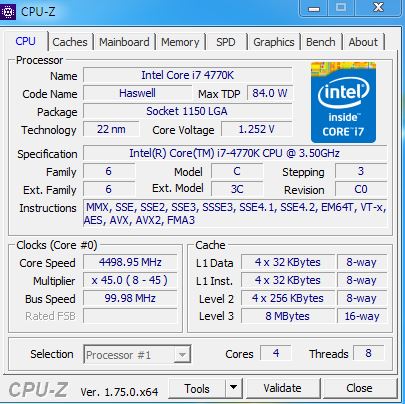
Also: until I installed this new memory, I was oc'ing my CPU to 4.4GHz (the highest it was stable at). Now I'm worried that the new hardware has reset my CPU to stock speed. My BIOS seems to think my CPU is only 3.5GHz - stock speed.
But CPU-Z - I think? - is indicating it's running at nearly 4.5GHz.
Can you put my mind at rest on this? - Thanks!
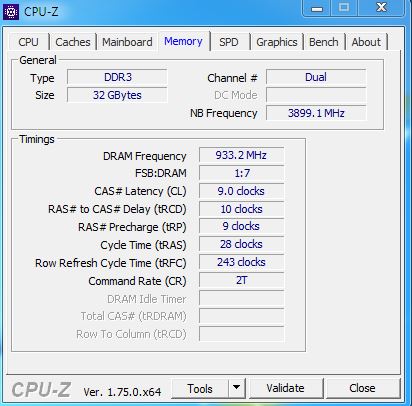
I just installed a bunch of new RAM. Now I want to check it's running at the correct speed. The RAM I bought is advertised as 1866 MHz DDR3, but the BIOS seems to say it's running at only 1333 MHz. I have to enable XMP in the BIOS or something.
The BIOS has a profile for XMP and I enabled it, but I'm still not sure my new RAM is the right speed. Can you tell from the attached CPU-Z capture?
Also: until I installed this new memory, I was oc'ing my CPU to 4.4GHz (the highest it was stable at). Now I'm worried that the new hardware has reset my CPU to stock speed. My BIOS seems to think my CPU is only 3.5GHz - stock speed.
But CPU-Z - I think? - is indicating it's running at nearly 4.5GHz.
Can you put my mind at rest on this? - Thanks!