• Some users have recently had their accounts hijacked. It seems that the now defunct EVGA forums might have compromised your password there and seems many are using the same PW here. We would suggest you UPDATE YOUR PASSWORD and TURN ON 2FA for your account here to further secure it. None of the compromised accounts had 2FA turned on.
    Once you have enabled 2FA, your account will be updated soon to show a badge, letting other members know that you use 2FA to protect your account. This should be beneficial for everyone that uses FSFT.

Help Setting Up Smoothwall 3.0

TrueGamer

Limp Gawd
Joined
Aug 21, 2004
Messages
228
I have it installed all peachy using the Green + Red network configuration. My "green card" is the onboard intel network adapter. The "red card" is a generic NIC. I have the "red card" plugged into my modem and my "green card" plugged into the internet port on my router. I can access the Smoothwall box but i can not get on the internet. All the router lights are green and so are the modem lights.

Any Ideas?

its set up like this
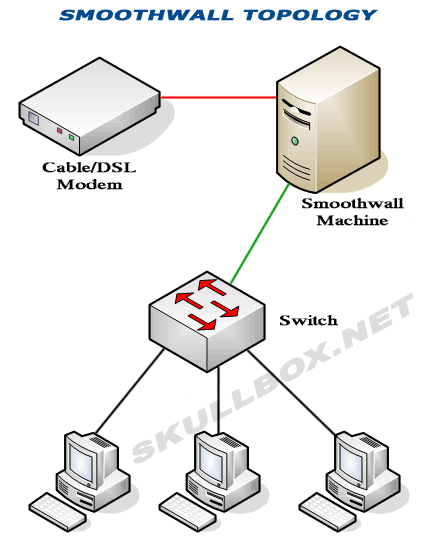
toplogy.gif
 
What kind of connection? If you're DSL...does your ISP require a PPPoE username and password?

If it's cable...have you powered off your cable modem for several minutes to it "forgets" the MAC of the prior device you had connected to it..and it will learn the MAC of your Smoothie boxes WAN NIC when powered up.

Or is it another combo modem/router?
 
What kind of connection? If you're DSL...does your ISP require a PPPoE username and password?

If it's cable...have you powered off your cable modem for several minutes to it "forgets" the MAC of the prior device you had connected to it..and it will learn the MAC of your Smoothie boxes WAN NIC when powered up.

Or is it another combo modem/router?

Its a Cable modem, havnt tried turning it off for that long just like 30 seconds..ill be sure to try that.

Do you have a wireless/wired router with DHCP enabled on it? Is it disabled?

Yes a wireless/wired router with DHCP enabled
 
Unplug power from your modem for atleast 5 minutes. Then replug power and the LEDs will do a pattern as it reboots and then it will reconnect to your ISP.

As far as the DHCP with the router, make sure your wireless router is set to Access Point mode and/or disable DHCP server. This will cause a conflict with your smoothwall. Have DHCP enabled on the Smoothwall and disabled on the router. This will solve any conflicts related to that.

Good luck!
0.png
 
Unplug power from your modem for atleast 5 minutes. Then replug power and the LEDs will do a pattern as it reboots and then it will reconnect to your ISP.

As far as the DHCP with the router, make sure your wireless router is set to Access Point mode and/or disable DHCP server. This will cause a conflict with your smoothwall. Have DHCP enabled on the Smoothwall and disabled on the router. This will solve any conflicts related to that.

Good luck!
0.png

alright so just disable DHCP on my netgear and i should be set
 
Yes. I'm not fimiliar with Netgear routers, but there should be a setting somewhere in the interface to set the unit to Access Point Mode or similar. This only needs to be done if you need wireless access. (Which I assume you do)
 
Alright ill try that tonight..gotta wait my brother is home and using the internet.

ill post back tonight
 
Could you provide a model number of the unit or a screenshot please? That would be of great help.
 
netgear4-2.JPG

(Above) Enable Wireless Access Point

WGRdhcp.png

(Above) Disable DHCP

From looking at your screenshot and the ones I posted above, try going to LAN IP Setup and see if you can disable DHCP. Then check the status. Hope this helps
 
Ill try all that tonight... If i cant get it to work ill play around wit hit..thanks for all your help AMD
 
Did all that and its still the same situation cant connect to the internet..what i notice is that when i login to my smoothwall box i notice that it says my local address as my IP issued by my ISP and the Remote address section is blank.

On my modem after i plug it back in all the lights are green except the send..the receiving works fine. MY router shows that the internet is working.

In my router settings under "router status" and "internet port" i see this..could it be something i can use to fix my issue?

Internet Port
MAC Address 00:1E:2A:73:BC:xx
IP Address 76.169.xxx.xx
DHCP DHCPClient
IP Subnet Mask 255.255.240.0
Domain Name Server
66.75.160.63
66.75.160.64


Any ideas
 
Kinda sounds like you are double-NATing your network and/or there might be an IP conflict somewheres. You should plug the green interface into one of the switch ports on your router, not the internet port. Also, make sure your smoothwall and your netgear do not have the same private IP address, ie 192.168.1.1. Make sure DHCP is setup on your smoothwall and turned off on your netgear.
 
Ive tried connecting green to a port on my router and it just doenst seem to work at all..ill try again.
 
Have you tried pluggin a your PC directly into the Smoothwall's green port? If you can get access from there then its something to do with the router, my guess is still going to be double NATing.

If you can't access internet then your Smoothie isn't configured properly...
 
The problem is with the DHCP..

when i do a /release and /renew /renew cant access the smoothie DHCP

EDIT:
i think
 
What IP is your smoothies GREEN interface set to?

If it's 192.168.1.1, then you should either set your routers IP to something else or change the smoothie and your gateway on your machines to the smoothies IP.

Make sure once you turn DHCP off at the router, as described above that your Smoothie has DHCP turned on
 
What IP is your smoothies GREEN interface set to?

If it's 192.168.1.1, then you should either set your routers IP to something else or change the smoothie and your gateway on your machines to the smoothies IP.

Make sure once you turn DHCP off at the router, as described above that your Smoothie has DHCP turned on

I have DHCP enabled on the smoothie but some of the setting options im clueless what should i put there
 
Make sure that your modem doesn't have a battery, if it does, take out the batter and power off and wait the alloted time.
 
Try the network without the Netgear and try disabling DHCP and using static IPs (for the computers/clients)
 
Again, make sure your router and Smoothie don't have the same IP. IMO, if you need the router to use as a switch, you should change it's IP to 192.168.1.2 or 192.168.1.250 etc. You should NOT use the routers "internet" port for the smoothie, while you can make it work, it is going to give you a lot of problems and not gain you anything. If you choose to change the smoothies IP away from 192.168.1.1 then you need to set all of your machines to have the gateway = the IP of the smoothie.
 
Hmmm...*ponders*

Ive tried all that was said with no luck on getting internet access
 
Ok, so you've done all this?

-The smoothwall's RED port is connected to your modem.
-PPPoE or Static IP or DHCP is enabled, per your proper configuration for RED. Is it properly retrieving the IP?
-The smoothwalls GREEN interface is connected to a SWITCH port on your router (NOT the "internet" port).
-The smoothwall's IP is 192.168.1.1
-The routers IP is NOT 192.168.1.1, also, it is not duplicating any other IPs on your LAN
-DHCP is OFF on the router
-DHCP is ON on the smoothwall
-Your computer(s) have a gateway of 192.168.1.1
-If your connection is "static", you have DNS servers properly assigned to the smoothwall.
-You know your wires are all good (are you using the same cables you were using for the router before you replaced it with the smoothwall?)


If you said yes to all of these things and it's still not working, try a few things;

-open a command prompt on your windows machine. Type "ipconfig /release" then "ipconfig /renew"... then show us the output from "ipconfig"
-ping 192.168.1.1 from your windows machine.
-log into the smoothwall and try pinging a few websites. does it work? does it give an error?
 
Back
Top