• Some users have recently had their accounts hijacked. It seems that the now defunct EVGA forums might have compromised your password there and seems many are using the same PW here. We would suggest you UPDATE YOUR PASSWORD and TURN ON 2FA for your account here to further secure it. None of the compromised accounts had 2FA turned on.
    Once you have enabled 2FA, your account will be updated soon to show a badge, letting other members know that you use 2FA to protect your account. This should be beneficial for everyone that uses FSFT.

Help overclocking i5 2500k please

ng4ever

2[H]4U
Joined
Feb 18, 2016
Messages
3,628
I am not even sure if I did it right I had it right at 4 Ghz but then messed it up :(

My current motherboard is a asus p8p67 le

I know that motherboard is limited but still how would I go about overclocking please ? Thanks.

Yes I am a noob when it comes to overclocking sorry. Any help greatly appreciated.

Oh yeah I forgot yes I have a third party cooler/fan.

1.jpg


2.jpg


3.jpg


4.jpg


5.jpg


P.S. Sorry if the images are to big.
 
I think my third party heatsink/fan is a Hyper something. I can't remember. Not sure if that is important or not.
 
Well I figured it out from a YouTube video and it doesn't help BF1 that much.
 
need more info/specs/temps...
post a pic of your hsf if you don't know what it is.
 
4.0 GHz on a 2500k is kind of Baby's first Overclock, its not a real boost to performance, its less than 20% over the default clock, which at 30 FPS translates to 6 extra FPS. not a noticable boost. Aim for 4.5 or higher.
 
Agree with above.
I damaged my old 2500K by accidentally over volting and stress testing, but it could still do 4.3GHz after.
Before that it would do 4.6GHz.
4GHz = simples.
 
I would agree if it hadnt happened.

Just before I accidentally set LLC to max (new bios setting appeared at that time), it could do 4.6GHz.
Straight after realising it was at 1.49V for 1/2hr of prime, it had dropped to 4.4GHz and then dropped to 4.3GHz.

I'm an electronic engineer, not daft about it :)
 
If the LLC was at max it definitely spiked higher than 1.5V so degradation from that is possible.
 
4.0 GHz on a 2500k is kind of Baby's first Overclock, its not a real boost to performance, its less than 20% over the default clock, which at 30 FPS translates to 6 extra FPS. not a noticable boost. Aim for 4.5 or higher.
It's would be nice is clock boosting had a direct linear impact on fps. But it doesnt. most likely you'd have less increase than 6 fps. but with a decent gpu overclock, it would help much more.
 
If the LLC was at max it definitely spiked higher than 1.5V so degradation from that is possible.
Yep, possible. That was the reading from the motherboard sensor, not always accurate or linear.
 
I agree with KazeoHin. A 4.0 Ghz overclock is pretty tiny. That CPU should get 4.4 - 4.6 Ghz without much effort.

Your screenshots don't show us what your CPU voltage is set to, whether it's manual, or an offset, and what value its being given - things which is of primary importance for any overclock.

I would leave Intel Speed Step turned on, as well as C1E and C3. For the overclock you're doing, you shouldn't have to worry about keeping voltage as low as possible, since you have have enough voltage to stabilize with all power-saving features, and not be anywhere close to running the CPU too hot / with too much voltage.


If your CPU cooler is a CoolerMaster Hyper EVO, then it's good enough to handle an overclock of 4.5 Ghz or so.


I would try an overclock configuration like this:

Turbo Ratio (By All Cores): 45

Load-Line Calibration: 50% (High)
VRM Frequency: Manual
VRM Fixed Frequency Mode: 350
Phase Control: Asus Optimized
Duty Control: Extreme

CPU Voltage: Offset Mode
Offset Mode Sign: +
CPU Offset Voltage: +0.04

Speed Step: Enabled
C1E, C6: Enabled


... and see how things work with that, and then tweak from there.

Thanks but remember I have a asus p8p67 le some of those options I don't have :( (I know I should of not bought the asus p8p67 le a long time ago)

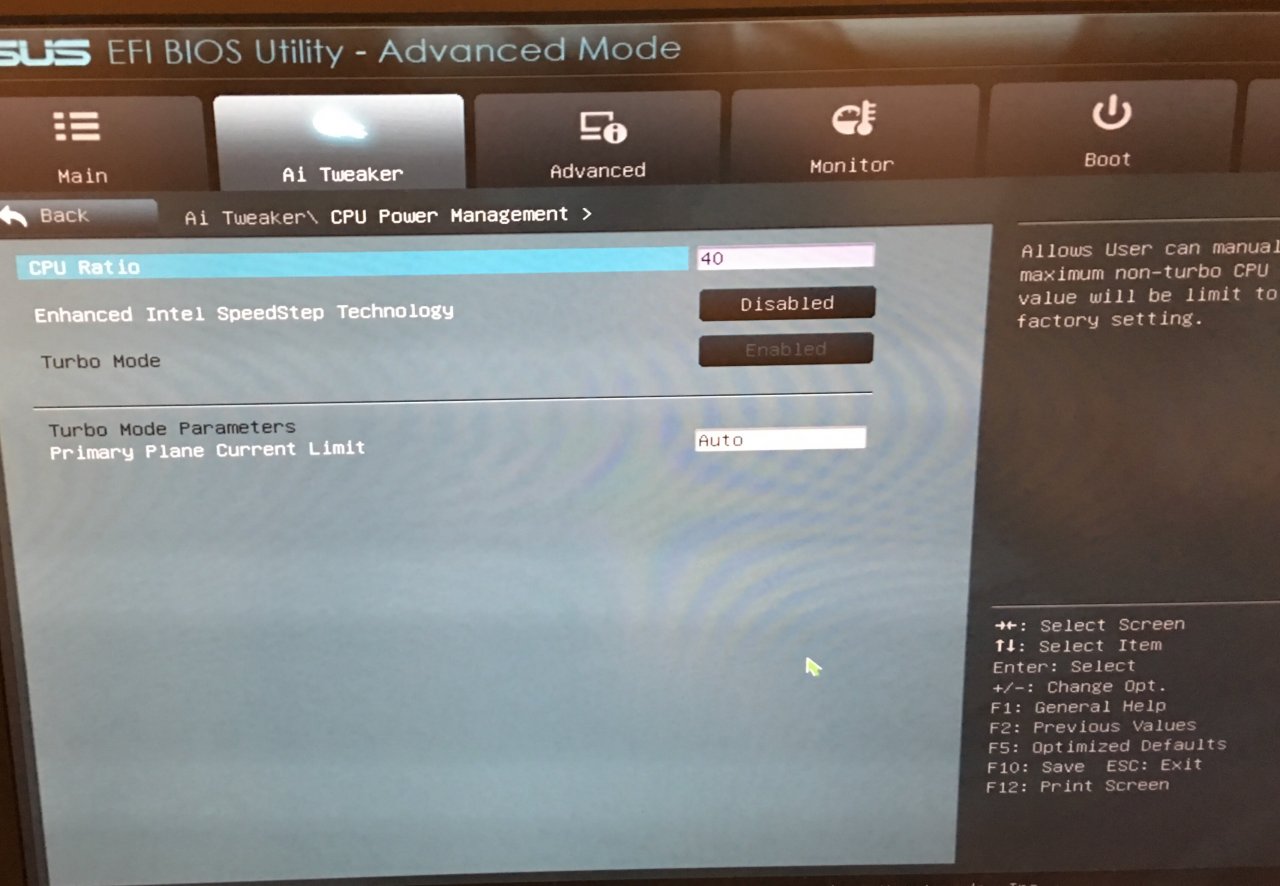
Anyway I tried with the options I did have but it froze every time on the Windows logon screen :(

The only settings I was able to get pass the login screen were these but eventually my whole system froze again while gaming :(


BTW I am a almost sure I have the CoolerMaster Hyper EVO as a cooler/fan but if not it is a good cooler/fan I have.
 
I have an Asus P8P67 Pro Rev 3.1 mobo, and all the settings I listed are there in my BIOS.

If your overclock freezes, then you probably need to raise the voltage. Keep all the other settings, and change the CPU Offset voltage to +0.06, and then try things again.

Thanks how high is the maximum I should put it if +0.06 doesn't work ?
 
Ok another question is it really worth overclocking from 4GHz to 4.5 Ghz ? I don't feel safe at 4.5 Ghz but did get it stable with CPU Offset voltage to +0.060 in Battlefield 1 so far.

I just didn't notice a higher minimum fps.

It's would be nice is clock boosting had a direct linear impact on fps. But it doesnt. most likely you'd have less increase than 6 fps. but with a decent gpu overclock, it would help much more.

Is this true ?
 
You might be bottlenecked by your GPU. What GPU do you have?

Download CPUID HWMonitor, leave it running, and monitor what your min and max CPU VCORE is. Play some games, do some computing, let the PC idle... and find out what voltage range your CPU is operating within. Report the figures here, if you wish, and we can tell you whether the CPU is fine.

GTX 1070.
 
You might be bottlenecked by your GPU. What GPU do you have?

Download CPUID HWMonitor, leave it running, and monitor what your min and max CPU VCORE is. Play some games, do some computing, let the PC idle... and find out what voltage range your CPU is operating within. Report the figures here, if you wish, and we can tell you whether the CPU is fine.

I don't see min and max CPU VCORE in CPUID HWMonitor :(
 
A GTX 1070 will eat alive your 4ghz or less 2500k. You absolutely should be gunning for a 4.5ghz.

I had a 2500k on Hyper 212+ for a long while. 1.3v manual worked for me, but some require 1.35v. Just keep in mind temps and try keep them below 80 under full load (can go a little higher but preferably not). LLC enabled/very high (level 6-7), CPU spread spectrum I believe I had off, sync all cores to 45 multi. Memory was even on XMP. I didn't really touch any other options.
 
A GTX 1070 will eat alive your 4ghz or less 2500k. You absolutely should be gunning for a 4.5ghz.

I had a 2500k on Hyper 212+ for a long while. 1.3v manual worked for me, but some require 1.35v. Just keep in mind temps and try keep them below 80 under full load (can go a little higher but preferably not). LLC enabled/very high (level 6-7), CPU spread spectrum I believe I had off, sync all cores to 45 multi. Memory was even on XMP. I didn't really touch any other options.

Thank you again. So far I manage to get 4.5 ghz and saved the profile. Now currently running at 4.5 ghz but now to see if it is stable. How would I go about that? I did play one round of BF1 without a crash.
 
Ok another question is it really worth overclocking from 4GHz to 4.5 Ghz ? I don't feel safe at 4.5 Ghz but did get it stable with CPU Offset voltage to +0.060 in Battlefield 1 so far.

I just didn't notice a higher minimum fps.


Is this true ?

It's usually voltage and/or temperatures that will cause an overclock to become "unsafe" rather than the clock speed, and even then it would usually just be a gradual deterioration of your CPU over a number of years. It's very unlikely to instantly do serious damage to your CPU unless you just use some completely crazy voltage on it.

I ran my 2500K @ 4.6ghz and 1.38-1.4V for 5 years and lost a whopping 100mhz off my max stable overclock (dropped from 5ghz to 4.9ghz). Every CPU will have a slightly different stable voltage/temperature curve though so it's really up to you to decide what you want to settle for. I ran mine at 4.6ghz because above that I hit a steep voltage/temperature "wall". 5ghz required enough extra voltage that my temps were 15C+ higher than running at 4.6ghz.
 
Run Prime95 for a couple hours. Some say run it for 8+. I say if it passes 1-2 hours and you can game on it without a BSOD over a few days, it's stable..

Also double check your temperatures using HW Monitor.
 
I had an 2500k on an Asus board. All I did was set the offset voltage by +.05 and set the turbo boost multiplier to 44. Prime stable for 24 hours.
 
Back
Top