• Some users have recently had their accounts hijacked. It seems that the now defunct EVGA forums might have compromised your password there and seems many are using the same PW here. We would suggest you UPDATE YOUR PASSWORD and TURN ON 2FA for your account here to further secure it. None of the compromised accounts had 2FA turned on.
    Once you have enabled 2FA, your account will be updated soon to show a badge, letting other members know that you use 2FA to protect your account. This should be beneficial for everyone that uses FSFT.

Heat Spreader quality on Conroe

NeoLogic

Limp Gawd
Joined
Nov 1, 2001
Messages
272
I was screwing around today waiting for my RMAed mobo to arrive in the mail. So I decided to lap my HSF, a Scythe Ninja. 30 minutes later, using a Hudy board as a flat surface, I managed to get a mirror-like finish on the bottom of the Ninja.

I then set the processor, an E6600 on the mating surface of the HSF, just kinda screwing around. To my surprise, the freaking surfaces were not nearly in full contact that I expected to see. I could actually see light between the CPU and HSF. The light was shinning around the edges of the CPU giving the impression that the HSF had more material removed from the edges than from the center.

I was kind of upset that I spent all this time and effort to make sure this would not happen by finding the most flat surface in my house to lap my HSF. But then I took a closer look, and mated the CPU to my HUDY board AND the granite countertop in the kitchen, I realized it was not the Ninja that wasn't flat, it was the CPU! The thing has a buldge in the middle. A rather large one.

So I'm now sitting here lapping the CPU, and I'm getting down to copper, and I'm seeing that the copper is only showing up in the very center of the CPU, confirming the fact my CPU has a "buldge" in the middle.

Before I go any further, is this normal and the way Intel wants the Heat Spreader to mate with the HSF, or should I continue lapping the CPU to get it as flat as possible?

I understand how the center of the heat spreader is the only part that contacts the chip itself, and could be the reason for the "buldge" but I just don't know this is by design, or if it's the reason I couldn't OC this chip to start with....although temps showed to be fine during initial testing.
 
Yes it's normal, the boys at Intel put alot of $ into R&D to figure that by the time you crank down your HSF, the pressure will make up the diff you are seeing and flatten / mate things up
but if you want to keep going, you already started
=)
 
^^ No, i dont buy that. After lapping, i was able to get a significant drop in temps. like 8c load, iirc.
 
the pressure isn't going to flatten it. lap it and you'll be fine, the bulge is most likely just a manufacturing flaw and not all of them are like that I don't think.
 
This is NOT normal, but something we have to put up with since Intel gives the heatspreader contract to the lowest bidder who does a piss poor quality job, and this time around they messed up worse than usual.

So many people have gotten concave or convex heatspreaders on their conroe its a shame. For the cost of these processors Intel should contract out a decent company, not some shitty third world company which they pay 1 cent per hs or whatever.

Lap away :p
 
You know what's messed up? Mine is convex.. Does this mean the inside of this heatspreader is not in contact with the die/chip? That's a scary thought.
 
I was getting idle temps of 50/51 with my E6600 and load temps of 65/66. I just put this down to me being rather anal about silence and 5v modding most of my fans. However there was a big pocket of heat in the top right of my case so I decided to change things around and bought the Zalman9500. Funny thing was that when I popped off the old cooler (Aerocool dominator) the base of the cooler was only half covered in paste. This bloody thing had only been half on!!

Now I put the zalman on (which was 100times easier) and idle is now 43 with load 52 (still at 5v) and because of the way the air flows in the case I have rid myself of my little sauna in the top right.

Still I never thought to check the IHS for flatness, maybe I will revisit that later. Incidently what grit paper should i use?
 
Sikpupi said:
Still I never thought to check the IHS for flatness, maybe I will revisit that later. Incidently what grit paper should i use?


Well, I'm no pro at it, and the auto parts store here is kinda limited, but I start off with 320 Automotive. This is the stuff that will remove the material pretty fast. As I lap, I keep the paper wet. Automotive sandpaper can be used either wet or dry, so it won't tear the paper.

Once you get the desired flatness and or remove all the major blemishes, like machine work, it's time to polish it up. I go to a 600 grit, again keeping the paper wet. Next step, 1000 grit. Then I do 1500. I would continue to 2000, but nobody here carries that stuff. When I was in the Army, we had windshield repair kits for aircraft that had "sandpaper" up to 8000 grit. It felt like leather. Pretty cool stuff, but I don't have access to that anymore :(

Final step is to get a metal polish for aluminum/copper and such.

Remember, even when using the polish, to not go in circular motions. This is true for the sandpaper as well. Keep the movement on one axis, and don't change it. It's okay to rotate 180 degrees when your lapping, so that you get a more even consistant wear, but don't rotate 90 degrees, or go in circles.

Hope this helps, and again, other people here might give you more advice, or advise you I'm all wrong, but it works for my current system which is in my Sig, and I'm sure it will work for my new system.

Good Luck
 
Thanks for that detailed explanation!!
If I get bored this weekend I know what I can do :D
 
This, combined with crappy seating of my Intel HSF led to temps in the 70's. T_T
Hopefully my E6600 isn't dead. I'm waiting for a new DS3. Turns out the crappy seating of the Intel HSF either shorted the board or bent some motherboard pins. PLEASE, SEND ME A NEW ONE, NEWEGG.
 
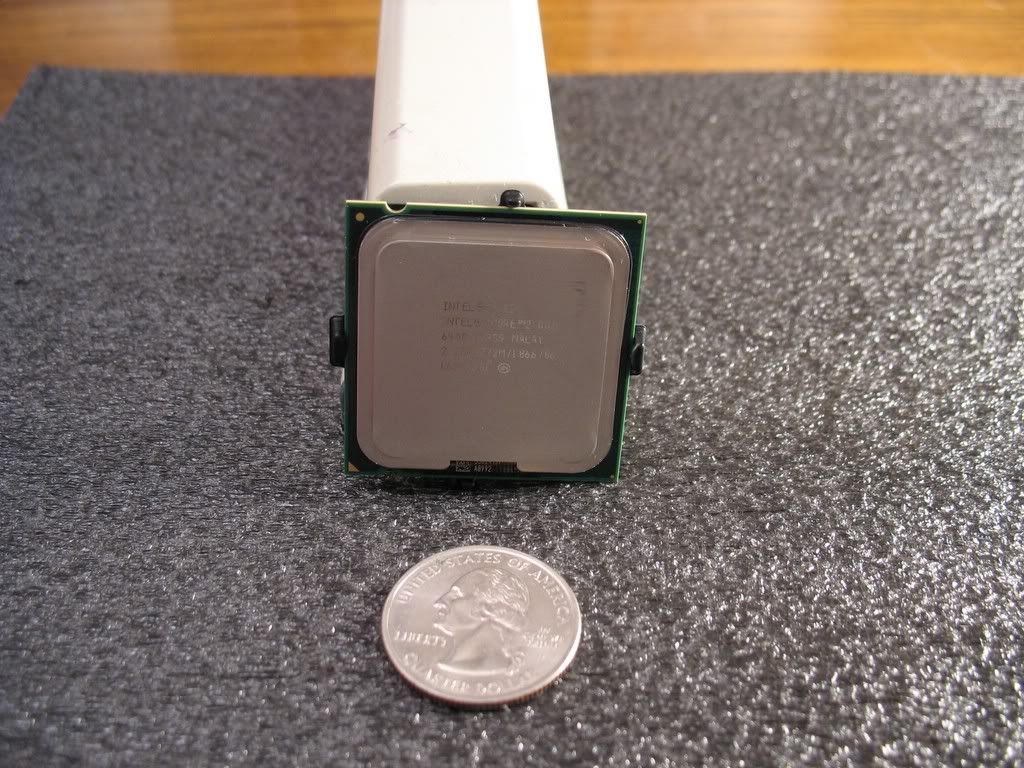
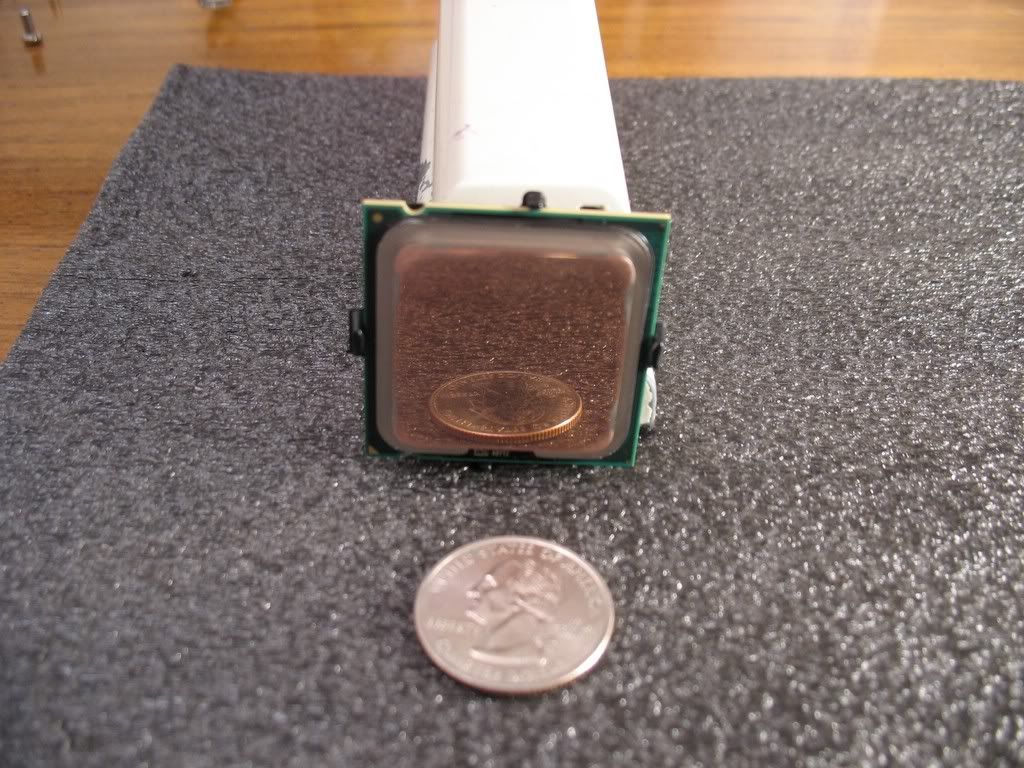
This thread needs pics...

IMG_1138.jpg

IMG_1142.jpg


Started with 400, then 800, 1500, and finally 2000 grit Auto paper from Wal-Mart. Last time I did this, some instructions on a site recommended wetting the paper. I tried going dry this time...I saved a WHOLE lot of time. It's not as pretty shiny as the wet method, but I'll take the time savings anyday.

So far it's idling 3C less...we'll see what loads like in a bit.
 
The only thing I'm concerned about is that copper corrodes pretty easily. Has anybody done this to a CPU in the past, say 3 years ago? Any corrosion issues? When it corrodes, it conducts pretty poorly from what I understand.

Luckily I'm in AZ so pretty low moisture levels in the air.
 
LOL... all that work to shave a few degrees off. :rolleyes: To each there own I guess. I've not had a single issue with my shitty IHS.... thing runs like a champ. If you want to lap the processor... do it because you want to try it, not becuase you are looking for some 1337 cooling solution. :D
 
If that was the case everyone with a copper heatsink would have a problem.

All it does is tarnish a little bit, but not where you have the CPU in contact with the HSF & thermal paste.

So you don't need to worry about it at all.
 
Poncho said:
LOL... all that work to shave a few degrees off. :rolleyes: To each there own I guess. I've not had a single issue with my shitty IHS.... thing runs like a champ. If you want to lap the processor... do it because you want to try it, not becuase you are looking for some 1337 cooling solution. :D

Usually Load temps change a lot more than idle, I've seen 1 degree less from lapping while idle but 8 during load. It be got 3 degrees on idle, I'm guessing he got at least 10 on load.
 
i have a skythe ninja on a e6300 at stock clocks and idle at 50'C according to coretemp.
 
omega-x said:
i have a skythe ninja on a e6300 at stock clocks and idle at 50'C according to coretemp.

Are you sure thats right? My 630 idles at 30 with a 275FSB. That just seems to high for an awesome heatsink like that.
 
annaconda said:
For overclocker every C counts.


Ah... so criticize Intel's design, which works fine for stock usage, because you can't get a few more mhz out of it, which is above what Intel validates for. Ok... I gotcha :rolleyes:
 
Poncho said:
LOL... all that work to shave a few degrees off. :rolleyes: To each there own I guess. I've not had a single issue with my shitty IHS.... thing runs like a champ. If you want to lap the processor... do it because you want to try it, not becuase you are looking for some 1337 cooling solution. :D
Dude thats cause his IHS was already relatively flat. Some people have gotten procs with IHS so concave or convex that after lapping they see up to 10C lower temps.
There were pics posted by people who posted visual tests, they aligned the processor perpendicular to an accurate checkerboard printout, and it was very obvious that the proc was horribly not flat.
In cases like that lapping makes a big difference.
 
Poncho said:
Ah... so criticize Intel's design, which works fine for stock usage, because you can't get a few more mhz out of it, which is above what Intel validates for. Ok... I gotcha :rolleyes:

So what exactly is Intel's flatness spec for its IHS's? That simple bit of information would end this debate. Either these IHS's are in spec or they are not. If they are not they shouldn't be sold, and if someone gets one, they need to return it.

Never mind, found it:

LINK

Exerpt 1:
While socket loading alone may increase the IHS
warpage, the heatsink preload redistributes the load on the package and improves the
resulting IHS flatness in the enabled state.

Edit 2: SI FTW
The flatness spec is 0.05 mm or roughly .002"
LINK (page 38)
 
yevaud said:
So what exactly is Intel's flatness spec for its IHS's? That simple bit of information would end this debate. Either these IHS's are in spec or they are not. If they are not they shouldn't be sold, and if someone gets one, they need to return it.

Never mind, found it:

LINK

Exerpt 1:
While socket loading alone may increase the IHS
warpage, the heatsink preload redistributes the load on the package and improves the
resulting IHS flatness in the enabled state.

Edit 2: SI FTW
The flatness spec is 0.05 mm or roughly .002"
LINK (page 38)
Hmm...I just translated your signature to read:
"Asrock Dual VSTA
E6400 @ 2.4 Ghz
1Gb PC4000PRO
Quadro 4000 AGP (softmod)"
 
So you all are lapping to the copper. When I was lapping tonight I did not want to goto the copper....
 
Lazy_Moron said:
Are you sure thats right? My 630 idles at 30 with a 275FSB. That just seems to high for an awesome heatsink like that.

Coretemp reads the temperature differently than the normal programs. It's supposed to be more accurate.
 
It's strange that I have only been lapping in one direction, yet there are scratches in both axis... Anyway, I'm still in the first stage, using 320 grit. The purpose of the photos is to show exactly how "Flat" the surface of this spreader is. lol.

Before I started lapping, as I mentioned in the first post, I mated the cpu and hsf together, just using gravity, and you could see daylight between the two, on the edges. After this quick lap (5 min) I can now put the two together, and I don't see anymore daylight, but you can tell there is some space between the two on the edges. I'll keep lapping till all I see is copper.

cpu.jpg


cpu2.jpg
 
I did mine last week and I was amazed to see it had copper underneath , i did it to make sure that the coolaborotory liquid pro was safe with this stuff


Did some lapping and its copper underneath
 
Some more lapping pics...my E6600 was actually not that bad. I saw copper pretty uniformy from just a few passes with the 320. Definitely good for 3 degrees or more though. Don't forget to lap your SouthBridge chips too-they're SERIOUSLY concave.
spec1stv5.jpg

lap1sow7.jpg

lap5syf6.jpg

coolers1spi5.jpg
 
let us know the difference this all makes, also what thermal paste you using?
 
I'm really diggin' that new Zalman STG-2 stuff. It can spead very thin with absolute ease. No more than necessary, no less than necessary - and complete coverage. On my 2 personal tests so far, I've averaged 1-2 degrees cooler with it. I used to be a die-hard AS5 user like veryone else. Even if it didn't offer any performance increase(it does), I'd still use it over AS5 simply because of the ease of application.

If you've got 2 quality-lapped surfaces to mate, you can spread the Zalman stuff EXTREMELY thin very easily. None of this "Rice sized dab in the middle of the proc" stuff-that never made any sense to me.
 
Brahmzy said:
I'm really diggin' that new Zalman STG-2 stuff. It can spead very thin with absolute ease. No more than necessary, no less than necessary - and complete coverage. On my 2 personal tests so far, I've averaged 1-2 degrees cooler with it. I used to be a die-hard AS5 user like veryone else. Even if it didn't offer any performance increase(it does), I'd still use it over AS5 simply because of the ease of application.

If you've got 2 quality-lapped surfaces to mate, you can spread the Zalman stuff EXTREMELY thin very easily. None of this "Rice sized dab in the middle of the proc" stuff-that never made any sense to me.
What about coolaborotory liquid pro?

I am going to try it but the lever and the thing that holds the cpu , what is that stuff made of ? it looks like alluminum and if it is then I will have to put masking tape or insulation tape over it.
 
Brahmzy said:
If you've got 2 quality-lapped surfaces to mate, you can spread the Zalman stuff EXTREMELY thin very easily. None of this "Rice sized dab in the middle of the proc" stuff-that never made any sense to me.

Lol! So true tho. After lapping my temps didn't go down that much. But I did the lazy dot method of Ceramique. I've got some AS5 and a baggy waiting for me tonight!! :eek: The Zalman stuff...that's not coming with the Zalman heatsinks? Is it?
 
Just remember lapping means you are saying bye-bye to your warranty ;) And as for thermal paste you can use Coollaboratory liquid pro as long as you have copper heatsink. Nothing can beat thermal paste made from liquid metal :D
 
I just got my 6300 last night and my heat spreader was most definetly not flat. I put a straight edge across the top and had quite a bit of play. Almost like a see-saw.

I am not going to worry about it though. I don't plan on OCiing very much at all but I do plan on running a completely passive system. So if my temps go up beyond specification I will pull the sandpaper out and lap away.
 
Michaelius said:
Just remember lapping means you are saying bye-bye to your warranty ;) And as for thermal paste you can use Coollaboratory liquid pro as long as you have copper heatsink. Nothing can beat thermal paste made from liquid metal :D
You sure about that?I mean the warranty bit
 
Back
Top