
HDMI & HDCP questions

lov3rboy408

Limp Gawd
Joined
May 28, 2006
Messages
376
what the different about HDCP and HDMI??? i have a monitor that have HDMI but i can't never get it to work... my video card doesn't have HDMI slot to plug it in.. is 8800 model support HDMI??? how do i make my 8800GTS to work with my HD monitor .. so it can look like HDTV
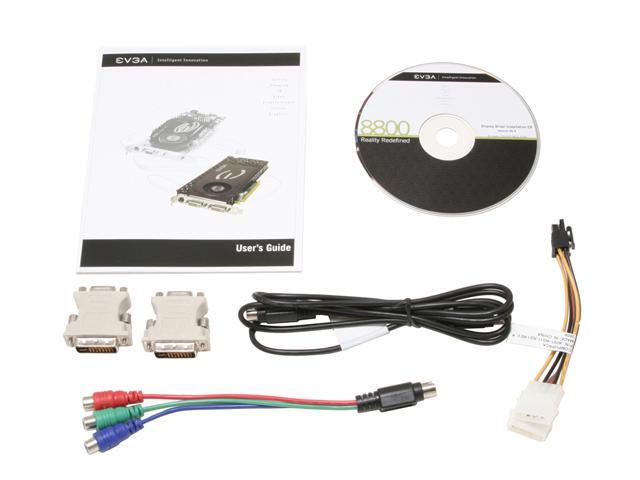
 
If you use the component out cable that came with the card (it has red green and blue plugs, you need to get RCA cables to connect it to your TV) that will give you a HD signal that is just as good as what you'd get with a HDMI cable. You could also buy a DVI to HDMI adapter and use a HDMI cable to connect to the TV from that, but I wouldn't recommend it as it is much more expensive and offers no better output quality.

HDCP is not actually a connection type, but a protection type. It is required to play HD-DVDs and BluRay discs, but not much else for now.
 
so all i have to do is buy DVI TO HDMI adapter and connet to my HD monitor .. than my screen will be HD LOOK?.... my roommate said if i max out my monitor resolution than it will become HD? is that true??
 
You have a HD tv, right? I told you, you don't need the DVI to HDMI thing. If you just use 3 RCA cables and the red/green/blue adapter that should have come with your card that looks like the thing on the bottom left of this picture:
14-130-071-09.jpg

and buy cables that look like this on both ends (color of the plugs is not important)
800px-Component_video_RCA.jpg

you can get the same quality HD signal and it won't cost nearly as much.

If your monitor has a DVI connection just use that. There is no advantage in image quality to using HDMI or component connections.
 
Ok, let me phrase this another way. What all kind of connection options do you have on your monitor? Is it /only/ HDMI, does it have a DVI connection, does it have component input, etc?
 
Ouch, that monitor doesn't have a DVI connector, which means you have to use an adapter of some kind. Either a DVI-to-HDMI adapter or a DVI to VGA adapter.

HD doesn't really apply to monitors. PC monitors have been higher definition (i.e. resolution) than standard television since longer than I can remember, and high quality monitors (usually 24"+) continue to be higher definition than any HDTV.

HDTV is nothing more than TV at a higher resolution than normal. (720p = 1280 x 720 | 1080p = 1920 x 1080). Standard TV comes in at 720x480, iirc
 
Back
Top