• Some users have recently had their accounts hijacked. It seems that the now defunct EVGA forums might have compromised your password there and seems many are using the same PW here. We would suggest you UPDATE YOUR PASSWORD and TURN ON 2FA for your account here to further secure it. None of the compromised accounts had 2FA turned on.
    Once you have enabled 2FA, your account will be updated soon to show a badge, letting other members know that you use 2FA to protect your account. This should be beneficial for everyone that uses FSFT.

haswell and adaptive

chrcoluk

[H]ard|Gawd
Joined
Jul 7, 2008
Messages
1,274
So I watched a asus video with a asus rep showing how to use adaptive, peice of pie.

I have never overclocked a haswell before.

My last cpu was a i5 750 which has old style overclocking.

To me adaptive overclocking is the easiest I have ever done.

All I did was pick a multiple (chose 43) so 4.3 ghz for max turbo.
Set adaptive offset to 0.05 so turbo voltage is 0.05v higher than default.

Bam done didnt touch anything else (except setting ram to XMP later). easiest overclock ever for me and I keep stock idle voltages/clocks.

1.15v for 4.3ghz speeds which I have been told on other sites is very good for a haswell.

Yet when googling adaptive haswell I see many seasoned overclockers struggling with it, odd to me. People are trying to do things like enter a voltage instead of an offset etc.

Have I missed something? seems fine on my rig, and I do get the get the spikes when using stress tools like prime95 eg. spikes up to 1.18-1.19v on prime95.
 
Have I missed something? seems fine on my rig, and I do get the get the spikes when using stress tools like prime95 eg. spikes up to 1.18-1.19v on prime95.

When I use adaptive if I just run Unigine Heaven the Vcore goes to 1.36v, it's supposed to not go higher than 1.27.
 
Cant replicate, dx11 crashes (app crashes not system, wont even start)

dx9 barely stresses cpu its almost idle.

opengl cpu utilisation is moderate and goes to full clocks in turbo, vcore maxes and stable at 1.129 in cpu-z and hwmonitor.

I am curious if you guys changing wrong settings when trying to use adaptive, only the offset is supposed to be changed not fix voltage values.

will post back if I get dx11 test to work.
 
no idea whats wrong with the unigine app but dx11 wqorks on my system with games and other apps (such as 3dmark).

In all tests even with 3dmark really struggling on its dx11 test my voltages on adaptive are find.
 
Bluesun311 well I got unigine dx11 to run on both their gpu benchmarks? not sure which one you used.

The gpumonitor.dll crash issue occues when I select single display in the settings (Default), I am choosing wall-auto and it runs now.

I am not getting any voltage spikes, seems to stress the cpu way less than prime95, and hwmonitor as well as cpuz report max voltage of 1.134v on cpu core. That is with 4.3 turbo clocks.

So for me adaptive seems perfect :)

and as I said all I did was enable adaptive, set offset to 0.05, thats it I did not set any specific voltages on any of the settings, all left on defaults. Plus of course setting 43 multipler on all core's for turbo multiplier.
 
I don't know. We're comparing 2 different processors, one has HT one doesn't. Ones overclocked pretty high, one isn't. Ill test again, it's been a while, maybe they fixed it in BIOS or something, but I doubt it. You're at a very conservative voltage--things get a little weird when you need 1.27v to be stable but don't want more than that.

Edit: yeah, after retesting I think they've done some tweaking but there's still a problem if you are up against the voltage wall to stay stable. I have adaptive voltage working just fine, it's stable and I can run Unigine Valley at the same voltage that I put in for my manual voltage--here's the problem: sooner or later the voltage creeps up--i don't know why, I think the VRMs job is too difficult. I let Valley run by itself for 30 seconds on adaptive and my voltage was where it should have been 1.27, but if I let it run a full cycle... first of all, it dips and struggles here and there and second, I check voltage max after 1 cycle and it's hit 1.3vcore. that's .03 above my cap. Not working as intended because Unigine valley is nothing more than a badass game rendering engine being played non-stop. It doesn't make use of any synthetic AVX or AVX2 instructions.

In the end, adaptive voltage is useless if you learn how all this shit works together. The secret is just letting the Operating System allow the UEFI to underclock and undervolt even though you are using Manual voltage Mode. All it does is completely cap the VID--which is nothing more than the absolute voltage ceiling allowed by the AVR. In adaptive mode this VID (voltage Identifier) is variable... which is the problem. In manual the only difference is the VID is locked. Doesn't mean vcore can't drop! Doesn't mean you have to turn off any other features like c-states.

Here's how to deal with this issue if you are [H]ardcore overclocking your chip to it's absolute max OC at the absolute lowest voltage possible--the secret is simply this:
Capture_zps5761ae4c.png~original


Once you do that simple change in the OS, you can set manual voltages for core and cache... and you won't get fps fluctuations anymore because when you are loaded, you are fully loaded (and fully capped at your input max voltage), but when the cpu is idle, it uses almost no voltage (just as in adaptive) and 800Mhz on all 4 cores (just as in adaptive). I do not understand why JJ pushes adaptive. Perhaps he does not know this trick or doesn't want to get into it. Honestly it's just a dummed down feature of the chipset itself. Kinda like AI tuner, it might work, might not, depending on how bad your chip is lol. I've had it fail me many times because my chip sucked. Marketing ploy. Even in manual, when you aren't using a heavy load, it will only go to 2400Mhz or 1.185v... it's really ridiculous. As far as I can tell literally the only difference between adaptive and manual is the VID, which appears to me to be nothing more than a variable used to speak between the UEFI and the OS about what the absolute voltage cap will be.

no idea whats wrong with the unigine app but dx11 wqorks on my system with games and other apps (such as 3dmark).

In all tests even with 3dmark really struggling on its dx11 test my voltages on adaptive are find.

Unigine Valley and Heaven both work fine on win8.1 I just did a new build of the OS other day. Valley is probably the most widely used natural 3d burn-in and benchmarking tool, at the moment. You may have some driver incompatibilities.
 
Last edited:
I agree since I am using a low adaptive offset and as such a low voltage the behaviour may change when its higher.

However you are the first person I have seen who says setting a static manual voltage still allows it to reduce voltage when idle, and that windows setting is default (but to 5% not 1%) it just controls the clocks not voltages.

I have personally always been against static manual voltages as I dont like my cpu idling at full voltage, so to me adaptive offset voltage is a huge step forward for overclocking. The spiking that you mention in my opinion is a bug which sadly I think has affected your opinion of it, asus probably should have fixed the bug but instead seem content to just say its ok as long as not running stress tools (my experience does match their statement tho, I only see it spike on my rig on prime95, not 3d bench apps or games). The asus rep explained it well in the video I watched and I immediatly understood it (I consider it far more noob freindly than traditional overclocking), however every guide, post etc I have reason on adaptive has instructions, methods different to what asus explained in their video as if the community has misunderstood how adaptive offset works. The asus rep made it very clear when using adaptive voltage it should not be used alongside manual set voltage. The 2 is one or the other, not both at the same time.

In regards to unigine I agree its possibly a driver issue and I may test a newer driver at some point, but it is my only 3d app which has any issues. All games and other test tools work fine. Sadly it seems without paying there is no way to ask unigine, tech support seems paid only. But valley DX11 does run fine in the wall - auto monitor mode.

Thanks
 
Last edited:
The asus rep made it very clear when using adaptive voltage it should not be used alongside manual set voltage.Thanks

What? Your welcome, but that last statement made no sense to me.

Here: This should mostly prove my case, although 15 people will think I'm a crackpot because I'm using Ai suite 3 for a fan controller.
Capture_zpsc34e2f8f.jpg~original


you are the first person I have seen who says setting a static manual voltage still allows it to reduce voltage when idle, and that windows setting is default (but to 5% not 1%) it just controls the clocks not voltages.
I've made many posts with this information but people don't google and no one has ever told me I was wrong, which normally people around here would jump all over the opportunity. As for Windows setting for Minimum processor state only affecting clockspeed and not voltage--citation needed. If you look carefully at the screenshot you'll notice the Power profile is set for High Performance and not the default, which is Balanced. Then again, you're on win 7 and it may be different if it's in UEFI mode or not. So again, we're not comparing apples to oranges. I'm on a Win 8.1 UEFI install and this trick works beautifully. I have not tried it on windows 7 but I suspect it is the same.

You asked what you were missing about manual voltage settings being preferred among overclockers. It's because no other mode can hardcap your voltage. I don't think it's a bug with Asus' boards I think it's a bug with the platform, in general. Just because you don't run into it doesn't mean it's not an issue for the i7 or for more heavily overclocked chips. The fix I found isn't rocket science, I'm not expecting a pat on the back and I don't think I'm the only one to figure it out--far from it.

Adaptive isn't rocket science, either. No one should really deserve a pat on the back for "figuring it out". It just doesn't work well for everyone and there's a better alternative for some so we take it.
 
Last edited:
yeah looks conclusive enough thanks. My old i5 750 didnt have that behaviour so I wonder if this behaviour is new to haswell?

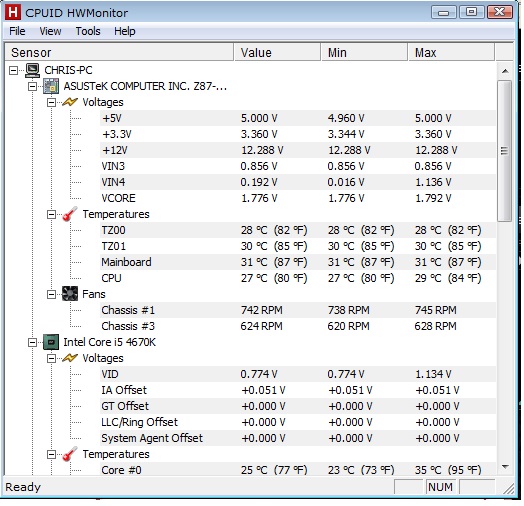
--edit-- sorry I think I misread, just checked my hwmonitor.

so on the motherboard vcore which you circled mine is always 1.766v. That is very high but I assumed it wasnt the cpu vcore.

My cpu vid (which matches cpu-z vcore) idles at 0.774 whilst yours is at the manual 1.270v.

hwmonitor.jpg
 
Last edited:
yeah looks conclusive enough thanks. My old i5 750 didnt have that behaviour so I wonder if this behaviour is new to haswell?

--edit-- sorry I think I misread, just checked my hwmonitor.

so on the motherboard vcore which you circled mine is always 1.766v. That is very high but I assumed it wasnt the cpu vcore.

My cpu vid (which matches cpu-z vcore) idles at 0.774 whilst yours is at the manual 1.270v

Yeah, it's definitely new to Haswell. I stress again, VID is nothing more than a synthetic value on the z87 chipset and represents, as far as I can tell, the maximum cap voltage as set by the Fully Integrated Voltage Regulator. In adaptive voltage setting this VID value can go very low... and it can also completely ignore your values as set in UEFI/BIOS and go above them if it calculates it needs more voltage to stay in business and simply change the VID on the fly.

I'm not sure if that's the most recent version of HWmonitor? If so, there's just a mistake on that reading, you are correct the 1.766 isn't your vcore at all, and I vaguely remember this issue with HWmonitor in the past, perhaps when I was using win 7 myself with Haswell, not long ago. The value 1.766V is your VCCIN (Cpu Input voltage) in this case and I use an Auto setting for mine and I've never had a reason to mess with it. I have read that it generally corresponds with raising the cache or ringbus multiplier. My VCCIN is very similar to yours.

It's not that I'm pushing win 8.1 so much, either, but moreso UEFI. The whole Microsoft ME thing that a lot of people are suspicious of... it's pretty badass when these programs that don't work for anyone else work for me :D

But it can be lonely when no one else believes you that "Yes AI Suite 3 does work (now)", thus why I occasionally get grumpy about this issue. There was just one thread out of like 10 I tried to get this message across about manual voltage and c-states/speedstep voltage power saving still working where someone tried it and verified their findings... ONE! XD
 
dont worry I believe you :) even if hwmonitor may be finicky, I trust your aisuite readings.

So it seems I can set a 1.15v vcore manually and it should still drop my voltage to about 0.8v on idle.

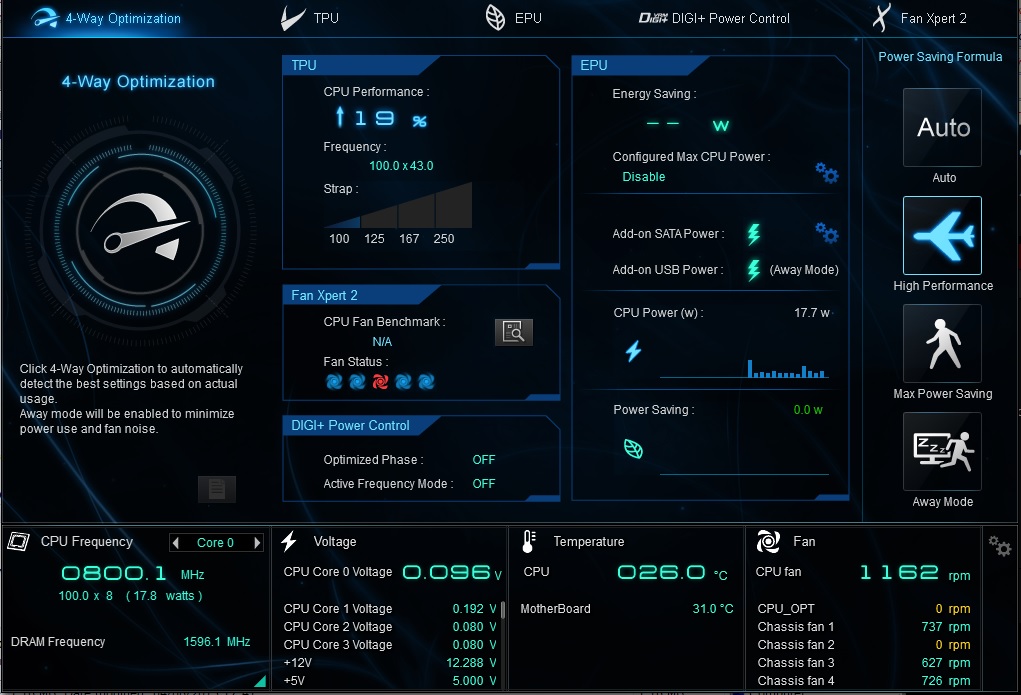
I see also aisuite is giving you individual core voltage readings as well, better than what hwmonitor does so now I think I will install it :)

and yep is latest hwmonitor, the older one was worse, half the readings were missing :) googling I did find someone with the same board as me with the same issue on the vcore reading, I figured it was wrong else my pc wouldnt be working :)

hwmonitor isnt picking up all my fans either.

I have the cpu fan plus 3 case fans all plugged into motherboard headers, inside the bios the rpm's are all showing but not in hwmonitor.
 
Last edited:
ok here is aisuite, looks much better, as haswell idle is actually below 0.1v.

I will run some more tests using aisuite to see if my voltage spikes.

hwmonitor and cpuz both coded by the same company, it seems their software not fully compatible with my z87 board.

aisuite.jpg


I filed of a bug report to cpuid as in my view their software is buggy on my board. Which of course misleads people, especially as aisuite is discredited and so many rely on cpuz/hwmonitor.

--edit--

voltage doesnt spike on unigine valley d11, also single monitor mode works when I disable aero.
prime95 (heat,fpu,voltage stress) the vid goes up in hwmonitor to 1.202, aisuite reports 1.216. Based on what you told me I interpret this as the bios setting a cap of 1.20 but the voltage spiked above it to 1.215. I guess since I am only doing 4.3 which I know isnt an agressive overclock I have minimal spiking going on.

will do fixed vcore tests later. the above tests are on my adaptive 0.05 offset.
 
Last edited:
Bluesum I got a new GPU now and I had to install new drivers for that as well, since then unigine starts up normally even with aero on, so to me I am satisfied the cpu wasnt the cause.

I still plan to test with static vcore to see if I get the idle low voltage same as yourself.
 
Back
Top