• Some users have recently had their accounts hijacked. It seems that the now defunct EVGA forums might have compromised your password there and seems many are using the same PW here. We would suggest you UPDATE YOUR PASSWORD and TURN ON 2FA for your account here to further secure it. None of the compromised accounts had 2FA turned on.
    Once you have enabled 2FA, your account will be updated soon to show a badge, letting other members know that you use 2FA to protect your account. This should be beneficial for everyone that uses FSFT.

Hard Connection for 2.5 drive?

Hades12

Limp Gawd
Joined
Feb 23, 2005
Messages
291
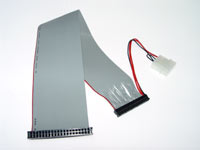
I am building a small system and bought a 2.5 drive for it. I have the Cable
25incable.jpg


But dont know which way to connect it to the drive. Help please
 
it should be obvious once you get the drive...that picture is a little hard to see for me to judge.

I'd venture a guess and say the side with the red and black wires going to the power connector is the side that plugs into the hard drive.
 
Haha very funny.

The small part will go onto the drive with the power to eather side, One way will kill the drive the other will work.
 
Yeah, the smaller of the ends, and the one with the power lead (which is +5v, BTW) is the end that plugs into the 2.5" drive. Make sure that the side of that connector with the leads coming off of it is plugged in so that the power leads coming off of it face the additional 4 pins that should be present on the pin connection portion of the 2.5" drive. In other words:

(this is your cable, 40 pins, at 20 pins per row)

....................
.................... +/- (this side has the power lead coming off of it)


(this is your HDD)

.................... ..
.................... .. (This is the additional 4 pins on the HDD that should be present)

If you took the lame representation of the cable, and put it just above the lame representation of the laptop HDD, and pushed the connections together, that would be the proper way to connect them together. The other end, of course (of the ribbon cable), goes to your motherboard, and the power lead must be plugged in. Unlike desktop drives, laptops receive their 5v power on the drive pins themselves.
 
Haha very funny.

The small part will go onto the drive with the power to eather side, One way will kill the drive the other will work.


^^ he's not joking. doing this any way other than I described above, will likely fry your drive...can you say RMA? (that's if you don't tell them that you plugged it in the wrong way...;) )
 
I thought it kind of obvious that the Large connector goes to the MB, and the small to the Drive.


But you got what I need, Molex end goes towards the 4 seperate pins.
 
Back
Top