• Some users have recently had their accounts hijacked. It seems that the now defunct EVGA forums might have compromised your password there and seems many are using the same PW here. We would suggest you UPDATE YOUR PASSWORD and TURN ON 2FA for your account here to further secure it. None of the compromised accounts had 2FA turned on.
    Once you have enabled 2FA, your account will be updated soon to show a badge, letting other members know that you use 2FA to protect your account. This should be beneficial for everyone that uses FSFT.

H100i pump noise

Nvidia_ATI

Limp Gawd
Joined
Oct 5, 2011
Messages
470
I am very particular about having a silent PC. My current setup has a Noctua NH-D14 running just the larger 140mm stock fan. I keep it at 600rpm on idle making it virtually silent. Similarly, all my case fans are either off or running at very low rpm on idle. I also have a couple of GTX 780 Lightnings in SLI. I am seriously considering getting the Corsair H100i for more working space in my rig and also for aesthetics.

My question is will I hear the pump noise when my PC is idle?
 
Have built over 25 high end work stations, most with the H110, but a few with the H100i and have never heard the pump at idle and the Asus mobos dial back the fans at idle.
If you have room for the H110 they are slightly quieter due to the 140mm fans instead of the 120mm on the H100i's!
 
Absolutely not. You Will not hear it even if its the only thing running in your rig. I have tested it ton of times with all the fans off. With the rest of the fans running at 600 RPM and the h100i at 1200 RPM the machine its Still hell quiet
 
The pump noise will depend on the temp of your CPU itself, it will speed up as needed (IIRC for the corsair AIOs), chances are you will not be able to hear it enough to be an issue, but everyone has their own tolerance levels as such I wouldnt go based on anyone else, your going to need to try it yourself if you are that interested.

If your looking for absolute silence, your looking at a custom setup. Larger radiator, thicker the better, a D5 pump (set to 1), and as little restriction as possible. Or you just stick with a massive air cooler unless thats a noise issue as it stands (My recommendation)
 
Theres like 3-4 different ways to affect a change on the quality of the Corsair hydro series pumps' noise. I found running at 1300 rpm instead of 1500 and changing the angle of the hoses a certain direction helped immensely. Like before it was a whiney ticking when I put my ear up to my case and after I can't hear it anymore.
 
The pump noise will depend on the temp of your CPU itself, it will speed up as needed (IIRC for the corsair AIOs), chances are you will not be able to hear it enough to be an issue, but everyone has their own tolerance levels as such I wouldnt go based on anyone else, your going to need to try it yourself if you are that interested.

If your looking for absolute silence, your looking at a custom setup. Larger radiator, thicker the better, a D5 pump (set to 1), and as little restriction as possible. Or you just stick with a massive air cooler unless thats a noise issue as it stands (My recommendation)

h100i pump run at fixed speed. 2200~2300RPM. and can't be controlled because its fed directly by a Sata Port, same with H80i. H70, H100 and H110 are made to run at full speed all time according corsair to no compromise cooling performance and also are weak pumps hardly it can make any noise.
 
h100i pump run at fixed speed. 2200~2300RPM. and can't be controlled because its fed directly by a Sata Port, same with H80i. H70, H100 and H110 are made to run at full speed all time according corsair to no compromise cooling performance and also are weak pumps hardly it can make any noise.

Interesting. I did not realize that the pump strength influences the noise it makes. I though the resistance to coolant flow presented by the rest of the loop is the major factor.
 
If your looking for absolute silence, your looking at a custom setup. Larger radiator, thicker the better, a D5 pump (set to 1), and as little restriction as possible. Or you just stick with a massive air cooler unless thats a noise issue as it stands (My recommendation)

I plan to eventually go to a custom setup with Broadwell/Skylake and Maxwell. I feel at that time, the performance increase will justify the additional expense.
 
Have built over 25 high end work stations, most with the H110, but a few with the H100i and have never heard the pump at idle and the Asus mobos dial back the fans at idle.
If you have room for the H110 they are slightly quieter due to the 140mm fans instead of the 120mm on the H100i's!

Absolutely not. You Will not hear it even if its the only thing running in your rig. I have tested it ton of times with all the fans off. With the rest of the fans running at 600 RPM and the h100i at 1200 RPM the machine its Still hell quiet

Thanks for your comments. It is very reassuring. If I get the h100i, the stock fans will be replaced with NF-F12 or SP-120 Quiet Edition.
 
A pumps noise is mechanical, not from fluid. As the pump moves, you hear the working of the pump. The only liquid/fluid sound you will hear is bound to be drowned out by the sound of a very low speed fan


@ Araxie - 1) They dont go to a SATA port, 2) The "i" series IIRC is fed off of the Corsair Link software? My only hands on with an AIO is with a H50 well before corsair had software, I was under the impression that the software helped regulate the temperature of your CPU, there are two ways to do this via the fans and the pump, both of which *should* be variable.
 
Thanks for your comments. It is very reassuring. If I get the h100i, the stock fans will be replaced with NF-F12 or SP-120 Quiet Edition.

do not use SP-120 Quiet, if well they are quiter than the Stock SP-120L in the h100i Unit they cant be really compared to the NF-F12 go with the NF-F12.. i use in one machine 4x GT AP-15s and my personal machine with 4xNF-F12 and they are awesome fans..

@ Araxie - 1) They dont go to a SATA port, 2) The "i" series IIRC is fed off of the Corsair Link software? My only hands on with an AIO is with a H50 well before corsair had software, I was under the impression that the software helped regulate the temperature of your CPU, there are two ways to do this via the fans and the pump, both of which *should* be variable.

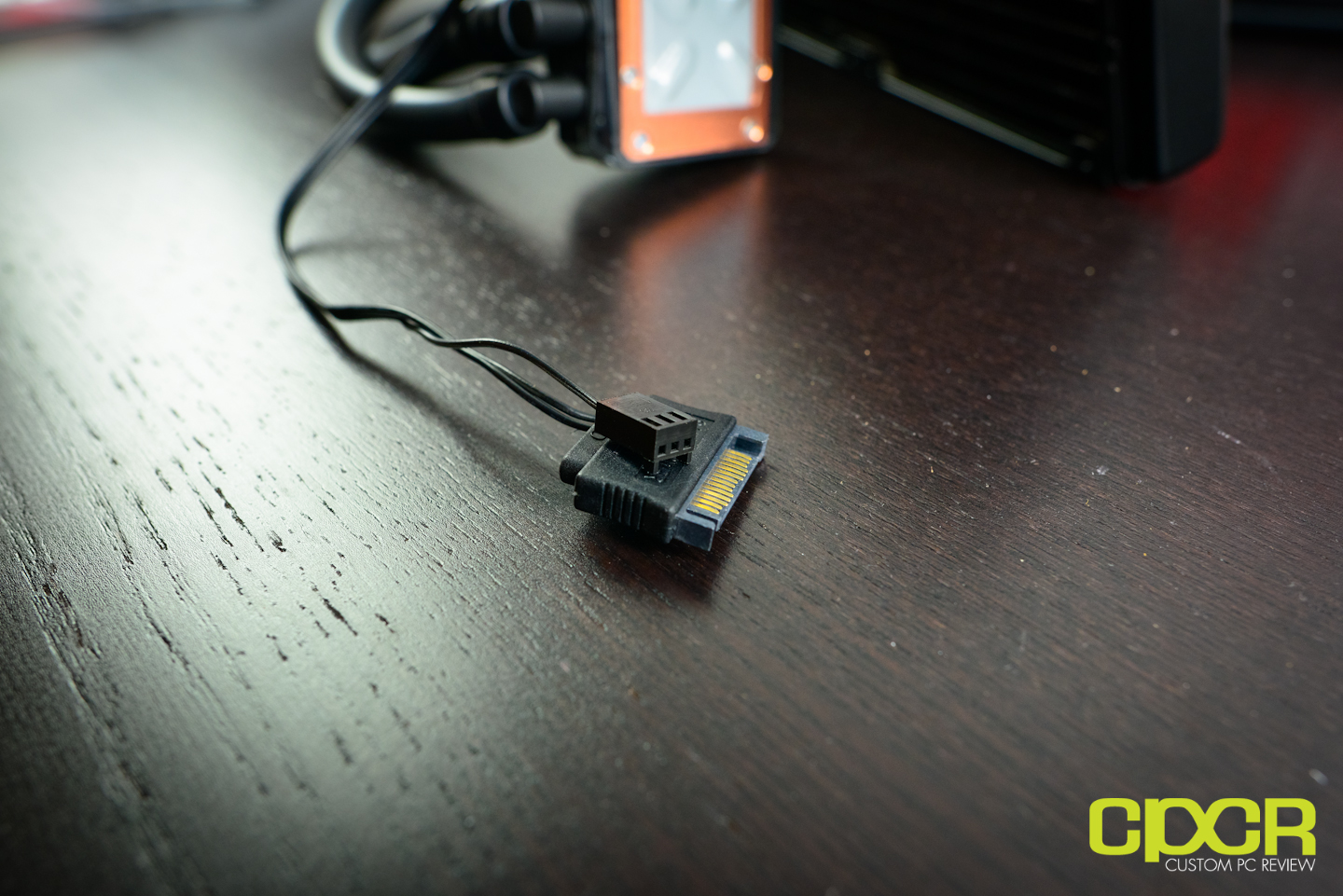
Yes they are all fed by the SATA port as you can see in image i'll post. the Corsair i Series have in the waterblock included the whole Corsair Link Hardware which its able to handle 4 PWM Fans the Pump and it work to register another Corsair Link hardware like Corsair AX digital PSU and RAM.. at the first very moment when the h100i and h80i were launched in the market the pump speed was regulated by the Corsair Link software and in fact they was allowed users to control the pump speed, however this caused major issues with too low speed and very affected cooling performance corsair changed the firmware IIRC in the 1.0.2 something like that in the first months in the market and fixed the pump speed to maximum speed.. the software as you said help to regulate the temperature of the CPU as the user desires with tight precision because the speed of the fans can be changed according to the Liquid Temperature instead of the CPU temperature. it bring really really good control over this and thats why i reverted from the h110 to the h100i.

now well. images:

35-181-032-TS


mfg3.jpg


corsair-h100i-cpu-cooler-custom-pc-review-7.jpg


as you can see the SATA ports its what power the whole unit. the 3pin connector have only 1 cable and its only to report the RPM speed to the motherboard and avoid issues with "missing/error CPU fan"
 
Ahh I misunderstood, I thought you meant for data, not power :> Been a while since Ive looked at the "H" series coolers outside of numbers for cooling values, my apologies
 
@Araxie, thanks for the advice. I'll go with the NF-F12s then. How does the GT AP-15 compare to the NF-F12 in cooling performance and noise? I have an NF-P12 from my Noctua cooler that I could re-purpose for the h100i rad but I suppose it is just better to get the NF-F12 for better static pressure.
 
Ahh I misunderstood, I thought you meant for data, not power :> Been a while since Ive looked at the "H" series coolers outside of numbers for cooling values, my apologies

No worries bud, i wasn't precisely clear either..

@Araxie, thanks for the advice. I'll go with the NF-F12s then. How does the GT AP-15 compare to the NF-F12 in cooling performance and noise? I have an NF-P12 from my Noctua cooler that I could re-purpose for the h100i rad but I suppose it is just better to get the NF-F12 for better static pressure.

i was in the exact same boat as you.. and in fact i bought 4x NF-F12s and 4x NF-P12s. both are completely silent in the 900RPM-1000RPM range.. however the F12s performed in average of 3degrees cooler at the same test, same controlled room temp, now, with the Low noise adapter PWM controlled both ranged in the same average RPM idle of 700RPM, and load F12 920RPM | P12 900RPM. still the F12 was 1 degree cooler. under full load.

now at full load without Low noise adapters, the F12 have some firm advantage over the P12s.. F12 are 1500RPM max RPM, P12 Max 1300RPM both at max speed resulted in of course a lower noise for the P12, but giving to the F12 some good 5-7C and even both at max speed both performed very quiet i ended keeping the F12s with the radiator and the P12s in my case 2x front mounted and 2x in the HDD bays.. (BTW this setup droped the GPU temp in 3 degrees in idle and 6 degrees in full load too, awesome setup in my case)..

about the AP-15s vs NF-F12. AP-15s are unbeatable for sure. however they are really expensive and noctua are really really close of that noise\performance ratio. i really do not think it worth the Price over the NF-F12 when they are really close in cooling performance.
 
On the H80i the fans plug into the pump block... and the block distributes power to the fan splitter. I did not like that, so I simply fed the fan splitter to my motherboard and controlled them without the software. Are you sure Araxie? I haven't used an H100i but I would think it would be exactly the same. The power to the fans CAN come from the SATA connection, if you plug the fan splitter into the block, but it's not necessary. I found the i series block to be cluttered enough as it is. Was trying to make a very clean looking install around the CPU itself and ultimately found the non i series to be better for my needs. The SATA connection is a major pain in the ass and only the i series uses it.
 
The h100i and h80i work in the Same way.. im of course referring to Out of the box experience of course you can connect the fans to the motherboard however unless you have aditional 4 pin pwm splitters or a dedicated fan controller it would be very PITA to control four fans for the radiator. The splitters thats come with the h100i and h80i are only able to be fixed in the corsair Block and yes. The power for the fans (of course connected to the water block) are only powered by the block sata connector and i have to soy i prefer to control the fans this way. Remember thats each fan connected and controlled by the motherboard actually cause extra stress to the motherboard power circuitry making it to gain some serious degrees i found in my mobo powering and controlling all the available fan headers to work 6C hotter than just powering it without control, and 8C hotter without any fan connected. And thats why i loved to connect the for four fans to the water block. Ah btw more or less a similar method was used in the vanilla h80/h100 units but those are powered vía molex not sata connector.. i Think with a pretty good imaginación and some work you can make a good clean build with the h100i as i have (i'll post a pic later im on phone right now).
 
@Araxie, I would appreciate a picture of your build because one of the main reasons for my planned move to an AIO is for aesthetics. It will be unfortunate if the h100i has too many wires sticking out of it.
 
How good is the stock TIM already applied to the CPU block? Should I replace it with IC Diamond 7?
 
@Araxie, I would appreciate a picture of your build because one of the main reasons for my planned move to an AIO is for aesthetics. It will be unfortunate if the h100i has too many wires sticking out of it.

sorry im traveling right now and i cant't post any recent pic, however i found some pretty old stuff that may work to show more or less how im right now..

How good is the stock TIM already applied to the CPU block? Should I replace it with IC Diamond 7?

do not replace the stock TIM if isn't really necessary, (bad mount, etc) the stock TIM in the corsair Hydro series its one of the best TIM you can find in the planet, its some very very special Shin Etsu TIM, do not have any cure time, isn't electricity conductive and have outrageous performance, many people that replace it with even high quality TIM like mx-4, NT-H1 (thats what im using right now) found that not matter what TIM used to replace it, it will perform a little worse later. so try to make a good mount from the start. =)


ok now with the pics, sorry they are pretty old seriously and the system its really awkwardly dusty..

this its the oldest one when i was using an H70.

This one its with the H100i with stock fans before reworked the entire system fans and PSU cables.. but thats it more or less.. actually the cable that crossed through the "Sabertooth Z77" Logo in the mobo are better routed its in the slot between the RAM and the Cover, in that space just above the H100i hoses. in part that build its a little better than what i have now xD because in that moment the Fan controller wasn't installed and that add TONS of cable to the machine. but i consider its pretty good.
 
NP bud.. i take the word for that beer!.. i will give a look to the thread..
 
Back
Top