• Some users have recently had their accounts hijacked. It seems that the now defunct EVGA forums might have compromised your password there and seems many are using the same PW here. We would suggest you UPDATE YOUR PASSWORD and TURN ON 2FA for your account here to further secure it. None of the compromised accounts had 2FA turned on.
    Once you have enabled 2FA, your account will be updated soon to show a badge, letting other members know that you use 2FA to protect your account. This should be beneficial for everyone that uses FSFT.

FX-55 OC'ing

theseeker

2[H]4U
Joined
Apr 27, 2005
Messages
2,245
I have just started to OC my FX-55 and I would like to see some results and tips. I have an Asus A8N deluxe sli MB with dual 6800 Ultras and 2 G's of Corsair XLL Pro Ram. I would greatly appreciate some guidance. BTW, CPU, NB, GPU's are all H2O cooled.
Thanks for your help.
 
Here is my FX55 setup, actually I have 2 different ones.

My newest, haven't really checked for stability YET:
MULTI 10x
FSB 288Mhz (2.5/3/3/10 1T)
HTT 3x
DDR 2.75v
CPU 1.55v + 6.6% over-volt
Nforce 1.65v

2.88Ghz on my FX55 (clawhammer core) using XP90 w/ 92mm tornado. I'm also using G.Skill PC4400 TCCD ram for all my OC's.

My "proven OC"
MULTI 11x
FSB 262MHz (2.5/3/3/10 1T)
HTT 3x
DDR 2.75v
CPU 1.55v + 6.6%
Nforce 1.60v

This also will give you 2.88GHz, but with "LESS" memory bandwidth. Both of these OC's are really fast, and "SO FAR" are stable. If I try to take my FX55 any higher than 2.88Ghz, the CPU fails to boot. I really need to up the Vcore, but on air cooling, ill be looking for trouble. I hope this was a good start for ya..
 
newls1 said:
Here is my FX55 setup, actually I have 2 different ones.

My newest, haven't really checked for stability YET:
MULTI 10x
FSB 288Mhz (2.5/3/3/10 1T)
HTT 3x
DDR 2.75v
CPU 1.55v + 6.6% over-volt
Nforce 1.65v

2.88Ghz on my FX55 (clawhammer core) using XP90 w/ 92mm tornado. I'm also using G.Skill PC4400 TCCD ram for all my OC's.

My "proven OC"
MULTI 11x
FSB 262MHz (2.5/3/3/10 1T)
HTT 3x
DDR 2.75v
CPU 1.55v + 6.6%
Nforce 1.60v

This also will give you 2.88GHz, but with "LESS" memory bandwidth. Both of these OC's are really fast, and "SO FAR" are stable. If I try to take my FX55 any higher than 2.88Ghz, the CPU fails to boot. I really need to up the Vcore, but on air cooling, ill be looking for trouble. I hope this was a good start for ya..

Thank you. I am H2O cooling so I will start with your proven OC and go from there. I will let you know. Thanks again!
 
newls1 said:
Here is my FX55 setup, actually I have 2 different ones.

My newest, haven't really checked for stability YET:
MULTI 10x
FSB 288Mhz (2.5/3/3/10 1T)
HTT 3x
DDR 2.75v
CPU 1.55v + 6.6% over-volt
Nforce 1.65v

2.88Ghz on my FX55 (clawhammer core) using XP90 w/ 92mm tornado. I'm also using G.Skill PC4400 TCCD ram for all my OC's.

My "proven OC"
MULTI 11x
FSB 262MHz (2.5/3/3/10 1T)
HTT 3x
DDR 2.75v
CPU 1.55v + 6.6%
Nforce 1.60v

This also will give you 2.88GHz, but with "LESS" memory bandwidth. Both of these OC's are really fast, and "SO FAR" are stable. If I try to take my FX55 any higher than 2.88Ghz, the CPU fails to boot. I really need to up the Vcore, but on air cooling, ill be looking for trouble. I hope this was a good start for ya..

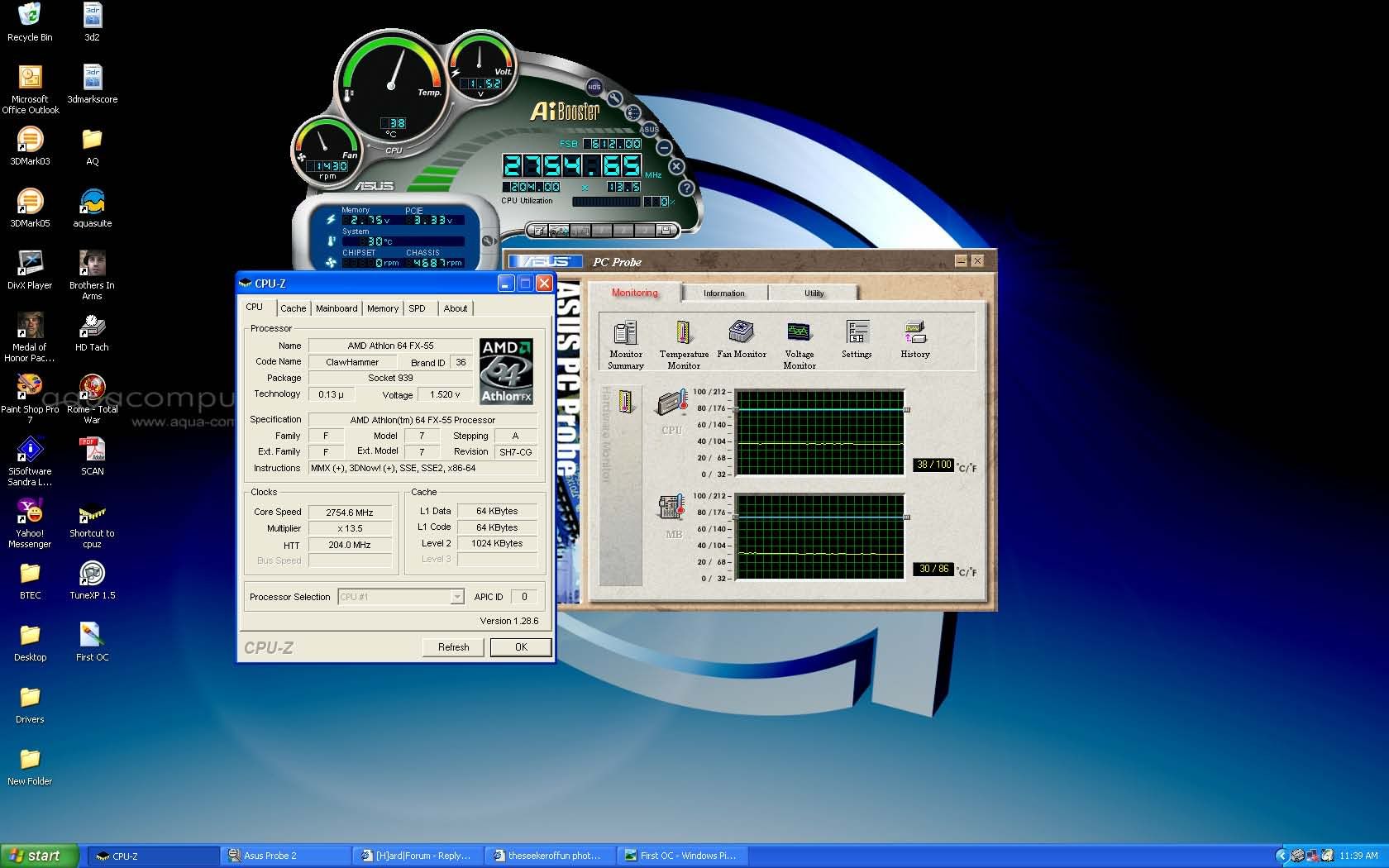
Tried your setup, but I has to make a few changes to get stability.
MUTI 13.5
2.5/3/3/10 1T
DDR 2.75v
CPU 1.55

This has given me 2.75GHz on the first attempt. CPU temp is 40c and NB temp is 36c.
I will try to post some screenshots later. What do you think?
 
theseeker said:
Thank you. I am H2O cooling so I will start with your proven OC and go from there. I will let you know. Thanks again!
not all cpu's are the same. while some cores can do >3ghz without a problem, others may be limited to 2.8ghz.. ymmv
 
theseeker said:
Tried your setup, but I has to make a few changes to get stability.
MUTI 13.5
2.5/3/3/10 1T
DDR 2.75v
CPU 1.55

This has given me 2.75GHz on the first attempt. CPU temp is 40c and NB temp is 36c.
I will try to post some screenshots later. What do you think?
What RAM are you using? If your not using "QUALITY RAM" than your OC is going to be limited, unless you use a DIVIDER... Let me know....
 
(cf)Eclipse said:
not all cpu's are the same. while some cores can do >3ghz without a problem, others may be limited to 2.8ghz.. ymmv

Thanks for your input. Any guidance for pushing it farther? I am a virgin when it comes to AMD.
 
theseeker said:
Thanks for your input. Any guidance for pushing it farther? I am a virgin when it comes to AMD.

Stay away from 1/2 multi's. I can more than likely get you more from your system, just PM me, and maybe we can set something up!
 
Here is the screenshot, as promised.

FirstOC.jpg
 
I have mine at 2807. Vcore 1.60(may try to lower that a bit see if it will run stable at 1.55)
2 gig of corsair xms 3200. 13x216. Mem timings @ 7-3-3-2t. I'm happy with this oc has been stable for 1 month.
 
I lowered the MULTI to 13, as it is not stable at 14. I have never attempted much OC'ing, but I am surprised at the problems I am having.
 
theseeker said:
I lowered the MULTI to 13, as it is not stable at 14. I have never attempted much OC'ing, but I am surprised at the problems I am having.

Hey, you need to drop your multi to 11x or 10x, and start raising your FSB if your ram will allow it, and or use a ram divider. Your OC will be much faster this way. Do this: Put your multi down to 7x. Put your memory timings @ 3-4-4-10, and DDR volts @ 2.85, and now start raising your FSB till windows becomes unstable. @ the point windows becomes unstable either back down 5MHz, or throw in a ram divider and keep going. When you reach the point of happiness, try to lower the memory timings down to 3-3-3-10, or 2.5-3-3-10 1T, and pray that everything is stable..... If you reach this point, your doing REALLY GOOD. NOW: start your CPU ratio @ 10x, and chack for stability. If all is good, up it too 11x. Make sure your providing the proper Vcore (1.55 + 6.6%) should be great, and now check for temps, and stability. This is all "1" big game, and this game takes alot of time and money. Dont rush, you may have to go back a hundred times in that BIOS and re-arange things like Voltage, FSB speed, reduce FSB speed, and raise the multi, etc.......... Have any questions, let me know, and i'll try to help ya.....
 
As Newls1 has stated you need to really lower the CPU multi. It would be helpful if we knew more about the parts you were using. Is the FX55 you have a 90nm core or a 130nm core? what is the cooling you are using exactly? (i saw ya said H2o but what all?) What are you using for a powersupply? I see you are using an Azus board. How about the Memory? what brand? speed? and timmings is it capable of (latency) ?

I have found that setting the CPU multi @ 11x and the HTT multi @ 3x and then running the fsb upward and adjusting the Vcore, the Vdim and the Memory timmings (starting with tighter timmings and loosening as you go) as well as divider if needed. I would easily belive you should have no issues hitting atleast 2.8. But this all very well depends on the parts you are using as well as the CPU luck. Ocing just by using the CPU multi give VERY litlle benifit. you will get the most out of any OC if you oc the memory with it. Hope that helps..

The Cpt.
 
Captin Insano said:
As Newls1 has stated you need to really lower the CPU multi. It would be helpful if we knew more about the parts you were using. Is the FX55 you have a 90nm core or a 130nm core? what is the cooling you are using exactly? (i saw ya said H2o but what all?) What are you using for a powersupply? I see you are using an Azus board. How about the Memory? what brand? speed? and timmings is it capable of (latency) ?

I have found that setting the CPU multi @ 11x and the HTT multi @ 3x and then running the fsb upward and adjusting the Vcore, the Vdim and the Memory timmings (starting with tighter timmings and loosening as you go) as well as divider if needed. I would easily belive you should have no issues hitting atleast 2.8. But this all very well depends on the parts you are using as well as the CPU luck. Ocing just by using the CPU multi give VERY litlle benifit. you will get the most out of any OC if you oc the memory with it. Hope that helps..

The Cpt.

I have no idea about the core. My cooling system is all AC, Aquatube-Aquastream-RAD EVO 240-CPU(CuplexXT)-NB(Cuplex)-RAD EVO 160-GPU1-GPU2-Aquatube. PSU is PC Power & Cooling 510 SLI and the MB is an ASUS A8N Deluxe SLI. The memory is Corsair
TWINX Pro LED 2048 PC3200 400 MHZ 2.5/3/3/8.
 
I would get OCZ PC4000 VX RAM (2x512) as a test. These are pretty much good for 250mhz frontside @ 2,2,2,6 1T.

I have not had good luck with any other memory.
 
R1ckCa1n said:
I would get OCZ PC4000 VX RAM (2x512) as a test. These are pretty much good for 250mhz frontside @ 2,2,2,6 1T.

I have not had good luck with any other memory.

The Corsair will not touch those timings, you live and you learn, 2.5,3,3,8 is the best I can get from it.
 
theseeker said:
The Corsair will not touch those timings, you live and you learn, 2.5,3,3,8 is the best I can get from it.
I would say the RAM is holding you back as you can do 2.7 with high multipliers but only 204 front side. You should get 250 x 11 no problem with some good RAM. 1 gig sticks have not been very overclocking friendly so only do it if you must have 2 gigs of RAM. If you are going to give the VX ram a run, I suggest the OCZ ram boster so you can hit 3.5volts which is how you get high FSB with tight timings.

I would guess you can get 2.8 - 2.85 out of your processer without high voltage.
 
It always makes me feel so good when i read posts from people with 800$ cpu's getting overclocks just 200mhz faster than my winnie 3000+ can do. thanks again for making me value my frugality.
 
7718 said:
It always makes me feel so good when i read posts from people with 800$ cpu's getting overclocks just 200mhz faster than my winnie 3000+ can do. thanks again for making me value my frugality.


You're welcome?
 
Back
Top