
SSo basically Im posting this to help all the other people in the same position as I was. Just trying to build a pc and really not having a fucking clue what your doing. I am far from being a pro and your going to see a few errors I have made during this build. Hell you might even catch a few that I have missed.
(You can skip this part if you just want to look at the pictures below)
I will start of by telling you that your doing good already because your at hardforums and that is the best place to be in this position. You really just need to do your research and make sure every part is compatible with another.
The way I did this was by just deciding what type of system I was gonna build. I wanted something that would be good at editing video, playing games and all around good at graphic design. I was on a budget so I basically leaned towards building the pretty hardcore gamer type pc. I decided I wanted to building something with a core2duo so I looked at what I need for this. I need a Intel mobo that was compatible with the core2duo, and I needed LGA 775 ports. I needed a PSU with a 24 pin connector or a 20+4 pin and a p4 connector. Now I picked my HDD, I wanted it fast and affordable with some good disk space and something thats not gonna crash on me. So I picked the Western Digital Caviar SE 500GB. Next I picked my graphics card the 8800GTS. For this I needed a mobo with a PCI-E 16x port, a 500w+ PSU with 2 PCI-E 6 pin connectors, and a case that would fit it well. I picked the Antec 900 for its great air cooling. I later changed the graphics card to a 8800GTX as I got a bit more money in my budget. Now that I had my case picked I knew it was time to pick the PSU. The PSU needed to be in ATX form and have all the above needs. I picked the HX520 from Corsair, thanks to the guys here at [H] I also wanted The ram basically I picked after I picked out my mobo, since really all I needed was DDR2 800mhz. Now its time to pick the mobo. It needed to have all the above things, I picked the asus p5k. You really need to look into what your goals are for the pc when you select the mobo. I wanted stablity and easy over clocking so I picked a mobo with the Intel P35 North bridge. I got a extra fan too and some other stuff. After this I ordered all my parts.
(This part is not in perfect order since I did not take pictures of EVERYTHING.)
When the parts all came the first thing I did was prepared the case by taking off the side panels. Then installed the PSU. It bascially slides right into place.

Here I am faced with the dilemma of whether or not its ok to put my PSU upside down. Thank go it is otherwise I would have had to cut a hole in the bottom of my case for the fan.

The screws to hold it in attach on the back of the case.
At this point you need to make sure you have barricaded your workspace. Especially if you have parents that dont understand how voiltale PC equipment is to static electricity.

This is also good to keep animals and small kids out too.
After that I installed the extra fan I ordered on the side of my case:

This just popped right into place, no screws needed.
Now its time to install the CPU. I took the mobo out and sat it on the static bag it came in. I dont have a pic of this part.
After that I opened the CPU box and got the cpu ready to install. I set the CPU in the socket the proper way and tried to push down.

It seemed like it was to hard and everything I have heard says DO NOT FORCE IT. So im like what the fuck no pins on the mobo are bent, and the cpu is in the right place. The only thing I could see wrong is that the ZIF bracket was bent a bit. Generally thats a bad thing right? I really dident think about this then and just went ahead and pushed down. I did it correctly and pushed on the ZIF bracket hopeing to make sure it dont lever the part of the cpu the bend is on and mess something up. I tryed this a few times and just seemed harder then expected. So I stopped and took a break and did some research. I dident really learn anything that would make my hands stop shaking. I took the CPU out once again and checked the mobo for bent pins and made sure the cpu was in the right place. It all looked fine. So I went ahead. I pushed down a bit harder then I was comfortable with, but I wasent using all the force my index finger could provide, so Im sure I was in the clear. I got the lever down and slide it under the the little thing that keeps it in place.

I feel pretty good now, but then some one told me its possible to install the CPU backwards. So now Im pretty much freaking out. I spent all my money ordering this pc and by the time I get the money to fix it every part is gonna be out of date. The person finally tells me that its on the right spot as long as the letters are facing the same way as the ZIF lever. I felt re leaved. Even tho im still nervous that I might have broke something from pushing down harder then I wanted to. I really expected it to have ZERO FORCE but I had to use about 1lbs of force so we will see.
After this little escapade I had I started to prep the HSF for installation. I took all the shitty thermal compound Intel had put on it off with a q tip and some isopropyl alcohol.

The first time left some residue so I did it again until it was very clean.

After doing that I put some AS5 on there and rubbed it around and removed all excess until It was shiny agian. I dont know they say to do this but I would expect it makes a better contact with the cpu.
Speaking of the CPU that needed to be cleaned also.
After cleaning I applied some AS5.

I figured that was to long and tried to rub some of it off with a q-tip. That was stupid as fuck the cotton from the q-tip just stuck in the AS5 so I tried to remove that part with a coffee filter but that was so big it just got shit everywhere.

So now I say fuck it and I wash all the AS5 off the cpu, and apply agian.

Thats a bit much yes, but im not doing agian. This will have to do.
I put the heat sink on like the manuals of the mobo and cpu tell you to.


That was all over and I felt great so I started putting the mobo in the case and realized I still need to install the RAM. So I took it out and set it back on the anti static bag.
Install the ram is the part where you will use more force then you ever feel comfortable using on a pc. The way I did this was I slid the ram in the port and then kinda angled it and to where I could get one lever down then pushed the ram down on the other side until It clicked into place. I did this with both sets.

I installed mobo into the case and it was pissing me the fuck off and my camera battery went dead so theres no pics for it. Its just a bitch to do with the copper things. You put the screws in and then come on undone under the mobo and then you have to take the mobo out put them all back in place and its just hell. I had to take the mobo in and out about 5 times. And theres the washer issue. Do I use washers? I posted here and asked if I needed to use the red washers that came with the case and everyone told me I did not need to.
Finally I got the mobo in and started to install the GPU. But wait.

What the fuck is that lever for? Is that like the ZIF lever. I just went online and I found its just there for nothing basically. It did help me with getting the card to right spot tho I guess. Got the card in, and damn does it look sweet. My pc is finally starting to come together. It feels really good to look at it.
So now I needed to install the hard drive

Its really easy to install it, I had to install it on the bottom since that black piece wont coexist with my GPU. All you need to do is put it in place and run the SATA wires. I ran mine back around, so when I decide to do some cable management I wont have to take so much apart.
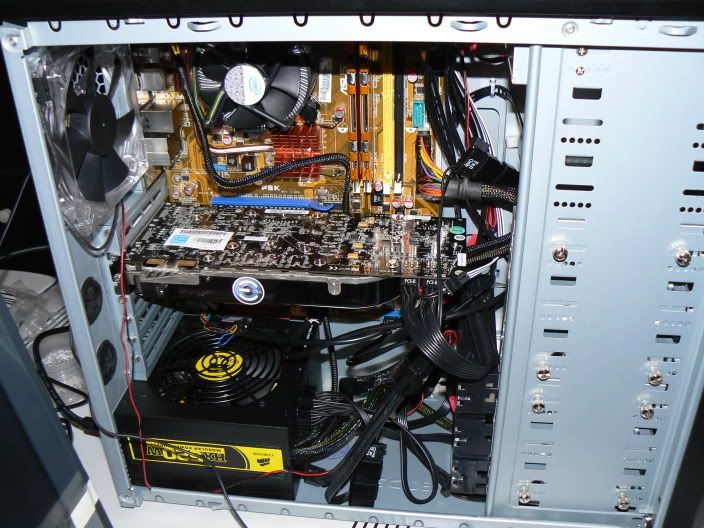
Before I turned it on I did one final check and sent my pics to Barney, he looked them over and I noticed my ram was A1 A2 and for dual channel it needed to be in slots A1 B1. So I fixed that.
Now its time to boot this bad boy up, and to my suprise I did everything right thanks to all the people I looked for help too.

Formatting the HDD took forever.

After it was all over, it came out like this

Now I just need to get my desk together and networking ran to my room.
More steps coming soon!
Final Specs:
E6750 @ 2.6GHZ/1333MHZ
ASUS P5K
eVGA 8800GTX 575/1800
Crucial Ballistix 2x1gb 800mhz
Western Digital Caviar SE 500GB
Corsair 520HX
Acer 20" 5ms Widesceen
Antec Nine Hundred
Thanks to every one here thats helped with this build. If it wasn't for [H], I wouldn't of done it.
(You can skip this part if you just want to look at the pictures below)
I will start of by telling you that your doing good already because your at hardforums and that is the best place to be in this position. You really just need to do your research and make sure every part is compatible with another.
The way I did this was by just deciding what type of system I was gonna build. I wanted something that would be good at editing video, playing games and all around good at graphic design. I was on a budget so I basically leaned towards building the pretty hardcore gamer type pc. I decided I wanted to building something with a core2duo so I looked at what I need for this. I need a Intel mobo that was compatible with the core2duo, and I needed LGA 775 ports. I needed a PSU with a 24 pin connector or a 20+4 pin and a p4 connector. Now I picked my HDD, I wanted it fast and affordable with some good disk space and something thats not gonna crash on me. So I picked the Western Digital Caviar SE 500GB. Next I picked my graphics card the 8800GTS. For this I needed a mobo with a PCI-E 16x port, a 500w+ PSU with 2 PCI-E 6 pin connectors, and a case that would fit it well. I picked the Antec 900 for its great air cooling. I later changed the graphics card to a 8800GTX as I got a bit more money in my budget. Now that I had my case picked I knew it was time to pick the PSU. The PSU needed to be in ATX form and have all the above needs. I picked the HX520 from Corsair, thanks to the guys here at [H] I also wanted The ram basically I picked after I picked out my mobo, since really all I needed was DDR2 800mhz. Now its time to pick the mobo. It needed to have all the above things, I picked the asus p5k. You really need to look into what your goals are for the pc when you select the mobo. I wanted stablity and easy over clocking so I picked a mobo with the Intel P35 North bridge. I got a extra fan too and some other stuff. After this I ordered all my parts.
(This part is not in perfect order since I did not take pictures of EVERYTHING.)
When the parts all came the first thing I did was prepared the case by taking off the side panels. Then installed the PSU. It bascially slides right into place.
Here I am faced with the dilemma of whether or not its ok to put my PSU upside down. Thank go it is otherwise I would have had to cut a hole in the bottom of my case for the fan.
The screws to hold it in attach on the back of the case.
At this point you need to make sure you have barricaded your workspace. Especially if you have parents that dont understand how voiltale PC equipment is to static electricity.
This is also good to keep animals and small kids out too.
After that I installed the extra fan I ordered on the side of my case:
This just popped right into place, no screws needed.
Now its time to install the CPU. I took the mobo out and sat it on the static bag it came in. I dont have a pic of this part.
After that I opened the CPU box and got the cpu ready to install. I set the CPU in the socket the proper way and tried to push down.
It seemed like it was to hard and everything I have heard says DO NOT FORCE IT. So im like what the fuck no pins on the mobo are bent, and the cpu is in the right place. The only thing I could see wrong is that the ZIF bracket was bent a bit. Generally thats a bad thing right? I really dident think about this then and just went ahead and pushed down. I did it correctly and pushed on the ZIF bracket hopeing to make sure it dont lever the part of the cpu the bend is on and mess something up. I tryed this a few times and just seemed harder then expected. So I stopped and took a break and did some research. I dident really learn anything that would make my hands stop shaking. I took the CPU out once again and checked the mobo for bent pins and made sure the cpu was in the right place. It all looked fine. So I went ahead. I pushed down a bit harder then I was comfortable with, but I wasent using all the force my index finger could provide, so Im sure I was in the clear. I got the lever down and slide it under the the little thing that keeps it in place.
I feel pretty good now, but then some one told me its possible to install the CPU backwards. So now Im pretty much freaking out. I spent all my money ordering this pc and by the time I get the money to fix it every part is gonna be out of date. The person finally tells me that its on the right spot as long as the letters are facing the same way as the ZIF lever. I felt re leaved. Even tho im still nervous that I might have broke something from pushing down harder then I wanted to. I really expected it to have ZERO FORCE but I had to use about 1lbs of force so we will see.
After this little escapade I had I started to prep the HSF for installation. I took all the shitty thermal compound Intel had put on it off with a q tip and some isopropyl alcohol.
The first time left some residue so I did it again until it was very clean.
After doing that I put some AS5 on there and rubbed it around and removed all excess until It was shiny agian. I dont know they say to do this but I would expect it makes a better contact with the cpu.
Speaking of the CPU that needed to be cleaned also.
After cleaning I applied some AS5.
I figured that was to long and tried to rub some of it off with a q-tip. That was stupid as fuck the cotton from the q-tip just stuck in the AS5 so I tried to remove that part with a coffee filter but that was so big it just got shit everywhere.
So now I say fuck it and I wash all the AS5 off the cpu, and apply agian.
Thats a bit much yes, but im not doing agian. This will have to do.
I put the heat sink on like the manuals of the mobo and cpu tell you to.
That was all over and I felt great so I started putting the mobo in the case and realized I still need to install the RAM. So I took it out and set it back on the anti static bag.
Install the ram is the part where you will use more force then you ever feel comfortable using on a pc. The way I did this was I slid the ram in the port and then kinda angled it and to where I could get one lever down then pushed the ram down on the other side until It clicked into place. I did this with both sets.
I installed mobo into the case and it was pissing me the fuck off and my camera battery went dead so theres no pics for it. Its just a bitch to do with the copper things. You put the screws in and then come on undone under the mobo and then you have to take the mobo out put them all back in place and its just hell. I had to take the mobo in and out about 5 times. And theres the washer issue. Do I use washers? I posted here and asked if I needed to use the red washers that came with the case and everyone told me I did not need to.
Finally I got the mobo in and started to install the GPU. But wait.
What the fuck is that lever for? Is that like the ZIF lever. I just went online and I found its just there for nothing basically. It did help me with getting the card to right spot tho I guess. Got the card in, and damn does it look sweet. My pc is finally starting to come together. It feels really good to look at it.
So now I needed to install the hard drive
Its really easy to install it, I had to install it on the bottom since that black piece wont coexist with my GPU. All you need to do is put it in place and run the SATA wires. I ran mine back around, so when I decide to do some cable management I wont have to take so much apart.
Before I turned it on I did one final check and sent my pics to Barney, he looked them over and I noticed my ram was A1 A2 and for dual channel it needed to be in slots A1 B1. So I fixed that.
Now its time to boot this bad boy up, and to my suprise I did everything right thanks to all the people I looked for help too.
Formatting the HDD took forever.
After it was all over, it came out like this
Now I just need to get my desk together and networking ran to my room.
More steps coming soon!
Final Specs:
E6750 @ 2.6GHZ/1333MHZ
ASUS P5K
eVGA 8800GTX 575/1800
Crucial Ballistix 2x1gb 800mhz
Western Digital Caviar SE 500GB
Corsair 520HX
Acer 20" 5ms Widesceen
Antec Nine Hundred
Thanks to every one here thats helped with this build. If it wasn't for [H], I wouldn't of done it.


