• Some users have recently had their accounts hijacked. It seems that the now defunct EVGA forums might have compromised your password there and seems many are using the same PW here. We would suggest you UPDATE YOUR PASSWORD and TURN ON 2FA for your account here to further secure it. None of the compromised accounts had 2FA turned on.
    Once you have enabled 2FA, your account will be updated soon to show a badge, letting other members know that you use 2FA to protect your account. This should be beneficial for everyone that uses FSFT.

Fan makes huge difference in HDD Temps!

SpeedyVV

Supreme [H]ardness
Joined
Sep 14, 2007
Messages
4,210
I am in the process of building a Windows Home Server.

The last component I need to get is a case.

Seing as Hard Disk Drives, are the key component of a WHS server, I decided to see what difference a fan would make on HDD temperatures.

All components are currently on an open bench setup:
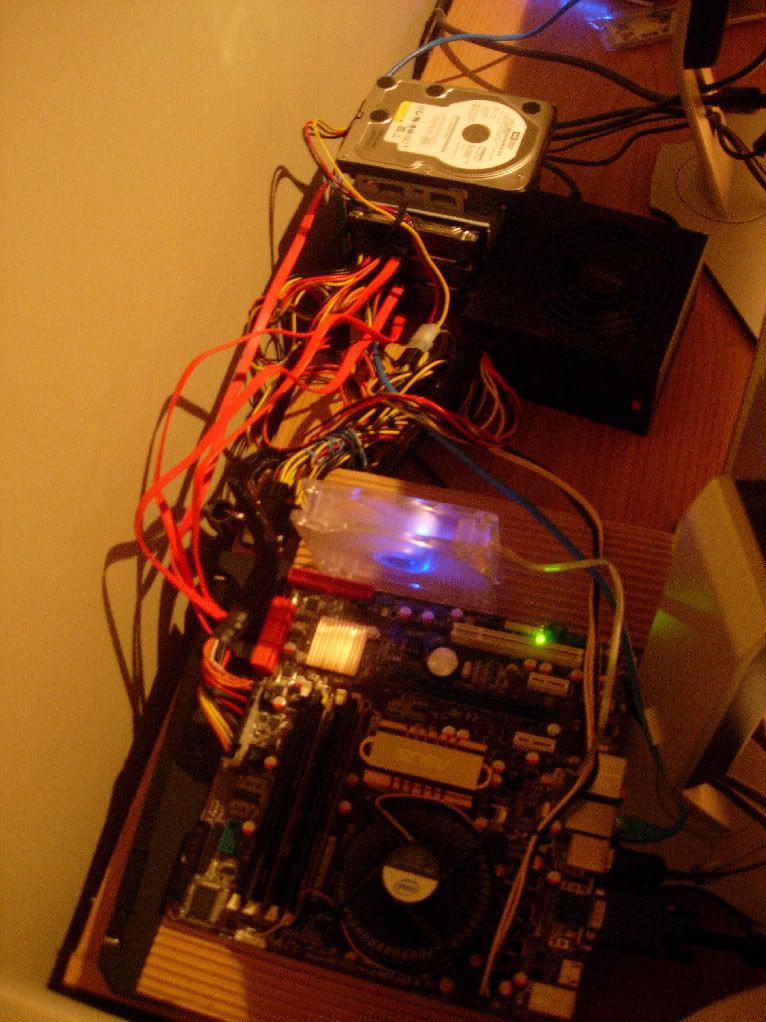
booted-1.jpg


What I did was unplug the fan you see on the above picture, and check the temperatures on the WHS Console.

Then what I did was plug the fan and let it run for 10min and take another screen shot.

I was blown away by the difference. 22C difference for the middle drive!!!!

Fan5min.jpg


This has got to make a huge difference in the MTBF of the drives.

Anyone know what the correct range of temps are for HDDs?

I want to make sure I get a case with enough cooling but also quiet, so I would like to strike a balance.
 
Breaking news: heat transfer via convection increases with flow rate :p

Any case with a fan near the hard drive cage will do just fine. Just make sure that you have enough room for future expansion!
 
I keep fans on my HDDs at all times. They will get blistering hot if you don't. It doesn't take mush fan either. They don't produce much heat but if they don't have anyway to exhaust it they just keep building up.
 
Harddrives are usually good up until 55C or so. You really do not want temperatures breaking 60C.

Your harddrive temperatures are much better after installing the fan. Just continue to check up on the S.M.A.R.T. readings on the drive every once in a while to insure that the drive is working properly.

K-TRON
 
I always like to stick my hard drives behind my intake fans in computers I build.
 
Thanks for the tip Khaydarin.

Looks good, and the Mini P180 caught my eye. Do you tink that is the same system?
 
I recently found the same thing out. My Western Digital 2500KS drive would get overheat and start clicking if it didn't have some active cooling. My new 6400AAKS gets the same temps as you (34 w/fan, 44 w/out). My 40Gb Maxtor Fireball III drive and My 80Gb Samusung Spinpoint worked perfectly fine without a fan.

I think the reason the KS series drives were common for overheating, was because they had 3 to 4 platters for the higher capacity drives. My 6400AAKS has only 2.
 
I recently found the same thing out. My Western Digital 2500KS drive would get overheat and start clicking if it didn't have some active cooling. My new 6400AAKS gets the same temps as you (34 w/fan, 44 w/out). My 40Gb Maxtor Fireball III drive and My 80Gb Samusung Spinpoint worked perfectly fine without a fan.

I think the reason the KS series drives were common for overheating, was because they had 3 to 4 platters for the higher capacity drives. My 6400AAKS has only 2.

Good to know I am not the only one with those temps.

I guess me having all 4 drives stacked like that did not help.

The interesting thing is how little info I can find online on what should be min\max\optimal operating temps for HDDs.

Maybe I am just not a good googler.
 
Back
Top