• Some users have recently had their accounts hijacked. It seems that the now defunct EVGA forums might have compromised your password there and seems many are using the same PW here. We would suggest you UPDATE YOUR PASSWORD and TURN ON 2FA for your account here to further secure it. None of the compromised accounts had 2FA turned on.
    Once you have enabled 2FA, your account will be updated soon to show a badge, letting other members know that you use 2FA to protect your account. This should be beneficial for everyone that uses FSFT.

Fan Hub Questions

skeeder

[H]ard|Gawd
Joined
Jul 9, 2004
Messages
1,316
Howdy folks,

My recent HTPC Build in a silverstone GD09 case has presented a bit of a situation that I'm trying to figure out.

My desktop computer has had a 5.25" Fan controller since 2004, a very simple, knob controller for the fans, it works great...very simple and easy to use. (Recall PWM didn't exist back then).

Now with this build, designed for some light gaming and Bluray playback, I'm having issues with heat and noise. My motherboard has 2x PWM headers, one for the intel heatsink the other has a PWM fan on it. I have two more fans I'd like to install, but they are 3 pin and would be very loud.

Do you know if there is a PWM controller that can control 3 pin fans like my very simple fan controller does?

If I cannot find one I may end up just doing a PWM splitter so I have 3 fans at the same speed.
 
all fans being 3 ping or 4 pin (PWM) can be controlled the same way via directly voltage.. So this mean you can actually whatever any kind of Fan Hub/Fan controller and it will work just fine, just pick whatever fit your likes you can even reuse your old fan controller if you like.
 
Depending on how many amps your fans draw, you can also just daisy chain them onto the one header.
It's fairly quick to check the motherboard and fan specs.

Otehrwise you could use something like the NZXT GRID+
 
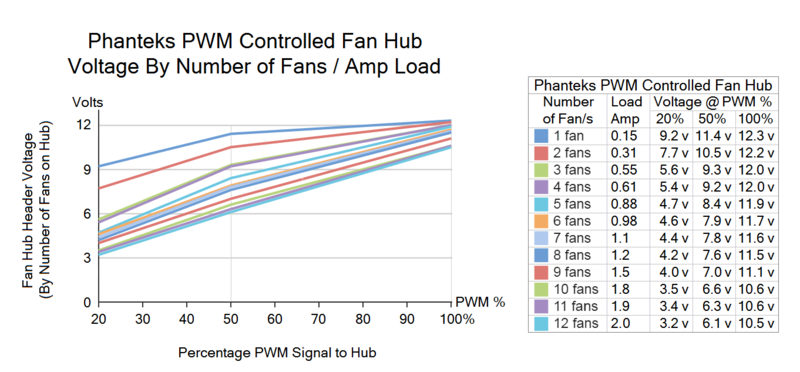
The Phaneks PWM hub should do the job. It's really not a PWM hub, but a PWM controlled hub for variable voltage 3-pin fans. It uses 12v power from PSU and PWM signal from motherboard. It uses the PWM signal to raise / lower voltage to fans. The only potential problem is having the right amount of fans / amp load to gvie a wide range of voltage. A minimum of 3-4 fans usually need to be used (0.5-0.6amp load) to lower it's low PWM (20%) signal voltage down to 5-6volt to fans. This give a 5-6v to 12v speed range. Below is testing a mate did showing fan number to voltage range.


Phanteks%20PWM%20fan%20hub%20Tony%20testing_zpsaetqhxif.png
 
The Phaneks PWM hub should do the job. It's really not a PWM hub, but a PWM controlled hub for variable voltage 3-pin fans. It uses 12v power from PSU and PWM signal from motherboard. It uses the PWM signal to raise / lower voltage to fans. The only potential problem is having the right amount of fans / amp load to gvie a wide range of voltage. A minimum of 3-4 fans usually need to be used (0.5-0.6amp load) to lower it's low PWM (20%) signal voltage down to 5-6volt to fans. This give a 5-6v to 12v speed range. Below is testing a mate did showing fan number to voltage range.
If they're similar to the ones that are part of the Enthoo Primo case line, then be careful with the 12V source regarding the PWM header on the motherboard. Some are only set up for true PWM (which then requires an external 12V source) control and others vary the 12V (do NOT supply external 12V to the hub) power source. The Fan 1 header on the hub is also used for tach feedback and can only have one fan attached to that header while the other fan headers can have two (maybe three, depending on the amp draw).
 
If they're similar to the ones that are part of the Enthoo Primo case line, then be careful with the 12V source regarding the PWM header on the motherboard. Some are only set up for true PWM (which then requires an external 12V source) control and others vary the 12V (do NOT supply external 12V to the hub) power source. The Fan 1 header on the hub is also used for tach feedback and can only have one fan attached to that header while the other fan headers can have two (maybe three, depending on the amp draw).
What you are describing is something I do not recomment doing with these PWM controlled hubs.

It's not some of them, They are PWM controlled and require a PWM signal to function properly. All Phanteks PWM controlled fan hubs are designed to use 12v power on pin-2.
If more than 0.7-0.8amp combined running load is connecte to a motherboard fan header there is a significant chance it will damage the motherboard fan header!!
Phanteks PWM controlled hubs all require a real PWM signal from a real P|M header to function as designed.

But if incorrectly used on 3-pin variable voltage or 4-pin heads that are not PMW, but instead are variable voltage some will function lke a 3-pin splitter usign the variable voltage on pin-2. This is okay for a couple of fans but if too much amperage is demand by fans the header will overload and burn out.

PWM headers have constant 12v on pin-2 .. same as supplied ejrm the Sata or Molex is connected to PSU.
 
What you are describing is something I do not recomment doing with these PWM controlled hubs.

It's not some of them, They are PWM controlled and require a PWM signal to function properly. All Phanteks PWM controlled fan hubs are designed to use 12v power on pin-2.
If more than 0.7-0.8amp combined running load is connecte to a motherboard fan header there is a significant chance it will damage the motherboard fan header!!
Phanteks PWM controlled hubs all require a real PWM signal from a real P|M header to function as designed.

But if incorrectly used on 3-pin variable voltage or 4-pin heads that are not PMW, but instead are variable voltage some will function lke a 3-pin splitter usign the variable voltage on pin-2. This is okay for a couple of fans but if too much amperage is demand by fans the header will overload and burn out.

PWM headers have constant 12v on pin-2 .. same as supplied ejrm the Sata or Molex is connected to PSU.
What I stated was per the manual for PH-PWHUB.

I have this hub (as part of the Enthoo Primo case), but removed it as it seemed iffy to me (plus, I'll be using a fan+pump controller anyways).
 
What I stated was per the manual for PH-PWHUB.

I have this hub (as part of the Enthoo Primo case), but removed it as it seemed iffy to me (plus, I'll be using a fan+pump controller anyways).
Yeah, I know Phanteks says it can be used as a variable voltage fan splitter without the PSU power being used, or even a PWM to variable voltage splitter. I am an avid Phanteks supporter, but they have made a few mistakes. Saying the hub can be used without using PSU power is one. While most users are smart enough to not try and run too many fans on a fan header, a few have damaged fan headers doing it.

I have 4 Phanteks cases with these PWM controlled hubs. All work just fine.

I experimented in my Primo by replacing the stock fans and hub with the new TY-147A SQ fans and Swiftech PWM hub. Honestly both setups work equally well.
 
Back
Top