• Some users have recently had their accounts hijacked. It seems that the now defunct EVGA forums might have compromised your password there and seems many are using the same PW here. We would suggest you UPDATE YOUR PASSWORD and TURN ON 2FA for your account here to further secure it. None of the compromised accounts had 2FA turned on.
    Once you have enabled 2FA, your account will be updated soon to show a badge, letting other members know that you use 2FA to protect your account. This should be beneficial for everyone that uses FSFT.

Eyefinity setup help

Tsuyashu

Limp Gawd
Joined
Jun 2, 2008
Messages
240
I am planning on grabbing a XFX 5850 or 5870 sometime during January and I wanted to get into the Eyefinity bandwagon.

I currently own a Syncmaster 245BW 24in, I bought it when it was around 400ish and it was recently repaired.

My question is this, I am not exactly willing to ditch this monitor and grab 3 new ones, but if I keep this monitor, I don't have much options as to get what for the remaining two.

Can anyone recommend a setup that will go well with my monitor?, it can't be turned for portrait, or unless I didn't see how. Also I am on a budget of at least 200 ea. monitor(tops)

I saw in the Hotdeals forums and noticed the thread on the NEC refurbs, http://www.necdisplay.com/Products/StoreFront/?CFID=10539344&CFTOKEN=38723588

Is there anything I can get there? or?

Here is a pic of my monitor in the corner =p
2009-12-28205648.jpg
 
It's going to be hard to match the native resolution of your Samsung for $200 per monitor. Have you tried other resolutions on it to see if buying screens with lower res is an option?

How are you going to setup eyfinity on your desk anyway? If you put your samsung on your desk where your keyboard is on the pic, it seems to be positioned pretty low ergonomically speaking.
 
I belive all three monitors must be the same for eyefinity to work.
 
I belive all three monitors must be the same for eyefinity to work.

They all have to be the same resolution, but not the same model. If you look around at posts on actual Eyefinity setups, you'll find that most people have 3 different monitors, but they are all running at the same resolution.

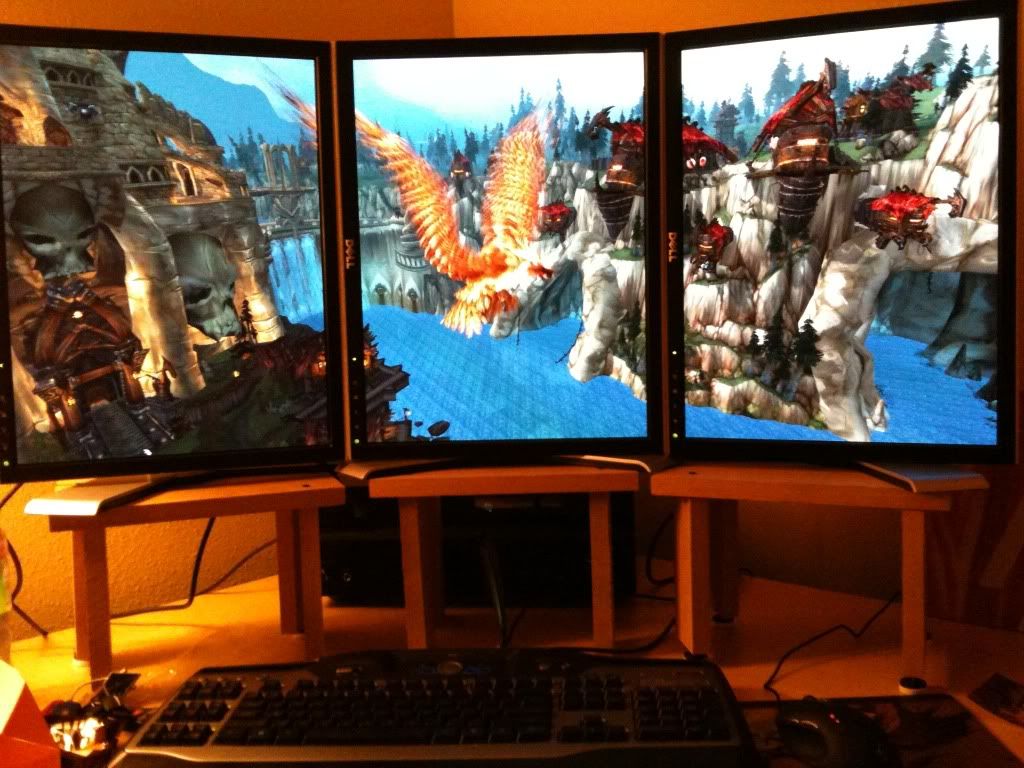
As for the OP, I know it hurts replacing a good lcd, but your not going to find a quality 24" monitor running at 1920x1200 for the price your asking. I recommend buying 3 refurbished dell IPS monitors. I found 3 Dell UltraSharp 2007FPs for $200 a piece. I paid a little more to be certain I got revision A05, as the previous revision had major issues, at least that's what I've heard. The difference between TN and IPS with eyefinity is like night and day. I originally bought 3 P2210Hs new from dell, and the viewing angles were pretty bad. With my new IPS panels, all 3 screens are easily viewable from any angle, whether the screens are portrait or landscape. I gotta say that the extra $200 would be well worth it, not only due to improved viewing angles, but the ability to easily switch between portrait and landscape, as well as a greatly improved color quality and depth.
 
Last edited:
The Dell UltraSharp 2007WFP are 21 inchers? Is it just me or it seems that only Dell creates displays that can rotate into portrait mode?, and I do want to get refurbs. Still looking around but noticed this
http://www.necdisplay.com/Products/Product/?product=ccd56591-1245-44e8-b76a-bd9033406ed3

The 2007FPs are 20.1 inches, though the monitors actually seem bigger because they are 1200 pixels tall vs. 1080 on the P2210Hs. I happily traded 300 pixels in height for 120 pixels in width (in portrait mode).

That's not a bad deal, though I think your right, the only company I've seen that makes a stand capable of portrait mode is Dell. I was determined to run portrait from the outset for RPGs and shooters, so Dell was pretty much the only option I could find. The only thing I would say is, if your planning on doing a lot of portrait mode gaming, get IPS panels. TN panels will work, but the viewing angle issues get to be distracting.

IMG_0018.jpg

3x 2007FPs in eyefinity portrait mode.
 
Back
Top