![[H]ard|Forum](/styles/hardforum/xenforo/logo_dark.png)
Navigation
Install the app
How to install the app on iOS
Follow along with the video below to see how to install our site as a web app on your home screen.
Note: This feature may not be available in some browsers.
More options
-
Some users have recently had their accounts hijacked. It seems that the now defunct EVGA forums might have compromised your password there and seems many are using the same PW here. We would suggest you UPDATE YOUR PASSWORD and TURN ON 2FA for your account here to further secure it. None of the compromised accounts had 2FA turned on.
Once you have enabled 2FA, your account will be updated soon to show a badge, letting other members know that you use 2FA to protect your account. This should be beneficial for everyone that uses FSFT.
You are using an out of date browser. It may not display this or other websites correctly.
You should upgrade or use an alternative browser.
You should upgrade or use an alternative browser.
External Rad Box Design
- Thread starter FatboyHK
- Start date


i like it -sleek like a koolance but with some decent components and customize-ability, but one problem to think about- what happens if you tip it over? will it work on the side? that resevoir is kinda long, if its not filled to the top there might be a problem there.
yes it is one of the risk I took in order to save some space... I don't have much real estate left in my room after installing sooooo many gadages and goodies, it loos like a command center more than a bedroom now 
so I will install a PS2-like stand and I will fill the res to the fullest
so I will install a PS2-like stand and I will fill the res to the fullest
friedchicken
Gawd
- Joined
- Oct 30, 2001
- Messages
- 711
I like it. How are you going to handle the power connection from the PC to the cooler case? 2nd power supply?
I like it. How are you going to handle the power connection from the PC to the cooler case? 2nd power supply?
you see there is a power port on the back of the radbox....it is actually a standard molex plug and I will use a "glorified" (lol) molex cable to supply power from my rig to the radbox
I would recommend to add a "data-port" so you can use the shutdown functions of the aquaero or also use some sensors within the PC.
as far as I know Aquaero support hardware-implemented shutdown (don't need and driver), but I don't know how it is done....shouldn't be thru USB because it will certainly need driver support....... is it done by somehow connecting Aquaaero to the PSU??? or motherboard? I have no idea.... I am thinking about a "dataport" like you described but without this knowledge I can't design and further, anyone has some hint for me?
once I have the info may be I can make the power and "dataport" into a single RS232 connector, lol copying from AquaDuct
..... nice and tidythe only external water system ive used was an exos, they had a small controller board that went in a PCI slot (not into the motherboard, just in the slot in the back of the case) which is where the hose, power, and temp monitors went thru. this board was connected through a (way too) short 8 pin plug to the back of the unit. the board that was in the computer had a connecter for power for the pumps/fans, one for the thermal probe, and two others; one you plugged the tail of the power switch into, and the other had a tail to plug into the PW_SW (power switch) jumper on the motherboard. that way the exos could control the computer if it needed to be shutdown, but the power button on the computer still worked and everything turned on, it was a very simple circuit and might work well with your setup.
The aquaero offers three ways of emergency shutdown:
• software-based with the aquasuite program
• hardware-based through a parallel connection to the power switch (mainboard)
• hardware-based by connecting the aquaero to the PS_ON wire (green) of the PSU
If you want to have it secure you should use the hardware-based methods. Both of them require a cable connection to the PC. Thats the reason why I suggested that "dataport".
Of course you could use a RS232 connector for that
Another thing: the aquaero offers a connector for two LEDs which can be programmed to your needs. Maybe you want to integrate that anywhere?
Only as an example: if the lid of the fillport would be made of plexglas you could illuminate it.
btw: will you use a flow meter?
• software-based with the aquasuite program
• hardware-based through a parallel connection to the power switch (mainboard)
• hardware-based by connecting the aquaero to the PS_ON wire (green) of the PSU
If you want to have it secure you should use the hardware-based methods. Both of them require a cable connection to the PC. Thats the reason why I suggested that "dataport".
Of course you could use a RS232 connector for that
Another thing: the aquaero offers a connector for two LEDs which can be programmed to your needs. Maybe you want to integrate that anywhere?
Only as an example: if the lid of the fillport would be made of plexglas you could illuminate it.
btw: will you use a flow meter?
Shoggy thx for you info. do you have any graphical instruction about how to connect those stuff for automatic power off? I don't have Aquaero yet so I don't have any manual yet
lol may be I should go google for the manual
I am thinking about adding a power LED in the bezel, and a warning buzzer in case of any error... (afaik I can use a buzzer in the LED port, am I correct?)
one kind of error I want to detect is stop of flow. yes I will use a flow sensor. I am thinking about swissflow, because it should be the less restictive than AC's and Innovtek's, but afaik I need to mod it before I can use it with Aquaero, as the signal rate is too high, I need to divide it by 3 or 4 times. or do you have any better suggestion?
lol may be I should go google for the manual
I am thinking about adding a power LED in the bezel, and a warning buzzer in case of any error... (afaik I can use a buzzer in the LED port, am I correct?)
one kind of error I want to detect is stop of flow. yes I will use a flow sensor. I am thinking about swissflow, because it should be the less restictive than AC's and Innovtek's, but afaik I need to mod it before I can use it with Aquaero, as the signal rate is too high, I need to divide it by 3 or 4 times. or do you have any better suggestion?
the only external water system ive used was an exos, they had a small controller board that went in a PCI slot (not into the motherboard, just in the slot in the back of the case) which is where the hose, power, and temp monitors went thru. this board was connected through a (way too) short 8 pin plug to the back of the unit. the board that was in the computer had a connecter for power for the pumps/fans, one for the thermal probe, and two others; one you plugged the tail of the power switch into, and the other had a tail to plug into the PW_SW (power switch) jumper on the motherboard. that way the exos could control the computer if it needed to be shutdown, but the power button on the computer still worked and everything turned on, it was a very simple circuit and might work well with your setup.
but the power switch function is actually directly controlled by Windows.... I think you understand what I mean.... to override this, i.e. forcing turning off my pc immediately, I need to hold the power button for several seconds.... will it still work with Aquaaero?
Shoggy thx for you info. do you have any graphical instruction about how to connect those stuff for automatic power off
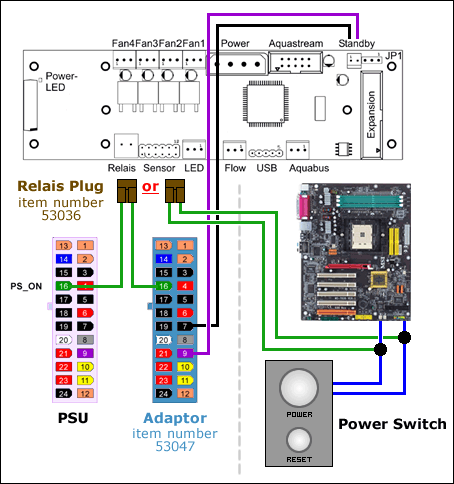
On the left side you see the method with the PSU and on the right the method with the power switch.
The PSU method looks a bit complicated but with the adaptor (like a very short extension) from AC it is really easy. It has a long PS_ON wire for the relais and also a long cable with a connector for the stand-by functions
For both methods you will need the relais plug!
I think I found a noob (non-DIY) way of doing it:
http://aqua-pcs.co.uk/index.asp?function=DISPLAYPRODUCT&productid=746

http://aqua-pcs.co.uk/index.asp?function=DISPLAYPRODUCT&productid=746
I love my current case (see the first post) and put a rad on top of it will just ruin it, and it is not expensive to make a box, compare with the price I need to pay for all the components it is peanuts...
and the box isn't closed, the exhuast ports will be covered by mast, unless I use those fine grain mast there won' be any diference
and the box isn't closed, the exhuast ports will be covered by mast, unless I use those fine grain mast there won' be any diference


have you seen this box
http://www.aqua-computer-systeme.de...oard=H3;action=display;num=1168795667;start=0
http://www.aqua-computer-systeme.de...oard=H3;action=display;num=1168795667;start=0
I will build it, I am nothing similar to mod from. The AquaDuct, yes I see it, indeed my design is quite similar to it, but I would like to use the component of my choice.
Arcygenical
Fully [H]
- Joined
- Jun 10, 2005
- Messages
- 25,066
Needs more blue LEDs
Or purple for great justice.
Or purple for great justice.

