• Some users have recently had their accounts hijacked. It seems that the now defunct EVGA forums might have compromised your password there and seems many are using the same PW here. We would suggest you UPDATE YOUR PASSWORD and TURN ON 2FA for your account here to further secure it. None of the compromised accounts had 2FA turned on.
    Once you have enabled 2FA, your account will be updated soon to show a badge, letting other members know that you use 2FA to protect your account. This should be beneficial for everyone that uses FSFT.

Explained: "Why Do Some OLED's Have Motion Blur?"

Mark Rejhon

[H]ard|Gawd
Joined
Jul 6, 2004
Messages
1,395
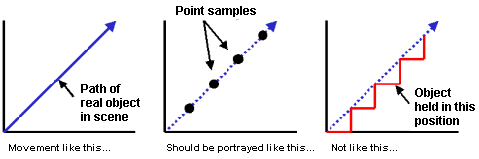
OLED has been regarded as a Holy Grail for motion blur. Unfortunately, the portable Playstation Vita has lots of motion blur during fast scrolling animations. This is due to sample-and-hold. The PS Vita OLED is bottlenecked by this issue. Some newer OLED’s eliminate motion blur, but not all do. Even instant pixel response (0 ms) can have lots of motion blur because of sample-and-hold. Frames continuously shines for a whole refresh. When tracking moving objects, your eyes are in different positions throughout a whole refresh; this causes the frame to be blurred across your retinas:
sampleandhold1.gif

(Source: Microsoft Research and many others)
Middle image represents flicker displays, including CRT and LightBoost.
Right image represents sample-and-hold displays, including most LCD and OLED.

See this article:
"Why Do Some OLED's Have Motion Blur?"
 
The article doesn't explain the issue. The LG OLED has no blur. The mobile OLED panels display it for whatever reason, such as TFT or driving scheme.

So expect it in mobiles but not in TV.
 
The article doesn't explain the issue. The LG OLED has no blur. The mobile OLED panels display it for whatever reason, such as TFT or driving scheme.

So expect it in mobiles but not in TV.

No blur on my PS Vita which uses a mobile OLED.

All OLED's have blur form what i understand... however its significantly less than an LCD one, so if you were to compare the two side by side it'd be easy to think the OLED has none. The OP explained it perfectly, not sure what you mean.
 
Fair point, but isn't this valid only for scenes rendered without motion blur? A cinema frame does not represent a point sample, it's got a defined frame exposure time. I feel like holding time is valuable/necessary for film albeit maybe not with 100% temporal density.

It might be a cool thing for example if you could sync up the hold time to the original frame exposure time, though at 24 Hz that might still pose problems for low degree captures.

The same arguments do apply to games with rendered blur, though blur in many games is still primitive and inaccurate.
 
The shorter the response time the closer the displayed image will be to the source frame at any given point. Flicker is more important and less well defined, case in point being the Sony OLED monitors being firmware updated to enable LCD-like mode because users complained of flicker which simulated theatre projector / CRT viewing.
 
Last edited:
OLED has been regarded as a Holy Grail for motion blur. Unfortunately, the portable Playstation Vita has lots of motion blur during fast scrolling animations. This is due to sample-and-hold. The PS Vita OLED is bottlenecked by this issue. Some newer OLED’s eliminate motion blur, but not all do. Even instant pixel response (0 ms) can have lots of motion blur because of sample-and-hold. Frames continuously shines for a whole refresh. When tracking moving objects, your eyes are in different positions throughout a whole refresh; this causes the frame to be blurred across your retinas:

sampleandhold1.gif

(Source: Microsoft Research and many others)
Middle image represents flicker displays, including CRT and LightBoost.
Right image represents sample-and-hold displays, including most LCD and OLED.

See this article:
"Why Do Some OLED's Have Motion Blur?"

Just to be clear this is motion blur caused by human eye tracking. I know it says it in the article but some people here are too lazy to read it but still can't resist giving their uniformed opinions. Here is my dumbed down summary.

(not in article)
With a typical LCD there is a real physical motion blur. The pixels take time to change from one color to the other (response time) and while they are changing they display garbage colors which creates motion blur. The longer the response time the longer the garbage is displayed and the worse the motion blur.

(explained in article)
With OLED the pixels basically change colors instantaneously so there aren't any garbage colors between frames. But human eyes expect something to be constantly moving like in nature. At 60 frames per second with an OLED the image stays still for 1/60th of a second, jumps to its next position, then stays still for another 1/60th of a second. The lower the frame rate the worse it gets.

CRT and lightboost attempt to eliminate the human perceived motion blur by making it black for a period of time between frames. The human mind comes up with its own data for the blackness between frames and smooths it out. OLED can do this too.
 
Back
Top