• Some users have recently had their accounts hijacked. It seems that the now defunct EVGA forums might have compromised your password there and seems many are using the same PW here. We would suggest you UPDATE YOUR PASSWORD and TURN ON 2FA for your account here to further secure it. None of the compromised accounts had 2FA turned on.
    Once you have enabled 2FA, your account will be updated soon to show a badge, letting other members know that you use 2FA to protect your account. This should be beneficial for everyone that uses FSFT.

ethernet at half speed?

RoffleCopter

[H]ard|Gawd
Joined
Oct 8, 2005
Messages
1,910
Well, I just got back from a week vacation at Florida, and I come home to boot my computer. In the BIOS it said something along the lines of "NIC dead." Anyway I thought this would be another Dell bug so I rebooted. When I connected to the internet, my download speed ranged from 100-800kbps when it usually got 2.7mbps down. Would I need to have Dell replace the mobo or something to get it working again? Or is it some software mapfunction? Everything was up and running before I left, and I shut down my computer before leaving.

Any ideas?
 
Did you disconnect the cables on your rig before you went on vacation? There may well have been a storm while you were away. Though, I should think that if you got zapped, you wouldn't be able to pull any bandwidth whatsoever.
 
Thing is, the laptop, which is on a wireless conenction, runs just fine. I don't know how a storm would cause some problem, though, there have been many storms in the NYC area before yet none have cuase much damage, if at all.
 
If you haven't already, reinstall the NIC drivers. I've seen this fix slow NICs before.
 
RoffleCopter said:
Thing is, the laptop, which is on a wireless conenction, runs just fine. I don't know how a storm would cause some problem, though, there have been many storms in the NYC area before yet none have cuase much damage, if at all.
Lightning hits a wire, and you get a huge surge of current that can fry components. I've seen a pair of NICs (one PCI, one onboard) the chips on which were literally melted by a surge like that.
 
I would replace the NIC in the machine. The last time we got bit by lightning at work, we had to replace all but 2 NICs in the building, it turned out to be about 25 NICs.... Lightning can do some wierd stuff.
 
i smell a duplex mismatch here, you'll be able to ping fine but only have 10-40 percent of your bandwith. im willing to bet that thing defaulted to 10meg half duplex, or 100 meg half duplex and the auttonegotiation failed to match the half duplex of the in question NIC, causeing TCP to incorrectly interpret collisions as lost packets, and it keeps stepping back its data size. look around see what your settings are and manually set up your duplex.

EDIT: to replace an integrated NIC, just go buy a pci NIC card and throw it in there, then disable your integrated NIC in the bios.
 
RoffleCopter said:
if it's integrated, then how do i replace the NIC? replace mobo?

Get a NIC from Newegg if the problem turns out to be a bad NIC. Try what the poster above me said, first.
 
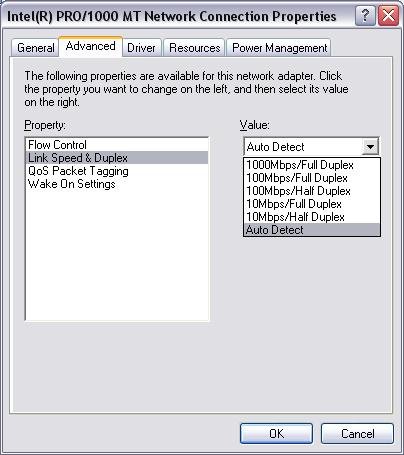
On a PC, you would go to your network interface's properties. Click on the "configure" button next to your network interface's description. Then set the "link speed & duplex" on the "advanced" tab to Auto. Here is a screenshot:

duplex_mismatch.jpg


taken from this page which i then read all 3 parts, not a bad write up. Duplex mismatches are rare at best, from my experience, but this guy will give you a good grasp on the concept.

http://searchnetworking.techtarget....-379&ad=562791&asrc=EM_NLT_490733&uid=5593046
 
Back
Top