• Some users have recently had their accounts hijacked. It seems that the now defunct EVGA forums might have compromised your password there and seems many are using the same PW here. We would suggest you UPDATE YOUR PASSWORD and TURN ON 2FA for your account here to further secure it. None of the compromised accounts had 2FA turned on.
    Once you have enabled 2FA, your account will be updated soon to show a badge, letting other members know that you use 2FA to protect your account. This should be beneficial for everyone that uses FSFT.

ESXi Passthrough not activating

TCM

Gawd
Joined
Nov 10, 2011
Messages
641
Please bear with me, I know this has been posted before but I can't figure out proper keywords to search.

I'm trying to passthrough the Intel C606 SAS SCU on an X9DR3-F via VT-d but after each reboot it tells me I need to reboot for it to be passed through. It is usable as a datastore, though. No disks are connected to it.

I can pass through the AHCI controller and an M1015, just not the SAS SCU.

I think it had something to do with a service running on ESXi that needs to be stopped manually. Or maybe I'm confusing this with yet another thing. Anyway, any ideas?

Thanks.
 
Did you check the logs for any errors? Also, you don't happen to be passing through USB ports/hub?
 
Nothing else is passed through. The box is basically in "test mode" with no datastore yet etc. I want to get familiar with everything before I put stuff on it.

Since I vaguely recall reading about this issue I thought someone could jump out and say "Yes, do this and it'll work". But I'll try to track it down with logs, no problem.
 
How many other devices do you have set for passthrough when you attempt this?
 
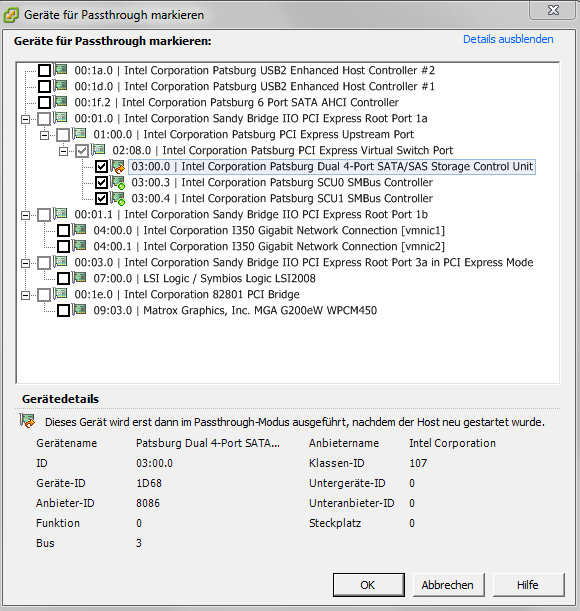
directio.png


Doesn't matter if I try to passthrough only the controller, the controller plus its SMBus devices or the AHCI and 9211i as well. The SCU always stays in that state. Grepping the logs now...

Code:
2012-04-17T22:59:44.633Z cpu2:2662)PCI: 3425: 000:003:00.0 to 4
2012-04-17T22:59:44.633Z cpu2:2662)VMK_PCI: 312: device 000:003:00.0 event: Device changed ownership: new owner vmkernel
2012-04-17T22:59:44.633Z cpu2:2662)LinPCI: LinuxPCIDeviceNotification:472: Notification for device 0000:03:00.0: event 2 but no action taken
2012-04-17T22:59:44.767Z cpu2:2662)Loading module rste ...
2012-04-17T22:59:44.771Z cpu2:2662)Elf: 1862: module rste has license VMware
2012-04-17T22:59:44.778Z cpu2:2662)Device: 90: Registered driver 'RSTe' from 35
2012-04-17T22:59:44.778Z cpu2:2662)Mod: 4015: Initialization of rste succeeded with module ID 35.
2012-04-17T22:59:44.778Z cpu2:2662)rste loaded successfully.
2012-04-17T22:59:44.781Z cpu2:2662)IOResource: 328: Registered resource 0x410015740fe0 from module 0 type 2 @ f98f8000 len=32768
2012-04-17T22:59:44.781Z cpu2:2662)IOResource: 328: Registered resource 0x410015741050 from module 0 type 2 @ f9000000 len=8388608
2012-04-17T22:59:44.781Z cpu2:2662)IOResource: 328: Registered resource 0x4100157410c0 from module 0 type 2 @ e100 len=256
2012-04-17T22:59:44.781Z cpu2:2662)WARNING: SCU OSSL Controller cnt 2 deviceID 1d68 rev 6
2012-04-17T22:59:44.782Z cpu2:2662)IOResource: 328: Registered resource 0x410015741130 from module 0 type 2 @ c0000 len=196607
2012-04-17T22:59:44.782Z cpu2:2662)WARNING: SCU OSSL esx_sci_driver_oem_parms_set: version 16 hdr num elements 2 ctl_idx 0
2012-04-17T22:59:44.782Z cpu2:2662)WARNING: SCU OSSL esx_sci_driver_oem_parms_set: Init OEM params from bios
2012-04-17T22:59:44.782Z cpu2:2662)WARNING: SCU OSSL esx_sci_driver_oem_parms_set: version 16 hdr num elements 2 ctl_idx 1
2012-04-17T22:59:44.782Z cpu2:2662)WARNING: SCU OSSL esx_sci_driver_oem_parms_set: Init OEM params from bios
2012-04-17T22:59:44.787Z cpu2:2662)VMK_PCI: 790: device 000:003:00.0 capType 17 capIndex 160
2012-04-17T22:59:44.787Z cpu2:2662)WARNING: SCU OSSL Setting up MSI-X (requesting 4 vectors)
2012-04-17T22:59:44.787Z cpu2:2662)IntrVector: 283: 0x51
2012-04-17T22:59:44.787Z cpu2:2662)IntrVector: 283: 0x59
2012-04-17T22:59:44.787Z cpu2:2662)IntrVector: 283: 0x61
2012-04-17T22:59:44.787Z cpu2:2662)IntrVector: 283: 0x69
2012-04-17T22:59:44.787Z cpu2:2662)VMK_PCI: 1177: device 000:003:00.0 allocated 4 vectors (intrType 3)
2012-04-17T22:59:44.787Z cpu2:2662)IDT: 991: 0x51 <SCU_ISR> sharable (entropy source), flags 0x10
2012-04-17T22:59:44.787Z cpu2:2662)VMK_VECTOR: 137: Added handler for shared vector 81, flags 0x10
2012-04-17T22:59:44.787Z cpu2:2662)IDT: 991: 0x59 <SCU_ISR> sharable (entropy source), flags 0x10
2012-04-17T22:59:44.787Z cpu2:2662)VMK_VECTOR: 137: Added handler for shared vector 89, flags 0x10
2012-04-17T22:59:44.788Z cpu2:2662)IDT: 991: 0x61 <SCU_ISR> sharable (entropy source), flags 0x10
2012-04-17T22:59:44.788Z cpu2:2662)VMK_VECTOR: 137: Added handler for shared vector 97, flags 0x10
2012-04-17T22:59:44.788Z cpu2:2662)IDT: 991: 0x69 <SCU_ISR> sharable (entropy source), flags 0x10
2012-04-17T22:59:44.788Z cpu2:2662)VMK_VECTOR: 137: Added handler for shared vector 105, flags 0x10
2012-04-17T22:59:44.788Z cpu2:2662)VMK_PCI: 684: Device 000:003:00.0 name: vmhba1
2012-04-17T22:59:44.788Z cpu2:2662)PCI: 3938: 000:003:00.0 named 'vmhba1' (was 'vmhba1')
2012-04-17T22:59:44.788Z cpu2:2662)DMA: 524: DMA Engine 'vmhba1' created.
That seems to cover everything related to the SCU from vmkernel.log
 
Last edited:
I was asking because I believe the limit of passthrough is 2 PCI devices..but it seems that this isn't the case in since you tested with only that controller.


Hopefully lopoetve will respond and can shed some light here.
 
IT's handing it back to vmkernel for some reason - probably because it thinks it needs it for boot.

Other than that, no idea - I don't use passthrough :(
 
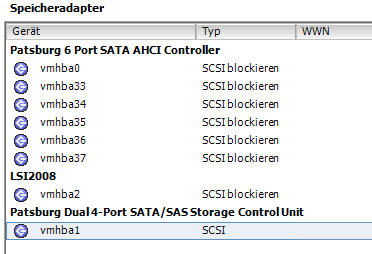
hbas.png


Is this related? It says "block SCSI" for those controllers that can be passed through fine, but just "SCSI" for the SCU.

And more importantly, can I influence this? What does "block SCSI" mean anyway in this context?

Edit: it seems "block SCSI" is really supposed to mean "block(subject) SCSI" instead of "block(verb) SCSI" as it was translated. I really ought to install the english client. *sigh*
 
Last edited:
hey, it could be worse - the polish client had a bug where most of the action buttons on warnings was pushed off the pane due to the length of the words. :p
 
Did you try to passthrough the whole pci-e device PCI Express Root Port 1a?
Can't tick greyed boxes, so no. The Virtual Switch thing auto-activates when I tick the SMBus devices. The SCU also auto-activates when I tick the SMBus devices. When I only tick the SCU, nothing else auto-activates.
 
Can't tick greyed boxes, so no. The Virtual Switch thing auto-activates when I tick the SMBus devices. The SCU also auto-activates when I tick the SMBus devices. When I only tick the SCU, nothing else auto-activates.

Not all devices are supported by passthrough, if I remember it correctly, devices behind PCE-E bridge are not supported. In this case, PCI Express Virtual Switch port might explain why it's not working properly.
 
Bummer.

OK, at least it's usable for datastores even if 8 ports for that are a waste. Could have gone with the X9DRi-F instead.

Well, who knows what the future brings, might be useful for something someday. This server will last me for years performance-wise.
 
Found this: http://hardforum.com/showthread.php?t=1680229

However, the only lines in vmkernel.log containing ACS are:

Code:
TSC: 462416 cpu0:0)BootConfig: 416: disableACSCheck = FALSE
ACPI: FACS @ 0x0x7f355f80/0x0040
0:00:00:03.948 cpu0:2048)PCI: 1166: enablePCIErrors: 0, enableValidPCIDevices: 1, pciSetBusMaster: 1, disableACSCheck: 0
0:00:00:03.949 cpu0:2048)PCI: 5987: ACS capable device

Still something else wrong?
 
hey, it could be worse - the polish client had a bug where most of the action buttons on warnings was pushed off the pane due to the length of the words. :p

That's actually really funny. Probably not for anyone using the polish client, but for me, I'm laughing.

Not all devices are supported by passthrough, if I remember it correctly, devices behind PCE-E bridge are not supported. In this case, PCI Express Virtual Switch port might explain why it's not working properly.

I have heard this as well. Have you tried the card in various ports?
 
Im sorry but what version of ESXi?

Starting with version 5 they do the ACS switch checking. I see you did a grep on vmkernel.log for ACS

Try to passthru, reboot as it says you need to to activate the device for passthru, then check vmkernel.log for "non-acs"

I experienced the same thing and there was a non-acs capable switch in my hierarchy when trying to passthru onboard intel NIC's and an adaptec 5805 (the 5805 has the non-acs switch on it itself)

See:http://kb.vmware.com/selfservice/microsites/search.do?cmd=displayKC&externalId=1036811
 
I will most likely have the same issue with the SuperMicro X9SRE-3F that I have recently purchased. Same Intel C606 SAS SCU.
 
Hi. Glad I found this thread. I have a few X9 systems I'm making ESXi 5 machines out of. Seems like the released boards have plenty of issues. I guess the kernels aren't ready yet either. X9DAi and X9DRi with 128GB RAM and pair od E5-2690's.

I've been benchmarking a few different setups, and only Windows 7 seems to work properly, and 75% of raid cards, including adaptec, areca, and LSI just don't work due to bios issues. Hit or miss depending on OS.

I'm afraid to put X9 boards in production. Anyone have solid performance with the ESXi installs on X9 boards?
 
Hi. Glad I found this thread. I have a few X9 systems I'm making ESXi 5 machines out of. Seems like the released boards have plenty of issues. I guess the kernels aren't ready yet either. X9DAi and X9DRi with 128GB RAM and pair od E5-2690's.

I've been benchmarking a few different setups, and only Windows 7 seems to work properly, and 75% of raid cards, including adaptec, areca, and LSI just don't work due to bios issues. Hit or miss depending on OS.

I'm afraid to put X9 boards in production. Anyone have solid performance with the ESXi installs on X9 boards?
No problems here with IBM M1015.

When you say benchmark and only Windows 7 works properly, do you mean that other OSes don't work or are they working but too slow?

I've been toying with this board for some time now and everything seems to work fine. I'm not sure about benchmarks, though. Can't compare it to anything but my old Core 2.
 
I checked the compatibility list and it shows the X9 boards as supported by ESXi 5.0 U1.

Only reason I brought this up was inconsistent benchmark results OUTSIDE of ESXi. Win7, RH 6, and MacOS 10.7 all installed fine, however, only Win 7 had the highest consistent benchmark score. Other people had higher scores with Linux and MacOS on previous gen machines. Geekbench and CineBench for example.

I guess it means ESXi 5 is tweaked for the new chipsets already. I'll give it a go tomorrow. This server has the X9DRi-LN4F+ board, 128GB ram with the E5-2690's, and an Areca 1880 16 port card.

BTW, can't believe I missed out on this forum for all these years :)
 
I have also been unable to get DirectPath I/O working for the 4-Port SAS, but I was able to select the onboard 6 Port SATA AHCI controller.

Will continue to work on this.
 
I have also been unable to get DirectPath I/O working for the 4-Port SAS, but I was able to select the onboard 6 Port SATA AHCI controller.

Will continue to work on this.

I was really hoping to use the last 4 on-board ports, because I'm completely out of PCIe slots, but I have the X9DRW-iF, and ended up with the same result.

The Patsburg 6 Port SATA AHCI Controller passes through just fine, but the Patsburg 4-Port SATA SCU shows up as behind the PCIe Virtual Root Port and is not able to be passed through (shows the constant "changes will not take effect until the host is restarted" message).

This was the result in both ESXi 4.1 U2 and ESXi 5.0 U1.
 
Its up to SuperMicro to test and support, and the server that I have is supported with vmware 5.
 
VMDirectPath is supported on several network cards. Everything else is experimental only.

This is true for 4.x, but I have yet to find anything supporting your statement for 5.x. From my conversation with vmware, it is up to the hardware mfg to certify for vmdirectpath on 5.x hardware.
 
This is true for 4.x, but I have yet to find anything supporting your statement for 5.x. From my conversation with vmware, it is up to the hardware mfg to certify for vmdirectpath on 5.x hardware.

There is no VMware certification path for VMDirectPath hardware. It's partner-supported only, not by VMware, which means you'd call the hardware vendor :)
 
Has anyone made any progress with this on VMWare? I have a super micro x9dr3 ln4f+ with a c606 and the same issues

As a test I managed to get the card to pass through on Linux KVM, to a freebsd guest however I could not see any of the drives attached to it. I'm going to try pass-through to a linux guest next.

I'm just about ready to order an m1015 at this point.
 
Last edited:
Update:
With linux KVM I am able to successfully pass through the c606 sas controller to windows 2012 server guest, after I load the drivers I can see the device and the hard drives attached! I can not see them in freenas beta guest with freebsd8.3 and what i believe to be the appropriate drivers loaded, but i think that's a bsd or freenas issue. as the drivers for the c606 were released in freebsd 8.3 I'm going to try vanilla freebsd guest next.

However, with linux KVM once i set intel_iommu=on the host system becomes very unstable and locks up in very short time <30 minutes. Symptoms are very strange. System works great for about 15 minutes, then something happens and it starts responding slower and slower, system processes quickly start taking up increase resources up to 100+% cpu until the host system just hangs.
 
Last edited:
well I've had limited luck with KVM, i can access sas drives, but no sata drives. under both windows and linux.

I've given up and am going to get an array controllen
 
I'm having the same issue with my X9DR3-LN4F+. I opened 2 tickets with Supermicro (one was an IPMI issue, the other this VT-d issue).

They responded to my IPMI issue the next business day. As for the VT-d issue, they finally answered back 2 weeks later... their response... came down to "I don't understand what you mean, can you explain it again"

So hopefully it won't be another 2 week wait, I doubt this issue will be resolved any time soon, but it more people report the problem to Supermicro, the better, maybe they will release a BIOS update or something to make this virtual switch between the dual 4-port controller be VT-d compatible.
 
Last edited:
Not looking forward to starting on this soon myself, although I'm passing through very different cards than you guys are.
 
Supermicro tech said he would get back to me next week with an answer, I'm guessing it will be something along the lines of "Not Supported".

In the mean time I've found a very reliable (so far) and flexible alternative. Local RDM passthrough device. I even tested going from a RDM back to a VT-d setup and didnt loose my data, just important the ZFS pool back into OI!!!

Of course this isnt a support setup, but technically neither is VT-d, the way I see it these two things are not somethign you would do on a production environment, but if you want you All-In-One to seem more like multiple machines vs an All-In-One, its the way to go.

This methog does not require a LUN, allowsthe creation of Hot Snaps, Allows Passthrough of selected disk on a controller vs the whole controller, VMCI can be enabled... so far I dont see any disadvantages!

See How-To set it up here
http://hardforum.com/showthread.php?p=1039099919#post1039099919
Post # 15
 
There are reasons that's not always a good idea ;) Have good backups ;)
 
lopoetve, Why is doing RDM Passthrough not a good idea?

Also I just emailed super micro tech support, like EZStuff said if they get enough people complaining maybe they'll do something.
 
Back
Top