![[H]ard|Forum](/styles/hardforum/xenforo/logo_dark.png)
Something that's bothered me for a while now is that some competetive gamers target extremely high FPS, but surely the improvements are quickly going to be swamped by other sources of latency? There's only one way to find out: Science!
For this experiment you will need:
* An oscilloscope. Preferably a fancy DSO capable of automatically calculating the delay between two signals.
* A mouse modified to allow button presses to be recorded by the oscilloscope. Simply soldering wires across the switch will do.
* A photodiode fast enough and sensitive enough to detect a monitor changing from dark to light.
* A way of changing the screen brightness when the mouse button is pressed, such as a game. I used UT3 because I'm familiar with modding it, it's old enough to run very fast, and it has an easily configured frame rate limiter.
Here's how I modded the mouse. It's a really old one that's only kept as a spare, so I don't care about extra wires sticking out of it:

I created a very simple mutator for UT3 that turns the whole screen black by default, and then changes it to white when the left mouse button is pressed. If anyone wants to reproduce these results, the mutator is here: https://mrevil.asvachin.com/comp/latency/UTMutator_Latency.zip
I used my 'scopes ability to run basic maths on input channels to normalize the signals from the mouse and photodiode so that they both appear as rising edges from 0 to 1, which makes them easier to compare (the physical mouse button signal falls from 5V to 0V when pressed, while the photodiode rises from about 3mV to 37mV). Here's what that looks like on the 'scope:
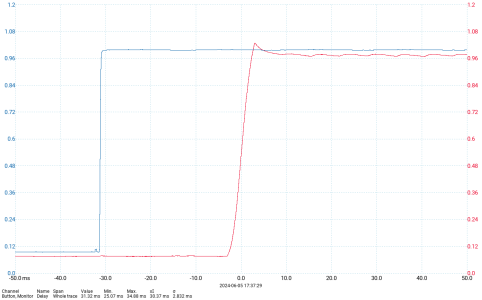
The blue trace is the mouse button, and red is the photodiode. The photodiode clearly shows the monitor's response time of a few milliseconds, including a very small amount of overshoot. There are some statistics underneath for the time between the rising edges of the two traces, which the 'scope conveniently calculates automatically. This is the input latency.
Settings: FreeSync on, VSync off, 4k@165Hz.
With this setup, I ran UT3 and clicked the mouse 50 times at each of several frame rates (which can be changed in-game with a console command, e.g. set engine.gameengine maxsmoothedframerate 60). I then plotted the results:

I also plotted latency vs. frame time:

The blue dashed line is a line of best fit, which intercepts the y-axis at at 21ms. So there's 21ms of latency in everything other than the time taken to render the frame. In other words, even if my machine rendered infinite frames per second, it could never take less than 21ms between pressing the mouse button and something happening on-screen.
So yes, there's some benefit from running at higher frame rates, though it rapidly decreases. And for some reason it stops improving completely at 360 FPS. I'd like to test a different game to see if that 360 limit is something specific to UT3, but since I gave up multiplayer FPSes some time ago, I don't have anything newer. Maybe someone else with the appropriate equipment would like to have a go?
EDIT: I just realized that the mouse is old enough to have a lower polling rate than mice have now. And indeed, a quick test shows 128Hz compared to modern 1kHz mice. So the input latencies measured above would all be about 3.4ms lower with a newer mouse.
For this experiment you will need:
* An oscilloscope. Preferably a fancy DSO capable of automatically calculating the delay between two signals.
* A mouse modified to allow button presses to be recorded by the oscilloscope. Simply soldering wires across the switch will do.
* A photodiode fast enough and sensitive enough to detect a monitor changing from dark to light.
* A way of changing the screen brightness when the mouse button is pressed, such as a game. I used UT3 because I'm familiar with modding it, it's old enough to run very fast, and it has an easily configured frame rate limiter.
Here's how I modded the mouse. It's a really old one that's only kept as a spare, so I don't care about extra wires sticking out of it:

I created a very simple mutator for UT3 that turns the whole screen black by default, and then changes it to white when the left mouse button is pressed. If anyone wants to reproduce these results, the mutator is here: https://mrevil.asvachin.com/comp/latency/UTMutator_Latency.zip
I used my 'scopes ability to run basic maths on input channels to normalize the signals from the mouse and photodiode so that they both appear as rising edges from 0 to 1, which makes them easier to compare (the physical mouse button signal falls from 5V to 0V when pressed, while the photodiode rises from about 3mV to 37mV). Here's what that looks like on the 'scope:
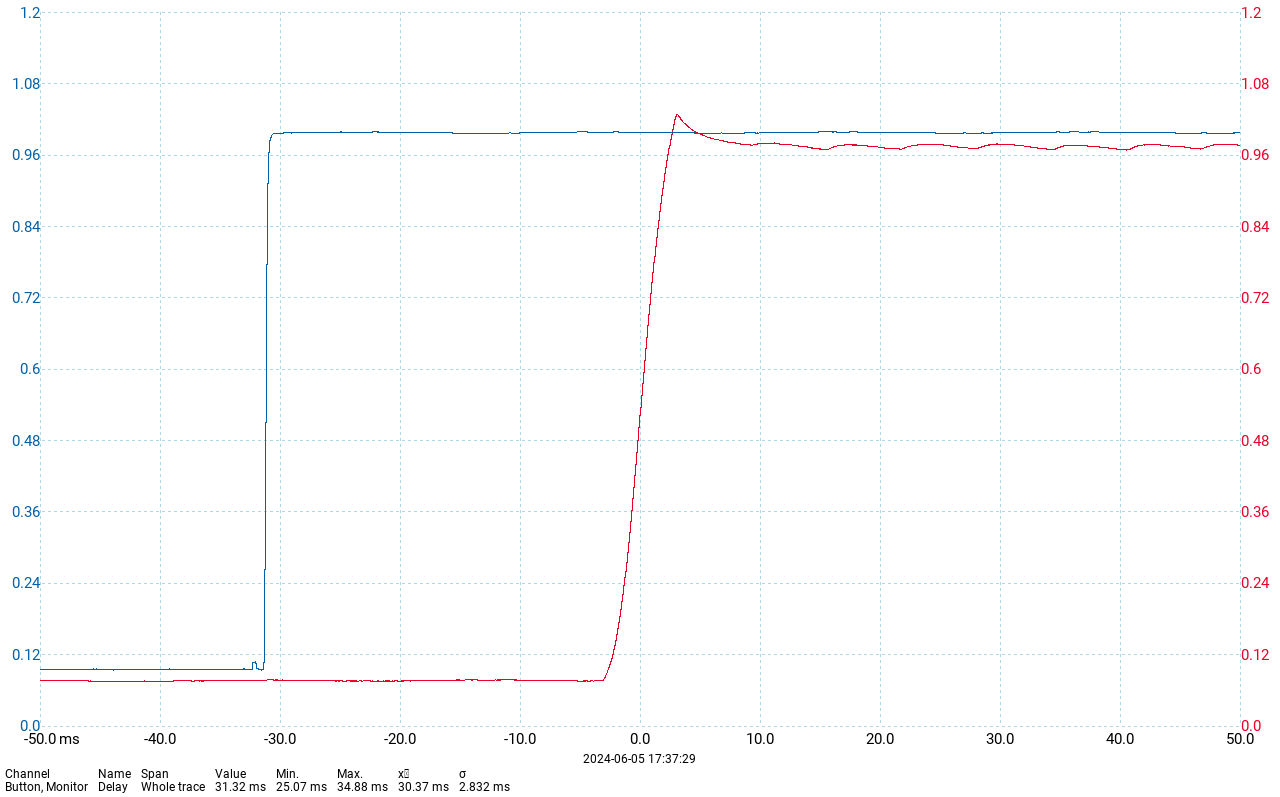
The blue trace is the mouse button, and red is the photodiode. The photodiode clearly shows the monitor's response time of a few milliseconds, including a very small amount of overshoot. There are some statistics underneath for the time between the rising edges of the two traces, which the 'scope conveniently calculates automatically. This is the input latency.
Settings: FreeSync on, VSync off, 4k@165Hz.
With this setup, I ran UT3 and clicked the mouse 50 times at each of several frame rates (which can be changed in-game with a console command, e.g. set engine.gameengine maxsmoothedframerate 60). I then plotted the results:
I also plotted latency vs. frame time:
The blue dashed line is a line of best fit, which intercepts the y-axis at at 21ms. So there's 21ms of latency in everything other than the time taken to render the frame. In other words, even if my machine rendered infinite frames per second, it could never take less than 21ms between pressing the mouse button and something happening on-screen.
So yes, there's some benefit from running at higher frame rates, though it rapidly decreases. And for some reason it stops improving completely at 360 FPS. I'd like to test a different game to see if that 360 limit is something specific to UT3, but since I gave up multiplayer FPSes some time ago, I don't have anything newer. Maybe someone else with the appropriate equipment would like to have a go?
EDIT: I just realized that the mouse is old enough to have a lower polling rate than mice have now. And indeed, a quick test shows 128Hz compared to modern 1kHz mice. So the input latencies measured above would all be about 3.4ms lower with a newer mouse.
Last edited:


