• Some users have recently had their accounts hijacked. It seems that the now defunct EVGA forums might have compromised your password there and seems many are using the same PW here. We would suggest you UPDATE YOUR PASSWORD and TURN ON 2FA for your account here to further secure it. None of the compromised accounts had 2FA turned on.
    Once you have enabled 2FA, your account will be updated soon to show a badge, letting other members know that you use 2FA to protect your account. This should be beneficial for everyone that uses FSFT.

Easiest Beginner WC Kit

Carnival Forces

Supreme [H]ardness
Joined
Feb 9, 2003
Messages
4,297
i'm terribly sorry if this is a repost, but here's my question:
what is the easiest, hold your hand, here's a nice instruction sheet, complete-everything-you-need WC kit?

i want to get it on my old(er) Duron 950MHz system, before i try it on my dream machine (my A64 system :D)

help appreciated.
 
koolance exos, but youll need to buy another bracket to have the waterblock mount to the a46.
 
The Koolance Exos seems to be easy to install, and the performance is pretty decent. I'd say go with that.
 
acascianelli said:
koolance exos, but youll need to buy another bracket to have the waterblock mount to the a46.

erm, would you mind terribly telling which bracket, and which size (if there is a size?) and what-not i'd need to buy?

i'm in the process of reading the FAQ...so sorry if my posts end up sounding incredibly foolish...
 
Carnival, I would just do some reading and put it together yourself, its terribly easy to setup your own loop. you just connect some parts together with tubing, and theres only a few parts, a water pump, a heatercore/radiator, your CPU and/or GPU waterblock and an optional resevoir. From there you just buy some tubing, some hose clamps, and you connect them together, in the order of Pump --> Rad --> Blocks --> Pump (there are alternative orders, there are postings in this forum discussing them). Its really QUITE easy, probably cheaper, and definitely better performance wise. If you want to know what parts to get ...

Pump: Danner Mag 3 OR Eheim 1250 (these are the two i've had experience with, there are others, but I have never used them, thus I wont advocate them).

CPU Waterblock: White Water from D-Tek OR Danger Den RBX

Rad/Heatercore: A heatercore is best, these come out of vehicles and cost like $20 (as opposed to the $60 you'll pay for a radiator), and they cool better. dangerden sells them ready to go for $30 http://www.dangerden.com/mall/Radiators/heatercore.asp (the extra $10 is because they solder the barbs on for you so that all you need to do is hook the tubes up to it, very easy :)).


Tubing: Tygon or Clearflex, Tygon is more expensive, but more flexible

Resevoir: I don't recomend or condone the use of a resevoir, I PERSONALLY don't like them, I opt for the simpler T-Line setup (http://www.dangerden.com/mall/Misc_Hardware/fittings.asp, you just put that T in your setup, nearest to the top of the loop, and connect a tube to the bottom part of the T and thats how you fill it, VERY easy, and you dont have a box full of water in your comp :)).


I just setup my first watercooling loop myself, and I was just like you at first intimidated. Now that i've done it I realize how extremely simple it is.
 
Yeah I would recommend custom kit for joy of first timing :p
It seems to me you don't change your system often. If you don't, custom kit would be the way to go.
For someone like me who changes components way too often... Koolance Exos just makes life WHOLE lot easier. (This must be my 8 or 9th mobo in last one year)
If you plan to go exos route I recommend buying it off e-bay from someone who seems to specialize in selling exos there. Good price good product (brand new :p) htp_tym. I haven't seen him selling one recently but it's good to try.
 
scuse me for being a noob.... how do you get the tubes into the case?

like what opening.. lol..
 
theres a little backplane that the tubes run through, it also connects power to the exos.
 
what about getting the water-blocks on the GPU / north-bridge / CPU???

for the CPU i guess you just take the HSF off and put the water-block on like a heatsink

but whatabout the GPU and the North-Bridge ? :confused:
 
the koolance blocks come with all the mounting brackets youll need to put them on NB and GPU's.
 
Carnival Forces said:
what about getting the water-blocks on the GPU / north-bridge / CPU???

for the CPU i guess you just take the HSF off and put the water-block on like a heatsink

but whatabout the GPU and the North-Bridge ? :confused:

I wouldn't WC Northbridge. Not cost efficient and more restriction to worsen temp on GPU/CPU.
http://www.hardforum.com/showthread.php?t=760053&page=2 in middle is mysetup... GPU is now 6800GT but pretty much same with cleaner wiring now :p
 
If you wanna save some space, the new WC solution from Kingwin is great. Mounts in a 5.25 bay and should offer some overclocking capabilitys. And at $99 with all the stuff, it should be great until you are ready to buy a more high-end kit.
 
bump, please, someone answer ,my question please

will i have to take off the existing GPU HSF in order to use the waterblock that comes w/ the Exos?
 
yes, you will. technically, you could w/c the heatsink, but it wouldn't be as efficient. good luck, tho i'd suggest getting into w/c my way. i custom built the cpu block for my w/c system (may as well dive in headfirst if your gonna get your feet wet... or something like that) and i'm working on the radiator now... just need to get the fans so i know how big to make the shroud. but the koolance is a decent approach... just not as much fun:D

 
Carnival Forces said:
bump, please, someone answer ,my question please

will i have to take off the existing GPU HSF in order to use the waterblock that comes w/ the Exos?

If your buying a new video card I think BFG is selling a card watercooling ready in the 6800 series.
 
Darth Flatus said:
If your buying a new video card I think BFG is selling a card watercooling ready in the 6800 series.

sadly no, i'm not buying a new video card, my system already has the 9800Pro

how would i go about popping off the fan/heatsink on my video card? how do i make sure i don't destroy it? :confused:
 
Taking off the R9800 HSF is a breeze. Just squeeze together the ends of the holddown pins on the stock heatsink and gentley rotate the 'sink back and forth until the thermal grease lets go of it. It isn't nearly as dangerous or scary as taking a heatsink off of a videocard used to be. It's alot more like pulling off a CPU HSF now - just use common sense and gentle motions.

As far as simple kits go, I really enjoyed putting together my asetek waterchill. It's pretty basic with just a radiator, cpu block, pump, and inline reservoir. Because I was putting it into an Antec Sonata (small midtower) it took some dremeling, but in a larger case it would fit just fine.

I'd think that any dangerden, swiftech, or asetek kit (they are all pretty similar) would be on the beginner level. I was actually surprised by how easy the base installation of my kit was. The neat thing about all these kits too, is that they include wiring solutions that make it easy to have your kit running whenever your unit is, so that you don't fry your bits and pieces...
 
thanks for answering my question :)

dewhite said:
I'd think that any dangerden, swiftech, or asetek kit (they are all pretty similar) would be on the beginner level. I was actually surprised by how easy the base installation of my kit was. The neat thing about all these kits too, is that they include wiring solutions that make it easy to have your kit running whenever your unit is, so that you don't fry your bits and pieces...

does the Koolance Exos come w/ this?
what are your temps/performance ?
how hard was your asetek kit to put together?
what do you mean "don't fry your bits and pieces"?
 
HiTech-Hate said:
man you ask a lot of questions :eek:

Do some Tutorial reading!
please, point to the part of the Tutorial that answers my questions.

also, the Forum is a place for asking questions, if we didn't, it would die.
 
The Radeons have a locking pushpin, just pull out the center pin on the fan side while squeezing together the tips on the backside.... :)
 
Carnival Forces said:
thanks for answering my question :)

does the Koolance Exos come w/ this?
what are your temps/performance ?
how hard was your asetek kit to put together?
what do you mean "don't fry your bits and pieces"?

No problem.

I'm sure the exos systems have some kind of automatic relay. I haven't spent much time looking at the coolance product line so I can't be more specific.

I can't be very helpful with realworld temps from my setup because my MSI motherboard reads temps incorrectly (waiting on a damn bios revision).

I can tell you that before I installed I had a vantec stealth 92mm fan on top of a Thermalright SLK-948U and was reading about 68c idle, and now I show around 60c idle. Assuming that the temp probs on this board at least calculate delta in temp correctly that's an 8c drop.

Keep in mind that I've got all of my fans running on 7volts instead of 12 because I sleep right next to my PC at night, and I'm a light sleeper.

As for ease of installation. Like I said I had to take some extra modding steps because I wanted the kit mounted in a very specific way inside a very compact case. As long as you get a kit that's known to fit well inside of your case setup is pretty simple.

Here is the quick and dirty rundown of a basic kit install:

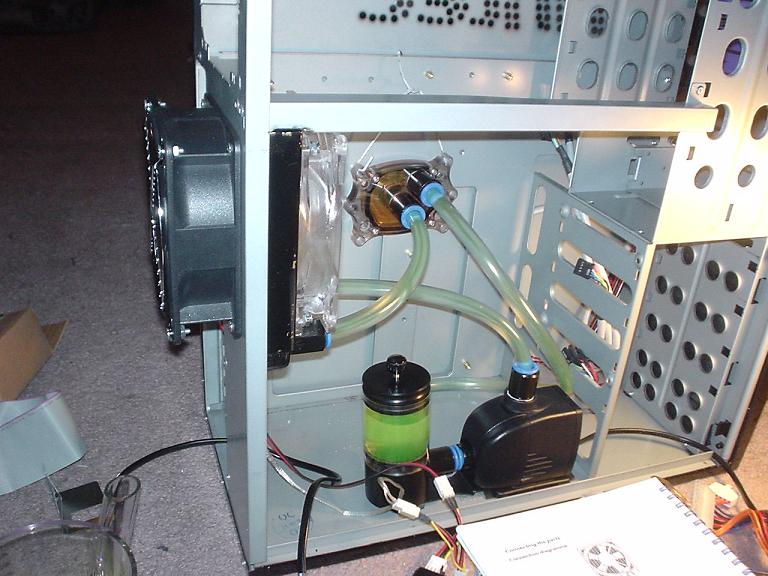
Just mount the rad, mount the pump, put the block where you think it'll end up (I used a piece of bent coat hanger to hold the block in place), and estimate tube lengths, cut a little on the long side to allow for error, fit the tubes into or over your fittings (depending on if you gets barbs, pushin fittings, or a mix of the two) and then put some water in the reservoir. I did/would do all of this inside your case with no components in there, then hookup a power supply to the pump and short pins 13,14 to start the PSU/pump and let it run, filling as needed. When the system is all full let it run 12 or 24 hours to get all the air bubbles into the res, and check for and correct any leaks. Then all you have to do is install your components into the system, mounting the waterblock to the CPU is a snap as long as you follow the diagram included.

Here is a pic of my system during leak testing to show how simple the system really is:

waterchill.jpg
 
Back
Top