• Some users have recently had their accounts hijacked. It seems that the now defunct EVGA forums might have compromised your password there and seems many are using the same PW here. We would suggest you UPDATE YOUR PASSWORD and TURN ON 2FA for your account here to further secure it. None of the compromised accounts had 2FA turned on.
    Once you have enabled 2FA, your account will be updated soon to show a badge, letting other members know that you use 2FA to protect your account. This should be beneficial for everyone that uses FSFT.

DVI to VGA adapter display problem

Jerry_03

Weaksauce
Joined
Oct 12, 2009
Messages
92
I bought a Dell Optiplex FX170 (which is a thin client) off ebay. I know its booting up because the power LED comes on and when i connect headphones to the audio port I can hear the windows start chime (it has windows embedded as the default OS).

It only has a DVI-I port. I tried it with two different monitors. unfortunately both are VGA only monitors. so I had to use a VGA adapter. looking at the chart below, first adapter looked like a DVI-D Single link male interface. 2nd adapter I tried looked like a DVI-D dual link male interface. Both adapters failed on both monitors. on my second acer monitor I got the error "input not supported" using both adapters
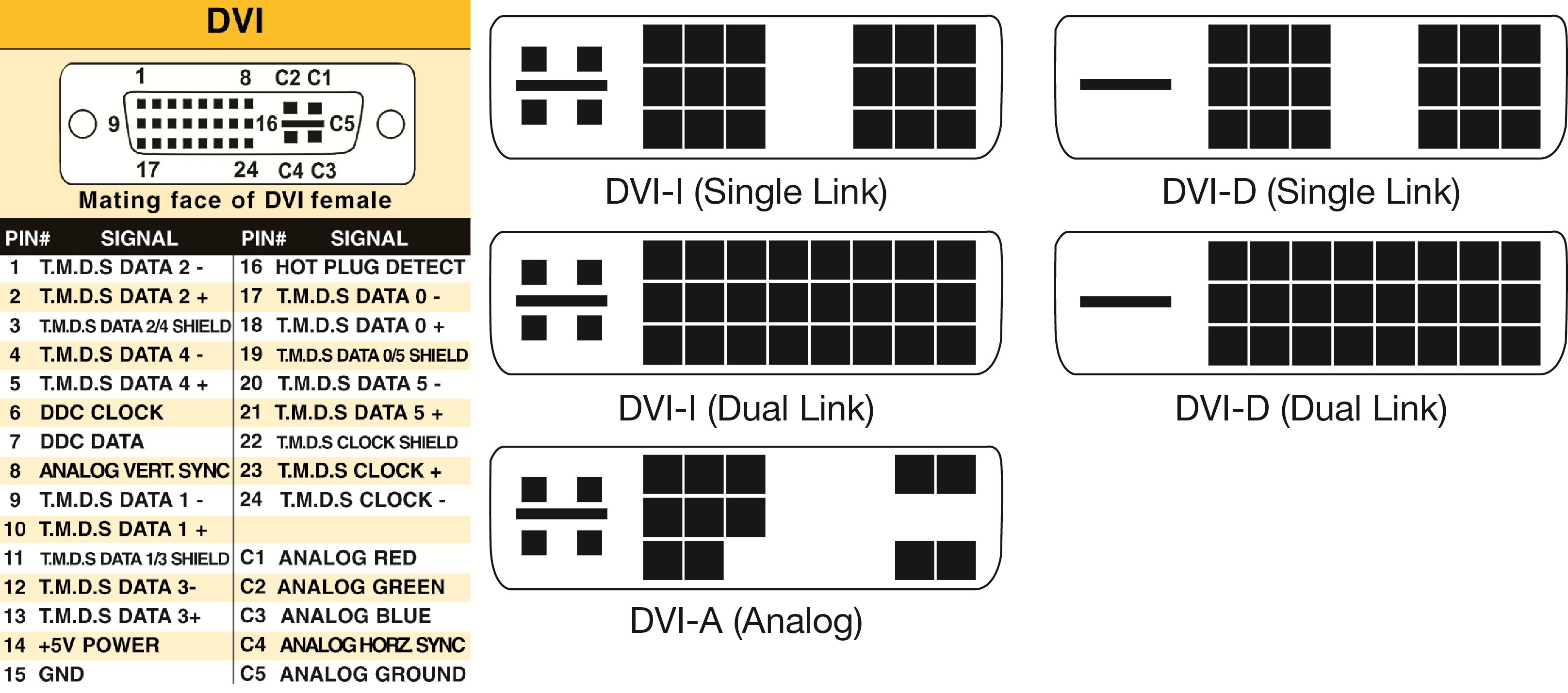
DVI-connectors-type.jpg


upon reading up on DVI seems I will need a DVI-I Dual link to VGA adapter. dual link because it needs to carry the analog signals over to VGA. Just want to verify I am correct before I go out and buy the adapter.
 
You don't need a DVI-I dual link adapter. You just need an adapter that either looks like DVI-I single or dual link, or DVI-A. The important pins for analog are the C1-C5 pins.
 
so I tried two different adapters that I borrowed from a friend.

One of them looks like a DVI-I dual link to VGA:
http://imageshack.com/a/img829/1272/f9da.jpg

So does the second one:
http://imageshack.com/a/img36/4626/wwe0.jpg

and it still doesnt work. I tried using two different monitors, one CRT, one LCD. both have VGA interface only. Again the acer LCD monitor it gives the error input not supported

No idea whats going on. The device is a Dell Optiplex FX170 which is a thin client. In the manual it says VGA is supported with an adapter. Heres the DVI interface on the optiplex:
http://imageshack.com/a/img706/6389/0wpg.jpg
 
so I tried two different adapters that I borrowed from a friend.

One of them looks like a DVI-I dual link to VGA:


So does the second one:


and it still doesnt work. I tried using two different monitors, one CRT, one LCD. both have VGA interface only. Again the acer LCD monitor it gives the error input not supported

No idea whats going on. The device is a Dell Optiplex FX170 which is a thin client. In the manual it says VGA is supported with an adapter. Heres the DVI interface on the optiplex:

The first adapter you posted appears to be your bog-standard DVI-I to VGA adapter. It should work with any DVI-I port. The second adapter you posted allows one to run both a VGA and DVI monitor off a single DVI port, assuming the device supports this.

The error displayed on your Acer LCD indicates the monitor is receiving a video signal, however the signal is outside of the range that the monitor can display. Typical causes for this are the refresh rate being too high or the device is outputting a resolution that the LCD cannot display.

Was this device purchased used? It might be possible the video output is just dead...
 
Can you see the machine POST or do you get no display ever?
 
cant see anything at all. like i said I Know its booting up to windows cause when i plug speakers in the audio port i can hear the windows login chime.
 
There are multiple phases to booting and Windows loading, what you see at each phase can help diagnose the problem.

If you see nothing during the POST phase, its not a resolution or refresh rate issue, it looks like there is no analogue output at all.
Try resetting the CMOS in case it can somehow be disabled.

Is there a graphics card in the machine?
If so, the output might be diverting to that instead of the onboard video.

Failing that, borrow a digital input monitor and see if that works.
Its possible the display output is blown.
 
device in question is a optiplex fx 170 -- a small desktop portable thin client

maxresdefault.jpg


it only has the onboard GPU no dedicated GPU. as for cmos, not sure where to even look for it in the device.

I will try to hook it up to a DVI input monitor at work to see if i get something
 
If there is no display signal at any point during the boot sequence, it is highly likely the GPU is fried, or some component related to the GPU is fried. Or maybe just the analog circuitry is fried.
 
yeah im convinced its the display output on the device, wont get signal with a DVI input monitor. luckily the ebay seller is understandable and will accept it for a return.
 
Back
Top