![[H]ard|Forum](/styles/hardforum/xenforo/logo_dark.png)
Navigation
Install the app
How to install the app on iOS
Follow along with the video below to see how to install our site as a web app on your home screen.
Note: This feature may not be available in some browsers.
More options
-
Some users have recently had their accounts hijacked. It seems that the now defunct EVGA forums might have compromised your password there and seems many are using the same PW here. We would suggest you UPDATE YOUR PASSWORD and TURN ON 2FA for your account here to further secure it. None of the compromised accounts had 2FA turned on.
Once you have enabled 2FA, your account will be updated soon to show a badge, letting other members know that you use 2FA to protect your account. This should be beneficial for everyone that uses FSFT.
You are using an out of date browser. It may not display this or other websites correctly.
You should upgrade or use an alternative browser.
You should upgrade or use an alternative browser.
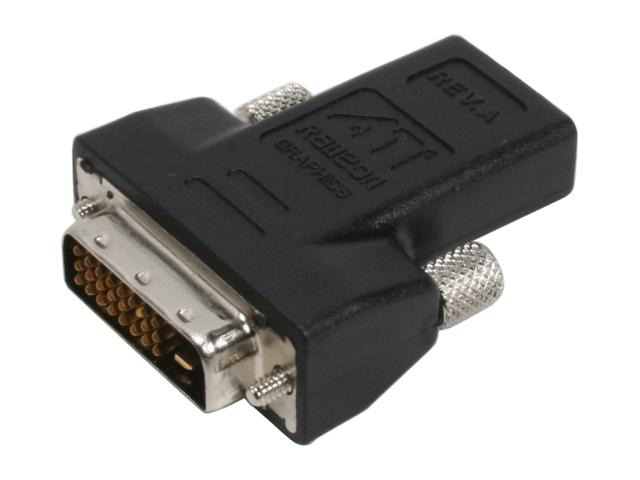
DVI to HDMI Adapters
- Thread starter Seraphic
- Start date
Blackforge
Gawd
- Joined
- Nov 16, 2004
- Messages
- 718
3800 supports up to 5.1 AC3.
CrimandEvil
Dick with a heart of gold
- Joined
- Oct 22, 2003
- Messages
- 19,670
You don't get it; your video card needs to support it, the adapter has very little to do with what audio your video card supports.
CrimandEvil
Dick with a heart of gold
- Joined
- Oct 22, 2003
- Messages
- 19,670
But I do get it since I'm not using the adapters with the video cards, just another device.
Same principal; the device has to support such things. The adapter has little to do with it. If you had "got that" then you'd have understood.
The adapters must have some kind of supported specifications. If the 3800 series only supported 5.1 AC3, I doubt the adapters supports 2 to 5.1 LPCM.
If the 4800 series supports 2 to 5.1 LPCM, then I would need those adapters. And yes, the device supports "such things".
If the 4800 series supports 2 to 5.1 LPCM, then I would need those adapters. And yes, the device supports "such things".
no you don't get it. the 3xxx series video cards support 5.1 audio regardless of what ati dvi/hdmi adapter you use. the 4xxx video cards support 7.1 audio regardless of what ati dvi/hdmi adapter you use.
Again though, I'm not using the adapters with the videos cards. They feature audio from DVI input, that is the reason I'm using them. But trying to find out if they will pass stereo and 5.1 LPCM.
Blackforge
Gawd
- Joined
- Nov 16, 2004
- Messages
- 718
Those are ATI only adapters, they take the outputs from the ATI card and convert them into the HDMI standard. The 3800/4800 series have built in audio processing and THIS is what is doing the audio. The adapters are simply connecting point A to point B. You WILL NOT GET Audio from any other DVI output as it is NOT in the specification, which is where/why HDMI was born.
i wouldn't go about mixing these adapter with non ati devices. nvidia matx boards that support hdmi with audio pass through have different pin outs and only work with the dvi/hdmi adapters that come with the board. the nvidia adapters don't work on ati video cards and vice versa.
Wow...I mean, just wow....
Seraphic, what they are trying to say is that the adapter your asking about does support the standards you are asking about. More importantly is this, does the equipment you are going to attach the adapter to support the standards you asked about.
Its like asking is a PS/2 to USB adapter support USB 2.0. The adapter isnt really whats important, its the port and the equipment your plugging the adapter into. Thats what will determine compatability.
Seraphic, what they are trying to say is that the adapter your asking about does support the standards you are asking about. More importantly is this, does the equipment you are going to attach the adapter to support the standards you asked about.
Its like asking is a PS/2 to USB adapter support USB 2.0. The adapter isnt really whats important, its the port and the equipment your plugging the adapter into. Thats what will determine compatability.
CrimandEvil
Dick with a heart of gold
- Joined
- Oct 22, 2003
- Messages
- 19,670
Again though, I'm not using the adapters with the videos cards. They feature audio from DVI input, that is the reason I'm using them. But trying to find out if they will pass stereo and 5.1 LPCM.
LOL Ugh. It's been explained several times to you, this isn't hard to understand. I'll sum it up, yet again: THE ADAPTER DOES NOTHING SPECIAL.
CrimandEvil
Dick with a heart of gold
- Joined
- Oct 22, 2003
- Messages
- 19,670
i wouldn't go about mixing these adapter with non ati devices. nvidia matx boards that support hdmi with audio pass through have different pin outs and only work with the dvi/hdmi adapters that come with the board. the nvidia adapters don't work on ati video cards and vice versa.
What are you talking about? The 3000 series were the only ones that were proprietary; any adapter that comes with a 4000 series will work with any DVI port; any adapter that comes with an NV board will work with any DVI port.
Only the AMD 3000 series didn't support using anything else other then the adapter they came with. (Although the 3000's bundled adapter worked just fine on non PC hardware.)
What are you talking about? The 3000 series were the only ones that were proprietary; any adapter that comes with a 4000 series will work with any DVI port; any adapter that comes with an NV board will work with any DVI port.
Only the AMD 3000 series didn't support using anything else other then the adapter they came with. (Although the 3000's bundled adapter worked just fine on non PC hardware.)
sorry not universally true.
The DVI part of the adapter is just a normal DVI Single link. I'm already using both of the adapters with the device and audio passes without issue. I do get audio since I'm going from HDMI to DVI into the device then DVI back to HDMI out of the device. The only reason it works is because the ATI DVI to HDMI Adapter pass audio. My input device supports stereo LPCM and that seems to pass fine. But a new device suppots 5.1 and 7.1 LCM.
Blackforge
Gawd
- Joined
- Nov 16, 2004
- Messages
- 718
What kind of devices are involved? Are you sure you're not getting sound from an Optical or Coax? Since I don't know what device is involved, you may be getting lucky by having the same adapters on both ends, since they would be passing the HDMI signal over the correct pins on either side. It sounds overly convoluted either way.
CrimandEvil
Dick with a heart of gold
- Joined
- Oct 22, 2003
- Messages
- 19,670
sorry not universally true.
Um, no. Your wrong. A regular off the shelf DVI to HDMI adapter will work with any of the G45 boards and NV's boards. The only problem you run into is trying to use a 3000 series card with a different adapter.
I know. I have these.