• Some users have recently had their accounts hijacked. It seems that the now defunct EVGA forums might have compromised your password there and seems many are using the same PW here. We would suggest you UPDATE YOUR PASSWORD and TURN ON 2FA for your account here to further secure it. None of the compromised accounts had 2FA turned on.
    Once you have enabled 2FA, your account will be updated soon to show a badge, letting other members know that you use 2FA to protect your account. This should be beneficial for everyone that uses FSFT.

DVI cables and 2405fpw

steins

n00b
Joined
Jan 17, 2005
Messages
21
Quick question...

I recently picked up a Dell 2405fpw and I am running it at its native 1920x1200 rez without any problems on dual SLI 6600 GT's with its stock OEM cable. I have heard there is a noticeable difference in switching to a dual link DVI cable. Has anyone had experience with switching from the stock OEM cable to a new dual link DVI cable?

Thanks.
 
Gonna do the same, just bought 6600gt with dual dual-link dvi so gonna try the dual link cable...I know the 2405 is single link but maybe the better cable will help as the dell one seems a little on the thin side.
 
Please post your results... I am very curious to see the outcome..
Thanks
 
pe3046 said:
Gonna do the same, just bought 6600gt with dual dual-link dvi so gonna try the dual link cable...I know the 2405 is single link but maybe the better cable will help as the dell one seems a little on the thin side.

yo dude your sig is WAY too long.

from http://www.hardforum.com/showthread.php?t=760666


The Rules said:
(22) No active links, graphics, cussing or advertising allowed in the SIGNATURE. Sig line is limited to 10 lines total as viewed @ 800 x 600 resolution or no more that 15 words per line.
 
Got my cable connected (and calibrated my monitor with a gretag eyeone), so it is hard to quantify because the calibration made a big difference but this cable was only like $8 which gives me a spare dvi cable so I think it is worth it. I ordered this along with some round cables, scsi cables, and shipping only came out to about $1.50 per item.
 
pe3046 said:
I know the 2405 is single link but maybe the better cable will help as the dell one seems a little on the thin side.
I don't see how a dual-link cable can improve a single-link monitor. I can understand the benefits of a bigger cable, but still that gain will be marginal, won't it?
 
DVI-I (single link) can support resolutions up to 1920x1080. The 2405 is native at 1920x1200. To get the full resolution you need DVI-D (dual link).

My 2405 shipped with DVI-I. Why??? :mad:
 
My 2405 works just fine with the included cable. It runs at the native supported resolution without any issues. Upgrading the cable shouldn't make a difference, really - DVI is a digital interface, you're either going to get a stable signal or not.

Maybe the max resolution depends on your video card, but I have an ancient ATI AIW Radeon running mine. The DVI interface looks much better than the analog one.

It looks like many video cards can 'trick' more bandwidth out of the DVI link by reducing the vertical blanking interval.
 
Correction, Dell shipped a DVI-D Single Link cable with both my 2405's. With all the attention given to analog-digital, this DVI cable bandwidth issue has received relatively no attention.

26854.jpg
 
Just FYI...I'm fairly certain the 2405 does not have a dual link input. Thus, connecting a dual link cable to is will do nothing for ya.

There were some rumors about this that I perpetuated as well, but then someone pointed this out to me.

http://support.dell.com/support/edocs/monitors/2405fpw/English/about.htm#Specifioications

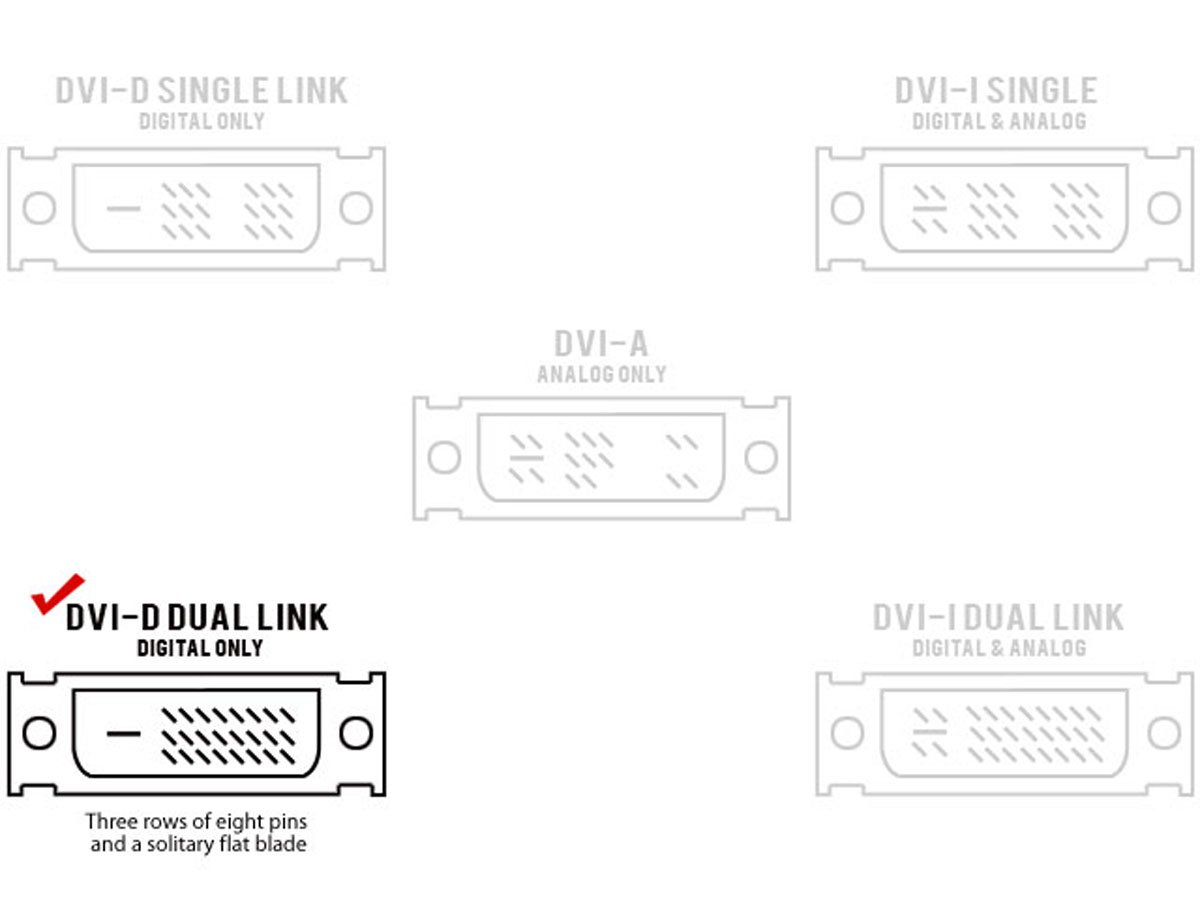
Scroll down to where it shows the pinout of the DVI connection. I believe that center bank of pins is X'ed out...signifying that it is only a single link input.

Also, if you do buy a DVI cable from the store...make sure it does not have the Analog pins. The analog pins are the 4 around the square thingy on the left side of the plug in the above diagrams. The Dell does not even have socked for these pins. It will not be able to connect. I bought a cable that had the analog pins....so I just ripped em out with a pair of pliers. Worked fine...not that I would suggest anyone do this with an expensive cable. I got mine for free from someone that didn't need it anymore.
 
DVI allows for ~164 million pps on a single link. At 60hz and 5% blanking (the signal is forced to remain inactive for 5% of the time), the dell does an effective 145,515,789 pps.
 
VendettaUF said:
Just FYI...I'm fairly certain the 2405 does not have a dual link input. Thus, connecting a dual link cable to is will do nothing for ya.

There were some rumors about this that I perpetuated as well, but then someone pointed this out to me.

http://support.dell.com/support/edocs/monitors/2405fpw/English/about.htm#Specifioications

Scroll down to where it shows the pinout of the DVI connection. I believe that center bank of pins is X'ed out...signifying that it is only a single link input.

Also, if you do buy a DVI cable from the store...make sure it does not have the Analog pins. The analog pins are the 4 around the square thingy on the left side of the plug in the above diagrams. The Dell does not even have socked for these pins. It will not be able to connect. I bought a cable that had the analog pins....so I just ripped em out with a pair of pliers. Worked fine...not that I would suggest anyone do this with an expensive cable. I got mine for free from someone that didn't need it anymore.

Good work.

dvi.gif
 
noobtech said:
So what does that mean? It doesn't need the DVI-D dual? I'm confused.. :(
What it means is that while your video card may be able to output 1920x1200, the input for the monitor will only show you 1920x1080 of that. The rest of the signal never gets into the monitor, even if you use DVI-D Dual Link cable, because the middle input DVI pins are dummy pins on the monitor.

Single link cables use one TMDS 165Mhz transmitter, while dual links use two. The dual link DVI pins effectively double the power of transmission and provide an increase of speed and signal quality; i.e. a DVI single link 60-Hz LCD can display a resolution of 1920 x 1080, while a DVI dual link can display a resolution of 2048 x 1536. Source
 
There is much info here that's only somewhat correct.

There is no actual resolution cap on single link DVI, the limit is in the pixel clock rate. Single link is 165 MHz and the formula for resolution to pixel rate is:

horizontal rez * vertical rez * refresh rate Hz * (1 + blanking rate) = pixel rate

ie-

1920 * 1200 * 60 * (1 + .05) = 145152000 (or 145 MHz)

As long as you don't exceed the pixel clock rate you can do any resolution you want that the panel will display:

3820 * 2400 * 14 * (1 + .1) = 141187200
 
Back
Top