![[H]ard|Forum](/styles/hardforum/xenforo/logo_dark.png)
Navigation
Install the app
How to install the app on iOS
Follow along with the video below to see how to install our site as a web app on your home screen.
Note: This feature may not be available in some browsers.
More options
-
Some users have recently had their accounts hijacked. It seems that the now defunct EVGA forums might have compromised your password there and seems many are using the same PW here. We would suggest you UPDATE YOUR PASSWORD and TURN ON 2FA for your account here to further secure it. None of the compromised accounts had 2FA turned on.
Once you have enabled 2FA, your account will be updated soon to show a badge, letting other members know that you use 2FA to protect your account. This should be beneficial for everyone that uses FSFT.
You are using an out of date browser. It may not display this or other websites correctly.
You should upgrade or use an alternative browser.
You should upgrade or use an alternative browser.
Do they make AIO coolers for gpu's?
- Thread starter m3talc0re
- Start date
D
Deleted member 278999
Guest
Look at the nzxt G10. You'll need RAM heatsinks, VRM heatsinks and thermal tape. I'd recommend at least a 140mm AIO.
It's not a great solution, but it's cheaper than a custom loop.
It's not a great solution, but it's cheaper than a custom loop.
The Kraken G10 universal bracket is awesome. Just be sure to get an AIO that works with it - remember that some AIO manufacturers have released updated versions of their AIOs that won't have the teeth on the GPU side that are needed to keep the AIO attached. Check out the compatibility list under Specifications (I can vouch for the H55 and X41) - Kraken G10 White PC Gaming GPU Cooler - Computer Case GPU Cooler - NZXT
The Corsair H55 (shown below) works just fine with the Kraken G10 bracket, and is a nice, cheap AIO cooler. The tubes are a bit short, so keep that in mind if you don't have your GPU in the top PCIE slot.
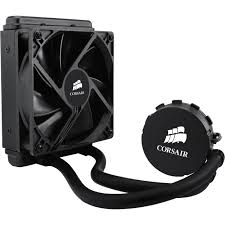
The right side, see those teeth? That's what the G10 bracket needs to hold down the AIO cooler. The G10 comes with a partial backplate that is used with the G10 bracket to sandwich the AIO cooler to the card with those hollow teeth as holders.
VRAM and VRM heatsinks are a huge PITA to apply and have stay put - thermal tape just doesn't stick, even the good stuff doesn't work well. I've given up on them altogether and just keep the G10 bracket's fan at 100% as well as keep my two side case fans going. No issues with a previous 980 Ti Classified (stepped up to a 1080 ACX 3.0), 980 Ti G1 Gaming (still have it), or a 1080 ACX 3.0 (current game rig GPU) running an AIO + G10 without extra heatsinks.
If your card starts to coil whine, adding heatsinks to the VRMs can help reduce the noise. I actually turned my case upside down so the stupid fucking VRM heatsinks would stay put on my 980 Ti G1 Gaming. The card started to coil whine fairly bad so I bought $20 worth of worthless heatsinks, and $15 worth of high quality double sided 3M thermal tape that worked no better than what came with the heatsinks. I didn't bother to add them on the 1080.
If you think not having heatsinks on your VRAM and VRMs will cause instability, well I've got news for you - it doesn't if you have decent airflow. My 1080 ACX 3.0 (yeah, the one with a 4+1 power system and a single 8 pin power connector) overclocks to 2202/5557 Mhz (that is a VERY high overclock for a 1080 under air or water). That shit works just fine all day while gaming - and I've been playing hours and hours of Shadow Warrior 2 this weekend. I've also been folding, while not gaming, at 2164MHz (2202 fails on some WUs) for the past two weeks straight. Not one hiccup. Same for my more power hungry and hotter 980 Tis.
Edit: I put my money where my mouth is and found my IR temperature scanner to test out my 1080 ACX 3.0 with a X41 and G10. The back of the VRMs (the back of the card, the solder joints that are sticking out) are ~140F (60C) looping Valley and the front of the VRMs look to be running ~85 to 92F (32C) - although the G10 bracket required me to measure from the side, so I'm not 100% confident that I got the entire (from the front) row of VRMs.
The Corsair H55 (shown below) works just fine with the Kraken G10 bracket, and is a nice, cheap AIO cooler. The tubes are a bit short, so keep that in mind if you don't have your GPU in the top PCIE slot.
The right side, see those teeth? That's what the G10 bracket needs to hold down the AIO cooler. The G10 comes with a partial backplate that is used with the G10 bracket to sandwich the AIO cooler to the card with those hollow teeth as holders.
VRAM and VRM heatsinks are a huge PITA to apply and have stay put - thermal tape just doesn't stick, even the good stuff doesn't work well. I've given up on them altogether and just keep the G10 bracket's fan at 100% as well as keep my two side case fans going. No issues with a previous 980 Ti Classified (stepped up to a 1080 ACX 3.0), 980 Ti G1 Gaming (still have it), or a 1080 ACX 3.0 (current game rig GPU) running an AIO + G10 without extra heatsinks.
If your card starts to coil whine, adding heatsinks to the VRMs can help reduce the noise. I actually turned my case upside down so the stupid fucking VRM heatsinks would stay put on my 980 Ti G1 Gaming. The card started to coil whine fairly bad so I bought $20 worth of worthless heatsinks, and $15 worth of high quality double sided 3M thermal tape that worked no better than what came with the heatsinks. I didn't bother to add them on the 1080.
If you think not having heatsinks on your VRAM and VRMs will cause instability, well I've got news for you - it doesn't if you have decent airflow. My 1080 ACX 3.0 (yeah, the one with a 4+1 power system and a single 8 pin power connector) overclocks to 2202/5557 Mhz (that is a VERY high overclock for a 1080 under air or water). That shit works just fine all day while gaming - and I've been playing hours and hours of Shadow Warrior 2 this weekend. I've also been folding, while not gaming, at 2164MHz (2202 fails on some WUs) for the past two weeks straight. Not one hiccup. Same for my more power hungry and hotter 980 Tis.
Edit: I put my money where my mouth is and found my IR temperature scanner to test out my 1080 ACX 3.0 with a X41 and G10. The back of the VRMs (the back of the card, the solder joints that are sticking out) are ~140F (60C) looping Valley and the front of the VRMs look to be running ~85 to 92F (32C) - although the G10 bracket required me to measure from the side, so I'm not 100% confident that I got the entire (from the front) row of VRMs.
Last edited:
I have a corsair h75 with the g10 bracket on my gtx980ti and it is unable to cool that thing. Gpu is constantly running in the high 70s with fans in push/pull running at max speed. I can feel that the radiator is hot and it does make sense - these aio coolers are generally designed for cpus and tdp there is usually around 100W. 980ti is 250w, so your 970 with a tdp of 145w might fare better, but, as previously mentioned, get a 140mm or bigger radiator to make it worthwhile.

Chapeau
Gawd
- Joined
- Jul 17, 2016
- Messages
- 753
GTX 1070 with a Kraken X31 and G10 - Ran about 60-65 degrees...
Can't compare to stock however as I didn't bother trying.
Full custom was 10 degrees cooler but far more hassle.
Can't compare to stock however as I didn't bother trying.
Full custom was 10 degrees cooler but far more hassle.
I have a corsair h75 with the g10 bracket on my gtx980ti and it is unable to cool that thing. Gpu is constantly running in the high 70s with fans in push/pull running at max speed. I can feel that the radiator is hot and it does make sense - these aio coolers are generally designed for cpus and tdp there is usually around 100W. 980ti is 250w, so your 970 with a tdp of 145w might fare better, but, as previously mentioned, get a 140mm or bigger radiator to make it worthwhile.
Trying not to derail the OPs thread, but I had an H55 with the G10 before I got a X41. The 980 Ti @1500MHz (dual 8 pin power connectors) with the H55 got to 55C max with a single fan at 100% and a max of 52C with two identical fans in push/pull, so you might just have something wrong with your H75.
Bad contact between the GPU and cold plate, not enough power to the pump (had that happen with the X41 until I changed power connections), too little thermal paste on the GPU/cold plate (had that happen with my stock 980 T1 G1 and it hit 92C in under 30 seconds), pump/fans not running at full speed, different models of fan causing issues in push/pull (as in, not the exact same fans) - to name a few.
You can ask the folks on the Corsair forums, the sub forum is called Cooling. They can help you troubleshoot it. If it's busted, well, Corsair has a long 5 year warranty now - The Corsair User Forums - Powered by vBulletin
Last edited:
I had an Arctic Accelero Hybrid 2 on an R9 290 overclocked and it performed well.
https://www.arctic.ac/us_en/accelero-hybrid-ii-120.html#?bild0
https://www.arctic.ac/us_en/accelero-hybrid-ii-120.html#?bild0
The fans are stock, they are running off a splitter connected to a motherboard. Since the radiator is really hot to touch i doubt there is a problem with the contact. Perhaps the pump is running very slow, will have to check on that.Trying not to derail the OPs thread, but I had an H55 with the G10 before I got a X41. The 980 Ti @1500MHz (dual 8 pin power connectors) with the H55 got to 55C max with a single fan at 100% and a max of 52C with two identical fans in push/pull, so you might just have something wrong with your H75.
Bad contact between the GPU and cold plate, not enough power to the pump (had that happen with the X41 until I changed power connections), too little thermal paste on the GPU/cold plate (had that happen with my stock 980 T1 G1 and it hit 92C in under 30 seconds), pump/fans not running at full speed, different models of fan causing issues in push/pull (as in, not the exact same fans) - to name a few.
You can ask the folks on the Corsair forums, the sub forum is called Cooling. They can help you troubleshoot it. If it's busted, well, Corsair has a long 5 year warranty now - The Corsair User Forums - Powered by vBulletin
arestavo, how are your memory modules and all's temps without any cooling on them? Wouldn't they get too hot and burn up? I'm wondering what all has to be cooled with the hsf on the gpu.
Per my first post:
"Edit: I put my money where my mouth is and found my IR temperature scanner to test out my 1080 ACX 3.0 with a X41 and G10. The back of the VRMs (the back of the card, the solder joints that are sticking out) are ~140F (60C) looping Valley and the front of the VRMs look to be running ~85 to 92F (32C) - although the G10 bracket required me to measure from the side, so I'm not 100% confident that I got the entire (from the front) row of VRMs."
That being the case, the VRAM can't be very hot either since the VRMs would be much warmer. And for the record, they do have the G10 fan blowing on them at full speed, plus the side case fans that keep a good amount of air flowing from the side as well.
tuggernuts
n00b
- Joined
- Jul 14, 2016
- Messages
- 49
As others have stated, the NZXT G10 bracket is a very good option. I have two cards with g10's and Kraken x41's - a Gigabyte R9 290x Windforce in my HTPC and an EVGA GTX 1080 SC in my main rig. Both cards saw huge temp decreases compared to their stock (non-reference) coolers. I actually bought an MSI 1080 Seahawk but returned it for the EVGA/g10/x41 build because the 120mm rad was too small and the Corsair fans are garbage. If you're doing this project it's because you want low temps and low noise - the 120mm MSI/Corsair runs hotter and louder than a 140mm rad with good fans.
This is incorrect, and a commonly held misconception. Thermal tape can work extremely well but success or failure hinges on surface preparation and application technique.
First, surface prep. OEM thermal pads leave an oil that is difficult to see or feel but that absolutely must be removed. Get cotton swabs and high-concentration isopropyl alcohol (91%+). A chip might look clean after removing the OEM pad, but the end of a cotton swab will be grey after you thoroughly scrub the chip. Don't be hesitant to go through a lot of swabs - I used one per chip (VRM and VRAM), using one end to apply the alcohol and do most of the scubbing, and the other end to finish the job and dry things off.
Second, application. Thermal tape needs pressure to adhere. My rule of thumb is 10 seconds solid pressure per sink, taking care to not slide the sink around. Pressure amount is difficult to convey but your fingertips should be hurting a bit.
I have personally used all of the following sinks with the tape they come applied with. None have fallen off, slid around, or moved at all:
Airlut aluminum heat sinks - small, good for single VRMs and similarly sized chips.
Akust aluminum heat sinks - perfect for covering multiple adjacent VRM at a time.
COSMOS copper VRAM heat sinks - VRAM-sized. Fits GDDR5 well. GDDR5x has a slightly smaller die, but these sinks can still be used depending on card layout (they work on a 1080 reference board just fine). The cable tie is a lie.
Note that I used the above with the tape they came with. Before trying any of this, I researched thermal tape itself. 3M 8815 is about as good as it gets for PC-friendly thermal tape. This is the example I used, but it is available in many forms from many vendors. ONLY buy it in sheet form - rolls are very difficult to deal with. This tape has very well documented properties - here is an extensive 3M tech doc with background, specs, application techniques, etc. I used 8815 tape with one of the Cosmos VRAM sinks. Removing the stock tape from the sink was a huge chore and in the end, there was absolutely no difference between the sinks with 8815 and the sinks with the stock stuff on my 290x - none have moved and all are very firmly stuck on after 9+ months in a high-heat environment.
A word on thermal adhesive: Don't. Thermal adhesive is essentially permanent. Only use this stuff on hardware you plan to never modify or sell in the future. It is almost impossible to remove this without damaging the hardware it was applied to.
*edit*
Shiny things:
R9 290x kraken test fit prior to heatsink installation
Stupid, sexy GP104.
VRAM and VRM heatsinks are a huge PITA to apply and have stay put - thermal tape just doesn't stick, even the good stuff doesn't work well.
This is incorrect, and a commonly held misconception. Thermal tape can work extremely well but success or failure hinges on surface preparation and application technique.
First, surface prep. OEM thermal pads leave an oil that is difficult to see or feel but that absolutely must be removed. Get cotton swabs and high-concentration isopropyl alcohol (91%+). A chip might look clean after removing the OEM pad, but the end of a cotton swab will be grey after you thoroughly scrub the chip. Don't be hesitant to go through a lot of swabs - I used one per chip (VRM and VRAM), using one end to apply the alcohol and do most of the scubbing, and the other end to finish the job and dry things off.
Second, application. Thermal tape needs pressure to adhere. My rule of thumb is 10 seconds solid pressure per sink, taking care to not slide the sink around. Pressure amount is difficult to convey but your fingertips should be hurting a bit.
I have personally used all of the following sinks with the tape they come applied with. None have fallen off, slid around, or moved at all:
Airlut aluminum heat sinks - small, good for single VRMs and similarly sized chips.
Akust aluminum heat sinks - perfect for covering multiple adjacent VRM at a time.
COSMOS copper VRAM heat sinks - VRAM-sized. Fits GDDR5 well. GDDR5x has a slightly smaller die, but these sinks can still be used depending on card layout (they work on a 1080 reference board just fine). The cable tie is a lie.
Note that I used the above with the tape they came with. Before trying any of this, I researched thermal tape itself. 3M 8815 is about as good as it gets for PC-friendly thermal tape. This is the example I used, but it is available in many forms from many vendors. ONLY buy it in sheet form - rolls are very difficult to deal with. This tape has very well documented properties - here is an extensive 3M tech doc with background, specs, application techniques, etc. I used 8815 tape with one of the Cosmos VRAM sinks. Removing the stock tape from the sink was a huge chore and in the end, there was absolutely no difference between the sinks with 8815 and the sinks with the stock stuff on my 290x - none have moved and all are very firmly stuck on after 9+ months in a high-heat environment.
A word on thermal adhesive: Don't. Thermal adhesive is essentially permanent. Only use this stuff on hardware you plan to never modify or sell in the future. It is almost impossible to remove this without damaging the hardware it was applied to.
*edit*
Shiny things:
R9 290x kraken test fit prior to heatsink installation
Stupid, sexy GP104.
Last edited:
As an Amazon Associate, HardForum may earn from qualifying purchases.
Ha, that Chinese shit (the COSMOS copper VRAM heat sinks) probably isn't even copper. Probably copper colored sand filled plastic or some shit XD
I haven't looked at my 970 without the hsf it came with, but I'm wondering if it would somehow be possible to get the aio cooler on there then leave the rest of the hsf body in contact with all the VRAM and shit. I got to thinking about this when I took apart my old 560ti 448, lol. Definitely an idea I'll have to play with.
Edit:
I actually just now looked up the NZXT Universal bracket and it was not what I was thinking. I didn't realize it actually had a mount with a fan to help cool the rest of the card. I tried to check the compatibility thing and it basically just said it didn't know if it would work or not. I have an EVGA 970 SC
I haven't looked at my 970 without the hsf it came with, but I'm wondering if it would somehow be possible to get the aio cooler on there then leave the rest of the hsf body in contact with all the VRAM and shit. I got to thinking about this when I took apart my old 560ti 448, lol. Definitely an idea I'll have to play with.
Edit:
I actually just now looked up the NZXT Universal bracket and it was not what I was thinking. I didn't realize it actually had a mount with a fan to help cool the rest of the card. I tried to check the compatibility thing and it basically just said it didn't know if it would work or not. I have an EVGA 970 SC
Last edited:
Maybe I misunderstand but have you considered the EKWB Predator 240 or 360 (for both GPU+CPU but may depend how much you OC)?
Seems to be well liked by quite a few OC reviewers, especially with its design for connecting both GPU and CPU.
Jayz gives a pretty good summary although with it for CPU connector instead, some other sites have more detailed results.
Amusing video as he had problems with the ASRock motherboard for implementing as a CPU cooler and killed it by taking a risk (which he acknowledges), so worth it as a warning video as well.
Also EKWB would do waterblocks for various Nvidia cards.
It is not a cheap solution though, which is why some may go with the 360 model and do both GPU and CPU.
Just make sure check the AIO version which are newer rather than the traditional waterblock solutions they also offer.
Cheers
Seems to be well liked by quite a few OC reviewers, especially with its design for connecting both GPU and CPU.
Jayz gives a pretty good summary although with it for CPU connector instead, some other sites have more detailed results.
Amusing video as he had problems with the ASRock motherboard for implementing as a CPU cooler and killed it by taking a risk (which he acknowledges), so worth it as a warning video as well.
Also EKWB would do waterblocks for various Nvidia cards.
It is not a cheap solution though, which is why some may go with the 360 model and do both GPU and CPU.
Just make sure check the AIO version which are newer rather than the traditional waterblock solutions they also offer.
Cheers

- Joined
- Jun 7, 2007
- Messages
- 14,442
Copper or not, it does it's job pretty well, kept my r9 270x's vrms from getting too hot, anyway (not that they really needed cooling). Of course, I got enzotech "forged copper" sinks. Don't know how they compare, but hacking them to 1/4th their size to fit the vrms was fun.Ha, that Chinese shit (the COSMOS copper VRAM heat sinks) probably isn't even copper. Probably copper colored sand filled plastic or some shit XD
I haven't looked at my 970 without the hsf it came with, but I'm wondering if it would somehow be possible to get the aio cooler on there then leave the rest of the hsf body in contact with all the VRAM and shit. I got to thinking about this when I took apart my old 560ti 448, lol. Definitely an idea I'll have to play with.
Edit:
I actually just now looked up the NZXT Universal bracket and it was not what I was thinking. I didn't realize it actually had a mount with a fan to help cool the rest of the card. I tried to check the compatibility thing and it basically just said it didn't know if it would work or not. I have an EVGA 970 SC