Desperately seeking help installing NextCloud

Deadjasper

2[H]4U
Joined
Oct 28, 2001
Messages
2,856
I am frustrated beyond words. I have been fighting this for days now and keep running in Sh!t that plain does not work.

I'm currently following the instructions here - http://www.marksei.com/install-nextcloud-11-ubuntu-16-04/

I've gotten to here -
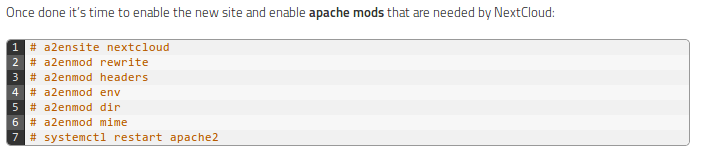
Selection_510.png


When entering the first command I get -

"Site nextcloud does not exist"

In spite of the fact that I followed the preceding instructions to the letter with the exception of using NextCloud v11.0.3 instead of v11.0.0.

any help much appreciated.
 
/etc/apache2/sites-available/nextcloud.conf
does for sure exist? No typos or case differences, etc...?
 
So I guess you created the nextcloud.conf following this part of the tutorial and have created the path /var/www/nextcloud with ownership to www-data?:

Now we need to create a new file in /etc/apache2/sites-available/nextcloud.conf . Feel free to use whatever editor you feel comfortable with and add the following lines:


Alias /nextcloud "/var/www/nextcloud/"

<Directory /var/www/nextcloud/>
Options +FollowSymlinks
AllowOverride All

<IfModule mod_dav.c>
Dav off
</IfModule>

SetEnv HOME /var/www/nextcloud
SetEnv HTTP_HOME /var/www/nextcloud

</Directory>

Hint: You don't need to do a2ensite, just copy the nextcloud.conf to /etc/apache2/sites-enabled/ and do sudo service apache2 restart
 
Ah, thank you sir. It didn't say it was supposed to be in /etc/apache2/sites-available/. I put it there and now I'm in.

Next up is to figure out how to force it to use https. :)
 
More issues. :(

Apparently one or more files failed integrity check I'm getting this -
Code:
Technical information
=====================
The following list covers which files have failed the integrity check. Please read
the previous linked documentation to learn more about the errors and how to fix
them.

Results
=======
- core
    - EXTRA_FILE
        - nextcloud

Raw output
==========
Array
(
    [core] => Array
        (
            [EXTRA_FILE] => Array
                (
                    [nextcloud] => Array
                        (
                            [expected] =>
                            [current] => bf2cd37d4c42c83e433cb3dd6d179fb195ba75a4d1dc3bc1a600f2afbee3a214b5e0695d450fcd96fd6484291e4482c238138fe62d680b983a1a05756809cfb5
                        )

                )

        )

)
 
Thanks. Yea, a self signed key is what I need.

I'm still trying to sort out how to force nextcloud to use https and so far all I've found is gibberish. You'd think this would be simple but it's not. :(
 
Do you have an extra file, "nextcloud" inside /var/www/nextcloud/core?

The docs have a section on that warning, it appears only if you're logging in as an admin:

https://docs.nextcloud.com/server/1...e_signing.html#code-signing-fix-warning-label

Nope, no nextcloud anything in /var/www/nextcloud/core. I did have trouble getting nextcloud.conf right and in the right location and I might have saved it a couple of times as just nextcloud but they're deleted and the trash has been emptied.
 
Thanks. Yea, a self signed key is what I need.

I'm still trying to sort out how to force nextcloud to use https and so far all I've found is gibberish. You'd think this would be simple but it's not. :(

It's extremely simple. You just need to edit the nextcloud.conf file to listen to the port 443 and add a couple of lines to it.

Also if you want, you can redirect any request coming to http:80 directly to the https (by adding another configuration for example, ssl-redirect.conf).

Code:
NameVirtualHost *:80
<VirtualHost *:80>
   Redirect permanent / https://mysite.example.com/
</VirtualHost>

There's a sample configuration in /etc/apache2/sites-available/default-ssl that includes the extra lines you need. You need to put your self signed keys to the paths configured to the SSL key paths naturally.
 
Do you have an extra file, "nextcloud" inside /var/www/nextcloud/core?

The docs have a section on that warning, it appears only if you're logging in as an admin:

https://docs.nextcloud.com/server/1...e_signing.html#code-signing-fix-warning-label


OK, I see that it's only shown when logged in as an admin. Think I'll just not worry about it for now but the file in question does not exist in the core folder.

I need to get NextCloud only using https and it's proving to be waaay more difficult than it should be. For one, there seems to be billions of different instructions on how to accomplish this but so far, all I've tried don't work or only work partially. At present I can log in as https but I can also log in as http so I'm half way there.

Again, any help much appreciated.
 
Back
Top