![[H]ard|Forum](/styles/hardforum/xenforo/logo_dark.png)
Hey guys, well since I ordered my Lian Li PC-75B I deceided to go ahead and put on my Danger Den TDX block + Maze 4 GPU.
These bad boys where installed on a:
AMD s939 3500+ (.90nm) w/ a DFi nF4 Lan Party Ultra-D
and also on a:
ATi Radeon X850XT
Here are some pics since I know 1/2 of you wont bother reading this.
My X850XT with the stock cooling :x


Starting cooler removal (please note you must use a precision screw driver to remove stock cooling plate)


All taken apart

Oh w00terz the block in prepared for install!

Oh yes it is t3h shiny :wacko:

Arctic Silver 5 for the extra coolness

All done :yes: ::front::

back

Onto the TDX Block now (sorry for the lack on "install" pics but it was kind of a rush job,. so here is the finished product.
Installed (kept stock backplate on for extra hold)

Top view :devil:

Dont you wish you had the ram in the background

Anyway those are the pics.
In a matter of days it will be living in this case here:
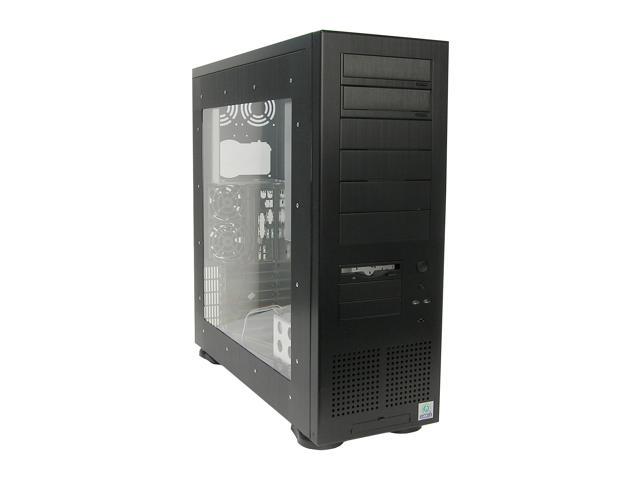

I just need to cut some holes in the stop for the radiator, and I'm also painting all the silver on the inside (drive bays, mobo tray) black for extra coolness
Stay tuned, more pics comming soon.
BTW if you guys want to mow down some of my bandwith here is the Hi Res directory. click > HERE <
I'm currently painting my radiators chrome (they are hanging up in the garage) but my case arrives today. So sometime before Friday I should be all done. I just have to mod some 120MM holes in the top of the case and throw everything in.
These bad boys where installed on a:
AMD s939 3500+ (.90nm) w/ a DFi nF4 Lan Party Ultra-D
and also on a:
ATi Radeon X850XT
Here are some pics since I know 1/2 of you wont bother reading this.
My X850XT with the stock cooling :x
Starting cooler removal (please note you must use a precision screw driver to remove stock cooling plate)
All taken apart
Oh w00terz the block in prepared for install!
Oh yes it is t3h shiny :wacko:
Arctic Silver 5 for the extra coolness
All done
:yes: ::front::
back
Onto the TDX Block now (sorry for the lack on "install" pics but it was kind of a rush job,. so here is the finished product.
Installed (kept stock backplate on for extra hold)
Top view :devil:
Dont you wish you had the ram in the background
Anyway those are the pics.
In a matter of days it will be living in this case here:
I just need to cut some holes in the stop for the radiator, and I'm also painting all the silver on the inside (drive bays, mobo tray) black for extra coolness
Stay tuned, more pics comming soon.
BTW if you guys want to mow down some of my bandwith here is the Hi Res directory. click > HERE <
I'm currently painting my radiators chrome (they are hanging up in the garage) but my case arrives today. So sometime before Friday I should be all done. I just have to mod some 120MM holes in the top of the case and throw everything in.


