CRT

Ass-wise posters, please laugh but don't choke. We still need that hidden truth you only know.
That hidden truth is called people's preferences.

LCDs have some advantages and some disadvantages.
CRTs have some advantages and some disadvantages.

Some people prefer LCDs [for certain tasks or for all tasks].
Some people prefer CRTs [for certain tasks or for all tasks].
 
Diamond Pro 930SB,

120_61_106.jpg

You can get the same results with most CRTs after hardware calibration.

Sure. This is your work or you have a link to the actual test?

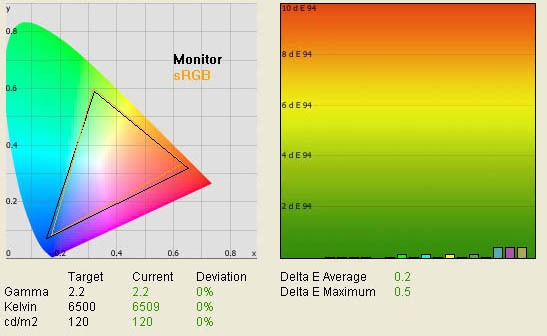
An LCD monitor calibration result (tftcentral.co.uk):
calibrated_lut.jpg
 
Last edited:
I'm still using my Sony GDM-F520 going on 8 years now...have no plans on getting an LCD unless my F520 dies on me...and if that happens I'll only consider 1 LCD---the NEC LCD2490WUXi

I wish I could buy another used GDM-F520 someplace...I agree with the posters here that stated that this monitor is the best CRT ever made (even better then the FW900)...I have a slight burn in at the top my screen but it is only really noticable on all white backgrounds...being that my monitor is going on 8 years I'm worried that it doesn't have long left...anyone with a new/like new or excellent condition F520 willing to sell it? PM me...or does anyone know a reliable retailer or place where I can purchase one?
 
Last edited:
#1 Design and Mechanics
It goes without saying: nothing looks more awkward than a CRT behemoth on your desk.
CRT provide neither height adjustment nor portrait mode.
343v.jpg
How a rational person responds: That's a valid point. But not terribly relevant for a lot of people who do not value this criteria. Most people who would value a CRT won't care about portrait mode. Nor will they mind no height adjustment. Nor will they mind the weight once it is set on their desk and placed so that the back of the monitor is hanging off the back, thereby giving as much real estate in front of the monitor as the average LCD.

How I would address this point were I albovin: Flop! Lies! You should shut your mouth! Nobody cares about protrait mode or height adjustments!

#2 Connectivity
It's a unique case if a CRT has anything more than a single analog connector.
LCDs offer several digital connectors (up to 3560x1600 resolution supported) to work with several video signal sources at the same time.
How a rational person would address this: This is also a valid point. But again, not really a big criteria for those who would otherwise be happy with a CRT for other reasons.

How I would address this point were I albovin: Flop again! The FW900 accepts VGA and BNC. So you are wrong. You lie!


#3 Screen Management
CRT menus look just miserable next to advanced or even mid-level LCDs.
Most of CRT menu tools are intended to counterbalance analog signal shortcomings rather than work on picture management itself.
How a rational person responds: That's a bit hyperbolic. And not altogether true. Many high-end CRTs had quite advanced controls. The FW900 has full RGB gain and bias controls as well as the more generic color temperature sliders. As well as three different types of color adjustment controls. In short, it grants the ability to fully adjust (and even successfully calibrate -- as I recently did with a Spyder 3) color to taste.

How I would address this point were I albovin: Flop and lies! Laugh but don't choke! The FW900 provides full adjustments and you would know that if you weren't so clueless. You have no knowledge. Please pass by.

#4 Brightness Distribution and Other Issues
It's a mistake to think that CRT screens have even brightness distribution just because they are CRT. This mistake comes from the lack of info and poor memory. Any of CRT and LCD may have uniformity issues.
Test images from behardware.com:
crtuniformity.jpg
How a rational person responds: This seems to willfully and disingenuously conflate color/brightness uniformity with the ubiquitous issue of backlight bleeding on LCDs. Yes, those test results do show some uniformity issues on CRTs. But also not there is no LCD listed there as a "control". . . all that shows is that CRTs are not perfect. It does nothing to show how a CRT compares to an LCD. You don't seem to mention backlight bleeding in any other portion of this overly long manifesto of LCD universal superiority. Was this your attempt at making us believe that CRTs have such an egregious problem as well?

How I would address this point were I albovin:
Flop and failure. You do not show us how your pathetic LCDs compare to CRTs.

Dead pixels on CRT? Why not?
Read this Sony F520 owner report:
I've had to change F520's 3 times, 1st time because of bluriness, 2nd time because of dead pixel, 3rd time because it just died, and now I have one that i wish i could change because the ghosting is more than 2.5cm/1.0 inch
There were no holy cows among CRTs even at their best times.
One can find similar reports abou present LCDs. Neither technology guarantee 100% production quality.
This is a perfect example of how you illogically find one exception to a rule and then extrapolate out dubious, unsupportable conclusions. CRTs cannot have dead pixels. There is no such thing on a CRT. They can have dust/dirt contamination (as can LCDs along with their actual dead pixels) or blockages in the shadow mask or aperature grill, but "dead pixels" as understood on an LCD cannot exist on a CRT. You finding one person on the internet describing a flaw on a CRT as "dead pixels" does not magically change the nature of the universe and make them possible on a CRT.

LCDs are so known for stuck/dead pixels that nearly every store has a "dead pixel" return policy. It's downright silly to equate this to a single report of someone finding a flaw on a CRT screen. Especially since the nature of the flaw, despite his inaccurate description, was almost certainly something that could happen to an LCD screen (on top of the likelihood of getting an LCD with dead/stuck pixels).

BTW LCDs have features to reduce uniformity imperfections...
It should tell you something that we never heard anything about CRTs needing to come up with such a technology. It should tell you that your point above wasn't terribly valid.

#5 Viewing Angles
LCD monitors can offer same viewing angles as CRTs:

crtips.jpg
A valid point. That point being that the very highest end panels for LCDs can do what any price-level CRT could accomplish. Is this not a wash?


#6 Measurements and Calibration
6.1 Color Quality
Thanks to behardware.com, this is an example of comparison of above average CRT and above average LCD. LCD provides better color quality in this case. This sort of performance depends on the model, not the technology. Nowadays LCDs are capable of dE=0.2 or less and don't yield CRT even a grain in color quality.
crtcoloracc.jpg
I believe Mathesar already addressed this. But I'm honestly not all that concerned with color calibration. My FW900 has always looked great to me and my dabbling with a Spyder 3 confirmed for me that my FW900 is still able to get its whitepoint perfectly set to 6500 (though I prefer it higher). So, I sent it back.

6.2 Black Level and Contrast Ratio
What is what here ( CRT or LCD)?
contrastcrtvstn.jpg

See the answer at the end of this chapter.
I don't need to wait. It seems it's a CRT in sub-optimal environment and an LCD in its optimal environment. Shocking that the LCD would look better in this fixed arrangement, no?

There is misunderstanding (constantly provoced by CRT fanatics - this forum has seen worst of them) in this department too.
Facts.
No display produces true black.
If you want to be this pedantic, fine. No display can do 100.00% true black. But the CRT comes much closer than any other display technology.

Best LCD monitors now are capable of black level as deep as 0.05 cd/m2 and CR up to about 1000:1.
For LCDs: Dynamic Range (full screen white over full screen black) is practically equal to Display Contrast (measured within an image).
CRTs have problems here. Due to technology specifics, CRTs are prone to flare.
CRT Dynamic Range is very high - up to about 15000:1 with black level measured on an empty black screen 0.1 cd/m2
Unless the user stares at the empty black screen as a sheep at the newly painted gate, this level of black is not available on CRTs for practical use due to flare effect.
Or. . . a dark and moody game or movie. What you're saying here flies in the face of what every reputable home theater and display review magazine, website, and pundit routinely state and demonstrate. . . that CRTs render a more pleasing image to the eye regardless of what numbers you're able to massage to twist reality.

The lie about CRT black level and CR is the use of Dynamic Range instead of Display contrast. Display contrast is what we actually see on the screen. For CRTs Dynamic range and Display Contrast differ dramatically.
Due to CRT flare, white from bright details bleeds onto dark details. The smaller dark details are, the more bleed, the more greyish black, the less CR. So 15000:1 for CRT is absolutely abstract number that has nothing common with real CR on real images.
Note: reference resources compare CRTs of their best times with prehistoric LCD at their early stage of development.

Black level and CR measurements from a research on displaymate.com:
39960101.jpg

CRT contrast ratio collapses from 17600:1 on unreal full black screen down to 419:1 on more realistic test pattern, and then further down to nothing (75:1) on more "busy" pattern.

Below is a sumulation of how similar test pattern would look on CRT (Note: low quality monitors may not show the difference between the full screens. PVA/MVA users please see from an angle):

displaycontrast1.jpg


Now you are not surprise to know the answer (What is What?).
A quote from behardware.com professional review (CRT Mitsubishi Diamond Pro 930SB at its best next to a rudimentary TN LCD):
This would all be so much more compelling if all the movies and games we watched were set on giant black and white checkerboards!

But since they are not, and quite often whole scenes are dark and moody, or there is a single bright object on only one part of the screen, the deeper blacks and superior contrast ratio of CRTs are able truly give us a gorgeous image. Whereas an LCD starts with a less "true black" and only gets worse from there. . .

Let's note the part where it says that CRTs "categorically" provide better/deeper blacks. An LCD only begins to approach LCD black levels when ambient lighting conditions mask an LCD's inherent inability to represent black properly. Yet, somehow, in this topsy-turvy world, the poster here market this as a feature to be praised.

Any person truly interested in a high fidelity image while gaming or watching media won't be troubled by the need to turn down the lights in the room to experience truer blacks and a more pleasing picture than an LCD can accomplish in a lit or unlit room.

6.3 Color Space
LCDs offer wide color gamut for specific needs of pre-print professionals.
CRTs lack that feature.
Valid point. But not a criteria I (nor most others) care much about. And it should be pointed out that you have posted several times that wide color gamut is actually something to be avoided for most users. Yet no mention of this here where it's useful to your argument(s). Strange, that.

6.4 Image Details
LCDs offer hardware (12-bit LUT) calibration providing reference quality grey scale rendition and variety of calibration options.
Below: a movie scene on Sony FW900 CRT (from this thread) and about the same frame (1-2 frames apart) on LCD. The image from sony FW900 CRT thread has loss of dark details (reflection on the side of the car, car wheels, shop entrance..)
Note: PVA/MVA users please look from an angle.
mib.jpg
Okay, this just gets downright funny now.

1. You're posting images taken by cameras of monitors as though these are empirical. I'm sure even you realize why this is silly.

2. Even if we accept these as a valid range of comparison. . . are you aware that most home theater experts would look at the lower image (which you prefer) and tell you that you need to take your "TV out of 'torch' mode?" The above picture is actually far more preferable and lifelike. You do realize that in real life there is darkness and shadows and that your eyes really shouldn't be able to pick up every little detail where there isn't a lot of light, right?

Do us all a favor, take the movie Gladiator and go to the scene where Maximus is meeting with Marcus Aurelius in his tent. Notice how for much of the scene, Maximus has half his face almost totally obscured in shadow. Now, turn up contrast and/or brightness. . . oh my gosh! You can see the other half of his face clearly! You're not supposed to see it. But a poorly adjusted TV/monitor will show you "shadow detail" and bring out things that the director never intended to be visible.

All this is to point out that it's ultimately silly of you to effectively show us an image of a scene on an LCD where there are more details showing and attempt to say that this shows the LCD's superiority. Especially when the upper (CRT) image actually looks more pleasing and life-like despite it not showing you more of the details that you mistakenly value over actual image fidelity and realism.

LCDs may come with built-in or optional speakers
So did many CRTs. Whoopity F'in Doo.

#8 Responsiveness
CRTs render moving images with no delay (input lag), at higher refresh rate (over 60Hz), has lower response time (no blur on extreme motion).
LCDs have level of responsiveness well enough to render top quality blu-ray video and comfortable regular gaming.
CRTs advantage in responsiveness has zero value for practical use except for certian type of computer games.
I love that. . . you essentially say: CRTs are better. But it's worth "zero." Except when it isn't. Biased much?

#9 Resolution
LCDs provide higher resolution than CRTs.
Odd. Since My monitor does 1920x1200. What does the average 24" LCD do? (that's a rhetorical question)

The first fact to remember about the use of so-called not recommended (non-native) resolution is that no one in his right mind uses a monitor other than in recommended resolution, again except for some games.
Well, as long as you're being fair and open-minded about the priorities of people other than yourself. At this point, do you really expect anyone to take what follows seriously? Why would anyone think that you're treating the issues fairly after reading that at the outset of this portion of your manifesto?

#10 Scaling
LCDs may have different scaling options like Full, 1:1 and Aspect. High end LCDs provide unlimited scaling. Recommended video.
Sorry about CRTs.
If I were you, I'd write something like: You fail. Or "flop". . . or something equally dismissive. Instead, I'll just state flatly that you re incorrect here to dismiss CRTs since they actually have more flexibility than LCDs. CRTs can adjust their raster to accomodate any aspect ratio. It's a shame you apparently didn't know this. Or it's even more shameful if you did know this but actually still managed to just say "Sorry about CRTs" and ignore this capability.

#11 Screen geometry
How can it be a problem? Oh, well, CRTS are here.
Yes, screen geometry is a chronic problem of CRTs.
Not applicable to LCDs...
Wow, a valid point. Too bad you can't seem to make these without sounding like a total ass.

#12 Applications
12.1 Office use
For office use LCDs provide more real estate in screen size (the largest CRT is just 22.5" small) and resolution, have better than CRT contrast ratio and deeper black,
more eye friendly.
Behardware.com again helps us.
Again, with the contrast ratio and deeper blacks in an office environment. Once again (not so) cleverly trying to disguise the fact that where most people truly want contrast ratio and deep blacks (gaming and cinema), an LCD will look less good than a CRT in a properly lit room. These are your own facts, merely presented in a fashion you will undoubtedly find unappealing. So you will attack me rather than them.

textb.jpg


Now you know why text on CRT looks that bad - flare effect.

Now the photo of interpolated text on LCD (recommended 1920x1200 and 1680x1050 interpolated to the full screen):
interpolation1.jpg

It's fair to say that interpolated text on LCD is still better than "standard" on CRT!
It's fair to say that you're beating a dead horse there since I don't know anyone who actually disputes that text on an LCD is generally preferable to text on a CRT. It's just a shame that you can't state facts and evidence like this more often without sounding like a jerk and also throwing in a bunch of biased nonsense and half-truths all around the valid information.

It's not necessary to interpolate lower resolution on LCD.
LCD scalar can be used to get lower resolution image on higher resolution screen dot-to-dot without interpolation:
28076919.jpg

Using LCD screen menu, 1680x1050 image can be interpolated to any degree between 1680x1050 and 1920x1200 or even larger.
Oh joy! So we can have non-native resolutions without interpolation just like on a CRT. . . except we have to make it smaller and waste most of our screen size. . . ummm. . . unlike a CRT. Thanks for that "feature!" Funny how you don't mention how CRTs are superior in this regard. You just keep moving right along. . .
 
Part Deux. Since forum software cut the other short:

12.2 Multimedia
In this regard CRTs are totally helpless in comparison with LCDs.
Oh well. . . if you say so it must be true! And look at all the reasoning and evidence you provide. . .

Oh, wait, that's it? Well, then you must be basing this on what you said above? But, what you said above has been largely demonstrated to be biased and unreliable. So. . . well, I guess we just take your word for it then?

12.3 Photo and video editing.
LCDs are again head and shoulders above with industry top image quality, viewing angles, higher resolutions and larger screens, connectivity and scaling options.
See above.

12.4 Games
12.4.1 Strategy games
All LCDs advantages work here.
Hmmm, guess what: "All CRT advantages work here" as well. That you have so disingenuously obfuscated them above I hope is not lost on people.

12.4.2 Action games
The only area of interest where CRTs better responsiveness and higher refresh rate can be materialized into advantage over LCDs. Even here some prefer the impression from larger screen with excellent colors to somewhat lower response time.
Video.
Well, that and all the other inherent benefits to a CRT (black level, contrast, etc.)

12.4.3 Bord games
All LCDs advantages work here.
. . . as do all CRT advantages that you refuse to acknowledge or disingenuously obfuscate.

12.4.4 Adventure games
All LCDs advantages work here.
. . . as do all CRT advantages that you refuse to acknowledge or disingenuously obfuscate.

12.4.5 Sport games
All LCDs advantages work here.
. . . as do all CRT advantages that you refuse to acknowledge or disingenuously obfuscate.

12.4.6 Simulation games
All LCDs advantages work here.

12.4.7 Various console games (PS3)
All LCDs advantages work here.
I think the pattern here has been demonstrated.


#13 Blu-ray and DVD
99% of CRTs are simply out of consideration due to miserable size, "square" format and minimal compatibility with modern digital video devices. As a unique exception we can mention Sony FW900 that is conditionally compatible (through converters) with some external video devices to display up to 1080i video. Again, even this dinosaur has just 22.5" diagonal -
the point where CRTs died.
Again, even this formerly best screen suffers from CRT flare.
As we know from tests, in practical use CRTs have whiter black and lower display contrast ratio.
. . . well, as stated above, I suppose that's true if, oddly, your "practical use" consists of watching black and white checkerboard patterns.

The only situation where CRTs' potentially better black can play it's role is watching dark video in dark room.
Careful, you come dangerously close to telling the truth here and accepting inconvenient facts. But alas, your use of the word "potential" and "only situation" leaves you just short of stating something respectably honest.

Modern LCDs offer hardware calibration that is valid for external video devices such as BD players and PS3.
CRTs lack that.
99.9% of folks watching Blu-Ray in their home theaters won't be calibrating whatever display device they use. Of the tiny portion that do, I highly doubt they would find the calibration method they are able to use insufficient. I found the results of the Spyder 3 to be quite good and I was able to get things dialed in perfectly according to the calibration software.

Unlike LCDS, CRTs do not support 24p signal. So the whole branch of Full HD technology that is based on 24p+Pull down Algorythm is dead for CRTs.
Do we forget LCDs uncomparably larger screens? No, we don't.
Blu-ray on 24" LCD.
I would like 24p. I know my CRT-based 53" RPTV HDTV won't support it. So this point may indeed be valid. I wonder, however, if a computer could be fooled into playing back Blu-Ray at 96Hz which would accomplish the same thing and allow for 24p playback (this is the technique some LCDs and Plasmas are already taking to achieve "film" playback).

#14 Ergonomics
It's pretty obvious that CRT ergonomics is close to zero while LCDs are full of features from that department.
LCDs have eyestrain reducing technologies (auto brightness, dynamic brightness), much less aggressive flickering, effective and convenient screen management, integrated sound, remote control as addition to already mentioned height/tilt/rotate/pivot.
LCDs provide a choice between glossy and matt screens.
All CRTs have reflective panel finish.
There's a lot of absolutes in those statements that don't belong. Not everyone feels less eyestrain with LCDs. Depsite you arrogantly stating that CRTs have "zero" ergonomics, some actually prefer them for eye comfort reasons (brightness, etc.). What "feels" better to someone is ergonomic for them. Not all CRTs are equally reflective. As usual. . . the list goes on and on. But since you actually start mentioning things like remote controls for monitors. . . I think we're done here.

#15 Conclusion?
This picture says everything.
50475156.jpg
Ooooo! What does it say? That from time to time businesses get new equipment? Tell me, what did that picture say in the mid 80s when those same piles existed but were being replaced by new CRTs? What would that pile say if it were a stack of newspapers? Bicycles? How about donuts!?!

Okay, you're back on ignore.
 
Last edited:
Apologies for the odd looking double-quoting. Something abpit albovin's use of colors and pound signs really confuses the forum software and causes it to insert extraneous quote tags. My attempt to fix it manually only caused more bizarre behavior.
 
Should my next monitor purchase be a sony fw900? Saw one on craigslist for 275, is that a good price? I think its a little inflated. Im pretty sure I have enough room for it cus it will kinda sit in a corner of the wall and my desk is pretty solid to support it. Im tired of shitty 1400 by 900. Either the sony or what lcd?
 
Should my next monitor purchase be a sony fw900? Saw one on craigslist for 275, is that a good price? I think its a little inflated. Im pretty sure I have enough room for it cus it will kinda sit in a corner of the wall and my desk is pretty solid to support it. Im tired of shitty 1400 by 900. Either the sony or what lcd?
If the buyer would give you a chance to test out the CRT (ask him to have it warmed up for you) when you arrive, I'd definitely consider $275 a good price for a FW900 that doesn't have any issues.


  • Check the screen carefully for nicks and scratches in the anti-glare coating.
  • If the colors look off (after warming up for 20-30 minutes), ask the buyer if he would mind you using the "Image Restore" function for a quick fix to see if it improves.
  • Adjust color purity issues with "landing" controls.
  • Check for major convergence issues. Minor ones can be adjusted through service mode convergence via Windas cable.
  • Once you've done all the above, I'd turn the monitor off and power it on a couple times (with a 30 second or longer rest between cycles). A lot of times, issues with these monitors first manifest themselves at power-on.
Good luck!
 
If the buyer would give you a chance to test out the CRT (ask him to have it warmed up for you) when you arrive, I'd definitely consider $275 a good price for a FW900 that doesn't have any issues.


  • Check the screen carefully for nicks and scratches in the anti-glare coating.
  • If the colors look off (after warming up for 20-30 minutes), ask the buyer if he would mind you using the "Image Restore" function for a quick fix to see if it improves.
  • Adjust color purity issues with "landing" controls.
  • Check for major convergence issues. Minor ones can be adjusted through service mode convergence via Windas cable.
  • Once you've done all the above, I'd turn the monitor off and power it on a couple times (with a 30 second or longer rest between cycles). A lot of times, issues with these monitors first manifest themselves at power-on.
Good luck!
Thank you very much, but one [H] member already bough it for 200. :( There goes my dreams.
 
Wow, Hurin that was great, I think a lot of people had similar thoughts but just didn't want to bother writing it out. You literally destroyed his arguments,

Albovin is such a strange poster, he seems to be trying to convince himself and everyone else that his monitor is the best and nothing else can even come close.

I don't think Albovin will even respond. He probably spent a lot of time coming up with all his "laboratory tests" and "facts", lol.
 
Albovin is such a strange poster, he seems to be trying to convince himself and everyone else that his monitor is the best and nothing else can even come close.

Stupid boys in men's restroom compete "whose penis is longer".
It's the least intelligent to believe that people around you are those stupid boys.
LOL
I can afford ANY monitor ANY time but that's not a matter of forum discussion.
 
Stupid boys in men's restroom compete "whose penis is longer".
It's the least intelligent to believe that people around you are those stupid boys.
LOL
I can afford ANY monitor ANY time but that's not a matter of forum discussion.

Yes, you are right... That is what stupid people do, try and show off/compete by saying obnoxious things.....

I really enjoy your posts Albovin, they provide me with a lot of entertainment.
 
Still using my trusty 21" Trinitrons. Mainly because I get them free from work and have a cache of them stocked up, but also because working on a LCD and laptops all day at work I simply prefer the looks of a CRT.
 
I really enjoy your posts Albovin, they provide me with a lot of entertainment.

Thank you. At least you have entertainment.
I too like your Case: Xclio Windtunnel Advanced. It's my dream. Especially the word "Advanced".
 
Still using my trusty 21" Trinitrons. Mainly because I get them free from work and have a cache of them stocked up, but also because working on a LCD and laptops all day at work I simply prefer the looks of a CRT.

Do you live nearby? I wouldn't mind upgrading from my current 2 x 20" Iiyama CRTs :D

(my desk will probably hate me for, it though...)
 
Back
Top