![[H]ard|Forum](/styles/hardforum/xenforo/logo_dark.png)
Navigation
Install the app
How to install the app on iOS
Follow along with the video below to see how to install our site as a web app on your home screen.
Note: This feature may not be available in some browsers.
More options
-
Some users have recently had their accounts hijacked. It seems that the now defunct EVGA forums might have compromised your password there and seems many are using the same PW here. We would suggest you UPDATE YOUR PASSWORD and TURN ON 2FA for your account here to further secure it. None of the compromised accounts had 2FA turned on.
Once you have enabled 2FA, your account will be updated soon to show a badge, letting other members know that you use 2FA to protect your account. This should be beneficial for everyone that uses FSFT.
You are using an out of date browser. It may not display this or other websites correctly.
You should upgrade or use an alternative browser.
You should upgrade or use an alternative browser.
Crossfire 5870 help.
- Thread starter Copyright
- Start date
I got a reply that could possibly be a fix for the issues we are having with the newer drivers. Who wants to give it a shot? 
"After examining the driver, this is what I think is happening.
It's probably got something to do with the ASPM switch that was added to the driver. That's the ability to enable the PCI-E bus to enter a low power state at the hardware level. The reg key EnableAspmL0s & EnableAspmL1 was added to the .inf for 57/58 cards. This was the only official inf change for the 57/58 cards between RC6/7 and last nights release. Also make sure that windows own power management is set to High Performance thus disabling the PCI-E from entering a low power state (although microsoft issued a patch for that). These changes were meant for crossfire cards to set the PCI-E bus to low power when not in use. It seems some cards/motherboard combinations are turning them off instead of the low power state. Or not letting them wake up properly. This is only my opinion.
+ download new version of GPU-z 0.3.6 to stop any 57/58 card related crashes."
"After examining the driver, this is what I think is happening.
It's probably got something to do with the ASPM switch that was added to the driver. That's the ability to enable the PCI-E bus to enter a low power state at the hardware level. The reg key EnableAspmL0s & EnableAspmL1 was added to the .inf for 57/58 cards. This was the only official inf change for the 57/58 cards between RC6/7 and last nights release. Also make sure that windows own power management is set to High Performance thus disabling the PCI-E from entering a low power state (although microsoft issued a patch for that). These changes were meant for crossfire cards to set the PCI-E bus to low power when not in use. It seems some cards/motherboard combinations are turning them off instead of the low power state. Or not letting them wake up properly. This is only my opinion.
+ download new version of GPU-z 0.3.6 to stop any 57/58 card related crashes."
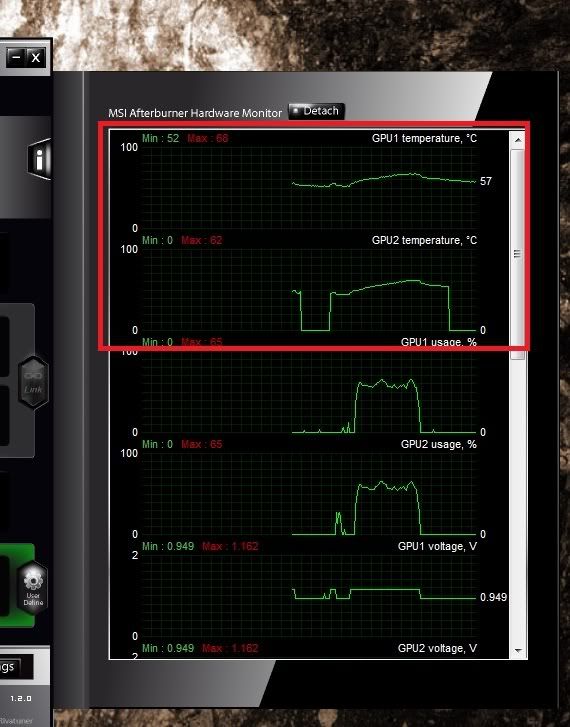

This thread scares me. Sold my 285's and my XFX 5870's arrive friday for crossfirex and now I'm reading about the problems.....ugghhh....
Keep in mind I think this was done for a reason but I don't care for the effects. I assume they shut the 2nd card off and just default the fan speed to 20% to try and save on power. If you have crossfire and your on your desktop I imagine you don't need the power of both right? All my games and everything else works great so don't be concerned about that. I just need to find a way to stop the 2nd card from shutting off in these newer driver releases. I want all the updates and performance improvements like everyone else but I wont give up the awesome fan control I have with the RC6 drivers. I wan't to see my temps at all time.
EDIT: I found after the driver installs and I reboot.... I must reboot one more time for vantage to work correctly. So the new drivers showed up and worked fine in Vantage after another reboot. I still switched back to RC6 though so I have control of the fans and so the 2nd card doesn't shut off.
Unwinder had some good information about our issue. Looks like we might have to either modify the registry entry or the inf from what others have mentioned. So what we are getting is normal per this power implementation.
"Correct guess, it is indeed new power saving technology. In latest builds ATI are actively experimenting with so called ultra low power state crossfire mode. The main idea behind this technology is saving some more Watts due to completely shutting down slave graphics card(s) in CF mode. However, it really opens jar of worms in terms of software compatibility. Low-level hardware access tools (RT, GPU-Z, Everest etc) may act absolutely unpredictable when hardware is being disabled dynamically during access to it. So there can be hangs / crashes / false readings in lot of such tools. Driver-level hardware access tools (CCC, Afterburner, i.e. tools working with hardware via Catalyst) will also loose control on slave chips when this new power saving mode is enabled. So in nearest future CF users may expect a lot of troubles related to controlling slave GPUs.
By the way, as far as I know ATI left a way to disable this power saving mode - there is EnableUlps registry entry, which can be set to 0 to disable this "improvement"."
"Correct guess, it is indeed new power saving technology. In latest builds ATI are actively experimenting with so called ultra low power state crossfire mode. The main idea behind this technology is saving some more Watts due to completely shutting down slave graphics card(s) in CF mode. However, it really opens jar of worms in terms of software compatibility. Low-level hardware access tools (RT, GPU-Z, Everest etc) may act absolutely unpredictable when hardware is being disabled dynamically during access to it. So there can be hangs / crashes / false readings in lot of such tools. Driver-level hardware access tools (CCC, Afterburner, i.e. tools working with hardware via Catalyst) will also loose control on slave chips when this new power saving mode is enabled. So in nearest future CF users may expect a lot of troubles related to controlling slave GPUs.
By the way, as far as I know ATI left a way to disable this power saving mode - there is EnableUlps registry entry, which can be set to 0 to disable this "improvement"."
where can i find the instructions to disable this in windows 7 registry? I took my second card out until someone can resolve this problem,
install your 2nd card with the latest drivers then search your registry for EnableUlps. Double click this and the value should be set to 0. Ive also been told this entry might show up twice so do this for any of EnableUlps that show up in the registry. Keep in mind I haven't heard anyone attempt this yet so one of us will be the first. I would do a reboot after to make sure everything takes. If the changes dont work you can just change it back.
These sorts of "improvements" seriously get me angry. Why on earth would they NOT provide a simple checkbox in the settings panel for us to disable this???
Why would they think this is a good idea for someone installing CF cards? We are obviously not your average user, most people have no clue what SLI/CF is and/or does. Absolutly rediculous.
Why would they think this is a good idea for someone installing CF cards? We are obviously not your average user, most people have no clue what SLI/CF is and/or does. Absolutly rediculous.
These sorts of "improvements" seriously get me angry. Why on earth would they NOT provide a simple checkbox in the settings panel for us to disable this???
Why would they think this is a good idea for someone installing CF cards? We are obviously not your average user, most people have no clue what SLI/CF is and/or does. Absolutly rediculous.
Yeah, I didn't go crossfire with the idea of saving power lol
SicKlown42012
2[H]4U
- Joined
- Jul 6, 2008
- Messages
- 3,319
I guess I will be waiting for a new driver update.....
Welcome to the wonderful world of a 5800 owner. But once they do put out a good driver, we'll all be singing the praises of the AMD Driver Team.
Blackforge
Gawd
- Joined
- Nov 16, 2004
- Messages
- 718
You can expect the new driver on the day Windows 7 is released (10/22).
Will this new driver fix the cf problems?
Its not a problem.... its ATI's ULPS.. Ultar Low Power Savings Mode. It just tends to create some issues. If you read what I put above there are registry changes that may fix the issue but you shouldn't worry about running your card.
fentzinator
Limp Gawd
- Joined
- Sep 8, 2002
- Messages
- 193
Thanks Copyright for the info. I did install GPUZ 0.36 and now GPUZ does work. Everest not yet. Might try your suggestion if I'm feeling brave.
fentzinator
Limp Gawd
- Joined
- Sep 8, 2002
- Messages
- 193
Changing EnableUlps to 0 works. Now Everest works and I have temps of both cards in CCC. Thanks very much for the tip.
Changing EnableUlps to 0 works. Now Everest works and I have temps of both cards in CCC. Thanks very much for the tip.
Thank you! I haven't had a chance to confirm this. I have to thank Unwinder and Rik55 in the ATi forum. They both came back with the same info on this. Glad to hear we have a work around. Now I can continue with the latest drivers.
Its not a problem.... its ATI's ULPS.. Ultar Low Power Savings Mode. It just tends to create some issues. If you read what I put above there are registry changes that may fix the issue but you shouldn't worry about running your card.
The problem I am having is the 2nd card doesn't seem to "wake up" for 3d apps. Exact same performance as 1 card, like cf is not working.
The problem I am having is the 2nd card doesn't seem to "wake up" for 3d apps. Exact same performance as 1 card, like cf is not working.
Did it work fine with the R6 drivers? If not then you might be having a hardware problem not a driver problem. The R6 drivers don't have ULPS enabled.
hey Copyright i love you mannnnnnnnn thanks for the tip!!!
haha thx, thats about how I felt when I found out it could be disabled. I went OCD with this issue until I got an answer. Even pissed off an Admin in the ATI forum but I finally got my answer!!!
Does that new driver have any performance/crossfire scaling improvements? is it worth to risk and swap the last driver with 9.11 ? thanks.
I haven't tried it yet. I have read good things about it.
Hey copyright just an update i think whenever you press restore factory defaults in CCC the power saving feature "kicks in" i disable it last night today guess what? it was on again really strange anyway i had huge issues almost 3 hours trying to fix my poor performance once i get in the registry the option was on! turn it off and bang! 2nd card works again no more slowdowns etc.You need to chek your registry again.
Hey copyright just an update i think whenever you press restore factory defaults in CCC the power saving feature "kicks in" i disable it last night today guess what? it was on again really strange anyway i had huge issues almost 3 hours trying to fix my poor performance once i get in the registry the option was on! turn it off and bang! 2nd card works again no more slowdowns etc.You need to chek your registry again.
I will keep that in mind but I never hit factory defaults button. I never had any issues with slowdowns to begin with. The only issue I had was the 2nd card not responding to fan control in MSI afterburner.
I will keep that in mind but I never hit factory defaults button. I never had any issues with slowdowns to begin with. The only issue I had was the 2nd card not responding to fan control in MSI afterburner.
Ah ok then, guess my second card doesent "wake" in 3D so actually i'm using 1 card when the power saving BS is on
Edit:Anyone know how adjust the LOD when using SS/AA to make avoid textures bluring? other then usign Ati tray tools wich doesent work.
Last edited: