• Some users have recently had their accounts hijacked. It seems that the now defunct EVGA forums might have compromised your password there and seems many are using the same PW here. We would suggest you UPDATE YOUR PASSWORD and TURN ON 2FA for your account here to further secure it. None of the compromised accounts had 2FA turned on.
    Once you have enabled 2FA, your account will be updated soon to show a badge, letting other members know that you use 2FA to protect your account. This should be beneficial for everyone that uses FSFT.

CPU upgrade help?

bertkelmer

Gawd
Joined
Apr 18, 2016
Messages
798
Hey everyone,

I have a sony vaio vpceb35fx/wi that use for work at home. It's been a solid laptop since I got it but now the CPU is overheating and it's slowing down some of my massive excel files.

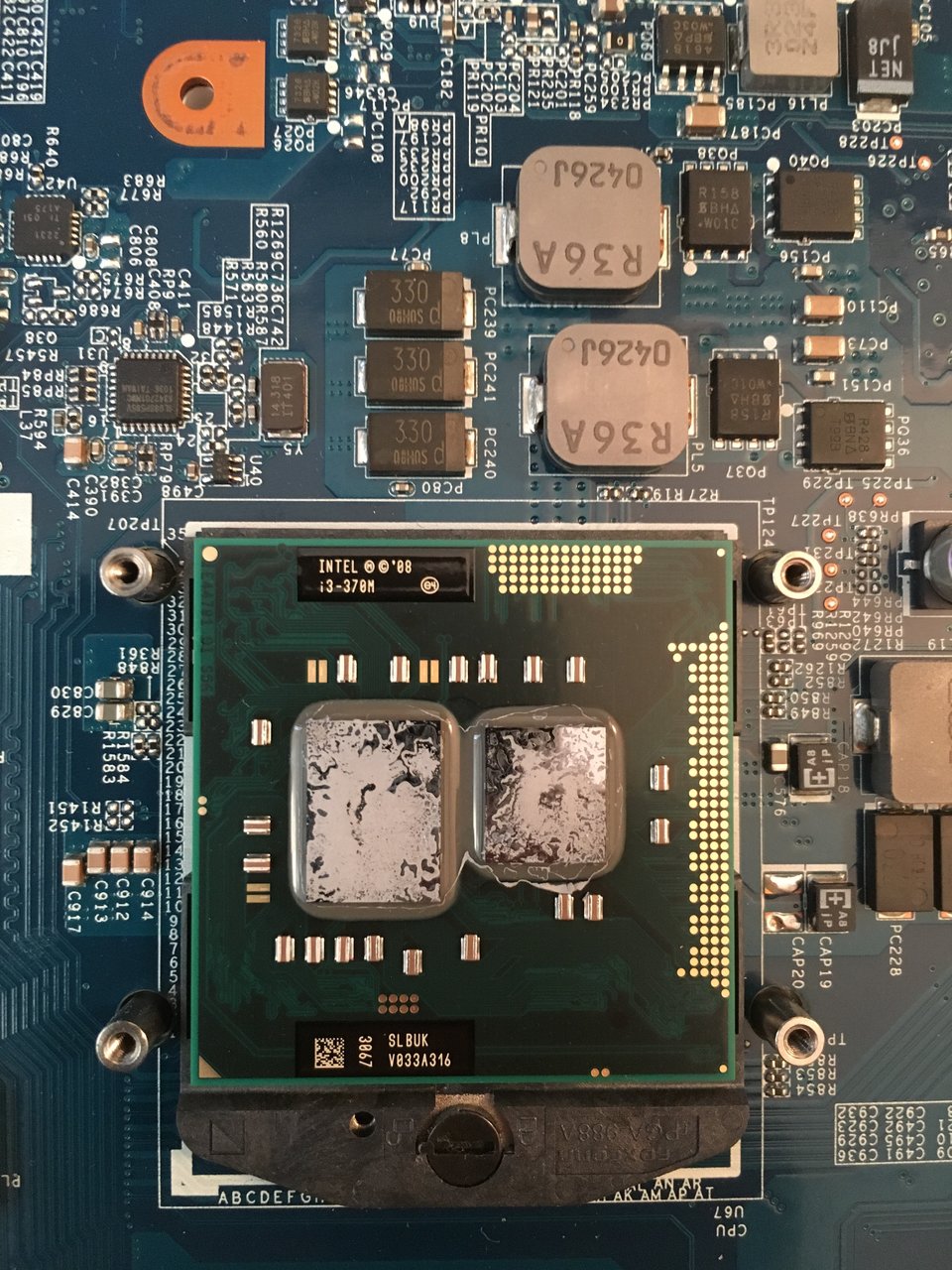
I opened it up today to apply thermal paste and clean the fan. Waiting for microcenter to open because I ran out of paste. Anyway I noticed that the CPU is not soldered on so I'm thinking maybe I can upgrade it to a better i3, i5 or i7. I already upgraded the RAM to max 8gb, and wouldn't hurt to upgrade the CPU if possible. Can anyone confirm what CPU I can go up to if I'm able to at all? I'll run the CPU Z thing to get all the details on the motherboard and stuff after I apply the paste.

Any input would be appreciated.
 

Attachments

  • FullSizeRender.jpg
    FullSizeRender.jpg
    302.6 KB · Views: 16
  • FullSizeRender_1.jpg
    FullSizeRender_1.jpg
    300.7 KB · Views: 21
Best you'll be able to do (maybe, see pendragon1) is an i7 620m or 640m, which will offer up to 50% better performance assuming you can keep the intake air nice and cool. The quad cores lack integrated graphics so avoid the 7/8/9 chips.

Quick check on fleabay shows the 620m around $40 and the 640m at $50. I'd go with the slower since there's no guarantee it will work. Do you have the generic top-side model name? If there are models just like yours with these cpus, then the i7s will likely work.

While you're at MC, have you thought of upgrading to SSD? (If you have already, great!). Could help with the load times, autosaves, etc.
 
Heat shouldn't be a prob as the max chip is 35w and your current chip is 35w. It will come down to what chips Sony lets that board support. The chipset supports all those but Sony can choose to lock out any and all of them. Like Greb said grab the cheaper 620 just in case it doesn't work. If you can find out what chip was used in the highest model in that series then that will most likely be the fastest you can get.
 
Thanks guys, that's what I figured. putting it back together now and run cpu z to see if it will narrow things down a bit.
 
Alirght guys, thermal paste really helped the i3, so quiet now. Anyway here is the CPU Z result. From the looks of it I could add a i7-640M and be good to go.
I think I'll buy the i7-640M, given there is a return policy from a seller, and see what happens.

Some questions:

Should I buy used and save 50% given it is working and not overclocked? (is it ever a good idea to buy used CPUs)
It's hard for me to justify buying a new one at $100 for such an old CPU, buy I could do it.

If it does work, after I install it do I need to do anything after?

7CpgA3u.jpg
pjrBHng.jpg
 
Looks can be deceiving with laptops. Yes your chipset supports all those chips but Sony can cripple the bios so it only supports certain CPUs**. They could literally lock it to just one cpu. Your best bet is to make sure what ever you buy can be returned if it doesn't work. A used one will be fine. If it works when you get it it should keep working and there should be nothing else to do except enjoy the new performance.

**edit: on the other hand it could also be completely unlocked and you could toss any of those into without issue. there is no way of knowing until you try.
 
Yeah, it may not work at all, but I'll take a shot with it anyway. All the websites I visited don't have my particular model, all I see it 33, 36, 37 etc but no 35, hah my luck. The link below only lists up to i5-520M but still it doesn't seem like a solid source of what could be, only what was. I'll bite the bullet and if it doesn't work I'll try to sell it and worst case I lost $50 or less depending what I sell it for.

Sony Vaio VPC-EB Series
 
Last edited:
For what it's worth, I've upgraded the processors in a couple of much older Sony Vaio's. These were S-series laptops from the Celeron-M days. I was able to pop in a much faster Pentium-M chip and had no issues with the BIOS being locked or anything like that. Of course, those laptops were much older than yours so YMMV.
 
Alirght guys, thermal paste really helped the i3, so quiet now. Anyway here is the CPU Z result. From the looks of it I could add a i7-640M and be good to go.
I think I'll buy the i7-640M, given there is a return policy from a seller, and see what happens.

Some questions:

Should I buy used and save 50% given it is working and not overclocked? (is it ever a good idea to buy used CPUs)
It's hard for me to justify buying a new one at $100 for such an old CPU, buy I could do it.

If it does work, after I install it do I need to do anything after?

I would make sure you have the latest BIOS installed before putting the new chip in. Or you can try it with the current BIOS. If it doesn't work, however, you may need to swap chips, upgrade the BIOS, and then try again.

Sony may even list CPU support changes for the BIOS on their download page.

As for buying new vs used... I would just buy used as long as it has been verified working.
 
Sony doesn't even have a bios update available for your board.

Only thing you could do is to use a bios flasher to make a backup copy and then run it through the microcode checker.
 
oh crap haha, wish I had this info before I purchased the cpu. I'll try this microcode check. CPU is arriving this friday.
 
does anyone know a easy way to get a copy of my bios
thats the thing...i would have checked it myself if the stupid fuckers would post it for download. my guess is contact sony and tell them you need to flash you bios or whatever and see what the clowns say.
 
thats the thing...i would have checked it myself if the stupid fuckers would post it for download. my guess is contact sony and tell them you need to flash you bios or whatever and see what the clowns say.
They have a bios upgrade utility, when I get home I'm going to give that a go and see what it says. At this point it would be good to get any sort of confirmation before I open it up and physically find out if it works lol.
 
To make matters worse, they completely outsourced VAIO support to some third party, I have a chat window open now and it's been 30 with no agent connecting.
 
Just a quick update for everyone who contributed. The i7-640M arrived, unfortunately it had a couple of bent pins and even had what looked like thermal paste on some of the pins, god knows what the moron did. At first I assumed it wasn't a match, because at first glance the pins looked fine, but then I thoroughly inspected the pins and found that they were bent. I tried to straighten some out but it wasn't really working, so I just gently forced the CPU in, hoping that it would work and straighten the pins out that way. It worked and when I turned on the laptop all was good. I haven't tested the new gained performance, if any, but I'm glad it works. I of course left negative feedback to the seller.

Does anyone know if having bent pins affect CPU performance?
 
Just a quick update for everyone who contributed. The i7-640M arrived, unfortunately it had a couple of bent pins and even had what looked like thermal paste on some of the pins, god knows what the moron did. At first I assumed it wasn't a match, because at first glance the pins looked fine, but then I thoroughly inspected the pins and found that they were bent. I tried to straighten some out but it wasn't really working, so I just gently forced the CPU in, hoping that it would work and straighten the pins out that way. It worked and when I turned on the laptop all was good. I haven't tested the new gained performance, if any, but I'm glad it works. I of course left negative feedback to the seller.

Does anyone know if having bent pins affect CPU performance?
no its shouldn't....most times it either works or doesn't. For that matter i have heard using a mechanical pencil works decent at straightening them out
 
Back
Top