• Some users have recently had their accounts hijacked. It seems that the now defunct EVGA forums might have compromised your password there and seems many are using the same PW here. We would suggest you UPDATE YOUR PASSWORD and TURN ON 2FA for your account here to further secure it. None of the compromised accounts had 2FA turned on.
    Once you have enabled 2FA, your account will be updated soon to show a badge, letting other members know that you use 2FA to protect your account. This should be beneficial for everyone that uses FSFT.

Could a Dell Wyse run emulators?

Cold Dark Shadow

[H]F Junkie
Joined
Mar 24, 2003
Messages
12,720
i picked up a Acer 22" monitor that came with what the guy said was a router well, turned out to be a Wyse thin client (V10LE) from a local auction.
Not really sure what to do with it but i was thinking if i upgraded the ram to 1GB (currently has 512mb) and the flash drive to something bigger, or run off a USB driver, figure a way to load XP on it (cuz i got a spare xp pro on hand) would it be able to run like MAME or something on it for a small retro gaming set up?
If not Im not to worried about it just not sure what to do with it I only paid 11$ for everything lol
 
Looks like there's a way to install 'Wyse enhanced Ubuntu linux' on the thing, MAME will work fine in linux, 512mb ram should probably be plenty for MAME, depending on what games you want to run?
 
didnt think about running linux. might have to give that a shot
Was thinking just 80s-early 90s acrade type stuff, DK pac man maybe the original MK nothing 3D or to over the top
 
Tried running ubuntu 14.10 from on USB from it and just keep getting "press any key to reboot" Tested it on another PC and booted fine. Sooooo not sure whats up,
Set the boot priority to USB-zip USB-Fdd and whatnot and it does see the usb drive when booted into the wyse os
 
What format was the USB stick (FAT32, NTFS), depending on the BIOS some can't deal anything above FAT32.
 
Its Fat32, i tried a different stick with a build Tinycore on it and it worked, also tried a slacko build with no luck, just keep getting rolling static on the monitor.

Tried loading TC from the first USB i tried and got the same thing "press any key to reboot" so its the kingston drive its not liking.
 
Got Puppy 431 to work off a small (256) usb, goin tot ry and load it to the internal DOM i think ill have just enough room for it, its only 128mb 431 is just under that
 
0.o

got puppy arcade goin on it. but once im done messing around i really dont know what ill do with it.
 
That was gonna be my next question, some of these non standard BIOS are touchy on size and format of USB sticks, heck even some UEFI.
 
For some reason it just doesnt like the 8gb kingston, my smaller USBs work fine even a 16GB pny works.
Havent messed with it for a couple days, sttill gotta figure out how to load 431 right on to the flash mod thats in it, everytime i boot with the usb i gotta go thru the setup stuff all over again. . i havent used linux since the original xbox days lol
 
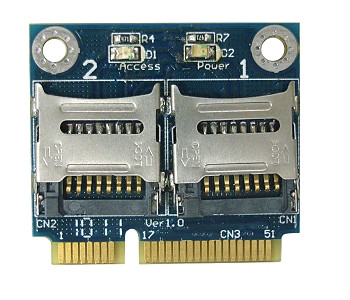
I've been using Linux Mint lately for small fanless PCs, initially loaded the ISO on a 4GB USB stick, then got a mini-pcie to micro-SD adapter and installed a full Linux to a 64GB micro SD and can boot from that into full Linux install from the mini-pcie adapter or the micro-SD in a USB adapter. Manufacturer claims you can't boot from it but I think it's mostly the BIOS that determines that as I can.

MR15_1__36983.1405397890.1280.1280.jpg
 
Thats pretty cool, i was thinking about finding like a 44 pin 2 SD adt. or maybe something for the pcmcia like a card adapter, SDs seems to be the cheapest way to go being those DOMs and higher compact flash are kinda spendy in regards of how much i want to put into this thing lol
 
Back
Top