• Some users have recently had their accounts hijacked. It seems that the now defunct EVGA forums might have compromised your password there and seems many are using the same PW here. We would suggest you UPDATE YOUR PASSWORD and TURN ON 2FA for your account here to further secure it. None of the compromised accounts had 2FA turned on.
    Once you have enabled 2FA, your account will be updated soon to show a badge, letting other members know that you use 2FA to protect your account. This should be beneficial for everyone that uses FSFT.

Corsair XMS4400

chrisf6969

[H]F Junkie
Joined
Oct 27, 2003
Messages
9,011
Anyone bought this stuff yet?

I'm wondering if I could get it up to close to 300Mhz FSB at 1:1 (DDR600)

Actually if it could do DDR575, instead of its stated DDR550 I might buy it just to see what type of bandwidth I would get going from 3:2 ratio (DDR400) with 2-2-2-6 timings to DDR575 - DDR600 @ 3-4-4-8


The 2 reviews I've seen of it so far havent pushed it to the limit. In fact, I think one of them couldnt even run it at its spec'd speed!! LOL wussies!

Kyle, Steve... please do a [H] review of it and take it to DDR600 so I know what I'd be looking at if I got it! :)
 
Originally posted by chrisf6969
The 2 reviews I've seen of it so far havent pushed it to the limit. In fact, I think one of them couldnt even run it at its spec'd speed!! LOL wussies!

Kyle, Steve... please do a [H] review of it and take it to DDR600 so I know what I'd be looking at if I got it! :)

There's a big reason why not many reviewers (if any) have pushed it to the max.....not every CPU/Mobo out there can do 300FSB+ without some crazy water/phase change cooling (or at all)..........and not everyone out there can afford the cooling to take their systems up that extra notch.

If you've got a rig that handles 300FSB just fine then great, but most people aren't that fortunate. Me, I'd be plenty happy running 1:1 at 275FSB.....I don't see how you could complain with numbers like that.....especially with dimms being pushed THAT far in the first place.

I'm not saying I'm not curious to see what this stuff is capable of, but you're making yourself sound like DDR550 isn't enough and anything lower is nothing more then a "wussie score." I'm not accusing you of anything, that's just how you came across.
 
Originally posted by cornelious0_0
I'm not saying I'm not curious to see what this stuff is capable of, but you're making yourself sound like DDR550 isn't enough and anything lower is nothing more then a "wussie score." I'm not accusing you of anything, that's just how you came across.

I'm saying a reviewer should have the kind of hardware to push it. (ex: like an unlocked engineering sample so the CPU wouldnt limit the FSB, or have tested enough mobos to have found one that can do 300FSB, etc.

DDR550 is great, I'm getting great numbers with 3:2 ratio (DDR400). I wouldnt bother upgrading to get a 5:4 ratio, only if I could run at 1:1 would I think about upgrading. So I want to know if thats possible with this new ram. Usually Corsair dimms have some overhead. But with this being DDR550 I wanted to know what type of overhead it had. And a good review I would think should show it.

(DDR550 is obviously an OC'rs memory since the highest spec out there is DDR400 they should OC it to its max)
 
IMHO, I seriously doubt DDR600 is possible. I would have to think either the RAM or the memory controller will shit the bed at that speed.
 
Originally posted by chrisf6969
I'm saying a reviewer should have the kind of hardware to push it.

Why SHOULD a reviewer have access to that kind of hardware??? Not all hardware review sites are run by rich millionares.....some are just regular folks that live off freebies from companies.....some even have to BUY the hardware they review.

(ex: like an unlocked engineering sample so the CPU wouldnt limit the FSB, or have tested enough mobos to have found one that can do 300FSB, etc.

Again, not everyone has this/that kind of time or resources to devote. I would highly doubt that having an engineering sample P4 is some kind of requirement for being a reviewer. Sure it's nice to have one (not that I'd know) but it should be FAR from an expected thing.

My honest opinion is that you need to relax your expectations when it comes to things like this......reviewers aren't above and beyond the market and often have to deal with the same problems we do. Either sit back and wait patiently for this almighty reviewer you've described or go do it yourself.
 
Originally posted by PClark99
IMHO, I seriously doubt DDR600 is possible. I would have to think either the RAM or the memory controller will shit the bed at that speed.

DDR600..... I doubt its possible too. Thats why I want someone else to test... so I dont have to be the guinea pig.

And real (big) reviewers get freebies, like engineering samples! Big hardware sites. Like HardOCP, TomsHardware, Anandtech, usually have an engineering sample and other free shit to test all the time. There's tons of "little guy" reviewers, mostly doing it trying to get free hardware or possibly make some adv money.

But its like comparing Car & Driver Magazine to Smalltown, AK Newpaper and the 2 writing articles on cars. Car & Driver are going to run it on a test track, with high tech equipment. Smalltown might use a stopwatch and a stretch of road.

Which do you think is going to give a more accurate review of the car. IE: if you want to be taken seriously you need to provide a throrough review (whatever it takes to do that) or you'll always be considered a "little guy"

Speaking of freebies, etc......

HardOCP, etc.. might even have a Prescott chip, but cant comment on it due to NDA. I know a while back, one of Anandtech's reviews said Prescott 2.8Ghz with "Prescott" colored white to match the background, but could be seen if you highlighted the text or viewed source on the page.

Ok, Enough of Cornelius's defending of crappy review sites.

Back to the subject... anyone tried it (DDR550) out yet?
 
Ok, Enough of Cornelius's defending of crappy review sites.

Again, what the hell is your problem? We're all entitled to our opinions and it's annoying as hell when people can't see that and continue to judge and put people down just because they don't see eye to eye.

If you want to sit here and bash me then I'll keep doing the same but I'd hope we can be civil about this..........seeing as we both generally want the same information.
 
I'm not bashing you! :p I'm bashing crappy hardware review websites which IMHO did not thoroughly test the ram. And then I stated why they are crappy & I dont excuse their lacking reviews, I dont want to hear excuses from supposed PRO's who are supposed to be giving their "expert" opinion. Thats what a professional reviewer of anything is supposed to do.

Site #1 - didnt even test the Ram at the stated speed of DDR550 (b/c they didnt have rig that could do 275Mhz). JUST NO EXCUSE FOR THAT!
Site #2 - didnt try pushing past the stated speed. When anything above DDR400 is obviously targeted at OC's, they should try to push it to the max, b/c thats what the typical buyer of that type of ram will do. Especially considering its VERY hefty PRICE TAG!!

Back to the car analogy its like testing a lamborghini at 55Mph b/c the road you were on had that speed limit. WRONG: go to a test track & do it right. IF they cant do it right leave it up to the real professionals.

Now I would never knock someone in the forums stating their experience with that ram. B/c they don't claim to be a PRO, with a website trying to give advice to people. And arent getting (some/sometimes) free stuff to do so.
 
Originally posted by chrisf6969
I'm not bashing you! :p I'm bashing crappy hardware review websites which IMHO did not thoroughly test the ram. And then I stated why they are crappy & I dont excuse their lacking reviews, I dont want to hear excuses from supposed PRO's who are supposed to be giving their "expert" opinion. Thats what a professional reviewer of anything is supposed to do.

Site #1 - didnt even test the Ram at the stated speed of DDR550 (b/c they didnt have rig that could do 275Mhz). JUST NO EXCUSE FOR THAT!
Site #2 - didnt try pushing past the stated speed. When anything above DDR400 is obviously targeted at OC's, they should try to push it to the max, b/c thats what the typical buyer of that type of ram will do. Especially considering its VERY hefty PRICE TAG!!

Back to the car analogy its like testing a lamborghini at 55Mph b/c the road you were on had that speed limit. WRONG: go to a test track & do it right. IF they cant do it right leave it up to the real professionals.

Now I would never knock someone in the forums stating their experience with that ram. B/c they don't claim to be a PRO, with a website trying to give advice to people. And arent getting (some/sometimes) free stuff to do so.

Alright alright.....truce?

I do agree that if someone is gonna do a review on a certain peice of hardware, they should be equiped to actually test it at what it's sposed to do. I might sound like I'm contradicting myself here but I still believe that not all reviewers are equal in terms of their hardware "arsonal" and the little guys should never be walked over because of this..........they just shouldn't attempt reviews at things they can't test properly.

I hope we've come to an understanding on this.

I'm still very anctious to see what some [H]ardcore dudes are able to do with this stuff. Not that it's gonna sway me to buy some.....I'm just curious is all, I like to know where the market's going and what advantages lie with certain new peices of technology.

I guess it just has to do with staying one step ahead of my friends so I can remain that guy who everyone comes to for help. :D
 
Originally posted by Tedinde
I've ran mine @ 295fsb 1:1 with a 2.6c, Highest the chip will go, I dont have my good 2.4 anymore that was good to 315fsb, sold it.


This is the highest i've seen geil 4300

By hipro in xtremesystems.

http://www.xtremesystems.org/forums/showthread.php?s=&threadid=25811

And i've seen some single channel OCZ @ 1:1 @ over 300fsb 2-2-2- timings on a AMD system

:eek:

I could say more then that but there are probly children present...............

:eek:
 
Mine is with the slackest timings you can set @ 295fsb, but 1:1 at that speed makes up for it!!!!!
 
Tedinde whats your sisoft mem scores at 1:1 at 295FSB ?? & timings (assuming 3-4-4-8? )
 
Originally posted by chrisf6969
Tedinde whats your sisoft mem scores at 1:1 at 295FSB ??

Please do tell, you've got me sitting here dreaming of what it would be like with no visual to go along with it. I need to be able to picture seeing the score on my screen or the dream isn't complete..........plz hurry. :)
 
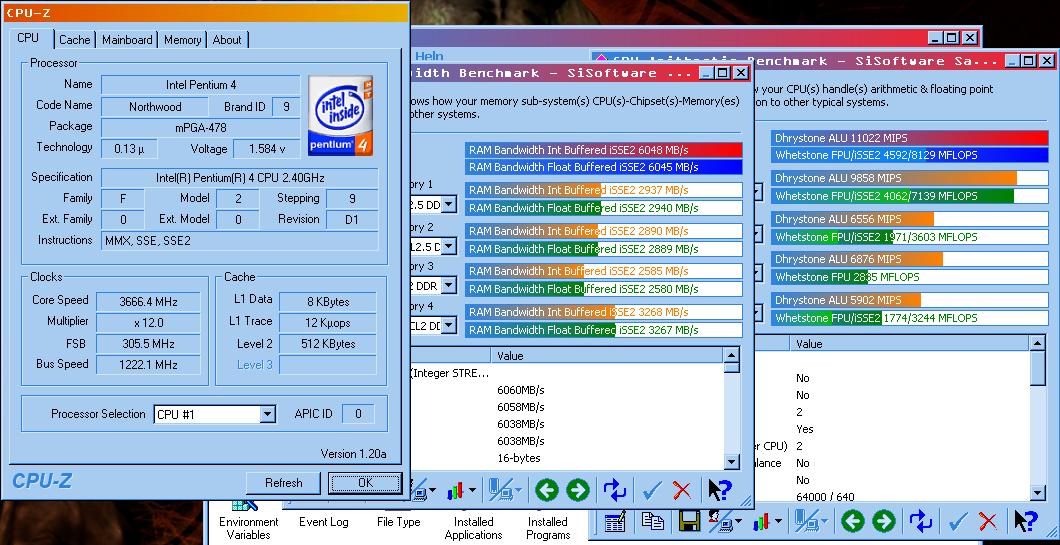
screen3666.jpg


Thats with a 3:2 ratio. Now somethings like 3dMark2001 prefer low latency so a 5:4 ratio at 250FSB with tight timings is better than 250 1:1 with loose. But jumping from 3:2 to 1:1 = 50% increase in ram speed. (granted I know it will not equal 50% increase in ram bandwidth)
 
(granted I know it will not equal 50% increase in ram bandwidth)

granted..........but those are still some nice results, especially that 2.4C you've got there. What kind of temps are you getting, is she prime/gaming stable at 3.66GHz at 1.58v??? Me wants. ;) :p

My old 2.4C could "only" do 3.4GHz at stock voltage but I'm waiting to see what I can do with the P4C800-E/2.6C combo I'm gonna have up and running this week.

I'll get right on it and get lot's of OC and benchmark results posted up here in my thread that started up way back when, when I still had my 2.4C. ;) Seeing as I'll finally have the whole setup up and running with my 1GB of PC3200 Platinum TwinX It'll be a fun trip to say the least. :D
 
its actually only 24 hr prime stable at 3.45Ghz, thats why I was saying I might get it(XMS4400) if it could do DDR575 (FSB288=3.45). I can game on it for hours on end and Run ANYTHING but Prime95 at 3.6Ghz.

At 3.45 with Prime running it tops out at 63C (can run prime 24hrs+ no problem)
At 3.60 with SuperPI and PiFast running it would get up to like 66C (cant run Prime)
 
Originally posted by chrisf6969
its actually only 24 hr prime stable at 3.45Ghz, thats why I was saying I might get it(XMS4400) if it could do DDR575 (FSB288=3.45). I can game on it for hours on end and Run ANYTHING but Prime95 at 3.6Ghz.

At 3.45 with Prime running it tops out at 63C (can run prime 24hrs+ no problem)
At 3.60 with SuperPI and PiFast running it would get up to like 66C (cant run Prime)

ahh, now I see why you're wondering about it so much. ;)

I'm afraid that even if MY cpu was stable at 3.45GHz like that.....I wouldn't be able to leave it there, not if I was toppping out at anything over 60C. I know it isn't dangerous but it's just a little to high for me.

Then again, if I had mine up that high and it WAS stable, I'm sure I'd be singing a different tune. ;) :p
 
Thing is it only runs that hot with Prime. Gaming (most of what I do) doesnt nearly tax the system like Prime does. I can game for hours and the max temp is in the high 50's C at 3.6Ghz.

Tedinde still waiting for your answer? Whats your memory scores at 295 at 1:1 & timings please! :)
 
Originally posted by chrisf6969
Thing is it only runs that hot with Prime. Gaming (most of what I do) doesnt nearly tax the system like Prime does. I can game for hours and the max temp is in the high 50's C at 3.6Ghz.

That's 'cus no game is keeping your CPU at 100% usage for 24 hours on end like Prime does. Seeing as todays video cards are computers in their own, less and less of the load is being dumped on todays CPU's, which is one of the reasons why gaming can often be fine and stable when Prime isn't.....not to mention the temperature aspect of it.

I like to have my systems 24hour Prime stable (as well as clearing a number of other tests) so that I know they'll be fine with ANYTHING I throw at them. With ram, I like to do some preliminary runs of memtest86 so that I know that when/if Prime95 conks out.....it isn't the memory.
 
Originally posted by chrisf6969
Thing is it only runs that hot with Prime. Gaming (most of what I do) doesnt nearly tax the system like Prime does. I can game for hours and the max temp is in the high 50's C at 3.6Ghz.

Tedinde still waiting for your answer? Whats your memory scores at 295 at 1:1 & timings please! :)

PM'd you, the 295fsb was on a AI7 rig, which if you know Pat just isnt there for some reason.

All my screenies are on my Sig rig which i killed the chip yesterday if you check my posts. I've got another one coming FEDEX overnight tomorrow. I'll get you some pics. And i'll seach some of my webshot pics for you, I posted a lot of them @ xtremesystems, let me check my pic uploads over there.

Still tight timings are better and easier with 5:4.


295fsb%20hyperx222.JPG
 
Here's you a screenie

Geil pc4200 2.8c 295fsb, Seached through posts @ xtreme.


6802.jpg
 
at 295 FSB:
3:2 ratio = 5900MB/s (2-2-2-5) approximate from my rig
5:4 ratio = 6540MB/s (2-2-2-5) <-- PROBABLY BEST
1:1 ratio = 6800MB/s (3-4-4-8)

nice, now here's the other question.

What about real world games & benchmarks?

Do they like the low latency or high speed.
 
Originally posted by chrisf6969
at 295 FSB:
3:2 ratio = 5900MB/s (2-2-2-5) approximate from my rig
5:4 ratio = 6540MB/s (2-2-2-5) <-- PROBABLY BEST
1:1 ratio = 6800MB/s (3-4-4-8)

nice, now here's the other question.

What about real world games & benchmarks?

Do they like the low latency or high speed.

Does it really matter? :rolleyes: ;)

Me likes big numbers.....yumm. :p
 
My 3dmark scores are the best @ 5:4 2-2-2-5 Than 1:1 @ high FSB. go figure.

Must find high fsb Low latency ram!!! Chips is dead till tomorrow. But my kingston in the first shot is good up to 260fsb 1:1 2-2-2-6 3.55volts though.:D
 
I don't know why people fuss about timings. I notice like a 0% difference between timings on a P4 system. Much different story on an AMD rig though.
 
At 1:1 ratio timings are not as important b/c the dual channel dram is almost saturating the FSB.

But once you move to the 5:4 or 3:2 ratio, there's a lot more headroom for those timings to make a difference.
 
Originally posted by chrisf6969
At 1:1 ratio timings are not as important b/c the dual channel dram is almost saturating the FSB.

But once you move to the 5:4 or 3:2 ratio, there's a lot more headroom for those timings to make a difference.

For sure. My comp has been down for about two and a half weeks now but when my buddy takes his ram (at 3:2) from CAS 2.5 to 2.....he gains about 300 or 400MB/s bandwidth. Not the largest gain in the world but they're far from high performance dimms that have sadly already hit their peak.

I can't wait to get my 2.6C / P4C800-E / TwinX1024-3200C2PT up and running this weekend!!! :D :D :D
 
Originally posted by batotman
I don't know why people fuss about timings. I notice like a 0% difference between timings on a P4 system. Much different story on an AMD rig though.

Its a whole lot cheaper to buy PC3500 with tight timings then it is to buy that $300+ worthless PC4000+ RAM.

Have you guys even noticed that the new A64's only have about half the bandwidth as the dual channel enabled intel boards and yet they win in nearly every gaming benchmark? Applications are a little different because they can benefit from a little more bandwidth but when you enable dual channel and your just running stock 200MHz speed DIMMS thats 6.4GB/s, theres no way you need more. The only thing you need is tight timings so your cpu can have quick access to the data it needs because in games its constantly jumping around accessing all sorts of different data strings while on a bandwidth benchmark its just pushing straight forward and timings dont play as important role. Timings are just as important on Intel systems as AMD systems and anyone that doesn't see that doesnt know what to look for or how to test right.
 
I want PC4000+ that runs at CAS 2 or at least 2.5!! :cool:

AMD (nforce2) boards run best at 2-2-2-11

while Intel runs best around 2-2-2-6
 
The funny thing is that DDR2 is suppost to have the same or even worse timings then PC4000 from what i hear. I dont know what their thinking in that more bandwidth is going to give more performance. They should be trying to get out DIMM's with even better timings, not worse.
 
2 things:

1st I remember when DDR first came out the lowest available was CAS 2.5 or 3, only later did they get back down to CAS 2 likce SDR

2nd at higher Mhz (speed) you can still have the same equivalent latency with higher CAS timings.

(not sure about math here, but.. I think)
CAS 2 at PC133 = CAS 2.5 at DDR333
they should have the same latency, but the DDR obviously would have a lot higher bandwidth. (on the memory side of things... obviously chipset and CPU can have effect on the latency also)

DDR2 is going to scale better (supposedly) so they will be able to increase the speed to offset the higher (initial) latency/timings.

Similar to RDRAM it had a higher latency... but once they got up to 1066 RDRAM the high speed was offseting the latency

BTW, HardOCP just posted the crappy site who couldnt even test the XMS4400 at its stated speed... http://www.gruntville.com/reviews/memory/corsair_twinx4400/page4.php <--- losers! :) Corsair should have prequalified them by asking them if thay have a system that can hit 275Mhz FSB (test at 3:2 ratio)
 
There are two trains of thought on this, the first is that high speed DIMM's (like PC4000 DDR) can make up for running slower timings by the amount of bandwidth provide the processor. Specifically, bandwidth is the amount of data that can be moved from one given device to another.

Most DIMM's that run tight timings, such as certain PC3200 & PC3500 modules, have to run the memory at lower MHz than the FSB. However, when overclocking to extreme speeds these DIMM's are bandwidth limiting the processor. What I mean by this, is that when the processor requires a great deal of bandwidth, the CPU will have to wait for another clock cycle before being filled, as the memory is just not fast enough to keep up at the same pace. Having a large pool of bandwidth is great when you're working with applications that process a lot of raw data, such as Photoshop or databases for example.

The other point of view is that CAS2-rated PC3200 & 3500 memory can make up for the lack of bandwidth because the memory has a lower latency that in effect moves data between the CPU and memory faster. Programs that do not require a large amount of bandwidth tend to benefit more from quicker data transfers between the memory and the rest of the computer; such as games or 3D applications.
 
BTW, HardOCP just posted the crappy site who couldnt even test the XMS4400 at its stated speed

Heh, read it yesterday.....now I agree with you on the point even more. What an awsome conclusion on a new product to say that they THINK or they HOPE or they HAVE FAITH in the ram.....and they KNOW it WOULD clock higher. :rolleyes: That was really annoying indeed.

Timings are just as important on Intel systems as AMD systems and anyone that doesn't see that doesnt know what to look for or how to test right.

Exactly, I've been trying to get people to understand this forever.....but nobody seems to listen. :rolleyes:

I want PC4000+ that runs at CAS 2 or at least 2.5!!

Come on dude, even us Canucks have got access to that kind of stuff already. Vibe might not have any ATM but it's been available for quite some time.

Good luck finding any CAS2 PC4000 though. :rolleyes: ;) :p
 
Come on dude, even us Canucks have got access to that kind of stuff already. Vibe might not have any ATM but it's been available for quite some time.

Good luck finding any CAS2 PC4000 though. :rolleyes: ;) :p [/B]

2.5-4-4-7 at 4200 isnt too bad. But its the exception... most brands are at 3-4-4-8.

Still noone has good timings. On my point system subtract 2-2-2-5 from the timings. Lower points = good

Ex: 3-4-4-8 subtract 2-2-2-5 = 1+2+2+3 = 8 points away from best
2.5-4-4-7 = 6.5 points still bad timings.
I'd be happy when they can do like 2-3-3-6 = only 3 points

And CAS (1st #) should probably be multiplied by 2 b/c it makes the biggest difference.
 
Originally posted by chrisf6969
2.5-4-4-7 at 4200 isnt too bad. But its the exception... most brands are at 3-4-4-8.

Still noone has good timings. On my point system subtract 2-2-2-5 from the timings. Lower points = good

Ex: 3-4-4-8 subtract 2-2-2-5 = 1+2+2+3 = 8 points away from best
2.5-4-4-7 = 6.5 points still bad timings.
I'd be happy when they can do like 2-3-3-6 = only 3 points

And CAS (1st #) should probably be multiplied by 2 b/c it makes the biggest difference.

I'm fully aware that lower numbers are better and I kinda like your little "system" for ranking timings.....kinda cool. Granted that OCZ is the only exception (so far) but it's nice to see something other then 3-4-4-8 out there none-the-less.
 
Back
Top