• Some users have recently had their accounts hijacked. It seems that the now defunct EVGA forums might have compromised your password there and seems many are using the same PW here. We would suggest you UPDATE YOUR PASSWORD and TURN ON 2FA for your account here to further secure it. None of the compromised accounts had 2FA turned on.
    Once you have enabled 2FA, your account will be updated soon to show a badge, letting other members know that you use 2FA to protect your account. This should be beneficial for everyone that uses FSFT.

Core i3 - Turn off video

KillerFry

Limp Gawd
Joined
Apr 1, 2008
Messages
373
Hey there;

I just got a Core i3 with an MSi H55M-E33 and 4GB of RAM.

But Windows 7 64-bit only has 3.87GB. I figure the IGP on the Core i3 is using the rest of the RAM for video, but I have a GeForce 8800 GTS 640MB.

I see no option in the BIOS to turn it off. Anyone has an idea on how I could go around it?

Thanks in advance,
 
May I dare ask why a Core i3 with a 8800?

Kind of pointless, not everyone's upgrade paths and needs are the same.

For example, I had a 9800GTX+, it was too much for what I need (COD4 @ 1440) so I sold it for $90 and bought this 8800 for $60.

Edit: And WTF most people would say 'you only have a 6420!' Your system is lopsided too...
 
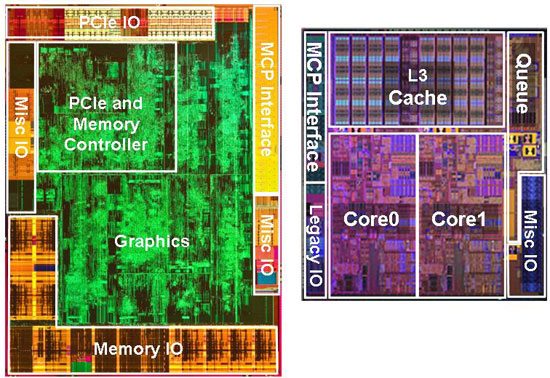
i3 contains two dies, left being 45nm, right 32nm if I remember correctly.
Arrandale_DiePhoto.jpg


Was using i3 w/ a 9800GTX+ (512mb) and 4GB of ram and windows XP x86 was reporting 3.25GB if I remember correctly.

Can you disable the onboard video? I think it disables it self automatically, as I didn't see any options in my bios. But I was using a P55 board too so that probably has something to do with it, lol.
 
Kind of pointless, not everyone's upgrade paths and needs are the same.

For example, I had a 9800GTX+, it was too much for what I need (COD4 @ 1440) so I sold it for $90 and bought this 8800 for $60.

Edit: And WTF most people would say 'you only have a 6420!' Your system is lopsided too...

at 3.2 >.>
like my 860.... @ 3.96 >.>
 
at 3.2 >.>
like my 860.... @ 3.96 >.>

Uh yeah the difference between his @ 3.2 and yours @ 3.96 is like night and day. First-hand experience, I had an E7400 @ 3.6, and upping it to 3.8 made it super quicker, like a magic barrier. And then I got this E8400 for the Hardware Virtualization, and at 3.6 it was noticeably faster than my E7400 @ 3.8. His GTX295 would see an assload more FPS with an 8000 series or any processor clocked over 3.5GHz, never mind a quad core.
 
Uh yeah the difference between his @ 3.2 and yours @ 3.96 is like night and day. First-hand experience, I had an E7400 @ 3.6, and upping it to 3.8 made it super quicker, like a magic barrier. And then I got this E8400 for the Hardware Virtualization, and at 3.6 it was noticeably faster than my E7400 @ 3.8. His GTX295 would see an assload more FPS with an 8000 series or any processor clocked over 3.5GHz, never mind a quad core.

you DO know that VT-x is only for stuff like VMware and does nothing for any thing else right?
and the little bit more of L2 on the 8x00 line doesnt help it much over the 7x00 in games
i think its all in your head 200Mhz one way or the other isnt much when your talking about multi Ghz CPUs
 
Why the hell wouldn't I know what hardware-assisted virtualization is for? Yes, I am a tech. Yes, I run VMs. Yes, I did need hardware-assisted virtaulization to do so. The latest version of VirtualPC requires it and previous versions don't work on Win7. My current certification class uses MS VHD images, so there was really little option but to upgrade to a CPU with VT-x. And the speed increase was not in my head. I am so symbiotic with COD4 that I can feel a split second of faster reaction. There was CPU/FPU magic beyond the 3.6GHz barrier on that processor.
 
Why the hell wouldn't I know what hardware-assisted virtualization is for? Yes, I am a tech. Yes, I run VMs. Yes, I did need hardware-assisted virtaulization to do so. The latest version of Virtual PC requires it and previous versions don't work on Win7. My current certification class uses MS VHD images, so there was really little option but to upgrade to a CPU with VT-x. And the speed increase was not in my head. I am so symbiotic with COD4 that I can feel a split second of faster reaction. There is CPU/FPU magic beyond the 3.6GHz barrier.

yes magic thats not science benchmarks or didnt happen
2. the LATEST ver of Virtual PC DOES NOT need VT-x
http://blogs.msdn.com/virtual_pc_gu...zation-update-now-available-for-download.aspx
 
It doesn't need VT-x, but only on XP! Not exactly what I'm talking about since I clearly mentioned I use Win7. Let's not turn this into a brainfight, sorry but I'm not a moron.

you seem to have that the wrong way around

The key take away here is: If you need to run Windows XP mode on systems without hardware virtualization, you now can. If you want to run other operating systems – you need hardware virtualization support for best performance (and official support from Microsoft).

it only supports running XP in VPC with out it any thing else will need it
 
Whatever, VPC said I needed VT-x when I tried to load Server 2003. I am not wrong about what was on my screen. I got VT-x because I needed it. End of story.
 
"It doesn't need VT-x, but only on XP!"

"you seem to have that the wrong way around "

"it only supports running XP in VPC with out it any thing else will need it"

...

English isn't your first language, isn't it? Or did you just wake up and still have crusties in your eyes and mis-read what I wrote?

no but i clearly have VPC working on my laptop that doesnt have VT-x
laptops OS is 7 Pro VPC is emulating XP
sooo yea.... what was that again?
XP Mode is a Windows 7 ONLY thing this patch was namely so people could roll out systems with XP mode for crappy aps that needed it on older pcs with out VT-x WILE using windows 7 learn to read the patch notes
 
So is it a bios setting? Or is the op stuck not having access to all his/her ram? I'd have thought it would auto disable having detected the separate video card.
 
The reason it's a Core i3 with an GF 8800 is because I had a budget constraint, so I just upgraded the the CPU, mobo and RAM. I was running an Athlon 64 X2 3800. :p It runs way better than before :p

There is a BIOS setting that says something like video device, and lets me choose between Internal, PCI and PCI-e. Obviously I set it to PCI-e, but it still only sees 3.87GB of RAM :S

EDIT: The videocard I already had. I'm thinking on upgrading it, but I'm waiting for Fermi to come out and then see how the playing ground moves around. Overall I like AMD cards better, but I'll see if there's a price cut once Fermi is released.
 
Kind of pointless, not everyone's upgrade paths and needs are the same.

For example, I had a 9800GTX+, it was too much for what I need (COD4 @ 1440) so I sold it for $90 and bought this 8800 for $60.

Edit: And WTF most people would say 'you only have a 6420!' Your system is lopsided too...
What I mean is why a Core i3 with a dedicated video card and not a i5 750 + the same card? I mean the whole point of the i3 is HTPC crowd who would use integrated video I though.

nm saw the last reply but anyway I still wonder. The 750 would have been a better choice in the mid term if you have a budget and dont want to upgrade often.

And about my CPU the reason i'm not running an i7 right now is that i'm waiting for my trip to boston this weekend to buy it at microcenter. I have all the remaining stuff home already. P6T Deluxe - Noctua NH-D14 - 12GB G.Skill 1600
 
Last edited:
Back
Top