• Some users have recently had their accounts hijacked. It seems that the now defunct EVGA forums might have compromised your password there and seems many are using the same PW here. We would suggest you UPDATE YOUR PASSWORD and TURN ON 2FA for your account here to further secure it. None of the compromised accounts had 2FA turned on.
    Once you have enabled 2FA, your account will be updated soon to show a badge, letting other members know that you use 2FA to protect your account. This should be beneficial for everyone that uses FSFT.

Cooling a 6600GT PCI-E GPU and Memory

Diablo2K

Supreme [H]ardness
2FA
Joined
Aug 10, 2000
Messages
6,849
I have a Gigabyte 6600GT PCI-E Card. (not the one with passive cooling). The core temps are ok, But the Memory on this card gets super hot, I dont have a temp meter hooked up to it, but It is very hot to the touch in the memory area. I would really like to upgrade the cooling on this card, but I am unsure of what to get.
My first thought was to get a Zalman 700 cooler, But it won't work with the Memory heatsinks on this card. I can't find any other heatsinks that will also cool the memory. I dont really want to hack up any memory heatsinks.
I will be getting the Aspire X-Qpack case so I will also need to make sure that it will fit into that case as well.
 
So you have sinks on your memory now? Cause the only retail Gigab's that I have seen all have un-sinked ram.
 
i don't really think you need ram sinks on a 6600GT, just improve your airflow.

my bfg 6600GT's ram sinks aren't too hot, they are just warm, but i have a 120mm fan blowing air straight across it, so i need no cooling.
 
NitrouseXpress60 said:
i don't really think you need ram sinks on a 6600GT, just improve your airflow.

my bfg 6600GT's ram sinks aren't too hot, they are just warm, but i have a 120mm fan blowing air straight across it, so i need no cooling.

So what you are saying, is that you don't need cooling because you are cooling it?


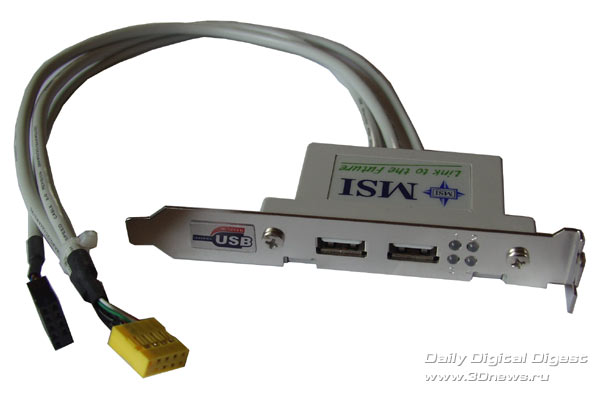
i have the same gigabyte as you have, what i did to cool my GPU temps by 10 degrees Celcius was get a PCI usb card like this:
msi-usb2-bracket.jpg


then i got rid of the wires inside by opening the case up. then i got an 80 MM fan and put tape on one side of the fan and on taped to the usp block. then i used super glue and now i have a ghetto pci slot fan. i now idle at 42 Celcius
 
Tiny said:
So you have sinks on your memory now? Cause the only retail Gigab's that I have seen all have un-sinked ram.
Nope, just bare memory.


NitrouseXpress60 said:
i don't really think you need ram sinks on a 6600GT, just improve your airflow.

my bfg 6600GT's ram sinks aren't too hot, they are just warm, but i have a 120mm fan blowing air straight across it, so i need no cooling.

I know that under the video card theres alot of dead air, but I never had a video card where the memory got as hot as this cards memory is. At Idle I am guessing the temps to be over 60c, and who knows what under load. I have had a crash or 2 playing World of Warcraft. I am thinking its cause of the heat issues. When I get the X-Qpack I am also sure that the airflow around the card will be alot better as the card will be verticle instead of horizontil like it is now and the PSU fan will suck that heat away.
I tried the "Detect Optimal Frequencies" and the memory setting it chose is 1175, which is awsome overclock, but it wont run anything at those speeds for very long before I get errors.

I based my comments on the Zalman 700 on the reviews on neweggs site. But I just seen on this forum pics of the exact same card with the Zalman 700 useing the stock Ramsinks and there was plenty of room. I wonder why everyone on neweggs reviews is haveing problems with clearance.
Looks like I may be getting the 700 and OCZ Copper Ramsinks.
 
0810 said:
i have the same gigabyte as you have, what i did to cool my GPU temps by 10 degrees Celcius was get a PCI usb card like this:http://www.3dnews.ru/documents/3617/msi-usb2-bracket.jpg[IMG]

then i got rid of the wires inside by opening the case up. then i got an 80 MM fan and put tape on one side of the fan and on taped to the usp block. then i used super glue and now i have a ghetto pci slot fan. i now idle at 42 Celcius[/QUOTE]

LOL, I actually have something sorta like that, I took a blank PCI slot cover, Bent it, drilled a couple holes, bolted a 80mm fan to it so it now sits so it blows air over the video card. works the best when I dont have the side cover on. but still does what it needs to with the cover on.
 
I don't believe that there are clearence issues. Zalman has it on their compatability list and like you said...there are people on the board that have it installed.

Some newegg customers are.....uhmm....lets say, not as savy as others.
 
Back
Top