• Some users have recently had their accounts hijacked. It seems that the now defunct EVGA forums might have compromised your password there and seems many are using the same PW here. We would suggest you UPDATE YOUR PASSWORD and TURN ON 2FA for your account here to further secure it. None of the compromised accounts had 2FA turned on.
    Once you have enabled 2FA, your account will be updated soon to show a badge, letting other members know that you use 2FA to protect your account. This should be beneficial for everyone that uses FSFT.

Computer Area Lighting

Ducman69

[H]F Junkie
Joined
Jul 12, 2007
Messages
10,561
In my office/game room, the overhead lighting is a bit bright for gaming/watching videos etc.

Rather than getting a simple desk lamp, I am curious if there are any suggestions for lighting that would turn on and off with the computer, preferably decently bright mounted invisibly to the back of the 30" monitor.

I was thinking that a USB light strip would be my best bet, but wanted to poll to see if anyone had any better creative ideas or something specific I should look at (saw nothing great on amazon/newegg).

Perhaps even something that can simulate the "ambient lighting" that some televisions now have, where the color of the surround light reflects the color of what is on the screen, if there is such a thing.

Thoughts?

5423541097_8ff4da9d7d_o.jpg
 
Last edited:
You're (kind of) in luck. Mad Catz should be coming out with an amBX (ambient lighting) system for PCs fairly soon, to replace the older Philips models that are no longer being manufactured. Supposedly they were to start shipping the "Cyborg Gaming Lights" by the end of January, but seemingly they've missed that deadline. It's sort of up in the air at this point though.

Basically, they're USB-powered and controlled LED light pods that react to whatever's on the display. This is essentially how it looks when you have the pods mounted behind your monitor, out of sight (though note that this is a different system entirely).
 
Awesome! Do not think I would have stumbled onto that on my own! Many thanks! :D

http://legitreviews.com/article/1523/1/

http://www.youtube.com/watch?v=Op-e5_sp594&feature=player_embedded
(Skip to 2:02)

The only problem I see though is that its not just the color changing but the intensity quite dramatically. :eek::

In a dark room, I am thinking this may cause eyestrain with pupils constantly dilating and contracting, and perhaps a simple system may be better for eye comfort after all. I would wager the USB only powered ones are probably too weak though, meaning manual switch ones would probably be needed. Hmm...
 
Maybe a cheap solution would be a cold cathode kit.
Ah, just one of those internal kits and then find a really long 12v molex connector to go outside of the case?

Yeah, I think that may be best. Good thinking. :cool:
 
I like this thread! I think it has inspired me to wire up my own LED set using 2 USB connectors :D
 
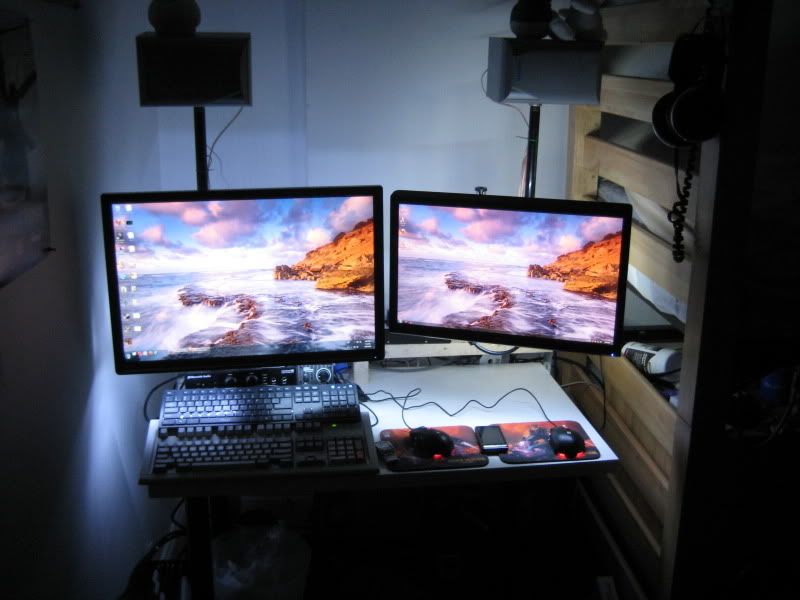
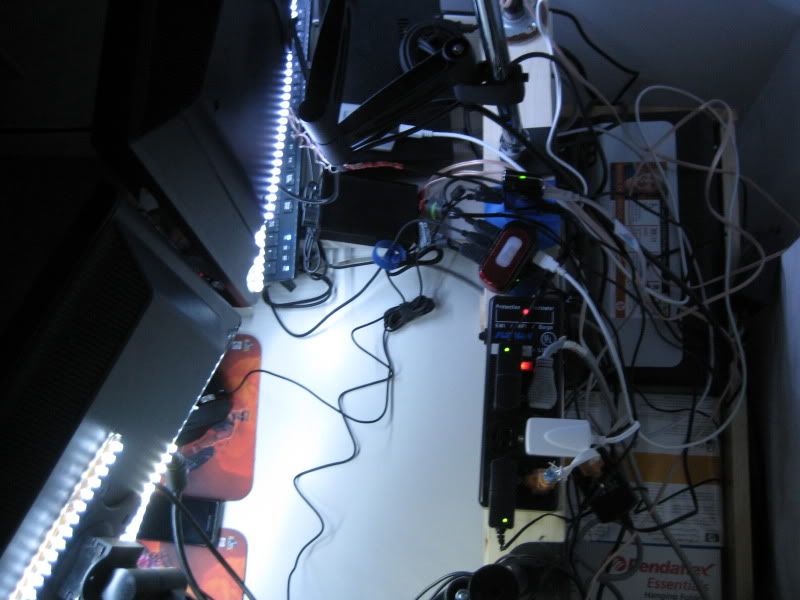
I have eight 12" white led strips on the back of my lcds. Will post pix later. They are hotglued on so that they only light up behind the monitor. I just use a pci bracket with a female molex connector from monoprice, and a long 12v to molex cable to power them, however, I am planning on using a 3 pin fan connector and hooking it up to a fan controller channel for brightness control.
 
Thanks JR! Definitely an option as well. In fact, I may even use that for my wall mounted TV in the living room if not for the PC.
I have eight 12" white led strips on the back of my lcds. Will post pix later. They are hotglued on so that they only light up behind the monitor. I just use a pci bracket with a female molex connector from monoprice, and a long 12v to molex cable to power them, however, I am planning on using a 3 pin fan connector and hooking it up to a fan controller channel for brightness control.
Do you recall the brand so I could look up pricing/etc? Thanks! :cool:
 
In my office/game room, the overhead lighting is a bit bright for gaming/watching videos etc.

Rather than getting a simple desk lamp, I am curious if there are any suggestions for lighting that would turn on and off with the computer, preferably decently bright mounted invisibly to the back of the 30" monitor.

i know it's not what you were after, but i've been using a desklamp to back light my 30in screen and light the keys on my keyboard for years. i'm using a kensington desk arm to mount the monitor which give a nice uncluttered feel to the desk. it's nothing fancy like what you're after but it works.

Desktop%20with%20samsung%20305t+%20&%20backlight%20(blur).jpg


its a shitty photo b/c of the longer exposure time (couldn't keep the camera still for that long). the lighting isn't uniform because of the directional light source, personally i wouldn't want it any brighter. the lamp isn't visable though you can see the switch just above the mouse.
 
Not sure the exact brand. They were from a Hong Kong based seller on eBay. Cost a dollar or two each.

IMG_3669.jpg

IMG_3668.jpg
 
nice lighting effect nalc. that's quite the rats nest behind your monitors. in truth mine probably isn't any better.
 
It's better now after some re-organization, but having two full desktops on a 3.5 foot wide desk kinda does that.
 
It's better now after some re-organization, but having two full desktops on a 3.5 foot wide desk kinda does that.

yeah i was gonna say, looks like your computer is in a closet. cosy though...
 
was also going to say, monitor mount arms rock. will never go back to using the stands the manufactures supply with their monitors. frees up desk space, gives more flexibility on how you use your screen (rotate btw landscape & portrait with ease, view depth with rake etc).
 
This might be a little [H]arder (and more expensive) than is necessary, but what about taking a pico projector and putting a diffuser over the lens? Put the projector behind the monitor and project onto the wall while you set it to mirror your main display. The diffuser should soften the image enough that you don't notice a lot of details in the light, and the intensity and color will vary with whatever is on your screen. You could also mess with the focus to help soften the image up as well.
 
As an Amazon Associate, HardForum may earn from qualifying purchases.
This might be a little [H]arder (and more expensive) than is necessary, but what about taking a pico projector and putting a diffuser over the lens? Put the projector behind the monitor and project onto the wall while you set it to mirror your main display. The diffuser should soften the image enough that you don't notice a lot of details in the light, and the intensity and color will vary with whatever is on your screen. You could also mess with the focus to help soften the image up as well.

it took me awhile to visualise what you were talking about but that's a pretty interesting idea. especially like the concept of mirroring the display of your desktop (be a cool effect while watching a film/video).

there might be an issue for the projector though. is there going to be enough distance behind your monitor to throw a big enough image one the wall (behind) that can be seen from infront of the monitor. may have to alter the angle of projector to display enough of an effect. unless ones desk is far enough away from the wall, the projector may have to be moved to another location.
 
As an Amazon Associate, HardForum may earn from qualifying purchases.
You're absolutely right. In a short throw situation there's one cheap option I can think of. You could put a concave lens in front of the projector. This will spread the light out. You can use the magnification equation (scroll down the Wiki page) to figure out specifics of the lens you need for this application. You should be able to pick up a cheap one that students normally use in an intro physics lab.

The only thing I worry about is that a pico projector won't be bright enough once the image has been spread out all over a wall with a lens plus a diffuser. If you already had a projector to play with it would be a lot easier to create an experiment because a diffuser is cheap (e.g. a nylon stocking or petroleum jelly on a cheap UV filter) and so is a concave lens (I see some for under $2.)
 
Unfortunately, its a Dell U3011 literally pushed up flat against the wall, and I like to be able to adjust the angle slightly left or right, so there isn't much realestate behind there for a desk lamp or pico projector.

Regarding the desk arm, also good contribution to the thread, but my desk is a double-decker design that does not allow any such clamping, and I don't want to damage it. An offset wallmount might be an option, but I think all I really need for right now is lighting.

Very very nice nalc! :D But yeah, twist ties and spiral tubing are your friend. :p

Shopping for the molex cold-cathode idea presented right now, and believe thats the way I'm going to go. Will update w/ pics when all setup, woot!
 
Last edited:
Back
Top