![[H]ard|Forum](/styles/hardforum/xenforo/logo_dark.png)
my-name-here
Limp Gawd
- Joined
- Mar 23, 2012
- Messages
- 281
After seeing how classy someone else's black and white build was, the red in my system has just seemed kind of trashy (for lack of a better word) looking. So I'm doing a color swap!
Amazon is amazing and letting my return my current motherboard more than 5 months after purchase! which is the whole reason this change is even occurring... if they had said no i probably would have just left it at that and dealt with my red scheme.
here are some BEFORE pics for reference:


first setps:
remove stickers from the gpus
swap out color rings on the fans
remove the custom stickers i put on the fans as well
remove red stripe from psu
remove all red from ssd
the only step of real substance here is the last... here are the pics:
peeling label off ssd. made a photocopy first just inc ase it didn't end up in one piece:

success!

i was originally going to coat it in plasti dip. but after realizing it was all aluminum i decided on a different approach:

sanding done:

printed off a black and white copy of the original label onto some glossy sticker paper. it didn't turn out as good as i would have liked (the reds came out especially dark) but it's the best i could get with my crappy printer:

stickers off the fans:

all the changes thus far:

next steps:
old motherboard (maximus IV extreme) out. new motherboard... sabertooth z77, actually got better overclocks with this board. i'm really loving it so far. also used some arctic silver 5 on the cpu this time around. really impressed with the 5-7 degree temp drops even when running the fan 4v less than before!
new ram! corsair 4x4gb dominators platinum @ 1866
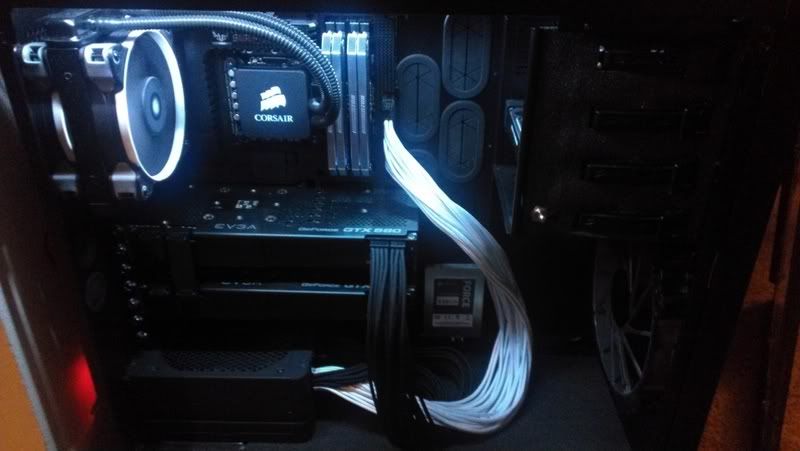
psu sleeving, replacing all red for white. also sleeving on 8 pin power extender. and used paint marker on the red connectors for the pcie cables. if this ends up looking bad i'll have to replace them with actual black ones.
replaced some red cords with black ones... they weren't really that visible in the first place though.
sli bridge adjustments
pics (much less this time):
psu sleeving:

and here are the changes:

sli bridge changes( i know i only need one, but i like this look) coated in plasti dip, used paint marker to make the connectors even more black on both bridges... for some reason the plastic they used was really chalky:

only thing left to do now is plasti dip all the color on the motherboard. waiting on refund from original board first just in case i need to send this board back... which would make me really sad.
i'll post some pics of that and a few completed when it's all finished.
Amazon is amazing and letting my return my current motherboard more than 5 months after purchase! which is the whole reason this change is even occurring... if they had said no i probably would have just left it at that and dealt with my red scheme.
here are some BEFORE pics for reference:
first setps:
remove stickers from the gpus
swap out color rings on the fans
remove the custom stickers i put on the fans as well
remove red stripe from psu
remove all red from ssd
the only step of real substance here is the last... here are the pics:
peeling label off ssd. made a photocopy first just inc ase it didn't end up in one piece:
success!
i was originally going to coat it in plasti dip. but after realizing it was all aluminum i decided on a different approach:
sanding done:
printed off a black and white copy of the original label onto some glossy sticker paper. it didn't turn out as good as i would have liked (the reds came out especially dark) but it's the best i could get with my crappy printer:
stickers off the fans:
all the changes thus far:
next steps:
old motherboard (maximus IV extreme) out. new motherboard... sabertooth z77, actually got better overclocks with this board. i'm really loving it so far. also used some arctic silver 5 on the cpu this time around. really impressed with the 5-7 degree temp drops even when running the fan 4v less than before!
new ram! corsair 4x4gb dominators platinum @ 1866
psu sleeving, replacing all red for white. also sleeving on 8 pin power extender. and used paint marker on the red connectors for the pcie cables. if this ends up looking bad i'll have to replace them with actual black ones.
replaced some red cords with black ones... they weren't really that visible in the first place though.
sli bridge adjustments
pics (much less this time):
psu sleeving:
and here are the changes:
sli bridge changes( i know i only need one, but i like this look) coated in plasti dip, used paint marker to make the connectors even more black on both bridges... for some reason the plastic they used was really chalky:
only thing left to do now is plasti dip all the color on the motherboard. waiting on refund from original board first just in case i need to send this board back... which would make me really sad.
i'll post some pics of that and a few completed when it's all finished.