• Some users have recently had their accounts hijacked. It seems that the now defunct EVGA forums might have compromised your password there and seems many are using the same PW here. We would suggest you UPDATE YOUR PASSWORD and TURN ON 2FA for your account here to further secure it. None of the compromised accounts had 2FA turned on.
    Once you have enabled 2FA, your account will be updated soon to show a badge, letting other members know that you use 2FA to protect your account. This should be beneficial for everyone that uses FSFT.

CM Stacker 830

kraemer007

Weaksauce
Joined
Mar 30, 2005
Messages
120
Does anybody have a Coolermaster CM Stacker 830?? On the web site they show that it has three 120mm fans mounted in it. Are the 5.25 slots still usable with the 120mm fans mounted???
 
there are 9 5.25" drives in there

with 3 120mm fans you have no spare5.25" bays
 
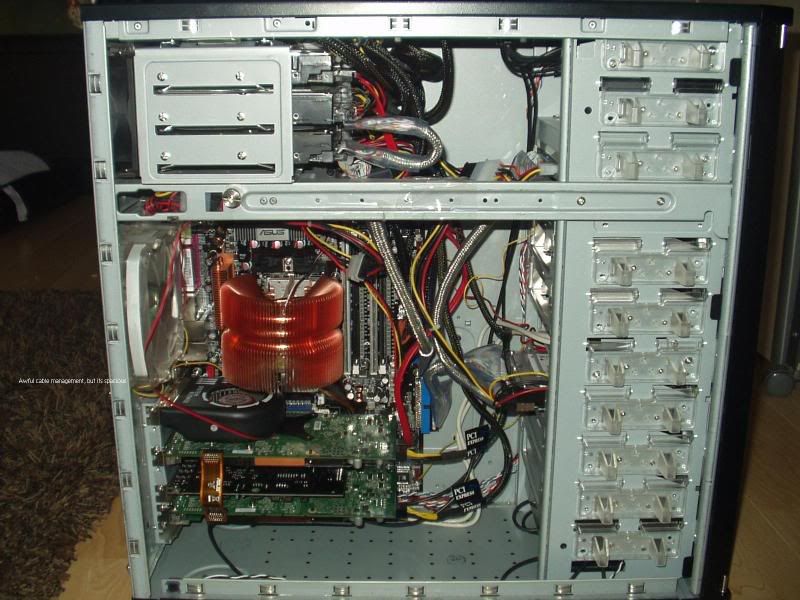
get the armor, with the three front 120mm fans (on the 3 in 1 modules) you still have 2 spare front 5.25 drive bays if you take out the bottom drawer (which isn't all that useful), but one of the spares has the power switch buttons (but has room for a floppy or media reader in the middle). Also has a rear 120mm as well as a rear 80mm on the back rear HDD cage and a top exhaust 80mm (if your PSU isn't too big like mine is :p ). I recommend the regular version, the xaser armor version has a funky window that does nothing for the case, you are better off with the solid metal side.e The front flaps are utterly useless and get in the way, but with a few screws they come off easy enough leaving a decently clean front. For alot less than the stacker 830, you will have more money for computer part upgrades or bank. I can post some pics of my setup if you want to know what im talking about :cool:
 
tacticus said:
there are 9 5.25" drives in there

with 3 120mm fans you have no spare5.25" bays
So, the fans dont fit IN FRONT of the 5.25 drive bays? That sounds wierd. How do they expect you to cool the drive bays if you want to put hard drives in em?
 
like the armor, the fans are mounted in the front of a HDD cage, i think the stacker cages come with 4 3.5 drive bays though, so you would have room for 12 hard drives, but no opticals.
 
aright, give me like 20 mins, have to unhook my baby and ill take some pics of the innerds to show the space with the rig in the top of my sig.
 
I am sure your going to think I am a nutbag and over analyzing this, but I need to be able to have 8 hard drives in the beast and I need fans keeping them cool. The other stacker (http://www.coolermaster-usa.com/Products.aspx?pid=633) shows a pic with three fans in the front but again, its not obvious if you can have the fans in there cooling the drives. Also, the "armor" your talkin about, is that a coolermaster product? Its not on their web page...
 
its a thermaltake product, but don't let that put you down, it's has a great build quality to it unlike some of their other products. With three of the 3 of the HDD cages (you have to buy 2 of them separately) you have 3 120mm fans running in front, with room for 9 Hard drives and like i was saying if you remove the included tray on the bottom you have 2 remaining slots, one 5.25 and one 3.5 drive bay.

*edit* actually that leaves you room for 12 hard drives =P, each cage with it's own fan cooling it, i forgot the extra cage in the back that i just took pictures of. . duh
 
So the fans actually sit IN FRONT of the hard drives on the armor? On the Stacker 830 the fans go IN PLACE of the hard drives!
 
yea, they are mounted in front of the hard drive cages to cool the hard drives and for intake airflow to the case. I only have one hard drive installed in the front so most of the air is being pushed into the case.
 
Whoa, and I was going to pick the stacker based on looks and a dislike for thermaltake. Guess i will have to look closer. Pretty sure they have kit for the stacker though, 4 in 3 they call them, 4 drives in the space of 3 - 5.25" bays and I thought a fan in front. =/
 
Yea, I am having a tough time finding a case I can put a lot of drives in and keeping them cool...
 
So look, at this pic:
1083_1Misc.jpg

If you put in the three fans, how is your computer supposed to run without a hard drive? I dont get it....
 
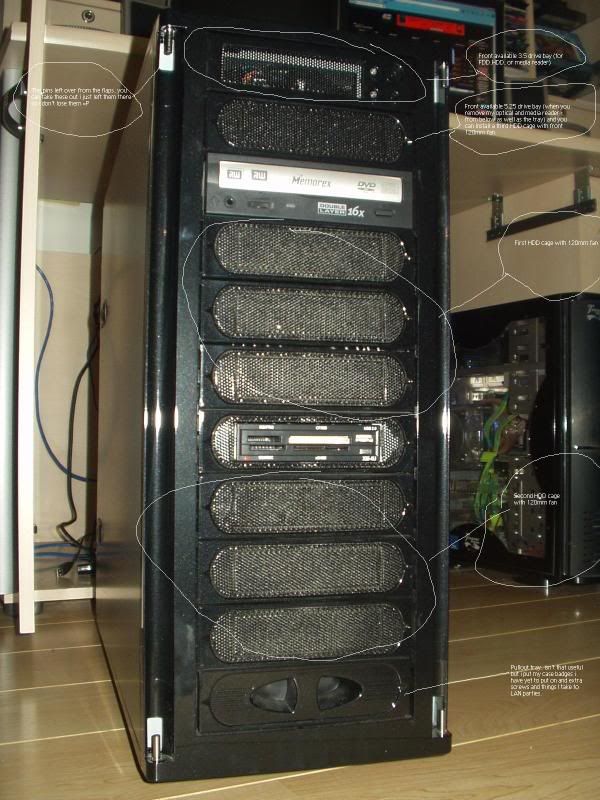
font came out too small, so captions are below each picture

P1010168.jpg

Basically it says the top is the power switch drive bay with the spare 3.5 bay. The one below it is the spare 5.25 bay when you take out my optical, media reader, and bottom tray and install the third 120mm fan with HDD cage.

P1010170.jpg

Rear with the top 80mm exhaust on the rear drive cage and 120mm rear exhaust

P1010171.jpg

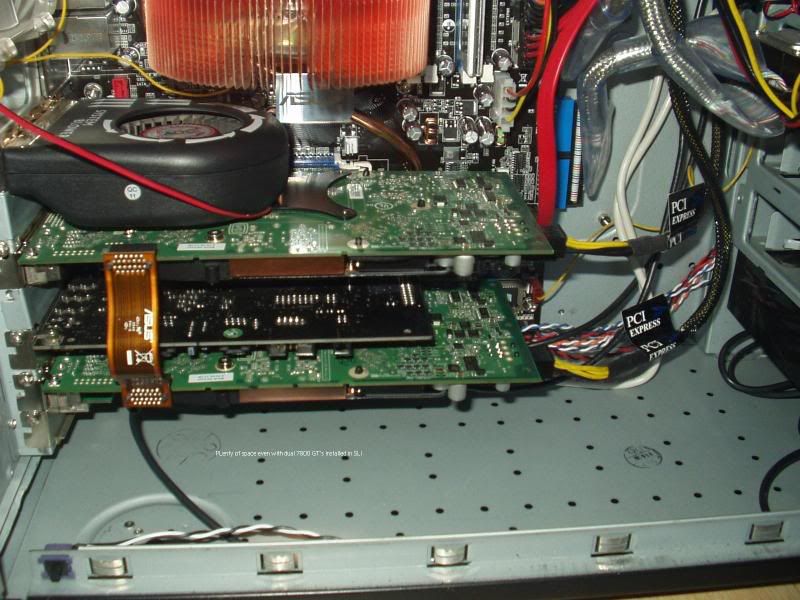
lots of room!!

P1010173.jpg

roomy even for dual 7800GT's in SLI

P1010174.jpg

the rear top HDD cage next to the PSU.

P1010169.jpg

the top exhaust 80mm fan mount area with top usb,firewire, and audio/mic connectors.

P1010175.jpg

my PSU was too bit to install the top 80mm fan, but you will probably be able to mount it fine

P1010176.jpg

more room for cable management behind the mobo tray

P1010177.jpg

i couldnt find a way to mount my 9500 zalman horizontal so i just installed an extra fan to remove the hot air from the HSF's intake fan.

P1010178.jpg

my case installed into my desk
 
when you buy the HDD cages they come preinstalled on the front of the cage, you can of course take those off and mount any 120mm fan you want. The case comes stock with one cage.
 
kraemer007 said:
So the fans actually sit IN FRONT of the hard drives on the armor? On the Stacker 830 the fans go IN PLACE of the hard drives!


Umm... I dunno what you're thinking, but the Stackers have 4-in-3 modules as well. Comes with one, and you can buy the two others. Same deal, HD cage with a 120 mounted on the front.
 
Tysterisk said:
Umm... I dunno what you're thinking, but the Stackers have 4-in-3 modules as well. Comes with one, and you can buy the two others. Same deal, HD cage with a 120 mounted on the front.
Look at the picture of the stacker on the previous page. The fans actually displace the hard drive. I called Coolermaster and asked them, they told me that indeed with the fans mounted you cant use the 5.25 bays....
 
kraemer007 said:
Look at the picture of the stacker on the previous page. The fans actually displace the hard drive. I called Coolermaster and asked them, they told me that indeed with the fans mounted you cant use the 5.25 bays....
You can't use them as 5.25" bays, but the drive modules create an even greater number of 3.5" bays on the inside. When the fans are mounted on the 4-in-3 modules, you can fit four hard drives behind each fan. I suppose you could find a way duct tape a regular fan in that space, but the the drive modules are easier and more efficent.
 
well if you want a bunch of hard drives the armor holds more, with the three front cages, the rear cage, and the two front 3.5 drive bays you can hold 14 hard drives total, or if you want one optical that's 13, the 830 is ok, but with the wide open mesh sides it really kills the airflow.
 
did anyone else with the 830 find the side panel a pain to open and close ?
 
board2death986 said:
well if you want a bunch of hard drives the armor holds more, with the three front cages, the rear cage, and the two front 3.5 drive bays you can hold 14 hard drives total, or if you want one optical that's 13, the 830 is ok, but with the wide open mesh sides it really kills the airflow.
The 830 sacrificed 2-3 bays to get that fancy front door. The original Stacker holds 12 drives and 2 opticals (or 15 drives with a 3-in-2 up top). The 830 drops to 8 drives and 3 opticals.

I've seen two Stackers with the power switches relocated to allow four 4-in-3 and 5-in-3 cages - 16 and 20 drives.
 
UPDATE: I went with the Coolermaster Stacker 830. Hands down, the most incredible case of all time! The guys at Coolermaster and elsewhere are wrong. You CAN put harddrives in all of the nine 5.25 slots and still put the three front fans in the front of the case. You can also mount 12 hard disks without using the "four into three stacker". You just have to remove their "auto mount thingys", the black mount locks.

What puts this above all others is the clear fan door. It lets you mount fans anywhere that you need some extra cooling. With several fan speed controllers you can have a perfectly silent, yet incredibly well cooled machine without going to water cooling. The icing on the cake here is that when the time comes, I wont have to go buy a BTX case, the Coolermaster is good to go. Damn, this is a nice box!

I'd post pics, but theyd not look as good as the ones at coolermaster.com.
 
Zamboni said:
I've seen two Stackers with the power switches relocated to allow four 4-in-3 and 5-in-3 cages - 16 and 20 drives.
With Seagate 500 drives available (and now 750) I cant see the need for more than 8 drives. Damn, just buy a SAN!!!
 
kraemer007 said:
UPDATE: I went with the Coolermaster Stacker 830. Hands down, the most incredible case of all time! The guys at Coolermaster and elsewhere are wrong. You CAN put harddrives in all of the nine 5.25 slots and still put the three front fans in the front of the case. You can also mount 12 hard disks without using the "four into three stacker". You just have to remove their "auto mount thingys", the black mount locks.

What puts this above all others is the clear fan door. It lets you mount fans anywhere that you need some extra cooling. With several fan speed controllers you can have a perfectly silent, yet incredibly well cooled machine without going to water cooling. The icing on the cake here is that when the time comes, I wont have to go buy a BTX case, the Coolermaster is good to go. Damn, this is a nice box!

I'd post pics, but theyd not look as good as the ones at coolermaster.com.

Yeah, next mod for me is definitely going to be an 830. Cut out the mesh in the door, remove the fan rack, pop a piece of plexi where the mesh was. Add 6 stand-off bolts (custom machined aluminum if I can get 'em) around the corners and put another etched piece of plexi with LEDs in the bolts to light it up nice and shiny. Only part I'm having trouble figuring out is where in the hell I'm gonna fit a ThermoChill PA120.3. Part of me says screw it, put it in the drive bays (they're deep enough that I can use the 4-in-3 that comes with the case for 2-3 HDs, have an optical above that, fan controller/etc, and still have the whole 360mm rad with fan assembly fit comfortably in there) and deal with a little restricted air flow. Other hand, there's the possibility of mounting it up top with a nice shiny Aquacomputer or similar metal grille. Only problem there is finding out where I'm going to stick a PC Power & Cooling 510 in the case.
 
kraemer007 said:
With Seagate 500 drives available (and now 750) I cant see the need for more than 8 drives. Damn, just buy a SAN!!!
A 16-drive Stacker is a poor-man's SAN (4TB, 16x250). Fo now, it's still cheaper to stack up smaller drives:

8x500 is $2400 for 3500GB
16x250 is $1360 for 3750GB

If only Xserves would go on sale... :(
 
Got myself an 830 2 days ago, and I also have the older huge Stacker, as well as a lian-li v1000

I can say is that the 830 is the best out of the 3, if only the side panels were as easy to open as the V1000! You really have to push and pull and put a lot of force to slide them out, hopefully they will get a bit looser with time. The Lian-Li has a much more understated design (and it looked pretty radical when it was new, with its Mac G5 look!), and the older stacker is just great to stack lots of hard drives :D

Really tempted to go into watercooling in the 830. You could fit a 2x 120mm radiator in the front bay area if you only have one optical drive, and a single 120mm one on the top in the space between the inner shell and outer shell... Definitely worth experimenting with!
 
Back
Top