i have a PNY 240gb ssd(have windows 10 on it) and a 128gb crucial(that i just took out from my cousin computer). i want to use 2 ssd, can i?. im installed the ssd and i initialize the ssd, but when i initialize the ssd, it's said that IO error some thing. Help!
![[H]ard|Forum](/styles/hardforum/xenforo/logo_dark.png)
Navigation
Install the app
How to install the app on iOS
Follow along with the video below to see how to install our site as a web app on your home screen.
Note: This feature may not be available in some browsers.
More options
You are using an out of date browser. It may not display this or other websites correctly.
You should upgrade or use an alternative browser.
You should upgrade or use an alternative browser.
You can use as many SSD's as you can normal spinning hard drives.
Give more detail about the error. What do you mean by initialize the ssd? Be specific about the error.
Attachments
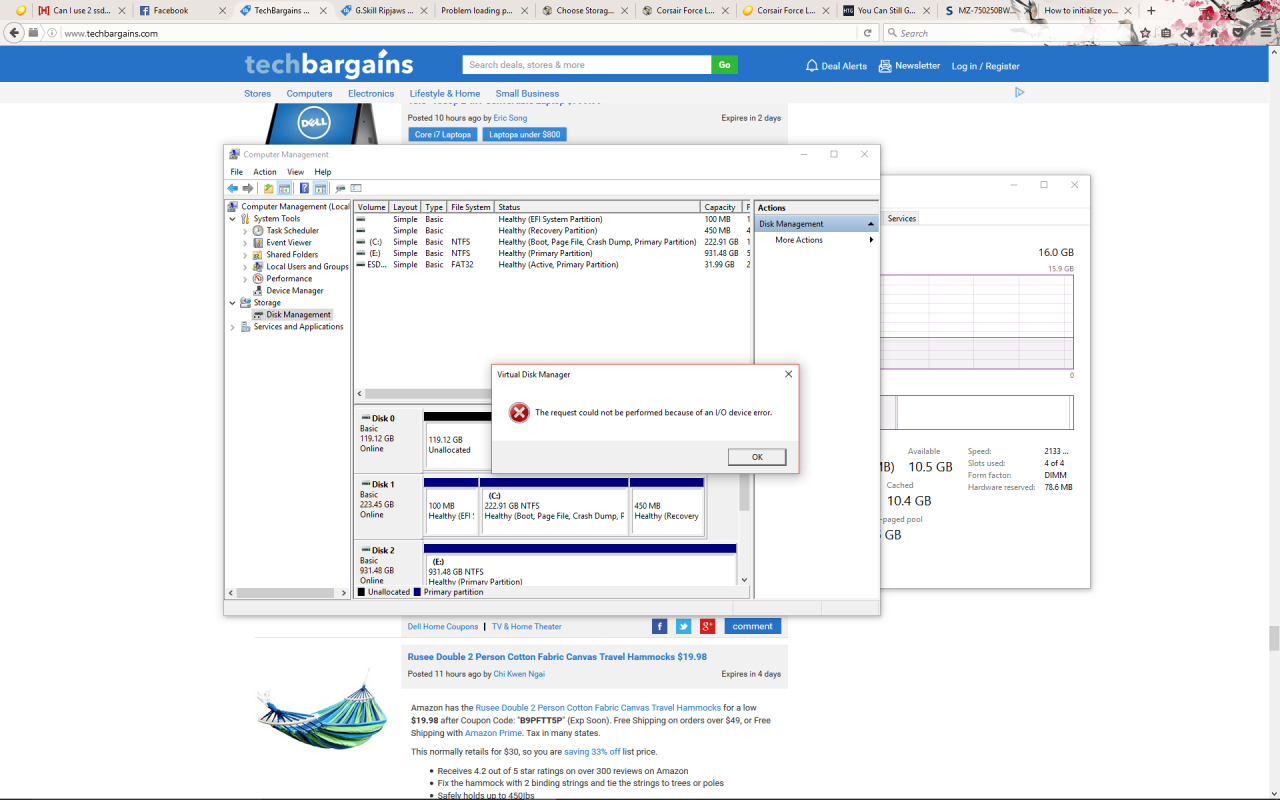
You may have a faulty SSD.
However, you can try cleaning it with Diskpart to see if something is just messed up.
open up an admin command prompt and enter these commands
diskpart
list disk
select disk (whatever the number of the disk is - looks to be 0 from your screenshot)
clean
create partition primary
format fs=ntfs quick
If that doesn't work, then the disk is hosed.
Last resort is to try a firmware update on the drive.
However, you can try cleaning it with Diskpart to see if something is just messed up.
open up an admin command prompt and enter these commands
diskpart
list disk
select disk (whatever the number of the disk is - looks to be 0 from your screenshot)
clean
create partition primary
format fs=ntfs quick
If that doesn't work, then the disk is hosed.
Last resort is to try a firmware update on the drive.