• Some users have recently had their accounts hijacked. It seems that the now defunct EVGA forums might have compromised your password there and seems many are using the same PW here. We would suggest you UPDATE YOUR PASSWORD and TURN ON 2FA for your account here to further secure it. None of the compromised accounts had 2FA turned on.
    Once you have enabled 2FA, your account will be updated soon to show a badge, letting other members know that you use 2FA to protect your account. This should be beneficial for everyone that uses FSFT.

Calling all hardware geeks

FatteyMattey

Limp Gawd
Joined
Sep 5, 2001
Messages
369
Up until this point I've figured that I was pretty knowledgable in the hardware area. I'm about to cry.

I RMA'd my power supply. That works now. I RMA'd my motherboard, so that should be good. BUT:

For half a year now I've been workign on this, partly because I"m hardcore slacking and work like once a month on it.

I'll turn my computer on and it will not detect the hard drives. Depending on how I have it hooked up I get one of these 3 problems.

1. It will just sit at "Detecting IDE Drives...."

2. It detects None for every drive slot.

3. I get this error "CMOS Checksum Error"

--Please guys, I have NEVER needed your help as much as I do now. My family has been waiting for me to get htis computer running for quite some time. I appreciate your time guys.
 
I'll do anything for help. I'm an honest person. I know talking on the Internet to someone you dont know is flaky but hear me out.

I'll send $10 to whoever helps me out on this through paypal. Just as long as your suggestions are the cause of it being fixed.

Like I said there's no way to trust me but hey, for a little bit of your time its worth finding out. I will pay.
 
And you're SURE they plugged in? They didnt slip out? Also, it might be worth flashing the BIOS to the latest one, if you have not already done that.
 
If the bIOS flash doesn't work, might want to try getting a PCI IDE controller card and see if that works.
 
Yes, I'm sure they're plugged in nice and tight.

And this motherboard just arrived from Newegg a couple days ago after I RMA'd the bad one. So shouldn't it still work without flashing the BIOS?

And on top of that I dont think my floppy drive would work anyway.
Thanks
 
I think the first thing that needs to be done here is for Mattey to list his system specs. Specs are the "rosetta" stone when it comes to troubleshooting. They really help.

Mattey can you go ahead and post the information about every component you have. Also post the current capacity of each voltage rail off the sticker on your power supply.


The CMOS checksum error can occur when a bad flash has occured, bios IC is damged ie the bootblock has been cleared etc.

What brand of bios is your? AMI, Award, Pheonix. It also boils down to the system specs like I've asked for above.


Thanks

MD
 
It may be your motherboard or hard drive. RAM is the slightest possiblity. I can't narrow it down to anything else.

Choices to do in order if the preceeding fails.

1) Go to BIOS and manually set hard drives to the correct places and save/exit.
2) Go to BIOS and reset to default.
3) Reset CMOS.
4) Unplug all but one HDD. Do the same with other HDD's one by one.
5) Replace the IDE connector(s).
6) Place Windows XP (or any OS though Windows XP's are easier) in CD drive and let it detect hard drive somehow (must boot up to CD).
7) Take out HDD's and test on another spare PC (just unplug all HDD('s) and plug in the power molex and connector).
8) Take the whole components out and just test with only the hard drives (one at a time) with unnecessary PCI devices, etc.

If nothing helps, then what the heck? If your hard drive seems to do just fine with other computers then it must be with your motherboard or some variation of PSU/RAM problems? Good luck.

Edit:

9) Re-flash your BIOS.
10) Replace your CMOS battery.

-J.
 
Mobo: Abit NF7 series
PSU: PowMax 500w
CPU: AMD XP 2.2 Barton (I think that's what it is. It's been a while so I'm not sure)
I forgot what heatsink it is but it's a really good one.
Video: ATI Radeon 9600 Pro


I'm sorry, I'm not sure which are the capacity of voltage rails on the sticker.
 
PowMax sucks but you should still be able to boot up. The amps you can check by looking into your PC, on the side of the PSU.

-J.
 
I'll check the amps, and try the hard drives out on a different computer and get back to you guys
 
You do realize that the choices I gave you was a potential fix for the HARD DRIVES only. The checksum error MAY affect the hard drive detection system which is why you should test the hard drives with another PC. It may all go down to your CMOS/motherboard basically.

-J.
 
FatteyMattey said:
Mobo: Abit NF7 series
PSU: PowMax 500w
CPU: AMD XP 2.2 Barton (I think that's what it is. It's been a while so I'm not sure)
I forgot what heatsink it is but it's a really good one.
Video: ATI Radeon 9600 Pro


I'm sorry, I'm not sure which are the capacity of voltage rails on the sticker.

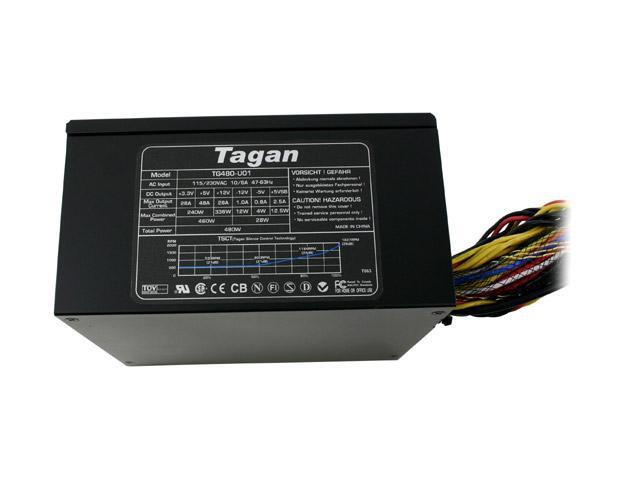
The sticker on the powersupply should look similar to this, sorry the picture is kind of crummy but it will give you an idea of what we're looking for.

17-101-509-03.JPG


See the current ratings (A) under each voltage. Thats what we are looking for. Reason being is that you have some high power equipment that needs quite a bit of current on the 12V line.

Also the CMOS corrupt error isn't something to take lightly.

Later

MD
 
MD_Willington said:
Reason being is that you have some high power equipment that needs quite a bit of current on the 12V line.

Which is precisely why I said to test with only one HDD, remove all others. The PSU may not support so much. Hint: 500 watts + PowMax = 300-ish watts. :)

-J.
 
Yep..I understand what you're getting at, just that sometimes people don't know why we ask these things. It's all good.

I've got to get going here so GeForceX will probably walk you through the rest Mattey

Later guys

MD
 
Alright, BOTH hard drives work correctly with another PC.

If its the ampsyour looking for they are:
28A 30A 25A .3A .8A 2A
 
Well then, its the mobo for sure. Are you sure you didnt get back the same defective board that you sent in? Alot of places do that if they find nothing wrong.
 
Amps look "fine". Two hard drives should be supported. I believe it may be your CMOS. Just reset it and see how it goes. Follow the list of order I provided. And I fear it may be the same motherboard you received. :/

-J.
 
I would be FURIOUS if I recieved the same motherboard. I'm dealing with Newegg here guys. I sent them the mobo back and it was missing a couple minor minor parts and the box was also minorly battered.

The one that I just recieved as 'replacement' was in a brand new box, and all the parts were present. Would they still have done this?

By the way. I went in the BIOS and fiddled. I managed to get the motherboard to detect the master drive, butnow after it detects it, it just sits there forever.
 
Okay it finally did something. But not what I want it to. After sitting there a while I get a boot disk failure and tells me to insert a system disk.


Also, I just checked the motherboard and I dont believe it's the same one that I had before.
 
You haven't even said if you resetted the CMOS or not. Take out the battery in the motherboard for 10 seconds (to be safe) then place it back in. Tell us.

-J.
 
Just did. I reset the CMOS, then loaded her back up.

Yes, it detected the drive, BUT, it gave me this error again:

'CMOS checksum error - Defaults Loaded'

So I hit F1 to continue.

Then I get:

Boot disk failure. Insert System Disk and press Enter
 
But i just did RMA it man.

I recieved this motherboard a couple days ago as a replacement for the last one that didnt work
 
Yes, you have to download the latest BIOS; a .bin file if I remember correctly. Was your other motherboard defective for the same reason? If not it really doesnt matter, RMA again.
 
Yes, the other motherboard was doing the same thing. Can anyone help me get the latest BIOS update? I have NF7s revision 2 i believe.
 
Have you tried with without all the PCI cards installed? Why not call newegg and see what they say. I'm guessing a bad batch of boards.
 
FatteyMattey said:
Just did. I reset the CMOS, then loaded her back up.

Yes, it detected the drive, BUT, it gave me this error again:

'CMOS checksum error - Defaults Loaded'

So I hit F1 to continue.

Then I get:

Boot disk failure. Insert System Disk and press Enter
Alright, the "CMOS checksum error - Defaults Loaded" error happens when you reset the CMOS. Resetting the CMOS loads the default, failsafe, values for the processor speeds, etc. That's why it's probably telling you the processor speed is "1100 Mhz" (I'm guessing it's showing you that while POSTing). Just hit F1, and set them everything as you wish, and save the settings.

As for the Boot Disk Failure, that does not indicate motherboard problems. It's just that it isn't finding any OS to load with the current drives. Perhaps the main drive isn't the first one on the chain, or not set as master. Perhaps you have a floppy inserted and it's trying to boot off it. You just have to make sure there is an OS to boot from on the drive you have set as master, and you're good to go.


Summary: There is nothing wrong with your hardware.
 
Anarch there is something wrong with the hardware.

I have tried the drive on my other PC and it works fine. It boots right up, it IS the master, its SET as master and it boots and I can use it.

There's no floppy disk in the computer and for that matter the A drive doesnt work for some reason.

I cant think of anything else that I could be looking over.
 
FatteyMattey said:
Anarch there is something wrong with the hardware.

I have tried the drive on my other PC and it works fine. It boots right up, it IS the master, its SET as master and it boots and I can use it.

There's no floppy disk in the computer and for that matter the A drive doesnt work for some reason.

I cant think of anything else that I could be looking over.
The BIOS sees the HD, and the drive works... not sure what's up, really. Maybe tinker with your boot sequence in the BIOS? What happens when you try to boot off a CD (after you've put the CD above the HD on boot sequence, of course)? What about trying "/fixmbr" from the recovery console (assuming you're running Windows XP)?

Troubleshooting over the net can be a PITA =/
 
Yeah man I understand that. I wish I had one of you guys here.

I cant flash the BIOS either because the floppy drive wont be recognized.

I have 4 computers and on 3 of them the floppy drives wont work. The light is on, but you cant read any floppies or anything like that. It's weird.
 
Liam what if I RMA and they give me the same one again.....i cant just keep paying shipping for every bad one they give me
 
Did they give you the same one again? If they didnt last time I doubt they will this time either. It might be a bad batch. Call the egg and see if you can get a refund or exchange for a similar board.
 
make sure to check your jumpers on your board, it could possibly be set to run SATA or RAID instead of normail IDE, you could always swap out the cables, or check your hd's jumper settings, they may not be set right
jumper for 1 hd:

No jumpers on hd.
Jumper for 2 hd's:
1 master, 1 slave.

if your only running 1 hd and the jumper is set to master, it wont detect.
 
CMOS checksum error means something is wrong with the CMOS (obviously ;)). I've seen this caused by old batteries, and I've seen this caused by corrupted BIOS. I would bet the battery is fine, due to it being brand new an such, but you can test it with a multimeter to be sure.
You can try and flash the BIOS with the latest version. Might help..
Or your BIOS chip is fscked. It is quite possible that you got two DOA mobos. I had a friend who received two dead CPU's in a row when he was building a new machine. Third one worked.

I recently experienced the same symptoms you are giving with an old machine at work. I couldn't fix it and had to swap mobos.
Hope this helps. Good luck.


[Edit]Correct, clearing the CMOS will generate this message, but if you're getting this message without manually clearing your CMOS, somethings wrong[/edit]
 
Back
Top