• Some users have recently had their accounts hijacked. It seems that the now defunct EVGA forums might have compromised your password there and seems many are using the same PW here. We would suggest you UPDATE YOUR PASSWORD and TURN ON 2FA for your account here to further secure it. None of the compromised accounts had 2FA turned on.
    Once you have enabled 2FA, your account will be updated soon to show a badge, letting other members know that you use 2FA to protect your account. This should be beneficial for everyone that uses FSFT.

cables and Pixel format

silk186

[H]ard|Gawd
Joined
Feb 26, 2008
Messages
1,628
I have a 280x connected to an ASUS VE247H 24" monitor and an LG 42LB550V 42"
The ASUS is connected with DVI and the LG with HDMI.
This is because the 280x has 1xDVI, 1xHDMI, and 2xDP
I wish cards came with 2xHDMI, 2-3x miniDP

Fist question, is this ideal? Will DVI, HDMI to HDMI and DP to HDMI give the same picture quality or would it have any percievable difference. My understanding is that HDMI is DVI + audio. I'm not really sure about HDMI vs DP except for bandwidth differences.

The second is is about Pixel format. I was reading elseware about calibrating a TV and RGB in nvidia settings. Looking at my AMD catalyst settings I see I have several choices:
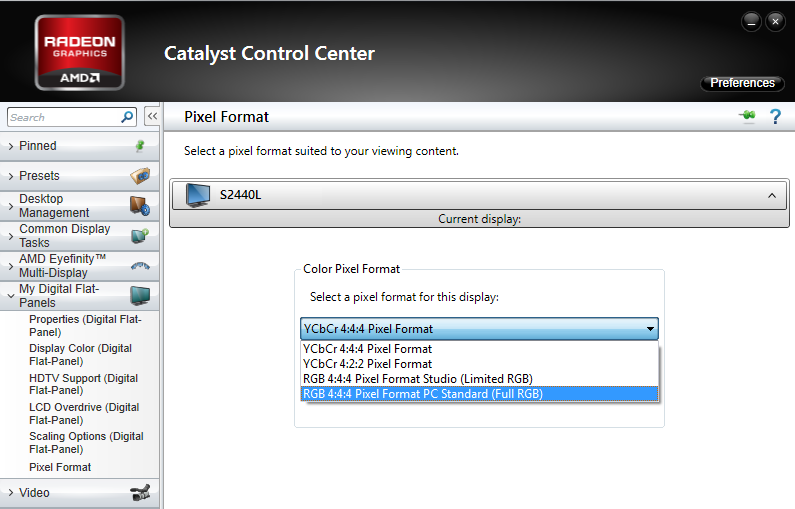
AMD-Color-Pixel-Format.png


YCbCr 4:4:4 or RGB 4:4:4 Full RGB (studio/PC Standard)
I don't really get the 4:4:4 vs 4:2:2 except the 4 is bigger and better than 2.
 
Last edited:
One of my main problems running dual screen is that after gaming on the 42" I turn the 24" back on and it doesn't recieve a signal from the GPU.
 
I have a 40" TV connected via HDMI and a 27" monitor connected via DP to a GTX 970. Both displays are able to act and perform independently, so I would say to your first question that how you're displays are connected should not be an issue, unless you are using an Eyefinity or Surround resolution.

Fist question, is this ideal? Will DVI, HDMI to HDMI and DP to HDMI give the same picture quality or would it have any percievable difference. My understanding is that HDMI is DVI + audio. I'm not really sure about HDMI vs DP except for bandwidth differences.
DVI only outputs uncompressed video, where the entire display is redrawn every time the screen refreshes. Bandwidth is limited by the wire, wire length, and pixel clock. HDMI uses packetization to send data to the display and bandwidth is only limited by the pixel clock. It supports compressed video formats in addition to uncompressed. HDMI and DVI are only electrically similar, meaning you can convert display output passively over digital interface. DP and HDMI both use packetization, but the data packets used are different between them. The important part is that all three use the same CEA standards for video output, meaning that picture quality should be similar between each interface in an uncompressed scenario.

The second is is about Pixel format. I was reading elseware about calibrating a TV and RGB in nvidia settings. Looking at my AMD catalyst settings I see I have several choices:

YCbCr 4:4:4 or RGB 4:4:4 Full RGB (studio/PC Standard)
I don't really get the 4:4:4 vs 4:2:2 except the 4 is bigger and better than 2.
YCbCr is considered "deep color" as the pixels are sampled based on perceived brightness and therefore look more natural to the eye. 'Y' is the luma, and CbCr are the blue and red differences from the luma (chroma), respectively. RGB is the absolute brightness value of each subpixel. The "4:4:4" is the sampling rate for a subset of pixels in the display notated as a ratio. In YCbCr it means the ratio of blue and red offset samples taken to the luma. So 4:2:2 means that only 2 chroma samples are taken for every 4 pixels of luma data. It basically boils down to anything other than 4:4:4 means a compressed video signal.

(I'm sure someone else could explain the above better than I...)

RGB colors are typically stored in 8-bits of data each, meaning brightness is a value of 0-255 in full RGB. Limited RGB limits brightness values to 16-235. I honestly do not know the origins or reasoning for using limited RGB other than it is prevalent in televisions.

One of my main problems running dual screen is that after gaming on the 42" I turn the 24" back on and it doesn't recieve a signal from the GPU.
I don't know about this issue. My second display, regardless of which one I was gaming on, always wakes back up by itself after closing the game. Have you checked the AMD control panel to see if the other display is still enabled after gaming?
 
Thanks for taking the time to answer all my questions.

The screens are set up duplicate and when I game or watch a movie I turn the 24" off.
Normally it wakes up fine, some times it doesn't and I will pull out the cable and plug it back in to the GPU.
 
Back
Top