• Some users have recently had their accounts hijacked. It seems that the now defunct EVGA forums might have compromised your password there and seems many are using the same PW here. We would suggest you UPDATE YOUR PASSWORD and TURN ON 2FA for your account here to further secure it. None of the compromised accounts had 2FA turned on.
    Once you have enabled 2FA, your account will be updated soon to show a badge, letting other members know that you use 2FA to protect your account. This should be beneficial for everyone that uses FSFT.

Budget build

Moabiouz

n00b
Joined
Jun 28, 2012
Messages
12
Sub $500 PC

I would like to share a build I am planning to get very soon
and you might wanna make it as a reference on your
upcoming purchase. Got these prices from newegg so
if you'll ask how much it would be on your country,
it would costs somewhere near these prices.
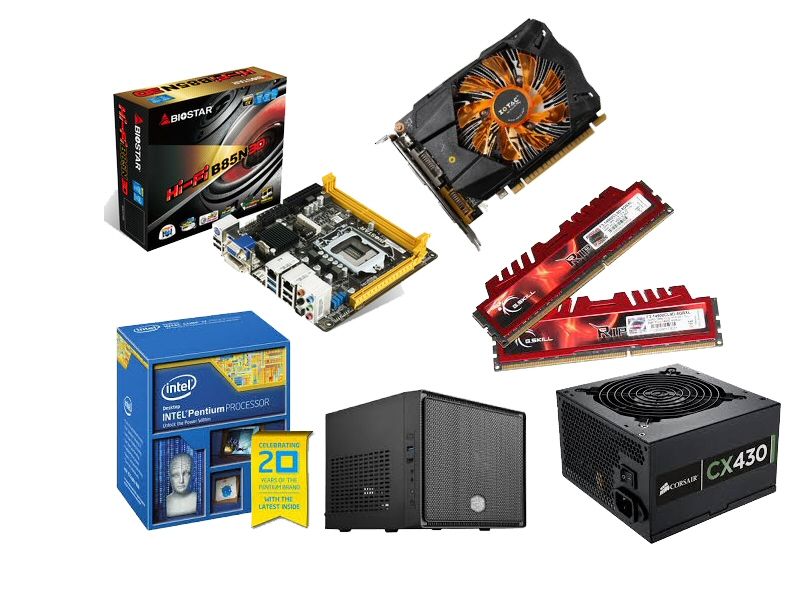
Image1_zps395cad60.jpg


Cooler Master Elite 110 = $39
* One of the most cheapest ITX casing out there. Unlike Lian-Li's
and Silverstone's, you could fit a standard sized PSU in it.

Corsair CX 430 430W = $39
*430w of power is more than enough for this entire build

Biostar Hi-Fi B85N 3D = $69
*Cheap and has mosy of the features those famous brands currently has.
For this small platform, it has a good built-in audio.

Intel Pentium G3258 3.2 Ghz LGA 1150 = $69
*At $70 you get a special edition CPU from Intel. An unlocked
CPU that overclocks well with the Biostar Hi-Fi B85N 3D.

G.Skill Ripjaws X 4GB X 2 DDR3 1600mhz = $79
*G.sKill sports a cheap and a kickass design on their
rams. 8Gb with a 1600mhz speed is good enough to play current released games.

Zotac GTX 750Ti 1GB 128-Bit GDDR5 = $139
*Sports the new Maxwell architecture. A card so powerful to handle
games like Battlefield 4, Titanfall, COD Ghosts etc. that peaks at
insanely low 75 watts.

Western Digital WD Blue 1TB SATA = $59
1Tb is I think a pretty good enough capacity for this build.

Total = $493
(monitor excluded)

A budget gaming PC that can handle latest games @ full HD.
It has a small foot print that you could put it almost anywhere
on your table.

;)
 
What's the priority of this build? The sub-$500 budget? The small form factor? Energy efficiency?

I ask because I believe that for a gaming build, there should be some more focus on the gaming performance, especially if you're trying to play some of today's first-person shooters. While the GTX 750 Ti can play Battlefield 4 at a 1920x1080 resolution, depending on the gamer's preferences, it may or may not be capable of playing BF4 well.
 
What's the priority of this build? The sub-$500 budget? The small form factor? Energy efficiency?

I ask because I believe that for a gaming build, there should be some more focus on the gaming performance, especially if you're trying to play some of today's first-person shooters. While the GTX 750 Ti can play Battlefield 4 at a 1920x1080 resolution, depending on the gamer's preferences, it may or may not be capable of playing BF4 well.

Must be all of the above. We don't have to spend that much just to play recently released or upcoming games.
 
Too many questionable choices for me to recommend building. Let's go down the list:

Where did you see that mobo actually supports the Pentium Anniversary Edition out of the box? While that motherboard will support Pentium AE after a UEFI update, you still need a compatible CPU in order to do said UEFI update. Considering that the Biostar mobo was released last year whereas the Pentium AE was only released in July 2014, there's a good chance that you may end up getting a mobo with an outdated BIOs. Hell, even some H97 and Z97 mobos don't support the Pentium AE out of the box.

The RAM is a questionable choice because:

1) You're already maxing out the system RAM at 8GB. Most people tend to upgrade their RAM at least once so upgrading RAM in this situation would require you to remove one stick and either leave it aside or find a new use for it.

2) The heatsinks on that RAM may interfere with the installation of 3rd party lower profile heatsinks that you see in mITX setups. If you're planning on overclocking, you're going to want a 3rd party heatsink.

3) Price. Right now, you can find single stick lower profile RAM for less than the price of that G.Skill:
http://www.amazon.com/dp/B00J8E92M6/?tag=extension-kb-20

Three problems with the video card:
1) Zotac tends to have somewhat quality control issues. Their customer support doesn't seem to be all that great either. The Zotac would have be to substantially cheaper than comparable cards from Asus, Gigabyte, MSI, eVGA, or XFX to be worth the risk IMO.

2) Unless you live in an area that has extremely expensive electricity rates, the lower max power of the 750Ti isn't all that useful. As of this post, you can find this XFX R9 270 for $150 from Amazon.com:
http://www.amazon.com/dp/B00GP6JGWQ/?tag=extension-kb-20c

$10 more (or 7% more) for that R9 270 means a 20% to 25% performance increase in games:
http://anandtech.com/bench/product/1130?vs=1080

The idle power difference between the two cards is not that much at around 7W to 14W:
http://www.xbitlabs.com/articles/graphics/display/geforce-gtx-750-ti_12.html#sect0
http://www.bit-tech.net/hardware/graphics/2014/02/18/nvidia-geforce-gtx-750-ti-review/10

While yes the R9 270 does use more power at load, using the load figures above, the R9 270's power usage at load is about 25% higher than the 750Ti. So basically it's a rather energy efficient card in that sense since 25% increase in performance means a 25% increase in power usage. Not to mention, if you live in a situation where electricity rates are high, you're not going to be playing games for 10+ hours where the 750Ti's lower power usage might help.

So all in all, not much of a reason to get the 750 Ti while the R9 270 is available at $150.
 
As an Amazon Associate, HardForum may earn from qualifying purchases.
Let me offer my two cents:

$59 - Intel Pentium G3220 dual-core processor
$65 - MSI H81I mini ITX motherboard
$70 - Crucial Ballistix Sport BLS8G3D1609DS1S00 8GB DDR3 RAM
$150 - XFX R9-270A-CNFC R9 270 2GB video card
$54 - Seagate Barracuda ST1000DM003 1TB HDD
$40 - Corsair CX430 430W PSU
$50 - Cooler Master Elite 130 or Thermaltake Core V1 mini ITX desktop case
====
$488 - Total before shipping and taxes

On top of what Dangman mentioned earlier, the only "flaw" with the XFX R9 270 is its length. The XFX R9 270 is 220mm (8.7in) long; the Elite 110 case can only support cards up to 180mm (7in) long.

If you stick with the R9 270 -- which I recommend, since we're trying to build a gaming PC -- you'll need a different mITX case like the Cooler Master Elite 130 or the Thermaltake Core V1.

These changes push the overall price to over $500, and Dangman's RAM swap isn't enough to compensate. I was able to find a cheaper processor, motherboard, and hard drive; they aren't perfect -- few things are with budget builds -- but you won't suffer any noticeable performance loss in gaming. I also found some RAM that's on sale, but I don't know how long that price will last.
 
As an Amazon Associate, HardForum may earn from qualifying purchases.
Too many questionable choices for me to recommend building. Let's go down the list:

Where did you see that mobo actually supports the Pentium Anniversary Edition out of the box? While that motherboard will support Pentium AE after a UEFI update, you still need a compatible CPU in order to do said UEFI update. Considering that the Biostar mobo was released last year whereas the Pentium AE was only released in July 2014, there's a good chance that you may end up getting a mobo with an outdated BIOs. Hell, even some H97 and Z97 mobos don't support the Pentium AE out of the box.

The RAM is a questionable choice because:

1) You're already maxing out the system RAM at 8GB. Most people tend to upgrade their RAM at least once so upgrading RAM in this situation would require you to remove one stick and either leave it aside or find a new use for it.

2) The heatsinks on that RAM may interfere with the installation of 3rd party lower profile heatsinks that you see in mITX setups. If you're planning on overclocking, you're going to want a 3rd party heatsink.

3) Price. Right now, you can find single stick lower profile RAM for less than the price of that G.Skill:
http://www.amazon.com/dp/B00J8E92M6/?tag=extension-kb-20

Three problems with the video card:
1) Zotac tends to have somewhat quality control issues. Their customer support doesn't seem to be all that great either. The Zotac would have be to substantially cheaper than comparable cards from Asus, Gigabyte, MSI, eVGA, or XFX to be worth the risk IMO.

2) Unless you live in an area that has extremely expensive electricity rates, the lower max power of the 750Ti isn't all that useful. As of this post, you can find this XFX R9 270 for $150 from Amazon.com:
http://www.amazon.com/dp/B00GP6JGWQ/?tag=extension-kb-20c

$10 more (or 7% more) for that R9 270 means a 20% to 25% performance increase in games:
http://anandtech.com/bench/product/1130?vs=1080

The idle power difference between the two cards is not that much at around 7W to 14W:
http://www.xbitlabs.com/articles/graphics/display/geforce-gtx-750-ti_12.html#sect0
http://www.bit-tech.net/hardware/graphics/2014/02/18/nvidia-geforce-gtx-750-ti-review/10

While yes the R9 270 does use more power at load, using the load figures above, the R9 270's power usage at load is about 25% higher than the 750Ti. So basically it's a rather energy efficient card in that sense since 25% increase in performance means a 25% increase in power usage. Not to mention, if you live in a situation where electricity rates are high, you're not going to be playing games for 10+ hours where the 750Ti's lower power usage might help.

So all in all, not much of a reason to get the 750 Ti while the R9 270 is available at $150.

Checked the board's cpu support list and it should support Pentium AE.

1. 8Gb is enough I guess, when you're not into video editing I think there's no need to have a 16gb kit. I'm using 8GB 1600mhz kit, playing battlefield 4 online, when I tried a pair of 8 gig, didn't notice any difference, fps wise.

2. Ripjaws X should be fine, there's a lot of space between CPU and RAM, and PSU over the CPU. I should know I'm already using that case in my other build. Anyway the build is not intended for overclocking, just budget gaming.

3. Thanks, I will consider that R9 270. About Zotac, end user support must depend on the distributor. In this side of the pond, Zotac has actually better customer support than EVGA, Inno3d. Also the extended 5-year warranty is a big deal.

Let me offer my two cents:

$59 - Intel Pentium G3220 dual-core processor
$65 - MSI H81I mini ITX motherboard
$70 - Crucial Ballistix Sport BLS8G3D1609DS1S00 8GB DDR3 RAM
$150 - XFX R9-270A-CNFC R9 270 2GB video card
$54 - Seagate Barracuda ST1000DM003 1TB HDD
$40 - Corsair CX430 430W PSU
$50 - Cooler Master Elite 130 or Thermaltake Core V1 mini ITX desktop case
====
$488 - Total before shipping and taxes

On top of what Dangman mentioned earlier, the only "flaw" with the XFX R9 270 is its length. The XFX R9 270 is 220mm (8.7in) long; the Elite 110 case can only support cards up to 180mm (7in) long.

If you stick with the R9 270 -- which I recommend, since we're trying to build a gaming PC -- you'll need a different mITX case like the Cooler Master Elite 130 or the Thermaltake Core V1.

These changes push the overall price to over $500, and Dangman's RAM swap isn't enough to compensate. I was able to find a cheaper processor, motherboard, and hard drive; they aren't perfect -- few things are with budget builds -- but you won't suffer any noticeable performance loss in gaming. I also found some RAM that's on sale, but I don't know how long that price will last.

Got all those prices from newegg since, I believe, that site is where most people compare the current prices locally. Of you will not buy from them if the items are available locally, shipping these stuff to your door is a total chaos.

Will try to find comparisons between those two video cards.

Thanks for your inputs :)
 
As an Amazon Associate, HardForum may earn from qualifying purchases.
Checked the board's cpu support list and it should support Pentium AE.
That didn't address my concern. Let me rephrase: Where did you find information showing that the motherboard will support with the Pentium AE with NO UEFI update? IN other words, if I was to buy that motherboard today, can I use the Pentium AE without having to do ANY sort of UEFI update? The reasons for my concerns, again, is that some of the newer Z97 and H97 motherboards did not support the Pentium AE out of the box and requires UEFI updates in order to do so. In addition, it takes a long time to clear out older inventory. At work, 9 months after the release of Ivy-Bridge-E CPUs, we were still doing UEFI updates on X79 motherboards to support those IB-E CPUs. Hence why I'm extremely skeptical of your claim that the Biostar Hi-Fi B85N 3D supports the Pentium AE out of the box. I need to see some proof of that.

Yes I understand the Biostar does support the Pentium AE but only after you do an UEFI update if that Biostar shipped with an older UEFI. I'm looking for actual proof that the Pentium AE actually works with no UEFI update with that Biostar motherboard.

1. 8Gb is enough I guess, when you're not into video editing I think there's no need to have a 16gb kit. I'm using 8GB 1600mhz kit, playing battlefield 4 online, when I tried a pair of 8 gig, didn't notice any difference, fps wise.)
While true that if this was strictly a gaming PC, 8GB of RAM is enough. However, people tend to use their gaming PCs for more than gaming and I think it's extremely short-sighted to already limit upgrade capability. If you tend to leave a lot of web browsers open like I do, you can easily hit 14GB to 16GB of RAM use easily.
2. Ripjaws X should be fine, there's a lot of space between CPU and RAM, and PSU over the CPU. I should know I'm already using that case in my other build. Anyway the build is not intended for overclocking, just budget gaming.
I have the exact same Ripjaws X that you mention and they did interfere with the fan placement on my Hyper 212+ HSF. Hence why I'm not willing to recommend them if there's even a chance that a 3rd party HSF will be installed.
3. Thanks, I will consider that R9 270. About Zotac, end user support must depend on the distributor. In this side of the pond, Zotac has actually better customer support than EVGA, Inno3d. Also the extended 5-year warranty is a big deal.
For Americans, Zotac is not that good for the following reasons:
1) Bad quality control
2) Bad customer support
3) Only two year warranties here in the U.S.

In addition, just because there's a longer warranty does not mean it's automatically the better choice. If the QC is bad, unless Zotac is paying for shipping both ways, it's going to get expensive sending that card back and forth for repairs/replacement over that five years. So for many people, it's better to just pay for a better built card that won't die often.
 
That didn't address my concern. Let me rephrase: Where did you find information showing that the motherboard will support with the Pentium AE with NO UEFI update? IN other words, if I was to buy that motherboard today, can I use the Pentium AE without having to do ANY sort of UEFI update? The reasons for my concerns, again, is that some of the newer Z97 and H97 motherboards did not support the Pentium AE out of the box and requires UEFI updates in order to do so. In addition, it takes a long time to clear out older inventory. At work, 9 months after the release of Ivy-Bridge-E CPUs, we were still doing UEFI updates on X79 motherboards to support those IB-E CPUs. Hence why I'm extremely skeptical of your claim that the Biostar Hi-Fi B85N 3D supports the Pentium AE out of the box. I need to see some proof of that.

Yes I understand the Biostar does support the Pentium AE but only after you do an UEFI update if that Biostar shipped with an older UEFI. I'm looking for actual proof that the Pentium AE actually works with no UEFI update with that Biostar motherboard.


While true that if this was strictly a gaming PC, 8GB of RAM is enough. However, people tend to use their gaming PCs for more than gaming and I think it's extremely short-sighted to already limit upgrade capability. If you tend to leave a lot of web browsers open like I do, you can easily hit 14GB to 16GB of RAM use easily.

I have the exact same Ripjaws X that you mention and they did interfere with the fan placement on my Hyper 212+ HSF. Hence why I'm not willing to recommend them if there's even a chance that a 3rd party HSF will be installed.

For Americans, Zotac is not that good for the following reasons:
1) Bad quality control
2) Bad customer support
3) Only two year warranties here in the U.S.

In addition, just because there's a longer warranty does not mean it's automatically the better choice. If the QC is bad, unless Zotac is paying for shipping both ways, it's going to get expensive sending that card back and forth for repairs/replacement over that five years. So for many people, it's better to just pay for a better built card that won't die often.

Problem might be how distributors in different regions handle their stuff. In our country, once a new cpu is released and vendors makes bios updates, stores and distributors updates bios of their old stocks. I think its an SOP to them. In that way whenever someone will buy the new cpu with their board, they will avoid compatibility issues.

Didn't had any problems with ripjaws and the cm hyper 212. I had one of those in the past. Yes, the space is too tight, but to get a push 'n pull configuration, you have to install the rams 1st before installing the fans for the cooler. Anyway, I do not recommend getting that cooler for this build since it is impossible to use it in a CM elite 110. If you want an aftermarket cooler, the best would be those 120mm closed loop coolers.

About zotac, they do good customer support here. Better than inno3d, better than EVGA.
I had a faulty GTX 650 before and they replaced it with a new one in two weeks time.
 
Problem might be how distributors in different regions handle their stuff. In our country, once a new cpu is released and vendors makes bios updates, stores and distributors updates bios of their old stocks. I think its an SOP to them. In that way whenever someone will buy the new cpu with their board, they will avoid compatibility issues.

Wait what? You're saying that stores where you are from will open motherboard boxes, update their BIOS, then put them back in the box and sell them as BNIB? I don't think so.
 
Problem might be how distributors in different regions handle their stuff. In our country, once a new cpu is released and vendors makes bios updates, stores and distributors updates bios of their old stocks. I think its an SOP to them. In that way whenever someone will buy the new cpu with their board, they will avoid compatibility issues.
What country do you live in?
What stores are you buying from?

That all sounds false. I've never heard of any retailer, foreign or domestic, doing exactly what you're describing until AFTER the customer has bought the motherboard in-store.
Didn't had any problems with ripjaws and the cm hyper 212. I had one of those in the past. Yes, the space is too tight, but to get a push 'n pull configuration, you have to install the rams 1st before installing the fans for the cooler. Anyway, I do not recommend getting that cooler for this build since it is impossible to use it in a CM elite 110. If you want an aftermarket cooler, the best would be those 120mm closed loop coolers.
Yes I know how to install RAM and the HSF. However, even done in the method you described, the fan still rested directly on the RAM itself and as raised as result. Now I wasn't recommending the Hyper 212 for a mITX setup. I just using as an example that you should account for 3rd party HSF when purchasing RAM with relatively tall heatsinks.
About zotac, they do good customer support here. Better than inno3d, better than EVGA.
I had a faulty GTX 650 before and they replaced it with a new one in two weeks time.
Fine, if that is true, then you might want to make that information clear. As again, I would not recommend Zotac to any American buyer for reasons already stated. But if Zotac is indeed better in other countries, then you want to make that information clear.

Let's be honest here: America and Canada are some of the biggest computer hardware markets. As such, when you do a general recommendation, you have to account for peculiarities of the American and Canadian computer hardware market.
 
Wait what? You're saying that stores where you are from will open motherboard boxes, update their BIOS, then put them back in the box and sell them as BNIB? I don't think so.

What country do you live in?
What stores are you buying from?

That all sounds false. I've never heard of any retailer, foreign or domestic, doing exactly what you're describing until AFTER the customer has bought the motherboard in-store.

Yes I know how to install RAM and the HSF. However, even done in the method you described, the fan still rested directly on the RAM itself and as raised as result. Now I wasn't recommending the Hyper 212 for a mITX setup. I just using as an example that you should account for 3rd party HSF when purchasing RAM with relatively tall heatsinks.

Fine, if that is true, then you might want to make that information clear. As again, I would not recommend Zotac to any American buyer for reasons already stated. But if Zotac is indeed better in other countries, then you want to make that information clear.

Let's be honest here: America and Canada are some of the biggest computer hardware markets. As such, when you do a general recommendation, you have to account for peculiarities of the American and Canadian computer hardware market.

Philippines. Not sure if it's illegal or something but yep, there are stores that sells their boards with bios already updated. Out of the box Z87 boards already supports haswell refresh. I think it's long time practice ever since am2+/am3 cpu days.

Glad I found some old pic of the ripjaws with the hyper 212

427072_2498430040203_1913422621_n.jpg
 
Philippines. Not sure if it's illegal or something but yep, there are stores that sells their boards with bios already updated. Out of the box Z87 boards already supports haswell refresh. I think it's long time practice ever since am2+/am3 cpu days.
Yeah, that's not legal AFAIK here in the U.S or even Europe for that matter. It doesn't surprise me that the Philippines would have such a practice though.

It also explains why Zotac is good for you: Zotac is supposedly pretty good in Asia from what I've heard. But outside the Asian market, not so good. Again, here in the U.S, they only have a two year warranty. Compare that to Asus, Gigabyte, MSI, eVGA, or XFX which tend to have a three year warranty minimum. Not to mention better quality control.

So that build is ok for the Philippines market. Horrible for the rest of the world.
 
Yeah, that's not legal AFAIK here in the U.S or even Europe for that matter. It doesn't surprise me that the Philippines would have such a practice though.

It also explains why Zotac is good for you: Zotac is supposedly pretty good in Asia from what I've heard. But outside the Asian market, not so good. Again, here in the U.S, they only have a two year warranty. Compare that to Asus, Gigabyte, MSI, eVGA, or XFX which tend to have a three year warranty minimum. Not to mention better quality control.

So that build is ok for the Philippines market. Horrible for the rest of the world.

Zotac has a good distro here, just like Asus, Gigabyte, Msi, heck even Palit. On the other hand, powercolor, inno3d, galaxy, to name a few are the ones who has bad feedback for having bad customer support.
 
Back
Top