• Some users have recently had their accounts hijacked. It seems that the now defunct EVGA forums might have compromised your password there and seems many are using the same PW here. We would suggest you UPDATE YOUR PASSWORD and TURN ON 2FA for your account here to further secure it. None of the compromised accounts had 2FA turned on.
    Once you have enabled 2FA, your account will be updated soon to show a badge, letting other members know that you use 2FA to protect your account. This should be beneficial for everyone that uses FSFT.

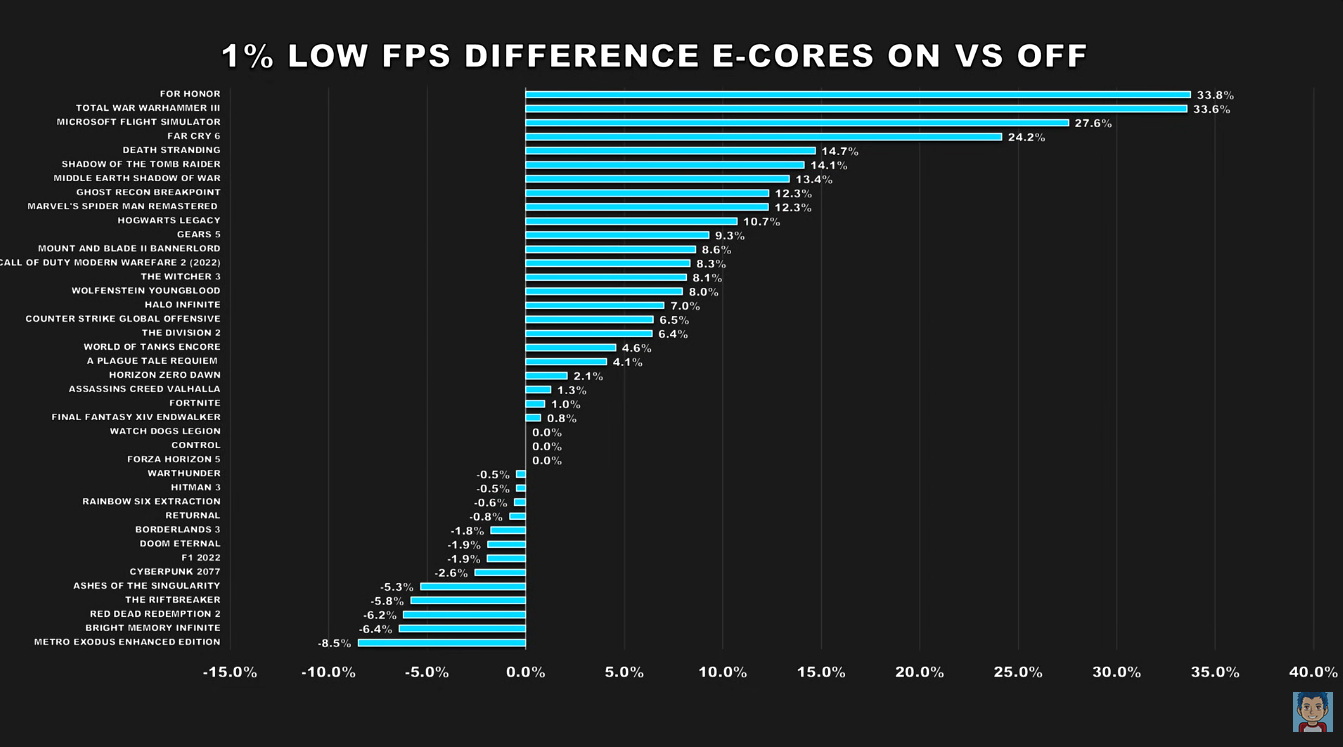
Better 1% lows Intel ecores

Comixbooks

Fully [H]
Joined
Jun 7, 2008
Messages
26,441
Screenshot_20260215_014619_Google.jpg

Maybe this is the reason Intel keeps adding these things when I had my 4 ecores with the 12700k they were always used with Win 11. Current system with my 14700k 12 ecores they hardly go up unless the system first boots up because I own 12 ecores. Not sure about additional heat.
 
Last edited:
AI slop with no measurements.

In any case, there shouldn't be background crap when a game runs.
 
View attachment 785719

Maybe this is the reason Intel keeps adding these things when I had my 4 ecores with the 12700k they were always used with Win 11. System with my 14700k 12 ecores they hardly go up unless the system first boots up because I own 12 ecores. Not sure about additional heat.
Get Process Lasso and run your game only on P-cores. For some games, HT on P-cores helps, for others it doesn't. That's why you need to test it, and the best way to do that is with CapFrameX.
 
AI slop with no measurements.

In any case, there shouldn't be background crap when a game runs.

AI slop indeed.
It gets things wrong more than right.

there's actually a lot of documented information and videos about this. 12th, 13th and 14th gen have better performance when ecores are enabled. (more 12th gen which have less and slower ecores) while couple of games have lower performance the general concesus is that keeping ecores turned on it's the better option for most games and turn only off if a specific game it's having issues (elden ring i can think of a game that have issues on windows 10 with 13th and 14th gen cpus.. ) so yes, in this time the AI it's actually right. the more background task and apps the more useful ecores are. also most issues are related to windows 10 or older versions of windows 11.


View: https://youtu.be/LcQUUmi3rWI?t=240
 

Attachments

  • 1% low.png
    1% low.png
    329.6 KB · Views: 0
Combo of AI slop and leading the AI on by posing a question formulated as a pre-determined conclusion.

Still, much of what it said is technically true. Offloading background tasks to the E-Cores will free up your P-Cores to focus on gaming, and that will increase your 1% lows. Where it fails is context. The tiny benefit you might see would pail in comparison to the benefit from something like 3D cache on a Ryzen X3D CPU. Most games also still do not fully utilize 8 cores, so on something like a 14900k you would still have spare P-cores available for background tasks while gaming.
 
AMD is adding them Ryzen 6 Medusa I forget what they wanted to call them. AMD just noticed what Intel was doing decided it was gtg.
 
The main problem with e-cores is that you expect Windows Scheduler to manage them correctly and give them "background" threads, but it only does so sometimes.
That's why Intel has designed something called Thread Director.
 
  • Like
Reactions: DF-1
like this
Not sure e-core/p-core matter much here, extra p-core could do it perfectly fine, e-core make it just easier to have many extra cores by taking less space. At least on a desktop maybe mobile things change specially with the very latest e-core now seem to be as or more efficiant than p-core
 
The main problem with e-cores is that you expect Windows Scheduler to manage them correctly and give them "background" threads, but it only does so sometimes.
That's why Intel has designed something called Thread Director.
intel thread director it's already built into windows 11 and works directly and automatically with the windows scheduler.. that's why most of the issues with 12th, 13th and 14th gen of intel cpus were on windows 10 or early versions of windows 11.

actually it works as intended i haven't found yet a single game on newer windows 11 with issues related to ecores. (i7 12700, and i7 14700K.).
 
The main problem with e-cores is that you expect Windows Scheduler to manage them correctly and give them "background" threads, but it only does so sometimes.
That's why Intel has designed something called Thread Director.

That's all fine but I have never seen actual measurements about this.
 
intel thread director it's already built into windows 11 and works directly and automatically with the windows scheduler.. that's why most of the issues with 12th, 13th and 14th gen of intel cpus were on windows 10 or early versions of windows 11.
Since when?
I'm just curious.

actually it works as intended i haven't found yet a single game on newer windows 11 with issues related to ecores. (i7 12700, and i7 14700K.).
If you want custom optimization, there is always room for it.
 
Not sure e-core/p-core matter much here, extra p-core could do it perfectly fine, e-core make it just easier to have many extra cores by taking less space. At least on a desktop maybe mobile things change specially with the very latest e-core now seem to be as or more efficiant than p-core
More cores, worse scheduling and/or prioritization >>> higher consumption and latency = lower FPS (in overall)

The Windows Scheduler has been in need of an overhaul for years, and things have been getting worse over the past few years.
 
More cores, worse scheduling and/or prioritization >>> higher consumption and latency = lower FPS (in overall)

The Windows Scheduler has been in need of an overhaul for years, and things have been getting worse over the past few years.

Personally I bet that the Windows scheduler's interplay with Intel's thread director is utterly primitive and mostly based on string matching program names, That's also why there are no professional CPUs with a mix of P and E.
 
It's definitely true you'd rather have at least 8 e cores for "just in case" and 16 ecores is an even nicer safety net. When I play rivals all 24 cores are being used and I have never seen a studder or hitch the fps is smoooooooth especially when there is a lot of playing in the map doing a lot of things going on simultaneously the extra cores literally go to work. Icing on the cake is loading the game and loading the maps and loading the shaders etc all move much much faster with the extra cores everything is smoother and snappier in all aspects of gaming.
I will say that I wish they were all Pcores but if I couldn't get all Pcores I'll settle for the Ecores.
 
It's definitely true you'd rather have at least 8 e cores for "just in case" and 16 ecores is an even nicer safety net. When I play rivals all 24 cores are being used and I have never seen a studder or hitch the fps is smoooooooth especially when there is a lot of playing in the map doing a lot of things going on simultaneously the extra cores literally go to work. Icing on the cake is loading the game and loading the maps and loading the shaders etc all move much much faster with the extra cores everything is smoother and snappier in all aspects of gaming.
I will say that I wish they were all Pcores but if I couldn't get all Pcores I'll settle for the Ecores.
You can try disabling HT on the P-cores so that only the P+E cores remain, and check if your FPS improves in some games.
 
Since when?
I'm just curious.


If you want custom optimization, there is always room for it.
Since always partially, the hardware part of intel thread director was designed and introduced with alder lake with windows 11 in it's heart, it does have support with windows 10 but doesn't work as good as it should, with the first iteration of windows 11 it also worked but still with minor flaws as we all know windows 11 was full of issues at launch. IIRC was from 2023 23H2 with the updated Intel Thread director "TD2 Update". that started to work with excellent results, and a bios update was required for Alderlake CPUs as it came updated from raptor lake and newers, also thread director received a major update to mobile with lunar lake.


More cores, worse scheduling and/or prioritization >>> higher consumption and latency = lower FPS (in overall)

The Windows Scheduler has been in need of an overhaul for years, and things have been getting worse over the past few years.

The windows scheduler was already updated in 24H2 also with benefits to AMD users.

Personally I bet that the Windows scheduler's interplay with Intel's thread director is utterly primitive and mostly based on string matching program names, That's also why there are no professional CPUs with a mix of P and E.

your bet it's actually quite wrong. but I can bet if you want =)
 
Since always partially, the hardware part of intel thread director was designed and introduced with alder lake with windows 11 in it's heart, it does have support with windows 10 but doesn't work as good as it should, with the first iteration of windows 11 it also worked but still with minor flaws as we all know windows 11 was full of issues at launch. IIRC was from 2023 23H2 with the updated Intel Thread director "TD2 Update". that started to work with excellent results, and a bios update was required for Alderlake CPUs as it came updated from raptor lake and newers, also thread director received a major update to mobile with lunar lake.

The windows scheduler was already updated in 24H2 also with benefits to AMD users.
I can only wish you luck in the hope that the scheduler will work as it should.

Yes, for AMD users it works, let's say, better than before, but that's because MS changed some security mitigations, not because they did anything about the scheduler module.
I know this because I stopped them manually and my FPS has remained practically unchanged after 24H2.
 
Personally I bet that the Windows scheduler's interplay with Intel's thread director is utterly primitive and mostly based on string matching program names, That's also why there are no professional CPUs with a mix of P and E.
Intel for server cpu made to be more run on Linux are way more homogenous in their cores config than the workstation that has more chance to run windows segment, I think one reason for the server type is that they run more homogenous workload, so you know in advance which cores are better for it and just buy those (and predictability of performance can be major has well). And matching program name could become quite optimised for an hyper scaler work.

The upcoming HEDT 52 cores would be one of those professional level workstation cpu that mix and match many type of core.

If you buy sierra forest to do something, chance are you would not want to have some p-core in there costing you a lot of e-core.
 
Intel for server cpu made to be more run on Linux are way more homogenous in their cores config than the workstation that has more chance to run windows segment, I think one reason for the server type is that they run more homogenous workload, so you know in advance which cores are better for it and just buy those (and predictability of performance can be major has well). And matching program name could become quite optimised for an hyper scaler work.

The upcoming HEDT 52 cores would be one of those professional level workstation cpu that mix and match many type of core.

If you buy sierra forest to do something, chance are you would not want to have some p-core in there costing you a lot of e-core.

I rather think the reason for homogenous cores in the server CPUs is that the Windows scheduler is hacked up to recognize certain processes by name and the Linux scheduler is not, and cannot since the server workloads are not available to Linux developers and there are too many of them.

And gaming is actually an extremely homogenous workload. The user doesn't want anything else from the computer at the time. All that background noise is unwanted (unless recording is enabled, and then you need a P-core to encode). Server workloads have way more legitimate background processes starting with all the monitoring.
 
I rather think the reason for homogenous cores in the server CPUs is that the Windows scheduler is hacked up to recognize certain processes by name and the Linux scheduler is not, and cannot since the server workloads are not available to Linux developers and there are too many of them.
Lot of linux use heteregenous cores on the mobile space and Linux like Mac on the PC space, samsung as big-middle-little, as for server workload not available to Linux developper (i.e the intel, amazon,meta, microsoft, ibm, google) I am not sure what that mean ?, the people making server workload and making linux tend to be the same peoples, lot of server monitoring need to be ran on the same core than the task, having one of 128 cores being smaller because it monitor the rest of the does not need to be on the cores, gain to be on CPU would not be worth the complexity. On laptop it is quite different (laptop is a lot what driving PC intel cpu direction and decision)
 
You can try disabling HT on the P-cores so that only the P+E cores remain, and check if your FPS improves in some games.
Have had ecores disabled for a while now and I find the hyper threads gimmicky especially since I tested them against the E cores which were about probably 40% faster than the hyper threads for me personally the juice isn't worth the squeeze of the hyper threads to add so much heat and voltage adding discomfort heating up my room differences maybe a percent or two certain games but definitely not the ones I play so it's permanently off for me yea.
 
Last edited:
So Danny revisits a huge benchmark again and the results are varying on a game by game basis check it out it's interesting all CPUs do decently 14,900k fairs very well in the 1% lows especially.


View: https://youtu.be/9Z9Fr_s3e_Q?si=g4f9nDJ-yKtjBebf

I can show you just this:

From linked video:
1771274918926.png


14900KF P+E + 4070 ti
1771275166053.png


13900KS P+HT + 5090
1771275256281.png


9800x3D @5550MHz SMT Off (8c) + 5090 (me)
1771275294860.png
I'm not sure if we're using the same CS2 benchmark (as in the video), but as you can see, CS2 relies very heavily on DDR5 tuning and, to some extent, on the processor clock speed.
The man in the video has a score lower than 4070 ti (only because CS2 is on low settings), and yeah P+E cores only.

But yes, I agree, it all depends on the game :)
 
I can show you just this:

From linked video:
View attachment 785971

14900KF P+E + 4070 ti
View attachment 785972

13900KS P+HT + 5090
View attachment 785973

9800x3D @5550MHz SMT Off (8c) + 5090 (me)
View attachment 785974
I'm not sure if we're using the same CS2 benchmark (as in the video), but as you can see, CS2 relies very heavily on DDR5 tuning and, to some extent, on the processor clock speed.
The man in the video has a score lower than 4070 ti (only because CS2 is on low settings), and yeah P+E cores only.

But yes, I agree, it all depends on the game :)

Good video 285K is the higest on benchmarks like Passmark single thread but games are a mixed bag due to HT. I'm wondering if this will carry over to Nova Lake. I really want Nova Lake to be good hopefully some leaks will show up.
 
So Danny revisits a huge benchmark again and the results are varying on a game by game basis check it out it's interesting all CPUs do decently 14,900k fairs very well in the 1% lows especially.

That's some very questionable benchmark methodology. Using a version of Windows that very few people use (IoT Enterprise), further hacked up ("debloated" hurp durp). Using 8000MT+ DDR5 on Intel when in the real world most people either can't afford DDR5 at all or are resorting to combos being sold with stuff like DDR5 4800 because they have no other choice. Yet even then I still see the 9800X3D cleaning house in most cases. I guess some people are sitting there staring at the video for half an hour, "oh DAMN, I just saw the 1% lows on the 14900k go above the 9800X3D for 0.03 seconds, that thing is amazing!"
 
That's some very questionable benchmark methodology. Using a version of Windows that very few people use (IoT Enterprise), further hacked up ("debloated" hurp durp). Using 8000MT+ DDR5 on Intel when in the real world most people either can't afford DDR5 at all or are resorting to combos being sold with stuff like DDR5 4800 because they have no other choice. Yet even then I still see the 9800X3D cleaning house in most cases. I guess some people are sitting there staring at the video for half an hour, "oh DAMN, I just saw the 1% lows on the 14900k go above the 9800X3D for 0.03 seconds, that thing is amazing!"
I personally use a copy of Windows Enterprise iot ltsc and it is also mildly de-bloated. I'm running 6400 c32 ram which probably is close enough to 8000 with higher latency. In the grand scheme of it all even though there are some Fanboys I think a lot of them have settled down to the point where I even personally ran a 9800 x3d and I still run my 13900 KS and I've come to realize that 1% lows do matter a lot I'll go as far as to say that they're the most important thing for me the smoothness of the gameplay means everything for my experience. Simply put I don't care which CPU is faster or slower all I care is that the CPU that I'm using gives me a very good playing experience and this video for example shows that the 14900k still gives you a basically flawless game playing experience whether he's tuned it very aggressively to even being tuned mildly I still feel like it's the same and close enough either way.
 
Every well-tuned system will give you a "flawless gaming experience."
More cores give you raw power, but they're not really that necessary for gaming.
Cache gives you fast data loading... if the data is in the cache...
Intel has better prediction, Ryzen can read faster from NVME.
And so on. Overall, just tune your system and enjoy. In most cases, the operating system and all support software are the cause of stutters or poor 0.1% low FPS.
 
Personally I like E-cores. They allow me to not worry what I run on my PC and when. Scheduler in Windows 11 (which I only use because having Raptor Lake. If I had AMD I would use Win10 which scheduler is better for AMD CPUs... sill somehow) is also quite good.

I only don't use HyperThreading. In benchmark scenarios difference is not that big but with fully loaded system running heavy processing on CPU will with HT reduce foreground applications (including games) performance by quite a lot. It is ~60% available P-core performance versus 100% (ignoring memory load and cache cause it affects both cases the same pretty much). Thing to note is that Win11 by default is configured for Alder/Raptor/Arrow Lake CPUs to push background processes to E-cores completely and in this case HT being enabled doesn't influence gaming performance that much. I disable this behavior because usually when I do heavy processing in the background I don't want it to be running only on E-cores or have application which uses CPU to be foreground. The way I use system I have 100% foreground application performance and background applications use rest of the CPU. Less performance than if HT was enabled but what can you do. At least in this case loss from disabling HT is much less than disabling SMT on AMD CPUs.

I find Intel dropping HT in their newer CPUs a very good development. Given excellent IPC or Arrow Lake I was willing to upgrade but to be honest even i9 13900KF which I use the way I use it (no HT and 5.4GHz/4.3GHz flat) is overkill for my needs. Only people reporting much better Quartus performance on ARL vs RPL made me hesistate to keep RPL - but then again I'll just wait for next flock of CPUs and then DDR5 prices to drop to reasonable levels which might take year or two.

Anyways, I'll recommend keeping E-cores on.
If you don't really do any productivity stuff keep default system settings to have all background stuff pushed to E-cores. It will give best performance in games.
 
Back
Top