
Best SATA RAID card under $200?

NoxTek

The Geek Redneck
Joined
May 27, 2002
Messages
9,300
I'm looking to transition our WHS box to SATA drives and due to the older motherboard it uses I'm looking into buying a multi-port SATA controller.

The system in question is nothing special... no really. Typical 'TheGeekRedneck' style:

AMD Athlon Tbred B 1800+
MSI Nforce 2 motherboard
1GB DDR333
SIIG PCI SATA1 card (1x SATA/1x eSATA)
Happily running WHS 2003

Currently the box is running a mishmash of drives:

1x 500GB SATA
1x 200GB PATA
1x 160GB PATA
2x 40GB PATA

Basically all the drives I had laying around in my spare parts bin. Eventually these old PATA drives are going to fail and I'd like to have a plan in place to move to new SATA units before that happens... this is where the SATA PCI card hopefully comes in.

So I'm looking for something that:

  • Is PCI
  • Has at least 4 SATA ports
  • Is cheap but fairly reliable

Some amount of onboard cache would be nice but the price seems to go way up with those types of cards so that's not absolutely necessary. Given that I use WHS version of software JBOD, RAID support is actually not necessary either but I figure I might as well have it in case I want to RAID for redundancy later.

Any idears? :)
 
I dunno about PCI, but I'm sure I've glanced and seen PCI-X cards that could be used at a slower rate in PCI slots before with 4 or 6 slots on them. Not sure about cache though.
 
The is easy. There have been at least 3 threads in the last week asking about PCI SATA cards. It seems that a question that gets asked every dang day.

Supermicro SAT2-MV8

It's PCI-X, but will run in a PCI slot just fine, though limited in bandwidth (133MB/s max). The bandwidth limitation is not an issue with WHS since you never see more than single spindle bandwidth anyway.

Edit: No such thing as a good RAID card with 4+ ports for under $200.
 
The is easy. There have been at least 3 threads in the last week asking about PCI SATA cards. It seems that a question that gets asked every dang day.

Supermicro SAT2-MV8

It's PCI-X, but will run in a PCI slot just fine, though limited in bandwidth (133MB/s max). The bandwidth limitation is not an issue with WHS since you never see more than single spindle bandwidth anyway.

Edit: No such thing as a good RAID card with 4+ ports for under $200.


Thanks, :) I did do a cursory glance back a few pages but didn't see anything that jumped out at me.
 
epimetheus

What about looking at the Port Multiplier scheme - this would give you 5x drives per SATA port

Let me know if you need more info
 
Yes there is google it with the term: SATA to 5x SATA hardware RAID 5 Controller

You will see it

See a lot of portmultiplier-based RAID setups in production environments? I didn't think so. Port multiplier might be fine for adding a couple of drives to a desktop, but as soon as the word server is mentioned, port multiplier should go out the window.
 
epimetheus

You are right about PM, what i'm talking is hardware raid controller PM....It is not SiI-3726 that you're seeing out there

It transfers about 230MB/sec with raid5, email notification, SMART monitoring, create a 8TB raid5 within 60sec...

Would you like to test one?
 
I would be interested in testing such a device for work. If it worked under linux with desktop drives. I currently have between 15TB and 24TB of linux software raid storing mostly medical images (backed up using tape) for research purposes.
 
here is what I did in our lab:

4x RAID5 (twenty drive) configured as RAID50

I can easily transfer at 820MB/sec (read/write)

drescherjm

As far as the Desktop drive we tested Hitachi Drive 2.0TB 100's system has been shipped, no problem so far
Since it's a HW raid and only need SATA port, therefore driver-less for MAC, Linux or Windows

Please note: there are some SATA port CAN NOT see over 2.0TB volume out there. This is the reason why Seagate does not release 3.0TB internal drive

Drop me an email. I will try to get a controller to you for eval
 
Last edited:
If it only uses one SATA link to connect to the motherboard, then how do you get 820MB/s? Could only imagine that if the actual data transfer was going over PCI-express instead.
 
I imagine it's the SI 4726 we're talking about here, right? Your RAID 50 setup is probably (4) 4726 chips with 5 drives each, right? Then software RAID 0 at the OS level. Have you benched this against a real RAID 50 setup with 4 volumes on a single RAID HBA?

I'll pry my foot out of my mouth and back off my outright disdain for port multiplier-based RAID, but I'd still have a hard time trusting it.
 
sub.mesa

Sorry for unclear post

I meant Four hardware RAID5 so it is FOUR SATA/eSATA ports required

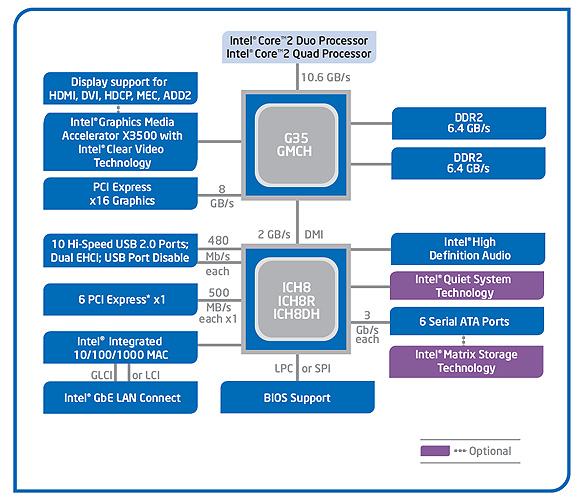
G35_Block_Diagram.jpg


With intel chipset ICH8/ICH9/ICH10 each port will give you over 200MB/s, so four of them as RAID50 you can get over 820MB/sec


epimetheus

SiI-4726 is an out of date RAID PM, although it is still good for RAID10. SiI-4726 does not support RAID5.
What does it take to convince you? :) Pictures and test results?
 
Last edited:
Most of the OS supports software raid0/1, that includes MAC OS10, Linux, Window XP and later

Window in Disk Management - Turn each drive to Dynamic drive, after that you can create a raid0
OS 10.x Create a RAID0 under Disk Utility
Linux uses mdadm

Since RAID0 post very little CPU requirement, there should be no resource hog with software RAID0
 
I know how to do software RAID 0.

My question was, in your benchmark, what exactly did you use?
 
I mean what OS and/or which software RAID 0 did you use?

Or did you use Intel fake RAID?
 
Sorry for unclear answer
Here is my set up:
Windows7 - 64bit

Using OS's RAID0 in Disk Manager - I don't like the MB raid (intel fake raid)
 
Last edited:
If not the 4726, what chip are you promoting? Yeah, a side by side benchmark would be the beginning of convincing me. Benchmark the OS/PM RAID50 against the same drives in a 5x4 RAID 50 setup on an Areca 1680ix, or similar proven RAID card.
 
Darn! to set set ARC-1680 as RAID50 with 20x HDD
ARC1680 + 2x ARC-8020 Cable Solution SAS Expander Module
This cost a lot. How about I just post my set up performance?
Would that work?
 
You don't need the 8020 expander, a 1680ix-24 or an 1680LP plus HP SAS expander would do it. What port multiplier chip are you using?

Why don't you start a separate thread on this as I truly am interested and I don't want to derail the OP's thread anymore.
 
That's OK, LOL, it's more responses than any other thread of mine usually gets. :D
 
Back
Top