• Some users have recently had their accounts hijacked. It seems that the now defunct EVGA forums might have compromised your password there and seems many are using the same PW here. We would suggest you UPDATE YOUR PASSWORD and TURN ON 2FA for your account here to further secure it. None of the compromised accounts had 2FA turned on.
    Once you have enabled 2FA, your account will be updated soon to show a badge, letting other members know that you use 2FA to protect your account. This should be beneficial for everyone that uses FSFT.

Basic power protection needed - Surge Protector or UPS?

Bisectors Fore

Limp Gawd
Joined
Aug 24, 2008
Messages
480
I just built a new computer and I am looking for some power protection. I was planning to just get a surge protector, but I read that many UPSs also function as a surge protector. However, I would like to keep the cost of whatever power protection I get within $50, and I realise that a good UPS may be more than that, although I heard of them being sold on sale for less than $50. If I can get a decent quality UPS that also does surge protection for $50, I would like to do that. If not, I will most likely just go for whatever surge protector is the best for that money. Also, it maybe true that I don't really need a UPS since I don't really have any critically important files on my computer. Any input would be welcome. Thanks.
 
I just built a new computer and I am looking for some power protection. I was planning to just get a surge protector, but I read that many UPSs also function as a surge protector. However, I would like to keep the cost of whatever power protection I get within $50, and I realise that a good UPS may be more than that, although I heard of them being sold on sale for less than $50. If I can get a decent quality UPS that also does surge protection for $50, I would like to do that. If not, I will most likely just go for whatever surge protector is the best for that money. Also, it maybe true that I don't really need a UPS since I don't really have any critically important files on my computer. Any input would be welcome. Thanks.

This topic has seen quite a bit of coverage of late. Poke through these threads and see if that helps;)

http://www.hardforum.com/showthread.php?t=1376509

http://www.hardforum.com/showthread.php?t=1376294

http://www.hardforum.com/showthread.php?t=1375862
 
I use one of these for my wife's computer and I live in Florida the lightening capital. The whole idea is to have a power source to avoid an abrupt shut down that can cause you to loose data or worse Windows.
Having seen it in action the poweron is instant but not enough juice ther to run for an indefinite period of time. I'd say 20-30 min. This gives you enough time to close windows properly. It's an NF4 rig running an pair of 7900GT in SLI an Opty running at 3.2GHz and a 500 watt PSU with an 20" LCD monitor. I leave only the PC and monitor plugged to it no printers etc. just the essentils to get her closed down. It also came in handy checking email after Charlie (hurricane) left us without power for 9 days. Anyoo you can spend a lot more and get much more but with my experience this is enough.
Hope this helps
 
also if u have raid0 i highly reccomend getting an ups.

 
I'd wonder if a cheap UPS is any better at protecting your stuff than a regular power strip. Power strips absorb so much stuff and then silently stop protecting. A UPS may run directly off the batter and inverter all the time, which gives you very good filtering and voltage regulation, or it's power supply is providing a good degree of that, both which last longer and give much better protection. But I don't think a cheap UPS is doing either of these things, you need to get one with a voltage regulation (AVR?) feature to be sure.

I guess you're getting the power backup, and that prevents loss/corruption of data, while your computer's power supply is presumably protecting the components from damage. It may not be protecting you from bad wiring/grounding, noise, fluctuating voltage, which can cause just as many problems. I would say that it's worth the risk using a power strip if you have no power issues or incidents of electronics failing, but if you have either of those get a real UPS or conditioner/regulator.
 
I have been running a computer in my house for almost 3 years and have never experienced a surge or other problem that seemed power related, aside from the occasional outage. But like I stated above, I don't have any data on my computer that I really mind losing. Another option I was considering was just to get a cheap surge protector that came with an Attached Equipment Warranty, so that in the unlikely event of a surge I would at least get re-imbursed for my stuff.
 
I have been running a computer in my house for almost 3 years and have never experienced a surge or other problem that seemed power related. Another option I was considering was just to get a cheap surge protector that came with an Attached Equipment Warranty, so that in the unlikely event of a surge I would at least get re-imbursed for my stuff.

On the surface that sounds good however only two companies I know of will actually pay. Panamax and good old Monster. I'll add, nobody pays for data loss.

If take a moment and open device manager and open disk properties you will see to options to check for higher performance from your storage system. If you read the paragraphs beside each check mark MS is very clear about if you do this with no power back up you will have data loss.

As mentioned above the situation becomes worse with a Raid array. Then there is the issue of a BIOS flash, drop power for more than say 100 ms you have a pooched BIOS.

Call it a condom if you like but safe computing requires a good quality UPS, who knows where that electricity might have been?;)
 
Ok, thanks for the info. Looking around on the net I noticed that that there is a company called "Monster," and a company called "Monster Cable." Are these two seperate companies, and if so, which is the one that you recommend? Also, is it possible to get a good quality UPS for $100 or less, and If so, can you recommend a model?
 
Ok, thanks for the info. Looking around on the net I noticed that that there is a company called "Monster," and a company called "Monster Cable." Are these two seperate companies, and if so, which is the one that you recommend? Also, is it possible to get a good quality UPS for $100 or less, and If so, can you recommend a model?

Monster and Monster Cable, one and the same. Without starting a whole flame thread about speaker cable their products work and they do stand behind them.

Wow, you never said what your new machine was, spec wise but for a good UPS you will probably exceed $100.00.

Do a bit of shopping around for this one:

http://www.circuitcity.com/ssm/APC-...sem/rpsm/oid/162959/rpem/ccd/productDetail.do

Or the 1500 unit.

To go much cheaper is really to cheat yourself. You can also find deals on Cyber power. I don't recommend the Belkin units, everyone I've tried has been flakey.

For closer to $200 you can generally find a sale on the APC 1500 Smart Power which will give you good voltage regulation, surge protection and battery back up.

Luck:)
 
Thanks for clearing that up about Monster.

The specs of my new machine are:

i7 920
P6T Deluxe
6GB DDR3
GTX 280
2X WD 640GB
PC P&C 750W
TRUE 1366
Antec 1200

I guess I should get a UPS that is rated with at least as many watts as my PSU, correct?
 
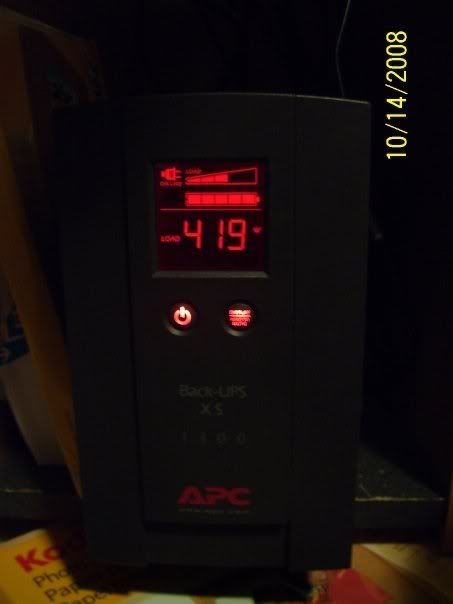
yes but i have the 1300 model below

load-1.jpg


Is there any difference between those two units other that the rating for Watts and VA? Also, do those units provide the surge protection and voltage regulation features mentioned above? Thanks.
 
Is there any difference between those two units other that the rating for Watts and VA? Also, do those units provide the surge protection and voltage regulation features mentioned above? Thanks.

no, yes, no problem
 
??? Please explain.

I would recommend a UPS over a surge protector, because a surge protector cannot protect your computer from power flucuations (Power loss then power surge). Imagine in one example, you are flashing your bios, and then you lose power to your computer. With a UPS, you would have time to complete the flash, but with just a surge protector you would lose the flash and possiblely have to buy another bios chip. I believe computers are delicate and require stable power all the time to function properly.
 
Really simple, this is why you want a decent "on line" UPS system. In my house I don't even loose internet when the power goes out (DSL) so I can grab the laptop and finish what I was doing, with a light load it will go hours easy.

Edit: but at any rate each of those represents a possible computer shutdown or loss of data.

untitled.jpg
 
Update: I got my UPS today and it is a formidable looking unit. :) The battery even came already charged. I have one quick question though, is it okay to position the UPS so that it is lying on it's side? It fits better in my desk that way. It looks like there are a couple of fans on the back, and maybe a vent in the top, and I was just wondering if it will screw up the airflow to have it lying on its side. Thanks.
 
Airflow should be fine unless you are blocking a vent. Batteries on all indoor small UPS's should be AGM which work in any position as well. Should be good to go.
 
Back
Top