Is it possible to route my Surround Sound to my computer? Now i have my receiver for my 5.1, everything is hooked up, just like it usually would be. Then i have the optical cable running from that to my xbox, for the 5.1 for my xbox, is it possible to also run that 5.1 to my computer and get that same sound? I do have the Acer H2332H, but that does matter? when i use my monitor, i use separate speakers anyways since i run the VGA from my monitor to my computer, and that doesn't carry Audio obviously. My xbox is set up perfectly, i just need the sound to run to my computer, while keeping the 5.1. is this possible?
![[H]ard|Forum](/styles/hardforum/xenforo/logo_dark.png)
Navigation
Install the app
How to install the app on iOS
Follow along with the video below to see how to install our site as a web app on your home screen.
Note: This feature may not be available in some browsers.
More options
-
Some users have recently had their accounts hijacked. It seems that the now defunct EVGA forums might have compromised your password there and seems many are using the same PW here. We would suggest you UPDATE YOUR PASSWORD and TURN ON 2FA for your account here to further secure it. None of the compromised accounts had 2FA turned on.
Once you have enabled 2FA, your account will be updated soon to show a badge, letting other members know that you use 2FA to protect your account. This should be beneficial for everyone that uses FSFT.
You are using an out of date browser. It may not display this or other websites correctly.
You should upgrade or use an alternative browser.
You should upgrade or use an alternative browser.
Audio From 5.1 System
- Thread starter WeezyTV
- Start date

- Joined
- Aug 16, 2004
- Messages
- 12,439
What receiver do you have? It's definitely possible though you might need some cable/adapters etc.
You need a receiver that supports analog 5.1 inputs or a PC sound card that supports Dolby Digital Live to send 5.1 over optical cable.
It also makes more sense to talk about sound from the source to the device. Like you send surround sound from your PC to your receiver, since the PC is the source and the receiver just plays the sound. Routing surround sound to your computer sounds like you want to capture that audio with your PC.
It also makes more sense to talk about sound from the source to the device. Like you send surround sound from your PC to your receiver, since the PC is the source and the receiver just plays the sound. Routing surround sound to your computer sounds like you want to capture that audio with your PC.
Yeah, no that makes sense. I understand you guys, i do know i'll need some type of cable and some kind of adapter. Uhm, im not 100% sure exactly what my Receiver can and can't do, but ill give you a list of inputs/outputs, since i only bought it from a friend. It has an optical IN, as well as Left and Right AUX out, i mean the only confusing part is having the sound when i use the computer, its just confusing to me for what ever reason, on the back of my computer, i do have the 5.1 outputs. I just dont understand how if the speakers run to the audio IN for my computer, yet to run it to my receiver, i would use the Audio OUT, if i do understand you correctly. So like i said before, on my xbox i use HDMI for sound and audio to my Acer monitor, but the audio sucks for the built-in speakers, so the video goes to my monitor, and i have the optical out running from my xbox to my 5.1 receiver. So yes, can you explain a way of getting the audio to play through the surround sound whille im on the computer/

- Joined
- Aug 7, 2004
- Messages
- 19,734
Are you using a dedicated sound card, or the audio chipset on your motherboard?
Post the model number of your sound card/motherboard and your receiver, and we can tell you if it's possible and what you'll need if so.
Post the model number of your sound card/motherboard and your receiver, and we can tell you if it's possible and what you'll need if so.
GIGABYTE GA-MA770-UD3 AM2+/AM2 AMD 770 ATX AMD Motherboard -
http://www.newegg.com/Product/Product.aspx?Item=N82E16813128376
- LHT754 LG Surround Sound
http://www.lg.com/us/tv-audio-video/home-theater-systems/LG-home-theater-system-LHT754.jsp
http://www.newegg.com/Product/Product.aspx?Item=N82E16813128376
- LHT754 LG Surround Sound
http://www.lg.com/us/tv-audio-video/home-theater-systems/LG-home-theater-system-LHT754.jsp
Your receiver supports optical (used by xbox) and coaxial (open). Your PC motherboard supports both. So you can use coaxial (rca cable), but unless the onboard sound supports Dolby Digital Live or the DTS alternative not all your games will be 5.1. Most games aren't encoded in Dolby Digital like movies are.
The only outputs on your home theater is hdmi and speaker wire. Unless you want to record your xbox audio on to your pc by sending a singnal from amplified speaker wires which is a real big mistake.
I googled recording hdmi audio and there isnt much there to help you.
I googled recording hdmi audio and there isnt much there to help you.
- Joined
- Aug 16, 2004
- Messages
- 12,439
shadowlord is correct, no idea where I pulled the adapter nonsense from. do what he says!
Last edited:

shadowlord
2[H]4U
- Joined
- Jan 6, 2005
- Messages
- 3,362
it seems there is some misunderstanding here.
so you like to hear the audio(sounds) of your computer over your speakers, right?
simply connect your digital out from your computer:
i marked the connector with red arrows....
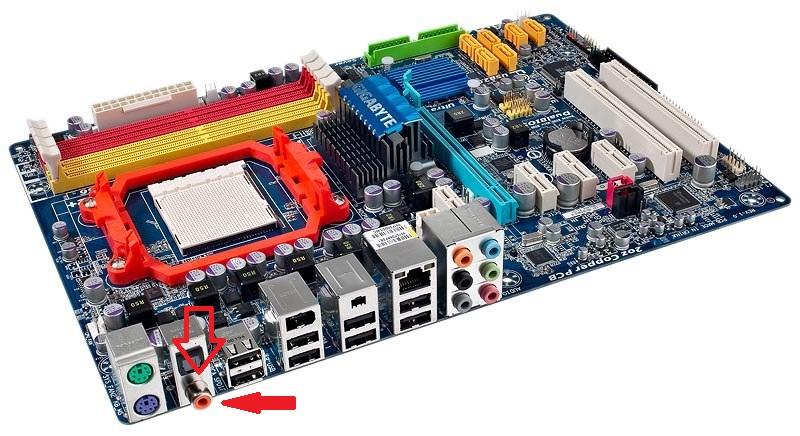
with a cable like this:
http://www.amazon.com/Digital-Audio...M6/ref=sr_1_14?ie=UTF8&qid=1292273112&sr=8-14
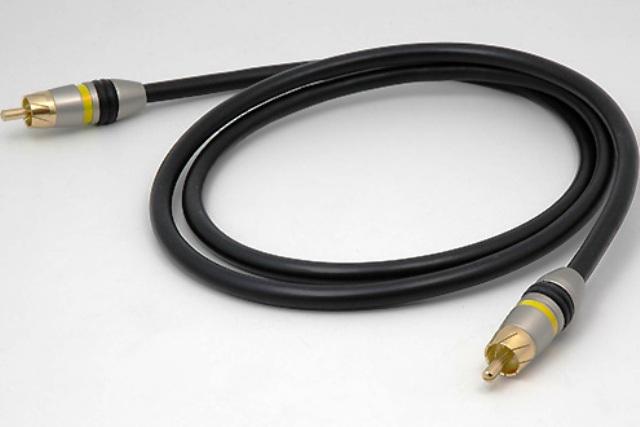
to this input on your receiver:
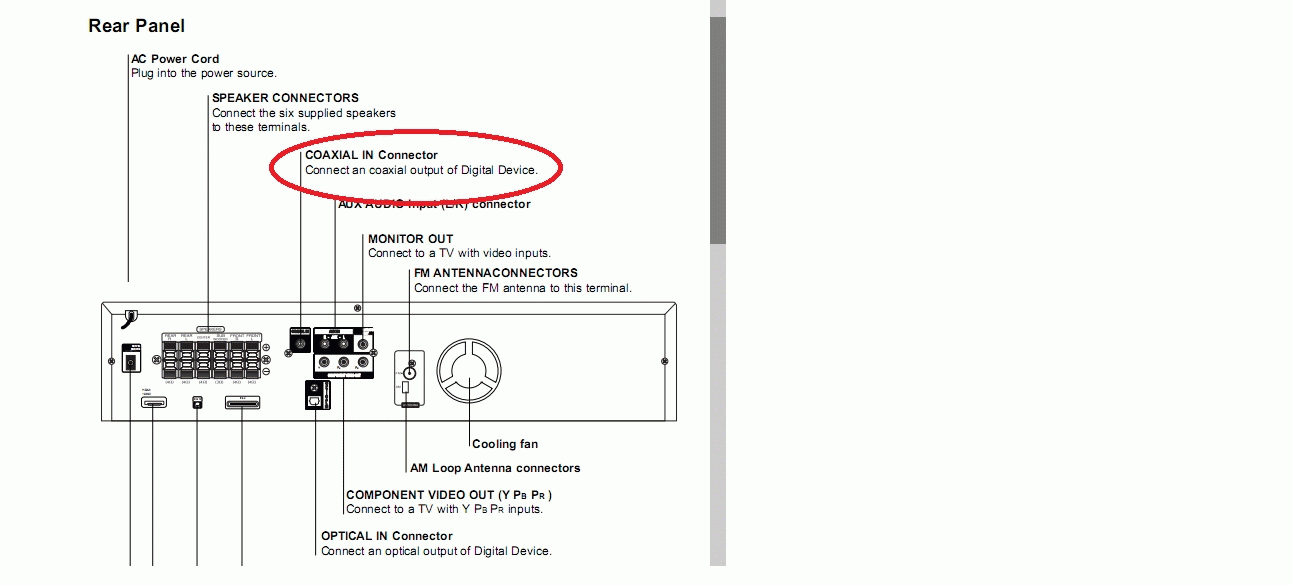
no adapter needed!
which OS are u using on your PC ?
Maybe you need to enable the digital output in your settings.
But thats easy under windows 7
so you like to hear the audio(sounds) of your computer over your speakers, right?
simply connect your digital out from your computer:
i marked the connector with red arrows....
with a cable like this:
http://www.amazon.com/Digital-Audio...M6/ref=sr_1_14?ie=UTF8&qid=1292273112&sr=8-14
to this input on your receiver:
no adapter needed!
which OS are u using on your PC ?
Maybe you need to enable the digital output in your settings.
But thats easy under windows 7
As an Amazon Associate, HardForum may earn from qualifying purchases.
http://www.newegg.com/Product/Produ...-_-Audio+/+Video+Cables-_-STARTECH-_-82203092
what if i used that? would that work?
what if i used that? would that work?
shadowlord
2[H]4U
- Joined
- Jan 6, 2005
- Messages
- 3,362
please post a picture of the back of your receiver.
i typed the modell number you gave us into google and it came up with the manual i got the picture from.
maybe something isn't quite right there.
i will look into the cable you posted as soon as i have the picture of your receiver to determinate what connectors you have available.
i typed the modell number you gave us into google and it came up with the manual i got the picture from.
maybe something isn't quite right there.
i will look into the cable you posted as soon as i have the picture of your receiver to determinate what connectors you have available.
sadbuttrue
Gawd
- Joined
- Feb 16, 2008
- Messages
- 519
If you follow through from the OPs original link you can see the correct manual indicating no coaxial input.
http://www.lg.com/us/tv-audio-video/home-theater-systems/LG-home-theater-system-LHT754.jsp
Second manual on there:
(pdf page 6) http://www.lg.com/us/tv-audio-video/pdf/HT902SB-R1[1].NA1ULLA _ENG_MFL34656568_070131.pdf
You'll need to use an optical cable and an optical switchbox as you only have 1 input. The ALC888 chip on your motherboard does not support dolby digital live, so gaming at 5.1 is not an option. You can however output 5.1 in passthru mode for movies, everything else will be stereo.
http://www.lg.com/us/tv-audio-video/home-theater-systems/LG-home-theater-system-LHT754.jsp
Second manual on there:
(pdf page 6) http://www.lg.com/us/tv-audio-video/pdf/HT902SB-R1[1].NA1ULLA _ENG_MFL34656568_070131.pdf
You'll need to use an optical cable and an optical switchbox as you only have 1 input. The ALC888 chip on your motherboard does not support dolby digital live, so gaming at 5.1 is not an option. You can however output 5.1 in passthru mode for movies, everything else will be stereo.
oh see i dont care about gaming at all. The sole purpose of having my 5.1 system is all for music. I dont have a good enough graphics card to play games, i have a 9500GT, and i really just use it for like watching nice movies. Along with the phenom x4, but anyways. Yeah i only want my speakers to output my computer sound because i use a lot of high end programs like FL Studios and stuff, so sound is key. is that truely possible with what i have right now? i wouldn't mind buying a sound card, i was looking at the Claro+, but im just seeing if i can get away without using it and still get 5.1 audio
shadowlord
2[H]4U
- Joined
- Jan 6, 2005
- Messages
- 3,362
sorry my bad. i somehow got the wrong manual.
Weezy. you only need an optical switch box and you'll be fine.
something like this...
http://www.amazon.com/TOSLink-OPTIC...ef=sr_1_4?ie=UTF8&qid=1292355068&sr=8-4-spell
it will allow you to switch between x-box and your pc and connect both to your receiver.
no need to buy a new soundcard right now since your receiver is the limiting factor right now as it only has one digital input. But don't worry, just setup the switchbox like this and you will be fine.
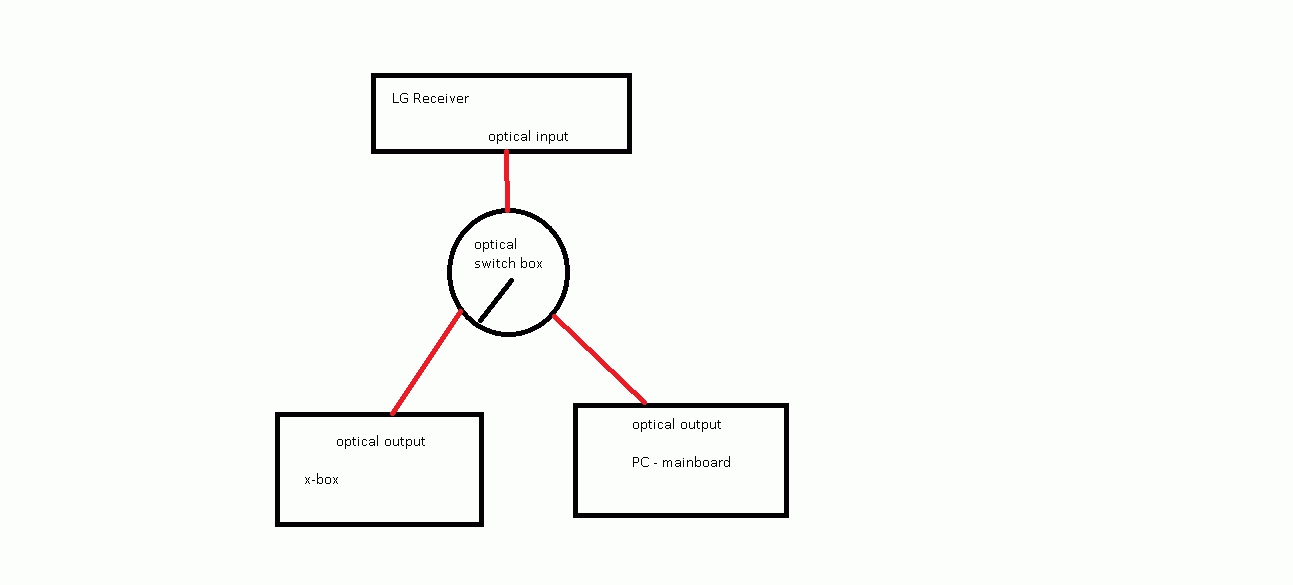
Weezy. you only need an optical switch box and you'll be fine.
something like this...
http://www.amazon.com/TOSLink-OPTIC...ef=sr_1_4?ie=UTF8&qid=1292355068&sr=8-4-spell
it will allow you to switch between x-box and your pc and connect both to your receiver.
no need to buy a new soundcard right now since your receiver is the limiting factor right now as it only has one digital input. But don't worry, just setup the switchbox like this and you will be fine.
As an Amazon Associate, HardForum may earn from qualifying purchases.
http://www.newegg.com/Product/Produ..._-82203092&AID=10521304&PID=3891137&SID=194r0
thats the outport on my computer, can i use that cable and get the 5.1 from the receiver?
thats the outport on my computer, can i use that cable and get the 5.1 from the receiver?