• Some users have recently had their accounts hijacked. It seems that the now defunct EVGA forums might have compromised your password there and seems many are using the same PW here. We would suggest you UPDATE YOUR PASSWORD and TURN ON 2FA for your account here to further secure it. None of the compromised accounts had 2FA turned on.
    Once you have enabled 2FA, your account will be updated soon to show a badge, letting other members know that you use 2FA to protect your account. This should be beneficial for everyone that uses FSFT.

ATX in SFF cube?

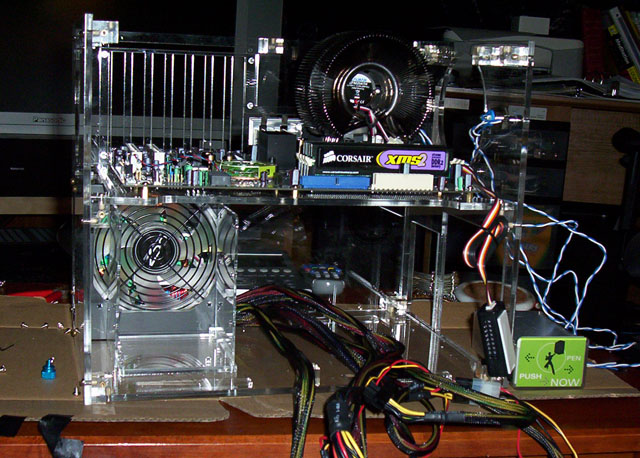
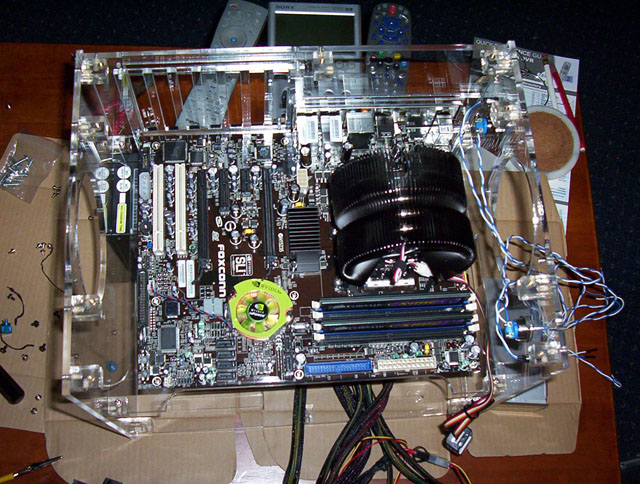
My case arrived today. It was packet very well. I haven't had a chance to gut the mid-tower case I have my components in yet, so the cube is bare for now. Here are a few pics of it just out of the box.
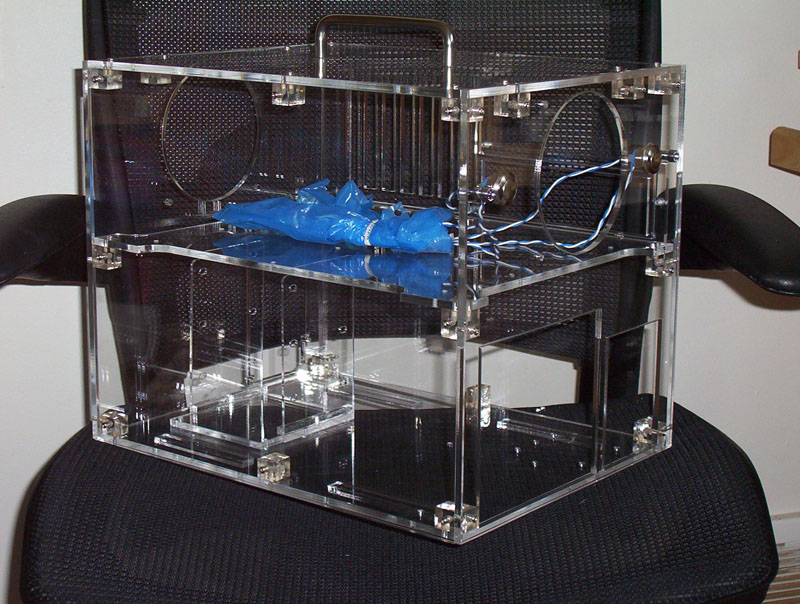
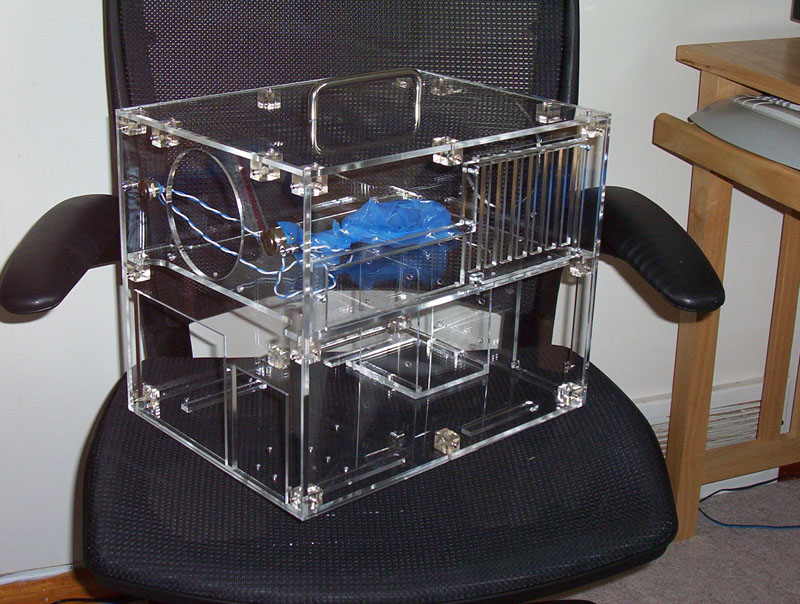
mycube_drive-side_1-sm.jpg


mycube_slot-side-1-sm.jpg


I'm very happy with it so far. The mods look like they will work just like I hoped they would too. Just wait 'till it gets loaded with hardware. :)
 
I started transferring my pc components into the cube last night. Unfortunately the zalman cpu cooler I am using is alittle too tall. I knew the fan might be a risk. I thought perhaps it would just be a really close fit or at worst I'd have to press the lid of the case on while fastening its screws down, but its just slightly too tall. I'm guessing its about 3/8" too tall which is just too much. In addition to being unable to close the lid (it just see-saws to one side or the other), I also can't grab the cube case to take along with me to other locations like I had wanted to since the unfastened lid has the handle on it.

The zalman is one of the few really good (and quiet) cpu coolers I would choose out of those available for my AM2 processor currently. It stands upright like a donut-wheel made out of radiator fins. After waiting eagerly to get this awesome cube case and spending alot of time putting my new hardware into it, it was quite a letdown when I realized with certainty that the lid wasn't going to fit back on.

I wrote mountain mods asking them about a replacement lid for the case. I inquired about a taller lid design without creating a gap on the exterior. Another idea I mentioned was a sideways mounted handle with an area cutout of the lid above the fan, and an acrylic box made vertically above that cutout.. sortof like a skylight. I asked if they had any ideas of their own too.

Now I'm thinking of bringing one of the slay cube case's screws to home depot to find the same type but longer to use with some sort of spacer until I can get a replacement lid. I know I could go with the stock amd fan but I really don't want to use that, and I don't feel like removing the zalman heatsink/fan and breaking the thermal grease layer either. :rolleyes:

Other than the lid/fan issue I'm really happy with how the build is coming along. The case is going to be great. :)
 
I ended up using longer screws from home depot. They are screwed in enough so I can lift the case using the handle, however there is a gap between the top of the case and the lid. Pulling up the screw heads retain the lid fine. Downward the lid is resting on the heatsink fan-grill which creates a gap all around the top, so its not that great of a setup as-is. It takes awhile to contact the bob slay dude so it may be a few days before I hear back from him about a replacement lid.

Other than the lid itself the build turned out pretty cool. I still need to order a device for my third 5.25" bay, and I could stand to tidy up the wires on the lower level of the case alittle more (the SATA cables, etc)... and I haven't installed any of the light bars yet, but it still looks cool. :) I'll post some pics this evening.

I was considering a hotswap HD bay for the third 5.25" bay but now I'm considering getting some LCD readout bay or something. There are some cool ones that can broadcast whats playing on winamp, etc. If anyone has something like that I could use some suggestions.
 
elvn said:
I was considering a hotswap HD bay for the third 5.25" bay but now I'm considering getting some LCD readout bay or something. There are some cool ones that can broadcast whats playing on winamp, etc. If anyone has something like that I could use some suggestions.
Nice case.. I like it. Hopefully we'll see some pix soon with it loaded with some hardware. ^_^

For an LCD, I picked up the VL System LIS2. It can display anything to do with your computer... It will rotate through all my voltages, speeds, network info, hdd info, temps, xp info, etc, and then when I open winamp/wmp it will display a motion graphic with song ID tag info, then go back to rotating my system info after I stop the music. It has a built in fan controller as well (4 channel). Look into that. It comes in all different colors. (silver face or black face, with red/blue/green vfd color) Xoxide and FrozenCPU carry it. Its well worth the price.

Here's a vid of mine when I first installed it. Since then, I've customized the info more to my liking with temps and stuff. It works in conjunction with the program "speedfan".
http://s8.photobucket.com/albums/a1/wiretap25/?action=view&current=MVI_0532.flv
^-- if you need a password to view the video, the password is "turbo" (without the quotes).
 
elvn, how about the LEDs that came with the case? when i ordered i opted for an extra red LED to replace one of the blue ones for power. it turned out that only the red one (which i had to strip and solder to the switch myself) works.
 
I like that system readout panel thanks for the reply and video link (w1retap). About the VL System LIS2 readout-panel in particular - I already have a 3.5" fan controller so I wouldn't need it for that purpose. Otherwise I like its readout function.

gobBobo if you are asking about the little LED power and HDD lights next to the power and reset buttons on the case I think they both work, and I haven't replaced them. I'll check closer when I get home to make sure they are working. The other lights I mentioned that I haven't installed are the little 4" light bars I ordered, and two longer ones that came with my 3.5" bay fan controller (all blue). I'll have to mess around with them the next time I open the case to tidy up the wiring alittle more. Its a pain to unscrew with the lid issue I have at the moment :rolleyes:

-------

I talked with the mountain mods dude today about my two suggestions for a higher case lid. We decided to go with one that my girlfriend suggested -- making an acrylic frame 'spacer' to go on top of the case like a picture frame, which would be sandwiched between the case lid and the top of the case (walls and screw mounts). The frame will have aligned screw holes and should hopefully be a snug, flush fit using longer screws. The bob slay guy said that the frame may have to bevel/ramp slightly inward to match the size of the lid itself since the lid is smaller than the walls of the case.
He was very interested in my ideas since as it turns out he is looking for solutions like that to suit people who want to use water cooling with the slay cube case. It sounds promising so far. When I get home I have to email him the exact dimensions of heatsink relative to the case so that we can be sure this time that everything will fit.
 
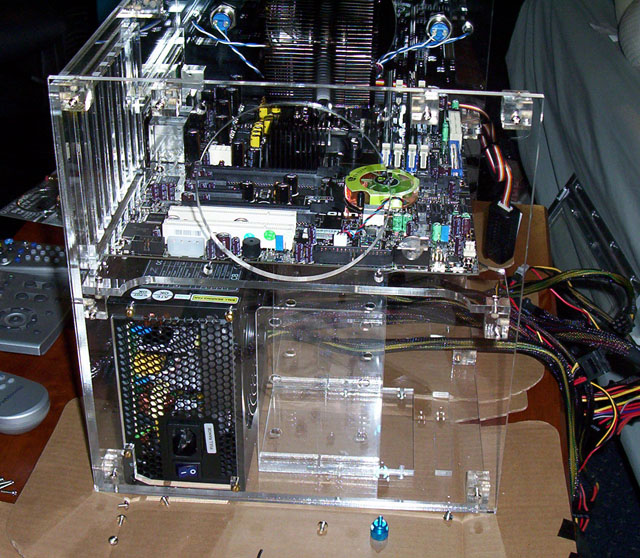
Here are a bunch of pics of the early first go of installing my hardware.

cubecase_driveside-early_sm.jpg


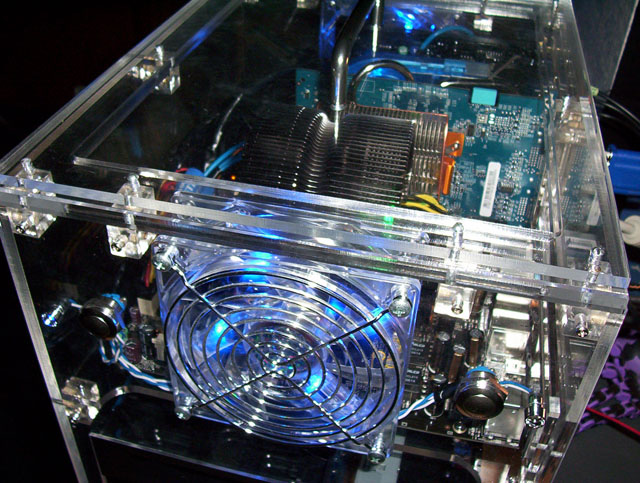
cubecase_topdown-early_sm.jpg


cubecase_rear-early_sm.jpg
 
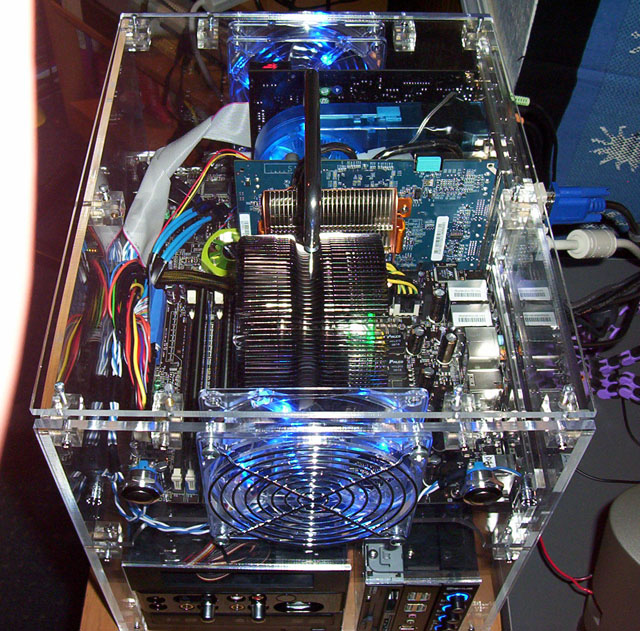
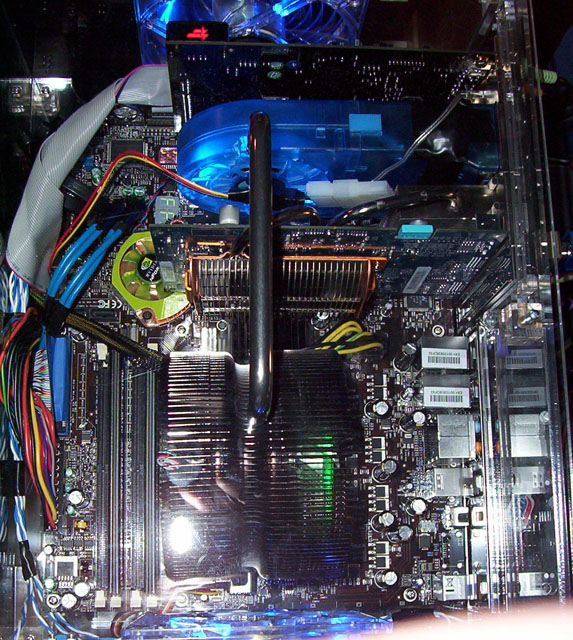
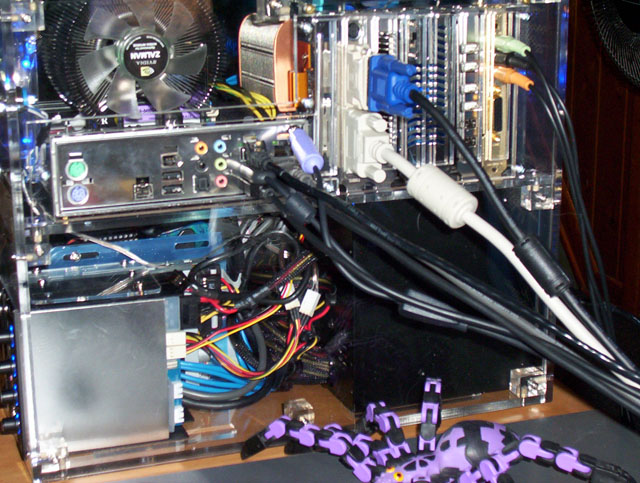
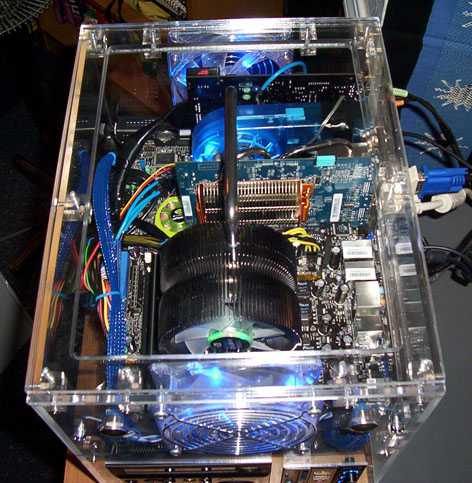
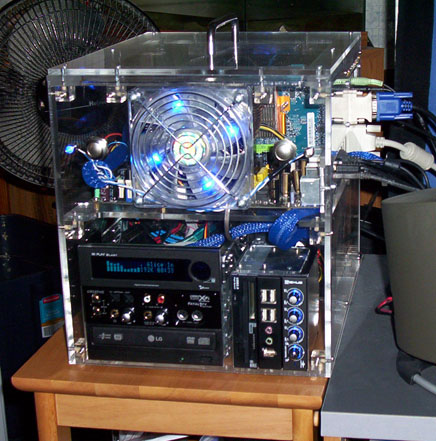
More pics of the cube hardware installed and functional. I have a few cold cathode lights to install yet, and the top 5.25" bay panel is just a placeholder at the moment. I'd also like to clean up the cables alittle more if I can manage it, and I am getting that spacer-frame for the top of the case vs. the zalman cpu cooler as soon as I can.

cubecase_topdown-1_sm.jpg


cubecase_topdown-close_sm.jpg


cubecase_rear_sm.jpg


cubecase_port-side_sm.jpg


cubecase-front-good_sm.jpg


cubecase_on-pillar-1_sm.jpg
 
looks really nice man. you did the same thing i did with the xfi fatal1ty front panel, twisted the ribbon cable all up. it really is a challenge organizing the cables in this box. :cool:
 
Thanks. I'm thinking about getting some kind of sleeve for the audigy cable (some kind of narrow sock or some electric sleeving?) , and I'm planning on tweaking/redoing some of the other cable management when I open the box to put in a display panel in the top 5.25" bay eventually.
I'm still shopping around for the VFD display panel. I'm considering getting the

VLSystem M-Play Blast - Blue VFD Display w/ Remote - Black

Orignally I was going to get a hot-swap harddrive bay for the third 5.25" bay instead of a display panel. I was going to use a hot-swap bay so that I could leave most of my personal files and data home when I take the cube on the road (swapping a cheaper harddrive in a spare harddrive tray into the bay). Instead, I'm going to research encrypting my files and locking out folders etc. and I can also try getting used to using a networked harddrive to store my financial data, etc at home and just keep my box itself more 'generic". :p
 
could always put those files in a hidden folder, then encrypt it, and then password protect it with a strong P@ssw0rd! lol

I should post up some new pics of my Bob Slay after adding some mods/lights/stuff. check later.
 
Here is a list of most of the hardware in my cube case presently. I haven't installed the extra cold cathode lights yet though.

----------------------------------------------------------------------------------------------------------

CPU: AMD Athlon 64 X2 4400+ Dual-Core 1MB Per Core 90nm (Socket AM2)

System Memory: Corsair Dual Channel TWINX 2048MB PC6400 DDR2 800MHz E.P.P. Memory (2 x 1024)

Video Card:
VGA GIGABYTE N 7600GT GV-NX76T256D-RH (passive cooler - Silent-Pipe II Technology)
-- this is to hold me over until DX10 cards come out. Works great with 2gig system memory

Sound card: Creative Labs X-Fi Fatal1ty Edition 7.1 24-Bit Sound Card w/Drive & Remote Black

PSU: OCZ| OCZ700GXSSLI 700W

Motherboard: FOXCON C51XEM2AA- 8EKRS2H 590SLI

Harddrives:

HD 150G|WD 10K 16M SATA WD1500ADFD --
Western Digital Raptor WD1500ADFD 150GB 10,000 RPM 16MB Cache Serial ATA150 Hard Drive

HD 320G|ST 7K 16M SATA2 ST3320620AS --
Seagate Barracuda 7200.10 ST3320620AS (Perpendicular Recording Technology) 320GB 7200 RPM 16MB Cache SATA 3.0Gb/s Hard Drive

Fan controller: VANTEC NXP-305-BK Black Fan & Light Controller Panel (3.5")

port replication panel: SILVERSTONE SST-FP32-B Aluminum USB/1394/Audio Panel (3.5")

Floppy + multi-format memory card reader: SIIG U2CRD RDR+FDD (3.5")

USB+Firewire PCI addon Card: MASSCOOL MT1394A+U2-R

Optical Drive: DVD burner LG|GSA-H10N BK 12XRAM
(LG Black 16X DVD+R 8X DVD+RW 10X DVD+R DL 16X DVD-R 6X DVD-RW 12X DVD-RAM 16X DVD-ROM 48X CD-R 32X CD-RW 48X CD-ROM 2M Cache E-IDE/ATAPI Super-Multi DVD Burner - OEM)

CPU cooler: ZALMAN|CNPS 9500 AM2

Harddrive coolers: 2x CompUSA Hard Disk Cooler Mfg Part #: EQ40100B SKU: 289662 (comparable to Maddog Multimedia Hard Drive Dual Fan Cooler Mfg Part # : MD-HDDF-CF602 SKU: 306878)

Add-on VGA cooler: Antec VCool Expansion Slot VGA Cooler (Mfg Part #: VCOOL SKU: 332236)

120mm case fans: 2 x 120mm Coolermaster Quad Blue LED Silent fan

Case lights: 2 x 4" DUAL BLUE COLD CATHODE KIT
2 x 12" BLUE COLD CATHODE LIGHTS (incl with fan controller)

-----------------------------------------------

Peripherals

Router: Linksys SRX400 wireless router (with 4 wired ports)

Monitors: (dual-mode)
Sony FW9012 24" widescreen crt monitor - running at 1920 x 1200 @ 85Hz
Viewsonic vx2025WM 20.1" LCD monitor - running native resolution 1680 x 1050 @ 60Hz

External Drives:

LiteON USB2.0 DVD/CD Rewritable drive Model SHW-1635SX
(LITE-ON Black 16X DVD+R 8X DVD+RW 8X DVD+R DL 16X DVD-R 6X DVD-RW 16X DVD-ROM 48X CD-R 24X CD-RW 48X CD-ROM 2M Cache USB 2.0 External DVD Burner)

US Modular 4GB Monstor Drive USB 2.0 "Pen" Drive (looks like a zippo-lighter)


Keyboard: Microsoft Wireless Optical Desktop Pro 2.0 Wireless Keyboard

Mouse: Microsoft Trackball Optical (5-button w/ thumb-ball style trackball)

Speakers Klipsch ProMedia Ultra 5.1

Headphones: Logitech Premium USB Headset 350

Game Pads
2x Logitech 963325-0403 RumblePad 2 Vibration Feedback Gamepad (wireless)
1x Microsoft Strategic Commander programmable controller

Flight stick Microsoft Sidewinder Flight Stick USB

WebCam Creative Webcam Pro EX

USB hub Belkin 4-port USB 2.0 hub (stackable)

Power backup APC BE750BB Back-UPS ES 750VA - 120v USB

Line conditioner
Tripp Lite LC2400
Line Conditioner 2400 Watt 6Out Corrects Hi&Lo Voltage Life Ult Ins
 
I came across the VL System M-Play 202 Plus Media Center VFD in a few reviews so now I'm considering that model. Even though I don't have windows media center edition it still has alot of cool functions. I'm not yet sure what the differences are between the M-Play 202 plus and the M-Play Blast models so I will have to do some more reading.

http://www.extrememhz.com/mplay202p-p1.shtml

http://www.vlsys.co.kr/

M-Play 202 Plus $74.99 at Xoxide

http://www.xoxide.com/vlsystems-mplay202-black-bluevfd.html
 
w1retap or anyone else.. I'm still confused between the VL system VFD models. They all seem to have the similar features. I'm guessing the 202plus is one of the newer models with the most features but I want to be sure before I order. Any thoughts would be appreciated.

M-Play Blast


M-Play 202 Plus


L.I.S 2 premium
 
The spacer 'frames' for the top of my case arrived yesterday. They worked out great except that I overtightened one of the screws on the top of the case and broke the little threaded barrel free from the acrylic so that now it just spins. :rolleyes: I'll have to order a few spares from mountainmods someday so that I have some onhand. I may try to extract the screw mount and gel superglue it back in too. I also used the opportunity to re-route and sleeve some of the cables while I had the case open. Other than the screw thing, I'm very happy with how the case turned out at this point.

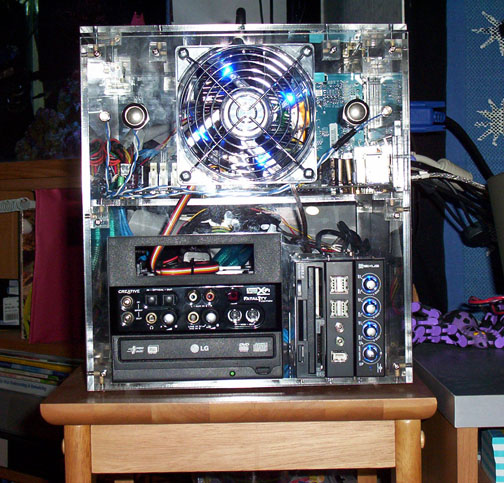
I still have a placeholder tray in the top 5.25" bay since I haven't ordered anything to fill it just yet (most likely a VFD like the M-Play 202 Blast mentioned above), so its not quite finished yet but getting close. One thing I'm going to have to deal with if I get a VFD is that I filled all my usb headers on the motherboard and my addon card's shared internal port/header. However the addon-card does have an internal firewire port free. If I can find an adapter to convert that internal firewire port to usb I'd be in business. If I can't find such an adapter then I might have to kill 2 of the four front usb ports on the port replicator :(

I'll take a few pics of the cube's current look when I get home in alittle bit.
 
The M-Play Blast is the older version for media oriented applications I believe.. and the 202 is the newer version with better support for XP MCE features and maybe better firmware support for advanced options? (i'm pretty sure.. I don't really know a whole lot about them) I think they only have a 2-channel fan controller where the LIS2 Premium has a 4-channel. (i know for sure my LIS2 has 4-ch fan support, because i'm using it) The M-Play and 202 have remotes and can turn on the PC via remote, where mine does not. Again, you would have to verify everything. Calling VL System would be the best thing, because they could explain it best. I know I love my LIS2 though. Its pretty amazing. The VL System VFD's hook up via USB. They have one of those "half" USB header connectors with just the 4 pins, or you can use the external USB connector to plug it into a free USB port outside your case or motherboard backpanel. All you hook up inside is your USB, 4-pin molex power, and fans via a 3pin or 4pin adapter. I have mine setup so when I'm overclocking and have higher temps on my processor, the fan speed kicks up accordingly. (you can also do it manual thru software, or have it based on CPU load) Its very easy to setup.

If you don't need the 4 channel fan controller, go for the M-Play Blast or 202. It will save you a little money over the LIS2 Premium. They both pretty much do the same thing. I guess the tradeoff is you don't get a remote with one, or don't get the 4-ch fan controller.
 
Thanks again w1retap for your insights and suggestions into the VFDs incl your experience with the model you own. I was hoping you'd post sooner or later. :) I'm also looking fwd to seeing more pics of gobBobo's rig too. By the way gobBobo, I had to flip my LED power and LED harddrive leads around a few different ways on the header pins until I got their LEDs working right.

As you gathered from my earlier posts w1retap, I like the Vantec analog fan controller (with the blue-lighted knob perimeters) that I have in one of the 3.5" bays so I wouldn't need the digital fan controller funtions on the VFD. I do want one of the most recent models though, with remote, so maybe the 202-plus is the one I'd want. You are prob right that I should call them and find out first. The display functions seem really cool which is mostly what I'm interested in. The remote functions are also a big plus.

My fans and controllers
My ZALMAN 9500 AM2 CPU fan is regulated by my motherboard, and also has a 3-stage knob controller (low-med-high) that came with it. I have the controller unit inside the case at the moment but I may make a modified PCI slot cover to integrate it into eventually. As it is, the motherboard seems to control the fan well without any additional digital controller and without adjusting the knob manually. The zalman cooler works great (other than the fact that I needed to get a spacer for the top of the case), and is very quiet. My 3.5" Vantec fan controller's analog knobs control the two big 120mm fans on the top level of the case, the four fans on the harddrive heatsinks (2 each), and the Antec VCool Expansion Slot VGA Cooler. The other big fan in my case that isn't on a fan controller is obviously that big 120mm blue-lit one integrated into the OCZ PSU.
 
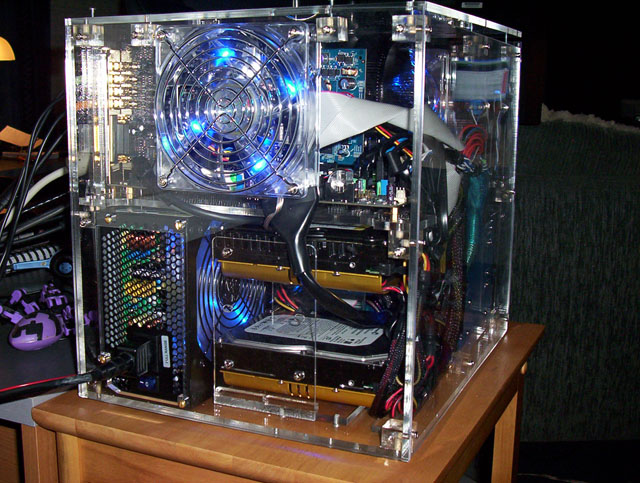
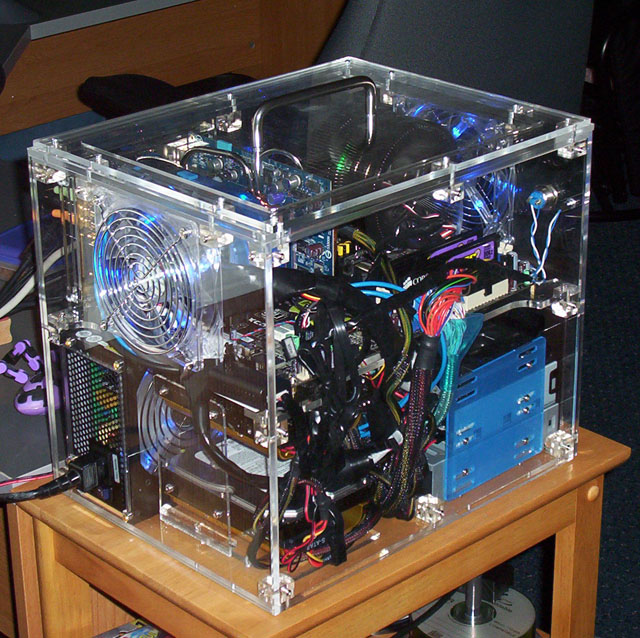
Here is a perspective pic of the port side of my cube case. It shows the new top with the spacers installed.

cubecase_port-side-perspective_8-29-06.jpg


Here is another close up that shows the spacer frames alittle better:

cubecase_new-spacers_8-29-06.jpg


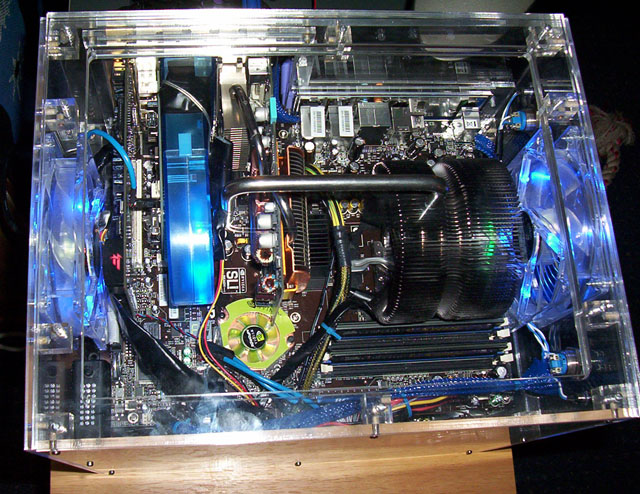
This picture shows the now sleeved x-fi Fatal1ty ribbon cable along with some other cables. It could still use some tweaking on the wire management but its alot better than it was. The bundled up extra length of the SATA cables cause some of the cable-bulk mess between the harddrives and the motherboard. If I could find some short SATA cables with right-angle connectors it would be alot better. Alternately I could perhaps feed the sata cables in lengths behind some of the drive bays instead of leaving them in bundles on the side of the case.

[
cubecase_rear-perspective-wires_8-29-06.jpg


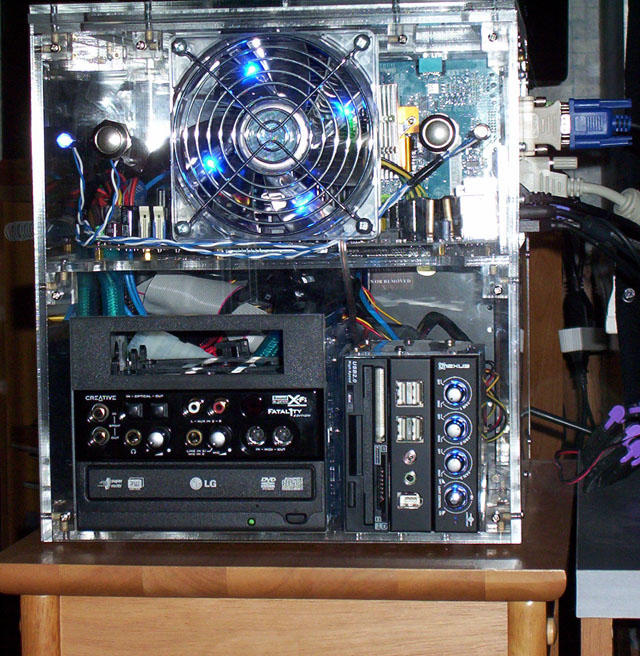
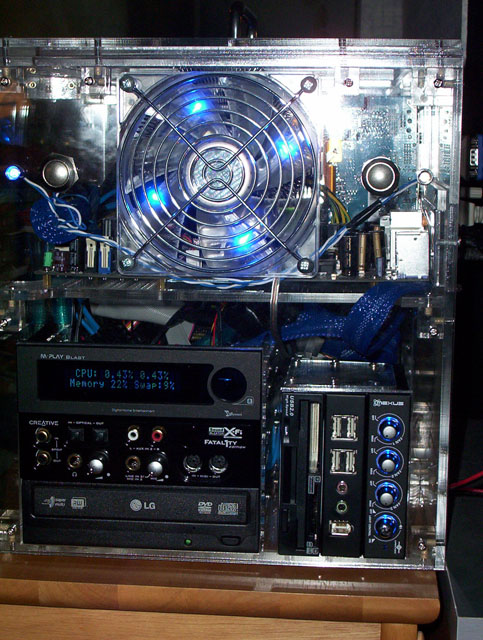
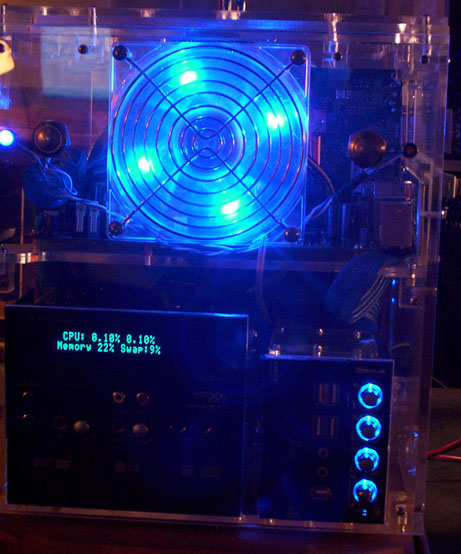
Here is a shot of the front of the case with the cables cleaned up more. It looks better in person without the flash washing out the picture of course. I didn't sleeve the entire length of the X-Fi Fatal1ty's ribbon cable, as you can see behind the place holder 5.25" drive bay where the VFD will eventually go. I'll have to work on that when I install the VFD.

cubecase_front-overflash_8-29-06.jpg


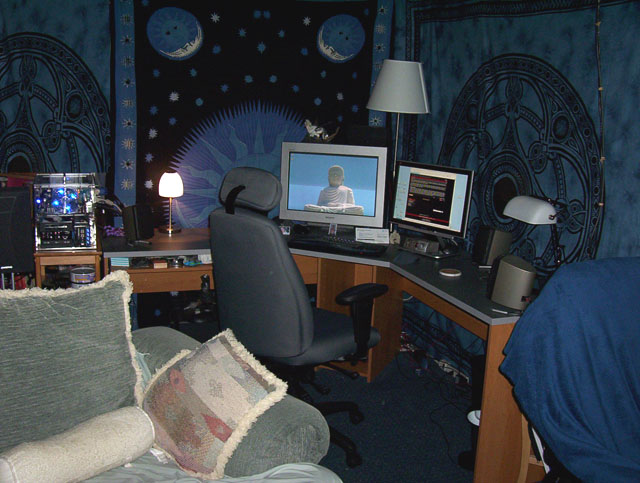
Finally, here is a picture of my desk setup. It came out alittle dark and undetailed unfortunately. Its difficult to get the whole desk + cube case into one shot.

cubecase_desk-setup-lighter_8-29-06.jpg
 
Very Nice!

One tip though - remove the blue plastic on the brackets for the 5.25 devices. It's just blue film to protect the acrylic from scratching. They should be completely clear.
 
Doh! :eek: Thanks lol. I was wondering why they were blue when I first got them. They didn't seem to be a seal at that point but I had alot of stuff on my mind/to install and I must have figured he used a different material since I had a custom bay height. At least blue goes with the theme :rolleyes:

I'll add removing the 5.25" bay brackets blue seal to the list of stuff to do when I get the VFD to put in. I am trying to do everything in as few case-openings as possible since I don't want to risk breaking any more of the little screw mount cylinders free of their acrylic blocks more than I have to. Speaking of that, also during the VFD install I'm going to swap the case mount block I stripped which flanks a 120mm fan with the corner one I stripped, and see if I can remove the little barrel mount from the stripped one so that I can gel superglue it back in securely.
 
I mistyped there. I only stripped one screw-mount in one of the mounting blocks, in the front left corner of the case. I mean to swap that block with one of the blocks on either side of the 120mm fan.

I hope this doesn't become a recurring problem with the mounting blocks and I also am hoping the gel superglue idea will work.
 
QMICRA-ATX1.jpg


This thread inspired me to try out my own ATX mod in a QMICRA SFF case.

So far I have it up and running with an A8N-SLI. hopefully I can secure the components and try to obtain a spare cover to mod.

If the project works out well, I will be installing my C2D SLI setup from my Lian-Li tower ;)
 
That QMICRA looks pretty good dworley. I read about that kind of mod and actually considered it before deciding I liked the cube alittle better. The fact that I didn't have to modify it myself was also a big factor. Being able to use an ATX board is great for either setup though - congrats on your mod. Maybe you could get an acrylic cover made for it now. ;)

I saw you mention SLI. I had considered that too, or a GX2 card but after tallying up all my hardware costs I decided on a single video card with budget in mind, yet good performance. I'll drop alot on a video card when DX10 cards come out instead. My vid card is a GIGABYTE 7600GT GV-NX76T256D-RH (passive cooler - Silent-Pipe II Technology) that I got for around $140. It runs all of my games great. I was shocked at how well it runs them to be honest. The 2gig of 800MHz DDR2 system memory probably helps alot though. This is my first rig with 2gig.

--- just looking at the QMIRCA pic again. I wonder if you could flip the case upside down and install a motherboard tray to sit above the powersupply, and use a custom cut case cover of course for the ports and pci slots. Your 5.25" bays could mount just the same upside down I think. That kind of configuration would be alot more appealing to me, especially if the sides were clear acrylic or had clear acrylic windows for the motherboard 'level'. That would be alot of modding considering cuts for the motherboard port and its pci slot cutouts, but sure would be neat.
 
I've been busy lately but I've finally decided on the M-Play Blast for my VFD. The blast and 202-plus are the two newer models. The only difference I can tell is that the 202-plus doesn't have any fan controllers and the M-Play Blast has two. Even though I most likely won't be using the VFD's fan controller function in this rig, its only ~ $15 more for M-Play blast which has two fan connectors ($90 vs $75). I might need that function someday if put the unit one of my other pcs someday.
 
I received my M-Play Blast and a cable sleeve kit I ordered. I'm going to try to find time to install them tonight if possible and I'll take some pics when I do the install. I think the whole case will look better when I am done. :)
 
sorry guys, i don't actually own a camera so i haven't been able to get more pics. hopefully soon.

elvn, how's that m-play blast workin?
 
I believe I tried to mount the fan sideways when I was installing it but I don't think it fit that way with ram so close vs. the 'donut' of radiator fins. I'm pretty sure that was why I didn't - either that or something about the clip/base itself prevented me from going that route .. I can't quite remember. I could investigate it again now that I have everything else taken care of pretty much. I'm sure it would be more effective considering the fact that if it could face front, the 120mm case fan could be installed to continue to blow that air directly out, but also because the zalman would be pulling heat off the fanless heatsink on the video card behind it. Alternately both fans could suck air in and blow it against both the zalman radiator fins and the video card's heatsink behind it.

I finally got around to installing my MPlay-Blast VFD and also sleeved a few cables last night and alittle finish-up this morning. I got very busy with other things so had put that project on hold alot longer than I had intended. I like the way the case turned out. I'll take some pics in a bit.

One thing I found that I should mention is that I did not strip any of the mounting block screw holes like I thought I had. The frame just wasn't lined up good enough they all work now.
 
Ok I took the heatsink out and flipped the snap-on bracket around. Its pretty close to the ram but it does fit. For some reason I remember the radiator fins were pressing onto the ram when I first tried it but I must have been wrong. It will work alot better this way, and it looks alot more streamlined too. Thanks for the kickstart to make me check it out again stormshadow. :)

Btw that dark, thick arctic silver thermal paste can get pretty messy -- its worse than boogers. :p
 
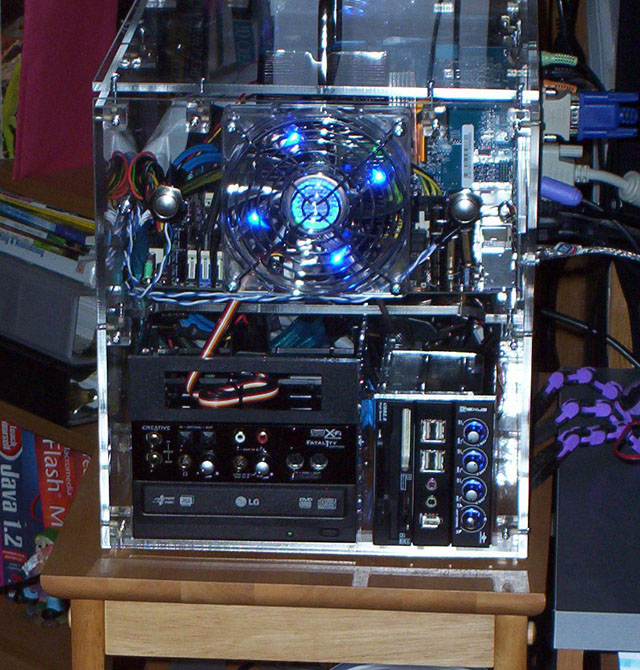
Heres a few pics. Pic quality is iffy on a few of them. Of course it looks alot better in person. I had to use the flash to keep it from being muddy looking or losing detail so its pretty harsh lighting wise compared to RL.

cubecase_top-down_9-27-06.jpg


cubecase_front_9-27-06.jpg


cubecase_front-close_9-27-06.jpg


cubecase_front-dark_9-27-06.jpg


cubecase_overhead-long_9-27-06.jpg
 
Still not sure but perhaps when I first felt everything out about the motherboard I had held the heatsink/cooler in place without the cpu installed and it was hitting the ram, so I turned the cooler sideways. I think the thin cpu height was enough to clear the ram so now it works.
 
I agree that it looks better with the heatsink rotation.
Probably helps, even more, on the CPU cooling. Noticed any temp difference?
 
To be honest I hadn't been monitoring the temps yet since I didn't do any overclocking. Unfortunately the ambient temp in my room happens to be 78 deg at the moment so it is not a good time to test.

I did install Speedfan(4.27) but I'm not familiar with it yet. I only have the motherboard's own sensor and the added sensor from my VFD, and the smart harddrives I guess. According to speedfan HD0 = 35C HD1=35C and ACPI temp is 40.0C , but Temp1, Temp2, and Temp3 are 52C at idle, which I know is alittle high. The VFD's heat sensor is currently just laying between the cpufan and the video card behind it, weaved into a power cable.

I may try facing the rear 120mm fan outward. As it is now, both 120mm fans are facing inward. Again my room is a very hot 78deg at the moment so its only pulling hot air in.
 
Ok I turned the rear 120mm fan outward and my three main temps are down some.

HD0 and HD1 dropped from 35C to 29C

I'm not sure what all the other temps are.

Temp1 is listed as 40C now, which I think remained the same.

but there is another Temp1 listed along with a Temp2 and Temp3 that are all still at 52C.

I didn't think I even had that many temperature monitors in this rig. As I said I'm still very unfamiliar with speedfan. :rolleyes:
 
I might need some stronger 120mm fans. These are quiet but could push more air. The room temp is still 74degrees which doesnt help. I'll also look into speedfan in attempt to validate the readings in case something is borked.
 
I was going to suggest using the back fan as exhaust as opposed to having 2 intakes.
It really wasn't designed to be used as 2 intakes, even though one of the review sights did it. you really need the back one to exhaust heat from the case, not to mention heat being dissipated from the PSU would just be sucked back in from the 120mm fan above it.

As for temp monitor software, why not motherboard monitor?
 
I did put the rear fan as an output as I mentioned a few posts ago. You are probably right about the PSU heat rising to be sucked in by it before I flipped the 120mm fan around on the back.

For temperature monitoring, I do like the Speedfan program, and I use that one because it is the heat and fan monitoring program that works with my VFD, (and also came on the VFD install CD). It works well even if it wasn't the only program directly supported by my VFD.

Everything is lined up well now. My system is just in a warm room, and I don't think my 120mm fans are moving enough air. They are "Coolermaster Quad Blue LED Silent fans ".
-----------------------------------------------------------------------
* Dimensions: 80 x 80 x 25mm
* Voltage: 12VDC
* Current: 0.21A +/-10%
* Input Power: 2.52W +/-10%
* Speed: 1800RPM +/-10%
* Air Flow: 22.84 CFM
* Air Pressure: 1.78 mmH2O
* Noise: 22dBA
* Weight: 64g
* Life: 30,000hr
* Bearing Type: Sleeve
* Speed Sensor: Yes
* Connector Type: 3 Pin
-----------------------------------------------------------------------

While I agree they are pretty silent, I think I need more air movement to expel the heat in the top level of the case.

I'm thinking of getting a pair of aerocool XtremeTurbine 120mm fans to replace the Coolermaster ones:
-----------------------------------------------------
Model
Brand AeroCool
Model XtremeTurbine-Silver
Spec
Type Fans
Fan Size 120mm
Compatibility Case
Bearing Type Sleeve
RPM 1800 + - 10%RPM
Air Flow 89.39 CFM
Noise Level 32.46 dBA (Condition: background noise lower than 17.0dBA)
Color Silver
--------------------------------------------------------

* I've also been considering drilling the top of the case (perhaps with a grille of holes) to add a third 120mm fan facing straight up.
 
Update --- ordered two of the Blue model Aerocooler XtremeTurbine fans from newegg. Should arrive within 4 days. I'll update w/pics and info when I get them.

Turbine3000.jpg


Turbine3000-1.jpg
 
I installed the two new fans and will post pics later. They look very similar to the smaller of the two pics in my last post. I'm very happy with the look. :) They are also moving alot more air. I held my hand inside the case between the cpu and the video card , and outside of the case behind the fan on the back and there is much more air moving.

I'm not sure if the CPU1, CPU2, and Motherboard temp reading are accurate. They might be, but I may have to check for a bios update for my motherboard to see if there is an update regarding temperature readings. According to speedfan those three temperatures are down only slightly to 123.8F from 125.6F (51C down from 52C) even with all fans powered 100%. However the ambient case temperature I am measuring with my VFD's heat sensor (placed between the cpu and the video card area) is reading 40C (104F degrees), and the HD's still hover around 32C (89.6F) which is good since the HD models I have in there are known to run hot.

If the readings are all accurate I may consider drill-perforating the lid of the case to put another 120mm fan in the 'roof'. As it is, the PCI/PCIe cards all form several 'walls' between the cpu and the rear fan of the case so perhaps a more direct air-shot up between the handle mounts would perform the evacuation job better. One of my other pc's full-tower computer case (antec I think) has a fan in the top of it that seems to work pretty well.
 
Back
Top