• Some users have recently had their accounts hijacked. It seems that the now defunct EVGA forums might have compromised your password there and seems many are using the same PW here. We would suggest you UPDATE YOUR PASSWORD and TURN ON 2FA for your account here to further secure it. None of the compromised accounts had 2FA turned on.
    Once you have enabled 2FA, your account will be updated soon to show a badge, letting other members know that you use 2FA to protect your account. This should be beneficial for everyone that uses FSFT.

ATiTool... Im scared.

Millow

Limp Gawd
Joined
Mar 19, 2004
Messages
173
now im a total newbie to over clocking. and well, i can't afford to replace my 9800 pro so i dont want to kill it.

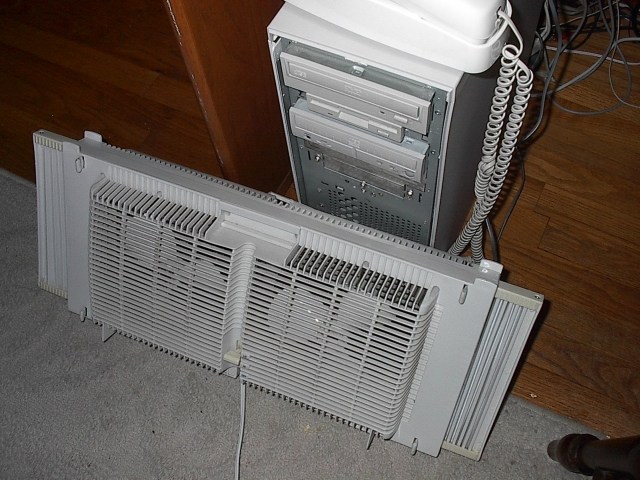
now, i want to over clock with a desk fan. something like this:

desk%20fan.gif


call me stupid, but i want to try it. has anyone actually done it?

so if it works, what should i do in ati tool to overclock?
 
well, now that that is out of the way... what do i do with ati tool?
 
Originally posted by Millow
now im a total newbie to over clocking. and well, i can't afford to replace my 9800 pro so i dont want to kill it.


then really, dont OC it.. cause there's ALWAYS a slight chance it'll die due to any small overclock. (i'm not trying be an ass)
 
well, i want to over clock it, but not overclock it right to the line where it would almost snap, you know?
 
I'll say this again:
if you cant afford to replace it, then dont OC it. You dont know where that "snap" line is. Every card has it's own 'line', some have higher clock tolerance, some have lower tolerance.

but to answer you question, you can raise the frequency of the core and memory to a higher speed. This is usually found in the Display Settings --> Advanced tabs.
 
do you think i could over clock my processor too with this? i play to take the left side of my case off and just stick the fan in there.
 
If you question refers to if ATItool can overclock your CPU:
NO, IT CANNOT.

Can you afford to replace a CPU?
If no then again: i suggest you leave it as is.. if it's faster than 2GHz, chances are that it's fast enough to run most, if not all, applications in existence.

Check your Motherboard BIOS settings if your motherboard supports overclocking.

BTW, that looks like a nice clean fan you got there....
 
no i meant could the fan provide enough cooling to overclock both the processor and the video card.
 
more airflow=more cooling so yes you SHOULD be able to but then again there are other factors to consider....other limitations of the system and such as RAM, add on cards, mobo, CPU, etc....as for ATITool...you are better off with that because when you tell it to find the Max core and Max mem it doesn't just jump to the highest setting and see if it works...it will gradually ramp up the memory/core (depending on which one you use) and test for artifacts...as few as 1...yes that is right...ONE artifact will cause the app to back down and keep doing that until it finds the sweet spot that doesn't have any artifacts...it is a far cry from tweaking the settings manually and hoping that the card doesn't crap out on ya ;)
 
A deskfan will seriously mess up your sound and cause electro-magnetic interference on your CRT monitor man.
 
Originally posted by Spare-Flair
A deskfan will seriously mess up your sound and cause electro-magnetic interference on your CRT monitor man.

Yup. I used a desk fan for a while blowing in the side of my system before I noticed it was unshielded. I spend some time trying to figure out buzzing in my audio and some system instability... I figured it out when I noticed my monitor flickering...

Also, I tested it out recently (last night), and that same desk fan doesn't cause a degree in temp difference in my current system with 6 case fans. It does drop it in my file server which doesn't have practically any fans, but... Just get a bunch of case fans if you want good air cooling...
 
Back
Top