• Some users have recently had their accounts hijacked. It seems that the now defunct EVGA forums might have compromised your password there and seems many are using the same PW here. We would suggest you UPDATE YOUR PASSWORD and TURN ON 2FA for your account here to further secure it. None of the compromised accounts had 2FA turned on.
    Once you have enabled 2FA, your account will be updated soon to show a badge, letting other members know that you use 2FA to protect your account. This should be beneficial for everyone that uses FSFT.

AS5 : Proper Application?

medium

n00b
Joined
Jul 22, 2004
Messages
50
I've looked on their website for instructions on applying the thermal paste. I'm concerned though because their example pictures show an awfully thin layer of the AS5, I'm worried that there'd be a problem of lack of contact between the heatsink and the core. Obviously, I'm a noob when it comes to professional thermal adhesives, and I'd feel more comfortable putting a slightly thicker layer of paste than what they show on arctic silver's site.

I have very little headroom for overclocking, I'm just trying to bring down my cpu from overclocking temperatures when it isn't overclocked at all. Also promoting some longevity.

Am i needlessly worrying about this?
 
The thinner the layer the better as long as its even.
The better the core makes physical contact with the heat sink the better the heat transfere.
so the only thing the layer wants to do is fill in any holes between the heat sink and the core.
So as long as your core and heatsink are flat then a thin layer works best.

Luck......... :D
u=Tigerbiten.gif
 
thanks for the reply. I'll keep that in mind for next week when the shipment of goodies rolls around.
 
The best way to spread AS5 is to buy some latex gloves, put a grain of rice size blob on the CPU and use your finger inside the glove to spread it evenly. Theres a great guide to it on the arctic silver site.
 
trinketsummoner said:
The best way to spread AS5 is to buy some latex gloves, put a grain of rice size blob on the CPU and use your finger inside the glove to spread it evenly.

After you've done that install the heatsink and squish the cpu, pull the heatsink off and see how much as5 got onto the base of the heatsink. Most likely not a lot, so put more as5 on the cpu, put the heatsink on and then take it off.
Gotta make sure the whole base of the heatsink makes contact with the core/as5.
 
forcefed said:
After you've done that install the heatsink and squish the cpu, pull the heatsink off and see how much as5 got onto the base of the heatsink. Most likely not a lot, so put more as5 on the cpu, put the heatsink on and then take it off.
Gotta make sure the whole base of the heatsink makes contact with the core/as5.
ah no.

if it's on the CPU core fine, just leave it.. It'll melt into the HS base after 200 hours of heat cycles (as per AS's site).
 
Taken straight from http://www.arcticsilver.com/as5.htm

Absolute Stability: Arctic Silver 5 will not separate, run, migrate, or bleed

It wont melt at all, if theres no as5 in one area, it wont be there in 200 hours.
You should apply the thinnest layer you can while making sure all of it gets transferred onto the heatsink. Otherwise you'll have a smaller contact patch.
My 3.0c is idling at 36c with the stock heatsink and no airflow in my case.
 
Do most do the thin layer thing on P4s and A64s or do they do what the AS site mentions; little over a b-b sized amount on center of the heat spreader, slap the HSF on and let the weight and pressure spread it out? I've done the method they've mentioned with the last five installs and wonder if there'd be any significant temperature difference doing the thin layer thing. Every little C counts in So. Cal. :)
 
forcefed said:
Taken straight from http://www.arcticsilver.com/as5.htm


It wont melt at all, if theres no as5 in one area, it wont be there in 200 hours.
You should apply the thinnest layer you can while making sure all of it gets transferred onto the heatsink. Otherwise you'll have a smaller contact patch.
My 3.0c is idling at 36c with the stock heatsink and no airflow in my case.

hmm, well, here's what i'm seeing:

Arctic Silver said:
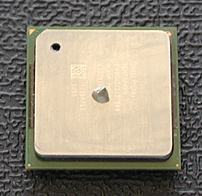
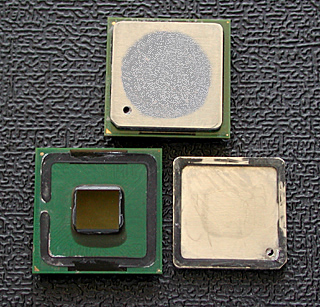
On the CPU, Arctic Silver thermal compound should only be applied to the top of the core. The core is the raised rectangle in the center of the CPU and is highlighted in red in the photos below of AMD and Intel CPUs.
Arctic Silver said:
For Arctic Silver 5:
Carefully apply the thermal compound directly to the core of the CPU.

For all Arctic Silver versions:
Only apply the thermal compound to the top of the actual CPU core. (Also known as the slug or die.
 
forcefed said:
Taken straight from http://www.arcticsilver.com/as5.htm


It wont melt at all, if theres no as5 in one area, it wont be there in 200 hours.
You should apply the thinnest layer you can while making sure all of it gets transferred onto the heatsink. Otherwise you'll have a smaller contact patch.
My 3.0c is idling at 36c with the stock heatsink and no airflow in my case.

you obviously haven't read the directions on their site.

how much you should use on a p4
p4_as_dab1.jpg


What it looks like after 200hrs.
p4_as_dab2a.jpg
 
Lint free items are best to use. Lint free cloths can be found in the form of eyeglass cloths. Don't get the kind pre-soaked in eyeglass cleaner - this will work well to get the AS off but clean with alcohol after to get the cleaner off. Finish with additive free lens clothes. This is just one example.

I also wanted to state that more emphasis is placed on the "perfect" application than sometimes needs to be. It is true that there is a lot of technique to applying AS5, and the better you do it the lower your temps will be, but the "benefit:technique" ratio tapers off after you are able to follow the basic guidelines.

Using a little too much is better than not using enough.
There are too many inherent uncertainties and errors in the method we (you, I, most people) will use to apply AS5, and some error is cancelled out by the fact that the AS5 will 'cure' over the 200 hour time period. It really does the rest of the work for you as long as you give it a good start.
 
Back
Top