Are my 3DMark scores normal?

Purostaff

Weaksauce
Joined
Mar 9, 2008
Messages
73
Hey guys, I would like you to evaluate the scores of my brand new Dell XPS 630.

I'm using Omega Drivers 169.25

3DMark06 score: 10875 http://service.futuremark.com/compare?3dm06=5889893
3DMark05 score: 13789 http://service.futuremark.com/compare?3dm05=4125138
3DMark03 score: 36394 http://service.futuremark.com/compare?2k3=5781592

Spec:
Dell XPS 630 (bone stock)
Intel Core2 Q6600 (2.40Ghz, FSB @ 1066MHz)
2 GB DDR2 SDRAM @ 800MHz
1 x NVIDIA GeForce 8800 GTX 768MB
500GB NCQ SATA @ 7200 RPM
Vista Premium SP1 32 bit

cpuz1.jpg


cpuz2.jpg

===

I've been told that my CPU scores should be ~400 higher for 3DMark06; what do you guys think?
 
It seems to be a bit on the low side, but i'm 3dmark noob myself. Just to give you an idea with my rig in the sig with processor at 3.4GHz and GT OC'd to 650/935 i score 12189. I would think that with Quad core and GTX you should get a lot higher numbers, but i'm sure more knowledgable people will shed some light at what could be wrong.
 
400 more points in 3dmark06 is nothing to worry about.

your components, overclocked, should allow you about 3000 (guess) more points in 3dmark.

not sure how dell bios' are since i've never used one, but if you can get to overclocking that quad, that's where i'd start.

immediately. 3.2 would probably be an easy goal for you and your q6600.

if you are concerned more about overall gaming performance, many people have successfully brought their gtx's to ultra levels through rivatuner/atitool/bios flashing and i'd suggest you do whatever you feel comfortable doing of the three options/steps. this may not raise your 3dmark score as much as you might like, but can help bring a 'playable :rolleyes:' 25fps to a 'playable :D' 29-30fps.

for your comparison, i can score >13k with my dual core e4300 setup @ 3Ghz.

if you were to clock your q6600 to 3Ghz, you'd be scoring similar to me in 3dmark because of your increased processor potential... though my real world gaming performance (on games which work with SLI) would be slightly better than what you would experience since most games aren't effectively multi-threaded. yet.

blah blah blah blah... lol happy easter.
 
lol thanks for the replies.

Well, my bud just got his XPS 630 as well.

http://service.futuremark.com/compare?3dm06=5853869

His Specs: (I bolded the differences)
Dell XPS 630 ( 650SLI )
Q6600 2.4ghz
2GB DDR2-667 @ 5-5-5-15
Vista Ultimate 32bit w/ SP1
160GB Raptor 10k RPM
8800GT

His score for 3DMark06: 10651

--
His score is very close to mine, but he has 8800GT.

I just want to make sure everything looks right (if not, then I can RMA) before I start overclocking her (can't wait).
 
as Dan always say

There are two things I can't stand in this universe: 3D Mark 2006 and time travel in science fiction. ENOUGH with that CRAP already!
 
The score looks right for the hardware at stock speeds. My recommendation is to format that thing and get all of Dells bloatware off it and then overclock.
 
Too bad you can't OC that quad. There might be a pin mod to do 333x9=3GHz, go ask people in the Distribute Computing section of this forum, that's where I've heard it from.
 
Too bad you can't OC that quad. There might be a pin mod to do 333x9=3GHz, go ask people in the Distribute Computing section of this forum, that's where I've heard it from.

Actually the recent XPS series support overclocking in the BIOS.
 
Actually the recent XPS series support overclocking in the BIOS.

I knew one of the XPS' came with an OC option, and that dell would pre OC it for you. Sorry I build custom here :p

If that bios can OC, then have some fun :D
 
Should be a bit higher, but honestly its how the games play and not how 3dmark scores. Like others have said, reformat the system and start with a fresh install and most up-to-date drivers and I'd bet your score would jump quite a bit. For reference my system scores 11431 (c2d e4500, 8800gt, 2gigs):

http://service.futuremark.com/compare?3dm06=5717627
 
I'm on a similar system, I get around 12.5k at stock settings.
So yes you're 10k is very low.

Mahybe it's those Omega drivers?
 
I'm on a similar system, I get around 12.5k at stock settings.
So yes you're 10k is very low.

Mahybe it's those Omega drivers?

Nah it's not the omega. I tested nVidia's and omega for 3dmark03 and 06, and the Omega came out on top with 14 and 41 points, respectively.

Here is my stock 8800gtx setting by the way: Core/Mem/Shader: 576/900/1350

Anyways, I formatted the HD and now installing stuff right now. I'll let you the result in a bit.
 
My stock is also 576/900.

Only problem I see is that I'm using XP 32-bit.
 
u should install crysis and update it.install fraps and run crysis on say map rescue.while running crysis run fraps too and benchmark it with fraps(f11)play the game for about o 10-20 mins.then look in fraps folder and give me your min/ave/max fps.hehe am i asking too much.
 
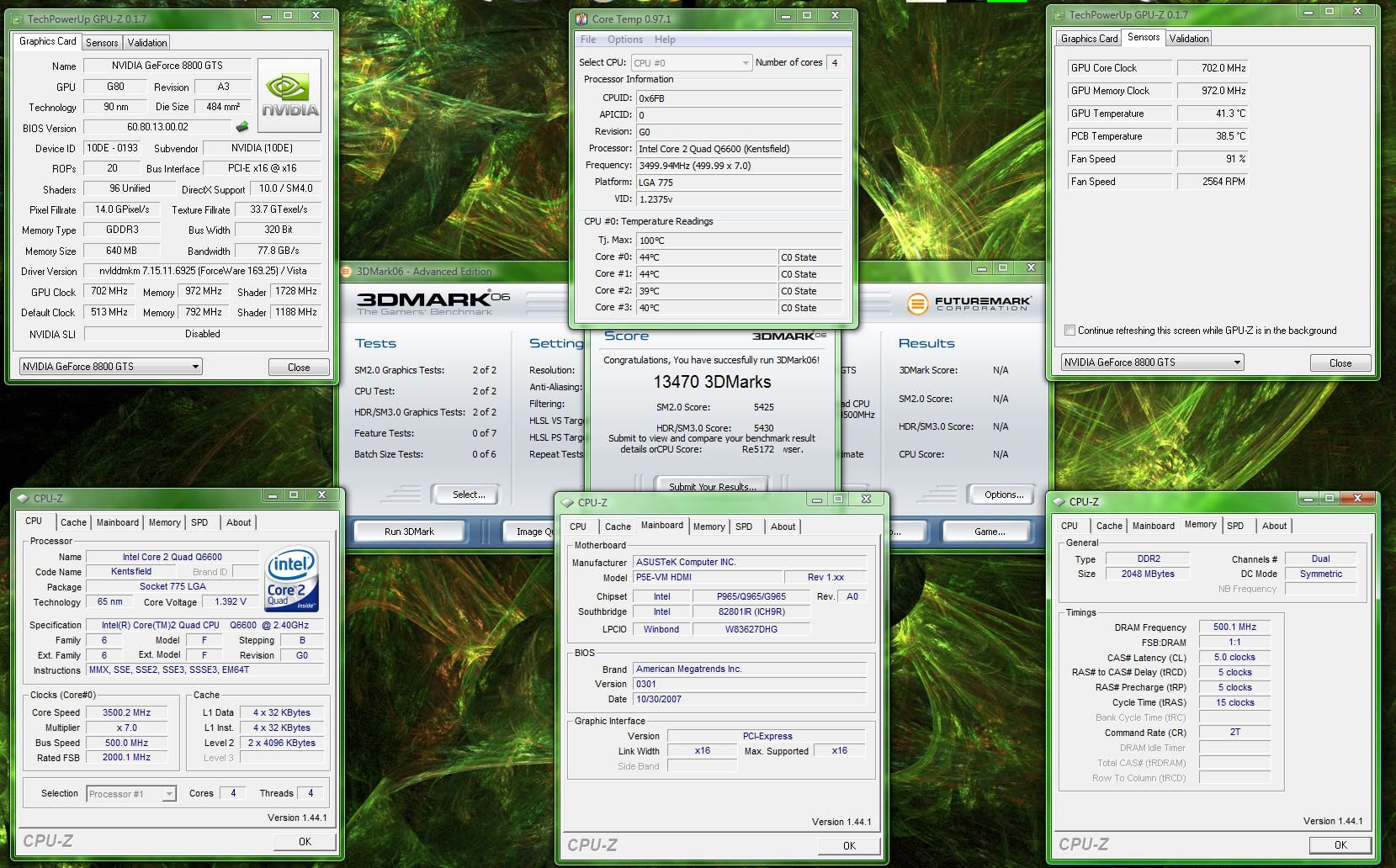
Not sure if it helps.. but I saw this thread and ran a quick run of 3dmark06 to compare it to.. This is my HTPC.. I am on a Q6600 @ 3.5ghz and a pretty decent overclock on my 8800GTS 640mb video card.. Hope this helps..


3dmark0613470.jpg
 
What kind of cooling do you have on that GTS?
I'm running stock on mine and I can't even get my GTX stable at 625. I keep getting a lot of BSODs during gaming, but no artifacts during stress testing. I assumed the BSODs were related to the OC.
:(
 
What kind of cooling do you have on that GTS?
I'm running stock on mine and I can't even get my GTX stable at 625. I keep getting a lot of BSODs during gaming, but no artifacts during stress testing. I assumed the BSODs were related to the OC.
:(

It's the stock cooler. This card used to be on an EK waterblock so when I put the stock cooler back on, I used Arctic Cooling MX-2 paste on the GPU.

What kind of CPU do you have and what is it overclocked to? What is your Vcore on your CPU? What kind of motherboard? What kind of ram and what is the vdimm set to? Since your GTX is not artifacting, there is a good chance that it's not your video card at all. Here is the overclock scale that I use to overclock my 8800GTS..

GPUtable.jpg
 
The memory clock was set to 1000, the settings were 625/1000 and the shader was linked to the core.
I'm guessing the memory clock was pushed too much..

My other settings are shown in my sig. All other volts are set to "Auto".

I left my PC looping 3dmark06 overnight after I OC'd the GTX, and I woke up to an nv4_disp.dll BSOD. I ignored it, but I noticed my other games were freezing often (I mostly play GH3) after about 10 to 15 minutes. I've since reverted back to stock and reformatted and reinstalled a different copy of Windows XP SP2 and the problem is gone.

I don't know if I had a bad driver install, a bad Windows install, or an unstable OC.
I suppose I should try again...

About that table pic you posted, where are those settings coming from?
Did someone tests a bunch of OC settings and pick the most stable ones or what? Also what do you use to check stability for the OC?
:p


My CPU/Mem settings are stable, passed 12-hour small FFT and 12-hour Blend in Prime95.
:(

[edit]
I'm running the 648 core settings (as shown in that pic you posted) and my 3dmark06 freezes everytime during the firefly demo. I keep raising my CPU vcore, I'm up to 1.27v or so now. Still freezing.

I put it back to 600/900 and it finishes 3dmark06 no problem.

Up to CPU vcore 1.325v, still freezing.

Back to 1.243v (My sig) using the 621 core settings from that pic, 3dmark06 finishes fine.
 
More update for you guys concerning omega vs nvidia drivers:

Omega Driver:
1st run: 11057 http://service.futuremark.com/compare?3dm06=5907077
2nd run: 11290 http://service.futuremark.com/compare?3dm06=5907191

NVIDIA Driver:
1st run: 10856
2nd run: 10856 http://service.futuremark.com/compare?3dm06=5907719

Then I did another run with Omega Driver after removing nVidia. The score was back down 10865... http://service.futuremark.com/compare?3dm06=5907925

Any ideas of what's going on here?

Hmmmmm.. not sure whats going on. I've never used omega drivers. As for the scale, it was on a few websites.. One of the websites that come to mind was madshrimps.com. I did a final run on my setup and you should be REALLY close to me as far as performance goes..

3dmark0613470.jpg
 
13.4k seems low for that system.
I'm getting 14.1k with the specs in my sig...

You're running a "clean" 3dmark06? (All normal settings 1280x1024 etc etc)?
 
13.4k seems low for that system.
I'm getting 14.1k with the specs in my sig...

You're running a "clean" 3dmark06? (All normal settings 1280x1024 etc etc)?

I am running a clean version.. Not sure if it affects my overall score, but I render my video on a 42" LCD monitor. Also, I have a single 8800GTS 640mb card.. Not a GTX or GT or GTS (92).
 
your scores aren't that bad. Even if you o/c your pc AND Vcard you're not going to see a HUGE improvement. 15k maybe
 
Back
Top