• Some users have recently had their accounts hijacked. It seems that the now defunct EVGA forums might have compromised your password there and seems many are using the same PW here. We would suggest you UPDATE YOUR PASSWORD and TURN ON 2FA for your account here to further secure it. None of the compromised accounts had 2FA turned on.
    Once you have enabled 2FA, your account will be updated soon to show a badge, letting other members know that you use 2FA to protect your account. This should be beneficial for everyone that uses FSFT.

Aquacomuter - control suggestions...

Halk

Limp Gawd
Joined
May 27, 2007
Messages
139
Ok, I've had an Aquacomputer watercooling setup for a couple of years now.

Recently I moved to an 8800 GTX, and got their block for that, which meant I had to switch out the chipset block, which is now their SLi one (the one with the offset in/out)

I also had high VRM temps, so I got 2 of their Abit mosfet blocks which are now on.

As far as temperatures are concerned, everything is ok, apart from the radiator.

The case is a Lian Li V2000B. I have 7 fans at the moment.

2x120mm mounted to the radiator, expelling air out of the bottom of the case. The radiator is mounted in the bottom of the case.
1x1200mm mounted on top of the radiator, blowing air downwards. I haven't yet tested to see if it actually does much.
2x80mm mounted underneath the PSU (I've turned the PSU plate over), they intake air.
2x120mm mounted in the standard V2000B places. I.e. one mounted blowing air onto the motherboard, and 1 mounted blowing air onto the hard drive racks.

The motherboard is an Abit AN8 Fatal1ty (a bad buy). It does have 6 fan headers though, and I have all of the fans connected to it (2 of them are on a Y splitter). It's supposed to be able to adjust the fans based on the 3 temps the motherboard reads - system, CPU, VRM. However it's not very good at it.

I'd like to connect all 7 fans to a fan controller, and have the fan controller also read from the motherboard and be able to control it in Windows.

Anyone have any suggestions? I'm not interested in an LCD screen, and I'm not bothered if it's Aquacomputers own make or not. I just want control over the fans and for when the PC is producing a lot of heat, for the fan controllers to adjust to get more heat out of the bottom of the case faster.

Any suggestions?
 
You can get an Aquaero LT that doesn't have the LCD attached. Then you have to program it via the Aquasuite software.

On my box I ran three Papst 120mm fans, on my radiator, to one fan header. All the fans are wired in parallel and I only used one rpm sensing wire from one fan for feedback to the Aquaero. Works great. :D

Just remember not to exceed the 5 watt limitation on the fan headers. My radiator fans are .71 watts each so even at full tilt I am just over 2 watts in power.
 
Alright, their description of it is nice, but quite vague.

It can control 4 fan channels.

Is the control software based, or is it hardware based? I realise that software interfaces with it through USB, but does the software just allow me to change the settings, or is it the software itself that will tell the Aquaero to turn up the fans etc?

I see it comes with 4 temperature probes. One of those can go in the aquatube, one of those can sit somewhere in the case near the motherboard, another can go in the hard drive/radiator section and one can go outside of the case to measure ambient.

Can it also read the sensors from my motherboard?

I'm fine with the fans, I haven't checked the current on them, but they're Nexus and Akasa Amber fans and I'm pretty sure they won't draw any real current. 4 fan channels should be enough. Intake (2), Radiator (2), Radiator top (1 or 2), Air cooling (2). I can wrangle the wiring. Having read your project logs TN, there's zero chance of me doing anything with the wiring like you have. But there's lots of places in the case to hide wiring, so it'll get hidden.

Assuming I do go for it, and without a display, how is it mounted? And is the USB an internal USB connection for a motherboard header? I.e. 7 pin thing on an 8 pin plug with one blanked out?

Thanks for the reply TN.
 
.Is the control software based, or is it hardware based? I realise that software interfaces with it through USB, but does the software just allow me to change the settings, or is it the software itself that will tell the Aquaero to turn up the fans etc?

After making changes in the software the eprom is burned with the new information, IIRC. So you have a hardware solution that is independent from the software. However, you do need the software to make changes on the LT version. Not so with the LCD or VFD versions.

I see it comes with 4 temperature probes. One of those can go in the aquatube, one of those can sit somewhere in the case near the motherboard, another can go in the hard drive/radiator section and one can go outside of the case to measure ambient.

AC only supplies the flat sensors with the Aquaero. The water based ones are extra.

Can it also read the sensors from my motherboard?

Not sure about this, but I do believe it can with some additional software like JaLCD's and Samurize.

Having read your project logs TN, there's zero chance of me doing anything with the wiring like you have. But there's lots of places in the case to hide wiring, so it'll get hidden.

I have to tell you that kind of wiring mods is quite painstaking work.

Assuming I do go for it, and without a display, how is it mounted? And is the USB an internal USB connection for a motherboard header? I.e. 7 pin thing on an 8 pin plug with one blanked out?

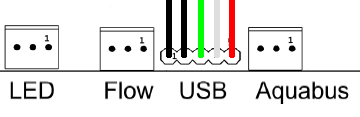
They are easily mounted with two 3mm screws anywhere ya want. It connects up to any USB header on your MB or auxiliary card. Just make sure you understand that the USB connection on the Aquaero is wired ass backward from the MB header. Pay particular attention to the manual!
 
Just remember not to exceed the 5 watt limitation on the fan headers.
10W per channel on aquaero with hardware revision 4.00. (total 30W allowed)
5W per channel on aquaero with hardware revision 3.07.

I see it comes with 4 temperature probes.
(...)
Can it also read the sensors from my motherboard?

It comes with 4 sensors but it has connections for 6 sensors, so you could buy two additional sensors.

The aquaero can not read the sensors from your motherboard and it will never do that because it is too insecure. What happens if you use those sensors for controlling and your computer crashs? There are so many possibilities which must be taken into account.

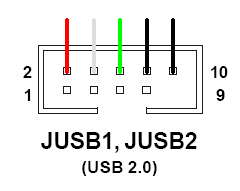
And is the USB an internal USB connection for a motherboard header? I.e. 7 pin thing on an 8 pin plug with one blanked out?
The connection cable is a standard cable with 5 separate pins for internal connection.

For orientation you should pay attention to the absent pin on your motherboard. Of course you could also use the second line. The 5th pin is not necessary to use the aquaero.

ae_k8n_anschluss.png


ae_usb_kabel.png
 
Shoggy, how come the 5w spec changed to 10w with the 4.0 revision? Was it only a software limitation? What is the FULL spec that the regulators allow? I have a triple radiator with 3x yate loon fans... that pull just over 10w at 12v (not that I'd EVER run them higher then 7v or around 8w).

I'm thinking about purchasing a white VFD Aquaero... That relay function just... gah... want.
 
3.07 has used pulse wide modulation (PWM) while the version 4.00 is using an analog control. I think that is the reason why the newer version can take more. I don't know the exact specs because they are not public... 10W is the "100%-secure-value".

btw: the software of both versions is absolutely identical. User with an old 3.07 can update to the latest OS and firmware themselve.
 
Cheers. That gives me something to think about.

What I'm thinking now is how do I get it to measure the temps on particular parts of the motherboard?

For example how could it measure the CPU? I have zero experience with sensors, I don't know how accurate they are or how they are fitted, or how close they can get.
 
3.07 has used pulse wide modulation (PWM) while the version 4.00 is using an analog control. I think that is the reason why the newer version can take more. I don't know the exact specs because they are not public... 10W is the "100%-secure-value".

btw: the software of both versions is absolutely identical. User with an old 3.07 can update to the latest OS and firmware themselve.

Alright, thanks... so it's new hardware then is it? Makes sense.

I'll have to make sure I can get revision 4.0... if I'm paying 200$ for it, I'd better damn well get what I want :D

Cheers. That gives me something to think about.

What I'm thinking now is how do I get it to measure the temps on particular parts of the motherboard?

For example how could it measure the CPU? I have zero experience with sensors, I don't know how accurate they are or how they are fitted, or how close they can get.

I believe the controller can read CPU/GPU temperatures from the system while it's on... For other components, you can use the flat sensor thingies.
 
Hmm, conflicting information. Shoggy works for AC in some form, so I'm more inclined to believe him when he says it can't and won't....

What makes you think it can?

Assuming it can read them then that's a very positive thing.

As for it being unsafe, then if the Aquaero can't read a temperature (crash?) then why not have it assume it's above the maximum threshold and have it turn on the fans at the highest setting.
 
Hmm, conflicting information. Shoggy works for AC in some form, so I'm more inclined to believe him when he says it can't and won't....

What makes you think it can?
.

I don't believe the aquaero can read them directly, but the aquasuite software should be able to... or, how else would it automatically change fan speeds based on component temperature?

As for it being unsafe, then if the Aquaero can't read a temperature (crash?) then why not have it assume it's above the maximum threshold and have it turn on the fans at the highest setting.

A smart suggestion indeed.
 
As far as I know it reads from the sensors attached to the Aquaero. Aquasuite does not change temperatures, it only allows you to see what Aquaero is doing, and tell Aquaero what to do when x reaches y etc.
 
As far as I know it reads from the sensors attached to the Aquaero. Aquasuite does not change temperatures, it only allows you to see what Aquaero is doing, and tell Aquaero what to do when x reaches y etc.

yeesh, You're totally right.

nevermind... This isn't the device for me :eek:

A glaring option to leave out AC!
 
yeesh, You're totally right.

nevermind... This isn't the device for me :eek:

A glaring option to leave out AC!

Ummmm... Aquasuite is an interface to the Aquero, or Aquaduct, or tubemeter, or multiswitch, never been advertised as anything else.'


How exactly can Aquasuite "change" temperatures? It can affect temps based on logic (ie. turn fan A to 100 percent based on sensor A reaching a certain level) but nothing on the marked can actually change temperatures other than the output devices themselves.
 
Ummmm... Aquasuite is an interface to the Aquero, or Aquaduct, or tubemeter, or multiswitch, never been advertised as anything else.'


How exactly can Aquasuite "change" temperatures? It can affect temps based on logic (ie. turn fan A to 100 percent based on sensor A reaching a certain level) but nothing on the marked can actually change temperatures other than the output devices themselves.

Oh come on, can't you read through an obvious mistake in symantics? You make it seem like you think of me as an idiot :eek:.

Of course I meant "change fan speed Sa to reflect temperature Ta over threshold THa"

I figured aquasuite could read motherboard temperatures, send the data to the aquero/aquaduct over USB, and control the fan speeds based on the OS reported temperature... Maybe through another daemon-type program...
 
Then maybe that's what I'm after too.

There's no real need for me to stick with Aquacomputer for this.

Although the other thing, can it do water sensors, flow rates? And I'm sure it won't be able to control the pump...
 
Wattage isn't the answer :) I won't use more than 10W in total. Likely around 5W at high load.

I want to be able to -

Have the system adjust itself automatically. I'll set the thresholds. But it'll adjust the fans to go faster when there is more heat being produced. Perhaps all it needs to do this is the water temperature. Ah, scratch that, the CPU and GFX under medium load (playing a game) would produce way more heat than the CPU under very high load (encoding), would have to take into account the CPU temperature as well as the water temperature.

I'm leaning on the Aquaero, because I'm thinking in the scenario where the CPU is under high load I'm going to want the pump to ramp up, which will reduce the temperature of the CPU.

Where the whole PC is under medium/high load I'll need it to turn up the intake and exhaust fans to dispose of more heat.

Where it's idle, I want it to turn the fans right down but not stop any. I find with fans stopping and starting it makes a noticable noise difference, which is very distracting. The case is silent at the moment, almost, so little things matter with noise.

I also like the idea of the Aqaero not being depenant on Windows not crashing.

So again I'm back to these probes. How do I use them, how accurate are they, where are they placed, and can they be used to tell the temperature of my CPU?
 
Well, I used to own a Big NG, so I can comment on it, I don't own the Aquaero, thus i'm trying to learn more about it.

It will change the speeds of whatever's connected to one of it's channels (fans or pump) based on the temperature of any of the supplied sensors. You can change all the speed thresholds (either through PWM or Analogue control) so that the fans never go below a specific voltage (removes the annoying start/stopping of the fans).

The sensors are fairly accurate, but will never reveal the actual temperature of the component... so there are built in controls to adjust for this (like, you can add a temperature offset between what say, coretemp would measure, and what the probes do).

They're fairly accurate too, the probes that is. The analog ones are only alright (Zener diodes...) but the digital ones (2 are included) are very accurate. They measured within 4c of what they were attached to, probably due to heat-transfer inneficiencies.

Ah, scratch that, the CPU and GFX under medium load (playing a game) would produce way more heat than the CPU under very high load (encoding), would have to take into account the CPU temperature as well as the water temperature.

Which is exactly why I figured the Aquasuite would be able to provoke the Aquaero to do this... Not an invalid assumption If you ask me!
 
Oh come on, can't you read through an obvious mistake in symantics? You make it seem like you think of me as an idiot :eek:.

Well you never know..... sometimes the small things get mistaken ;) You are one of the people on this forum I don't consider an idiot :)

I want to be able to -

Have the system adjust itself automatically. I'll set the thresholds. But it'll adjust the fans to go faster when there is more heat being produced. Perhaps all it needs to do this is the water temperature. Ah, scratch that, the CPU and GFX under medium load (playing a game) would produce way more heat than the CPU under very high load (encoding), would have to take into account the CPU temperature as well as the water temperature.

I'm leaning on the Aquaero, because I'm thinking in the scenario where the CPU is under high load I'm going to want the pump to ramp up, which will reduce the temperature of the CPU.

Where the whole PC is under medium/high load I'll need it to turn up the intake and exhaust fans to dispose of more heat.

Where it's idle, I want it to turn the fans right down but not stop any. I find with fans stopping and starting it makes a noticable noise difference, which is very distracting. The case is silent at the moment, almost, so little things matter with noise.

I also like the idea of the Aqaero not being depenant on Windows not crashing.

So again I'm back to these probes. How do I use them, how accurate are they, where are they placed, and can they be used to tell the temperature of my CPU?

I don't think you will get all of this functionality listed above with the Aquero. You can not tell the pump to increase based on anything other than a slider bar in the setup or via the front panel buttons. My suggestion is to use water temp as that is really the only thing affected when the CPU/GPU heat up. I use the temp sensor to monitor my RAM and MOSFET's and the monitor the incoming and outgoing water temps. You can set the linking ( input to output) to be veriable so the fans to slowly ramp up and down based on thresholds. Throw all this out the windows if you use a DDC with adaptor as it uses a fan if I remember correctly.

By the way you wouldn't want the pump to ramp up on heat; you want your fans to remove more heat from the radiator.
 
So I have a 939 socket, and there's a CPU on it with a couple of cores on top, and I have a waterblock on top of that.

Where does the sensor go?
 
By the way you wouldn't want the pump to ramp up on heat; you want your fans to remove more heat from the radiator.

Actually I do :)

When the water temperature is high, I want the fans to ramp up. When the CPU temperature is high (but not the water) I want the pump to ramp up. My watercooling system can easily eat the heat from the CPU, it's only when everyything is producing a lot of heat that the fans on the radiator have to go up.
 
So I have a 939 socket, and there's a CPU on it with a couple of cores on top, and I have a waterblock on top of that.

Where does the sensor go?

What I've done, is using aluminum flashing tape, trimmed it (carefully!) and taped it to the side of the waterblock... If you had an S775 socket, you could epoxy it to the retention bracket that holds the CPU in the socket (it's a bit shorter then the top of the IHS)


You are one of the people on this forum I don't consider an idiot

hehe, I know, thus the "you make it seem" part :p Your cookie is in the mail!
 
I can attach it to the waterblock on the CPU, I can stick it between the block and the socket, which is a little bit closer than on the side, but the same effect.

I have zero faith that it will give me any useful temperatures though.

I've removed the IHS on the CPU, the blockdirectly contacts the cores, the water hits that part of the block and removes the heat, I need convincing that the temperature of the waterblock that isn't touching the cores is in any way related to the temperature of the cores.
 
I can attach it to the waterblock on the CPU, I can stick it between the block and the socket, which is a little bit closer than on the side, but the same effect.

I have zero faith that it will give me any useful temperatures though.

I've removed the IHS on the CPU, the blockdirectly contacts the cores, the water hits that part of the block and removes the heat, I need convincing that the temperature of the waterblock that isn't touching the cores is in any way related to the temperature of the cores.

Depending on the height of the die, you might be able to tape it (electrical tape) to the green part of the chip (around the SMD capacitors) without it being higher than the core. Test-fit the block to check obviously!

Add around 5-15c to this value (depending on the thermistor's proximity to the core, carefully trim the brown plastic around the diode if you can)... That's what I required for the temp of my delidded X2 to match speedfan's.
 
Well, I can do that. Still not convinced though :p Then again how does the motherboard measure it? I have no idea where the motherboards sensor is.
 
Well, I can do that. Still not convinced though :p Then again how does the motherboard measure it? I have no idea where the motherboards sensor is.

Depends on the board. Programs like Coretemp and the new Speedfan measure from the DTS right on the die...

Something all boards should start doing :eek:
 
Depends on the board. Programs like Coretemp and the new Speedfan measure from the DTS right on the die...

Something all boards should start doing :eek:

I use both of them, and yes they read the on die sensor - which as far as I know AMD and Intel don't officially support :p

But motherboards, as far as I'm aware do not. Mine isn't reading the core temps, it's reading another sensor somewhere.
 
I use both of them, and yes they read the on die sensor - which as far as I know AMD and Intel don't officially support :p

But motherboards, as far as I'm aware do not. Mine isn't reading the core temps, it's reading another sensor somewhere.

Motherboards definitely do not read from the DTS.
 
Right. They have to do it from somewhere though. Maybe it's something in the socket.

Really? Hmm... I figured they did the digital version of the profs at my school give out marks...

Write the numbers 1 to 100 on seperate sheets of paper, throw them all down the stairs, whichever goes the furthest, is your temperature :D

The Old Socket As had a diode in the socket... not sure about the 775 and 939 sockets though.
 
Back
Top