• Some users have recently had their accounts hijacked. It seems that the now defunct EVGA forums might have compromised your password there and seems many are using the same PW here. We would suggest you UPDATE YOUR PASSWORD and TURN ON 2FA for your account here to further secure it. None of the compromised accounts had 2FA turned on.
    Once you have enabled 2FA, your account will be updated soon to show a badge, letting other members know that you use 2FA to protect your account. This should be beneficial for everyone that uses FSFT.

Am I not understanding something - SSD ???

TeleFragger

[H]ard|Gawd
Joined
Nov 10, 2005
Messages
1,292
Ok so I have an SSD in my work laptop and also in my surface pro 2. That is the extent of my knowledge of SSD... oh and a pci-e mini ssd in an Intel NUC...

with that said I am playing around with an SSD at work. I added it into a system as a 2nd drive.
It is an older unit. Samsung MZMTE128HMGR-000L1

Benchmark here - hope ok to post that benchmark link...
PassMark - SAMSUNG MZMTE128HMGR-000L1 - Price performance comparison


anyway for my testing I copied an ISO that was 3.8gb from SATA to the SSD and it was running @ approximately 72MB/s
Once the ISO was local I then copied it from SSD to SSD... started out at 278MB/s and dropped after 5 seconds to 120MB/s then kept going down to 70ish.

So I guess a first question is
Does Windows 10 cache files to C: to copy from D: to D: ?

If so that is ummm stupid. so I guess the next question is...
Should I expect better performance moving SSD as the OS drive then?


thanks for enlightening me on some very n00bish questions...
 
Looks to me like that is a pretty slow SSD to begin with.

Copying the same file from one place to another on the same SSD is also not going to give you near the full speed of the SSD. That is just how it is. Your full speed before it dropped is probably the speed of the built in RAM on the SSD.

The real test of sustained speed would be from one SSD to another of the same exact model.

It would also help to know the specs of the computer you were testing with.

Is there a realtime AV running on the computer? Which one is it?
 
Looks to me like that is a pretty slow SSD to begin with.

Copying the same file from one place to another on the same SSD is also not going to give you near the full speed of the SSD. That is just how it is. Your full speed before it dropped is probably the speed of the built in RAM on the SSD.

The real test of sustained speed would be from one SSD to another of the same exact model.

Only got 1 so cant test that.. but I understand you..

It would also help to know the specs of the computer you were testing with.

HP Z800 - i5 650 @ 3.2ghz

Is there a realtime AV running on the computer? Which one is it?

but of course! McAfee VSE 8.8 Patch 6, epo 4.8 patch 4 and dat 5800 engine


above...
 
Single-threaded file-copy is probably one of the worst tests you can run to benchmark something... really, any single-threaded test is pretty bad, especially if you can't control the blocksize.

I'd use something like iometer and setup a test with a 1MB block size and run some independent read and write tests.
 
Looks to me like that is a pretty slow SSD to begin with.

Copying the same file from one place to another on the same SSD is also not going to give you near the full speed of the SSD. That is just how it is. Your full speed before it dropped is probably the speed of the built in RAM on the SSD.

The real test of sustained speed would be from one SSD to another of the same exact model.

It would also help to know the specs of the computer you were testing with.

Is there a realtime AV running on the computer? Which one is it?
first speed was caching to RAM as buffer. Second is steady state. duplicating will net 1/3-1/2 speed typically or less if you run into garbage collections and other oddities. much better still than HDD duplication on same drive. I do believe windows could handle this much better
 
Single-threaded file-copy is probably one of the worst tests you can run to benchmark something... really, any single-threaded test is pretty bad, especially if you can't control the blocksize.

I'd use something like iometer and setup a test with a 1MB block size and run some independent read and write tests.

For setting standards and comparisons, you are probably right. But I don't think anything is more representative of real world usage then simply copying a file in Windows. That is how most people will actually use the product.

OP, I have a similar drive like this in my Chromebook. 128GB. It's about the same kind of sustained speeds I get when I do a simple stop watch test. The 128GB drive actually didn't provide that much of a speed upgrade over the 16GB standard SSD that was in it.

Could be drive itself, could the be the controller it's connected to.
 
For setting standards and comparisons, you are probably right. But I don't think anything is more representative of real world usage then simply copying a file in Windows. That is how most people will actually use the product.
If file copy metrics were the only one of concern, people would still just be using spinning drives.
 
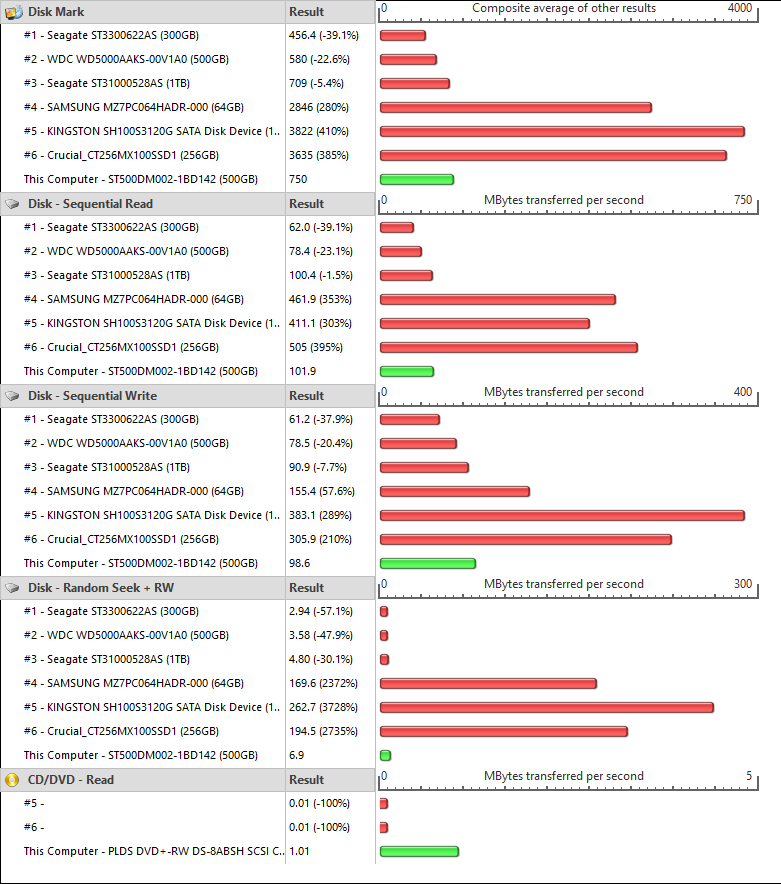
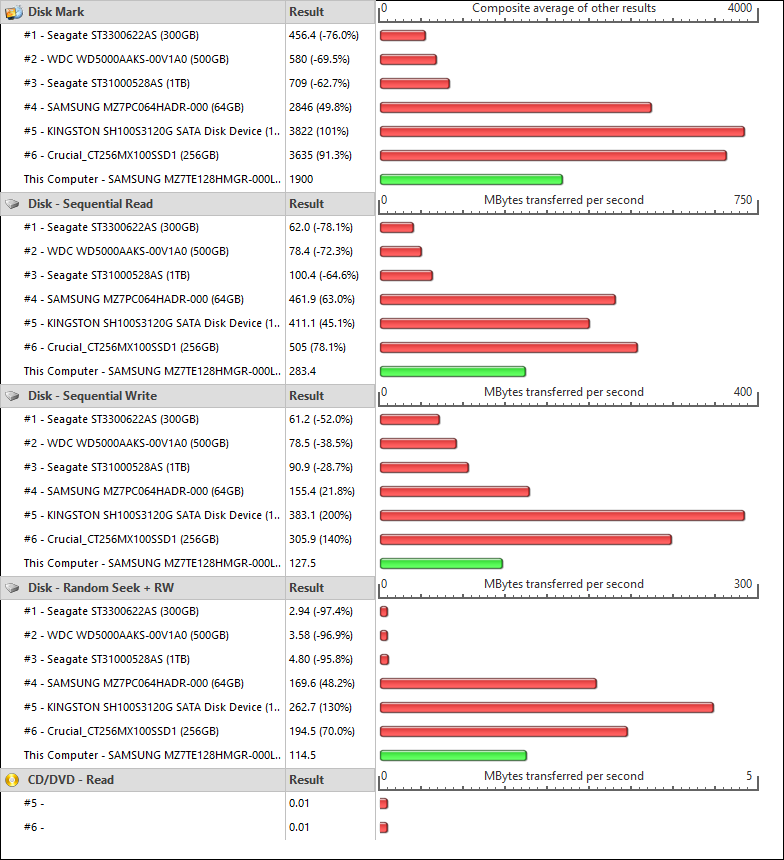
so in the 2 pictures i put above you see a huge difference in passmark tests between the 500gb spinning sata drive and the 128gb ssd. I am happy with it now, although 128gb isnt big, it was free and I already see a huge difference in ANYTHING I do from booting up to installing software...

thanks for the replies all...
 
Back
Top